Key Takeaways
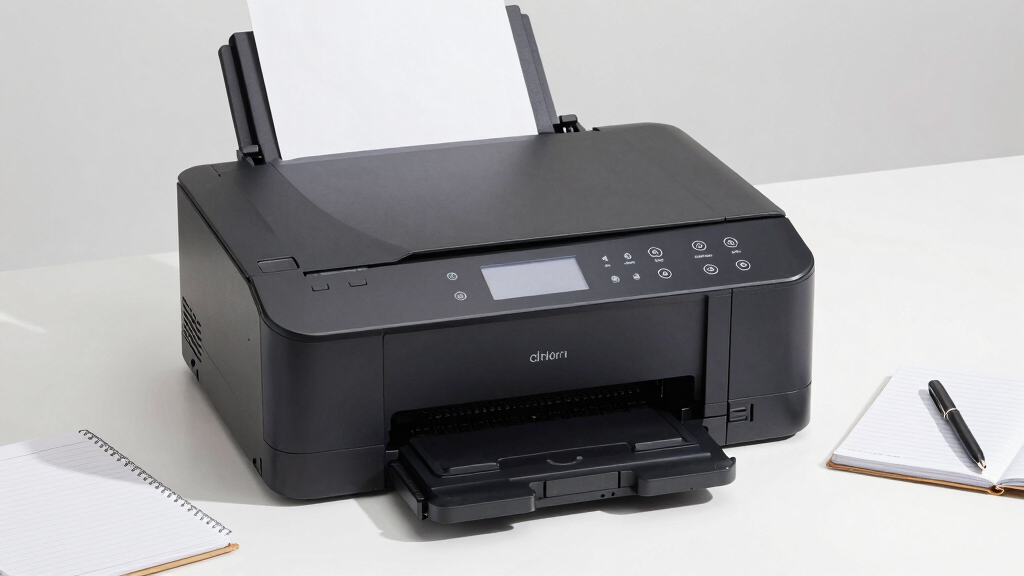
- The top-ranked all-in-one models combine printing, copying, and scanning, offering versatility for varied tasks.
- Price varies widely; budget options often sacrifice speed and advanced connectivity, while premium picks deliver high performance at a higher cost.
- Print quality and color accuracy are consistent across most models, but some compact printers may have slightly lower resolution outputs.
- Connectivity options like Wi-Fi, mobile printing, and Ethernet are essential for seamless integration into a modern home setup.
- Toner costs and yield significantly impact overall value; higher-yield cartridges reduce long-term expenses for frequent printing.
| HP Color LaserJet Pro MFP 3301sdw Wireless All-in-One Color Laser Printer |  | Best Overall for Small Office Productivity | Print Speed: 26 ppm black/color | Functions: Print, Scan, Copy | Auto Duplex: Yes | VIEW LATEST PRICE | See Our Full Breakdown |
| Xerox C230dni Wireless Color Laser Printer |  | Best Compact Design for Small Spaces | Print Speed: 24 ppm | Color: Yes | Connectivity: Wi-Fi, AirPrint, Mopria, Chromebook | VIEW LATEST PRICE | See Our Full Breakdown |
| Brother HL-L3300CDW Wireless Color Laser Printer with Copy & Scan, Duplex, Mobile Connectivity |  | Best Speed for Small Office and Home Use | Print Speed: up to 19 ppm | Functionality: Print, Copy, Scan | Connectivity: Wi-Fi (dual band), Wi-Fi Direct, USB | VIEW LATEST PRICE | See Our Full Breakdown |
| Brother DCP-L2640DW Wireless Monochrome Multi-Function Laser Printer with Copy and Scan |  | Best Monochrome Workhorse for Small Offices | Print Speed: 36 ppm | Scan Speed: 23.6/7.9 ipm | Auto Document Feeder: 50 pages | VIEW LATEST PRICE | See Our Full Breakdown |
| Brother MFC-J1360DW Wireless Color Inkjet All-in-One Printer with Duplex Printing and 1.8″ Color Display |  | Best Versatile Inkjet for Home and Small Office | Printer Type: All-in-One Inkjet | Connectivity: Wireless, USB | Display: 1.8-inch color | VIEW LATEST PRICE | See Our Full Breakdown |
| Canon Color imageCLASS MF665Cdw Wireless Duplex Laser All-in-One Printer |  | Best Overall for Versatile Home Office Use | Print Speed: 26 ppm in color and monochrome | First Print Time: 10.3 seconds | Wireless: Yes | VIEW LATEST PRICE | See Our Full Breakdown |
| Brother MFC-L3720CDW Wireless Color Laser Printer with Scanner, Copier, and Fax |  | Best for Small Offices Requiring a Full All-in-One | Print Speed: 19 ppm | Scan Speed: 29/22 ipm (black/color) | Paper Capacity: 250 sheets | VIEW LATEST PRICE | See Our Full Breakdown |
| HP Color LaserJet Pro 3201dw Wireless Color Laser Printer |  | Best for High-Speed, Professional-Quality Output | Printer Type: Laser | Print Speed: 26 ppm black/color | Print Resolution: 600 x 600 dpi | VIEW LATEST PRICE | See Our Full Breakdown |
| Brother HL-L3220CDW Color Laser Printer with Wireless & Duplex Printing |  | Best for Cost-Conscious Home Users with Basic Needs | Print Speed: 19 PPM | Paper Tray Capacity: 250 sheets | Duplex Printing: Yes | VIEW LATEST PRICE | See Our Full Breakdown |
| Brother HL-L3280CDW Wireless Compact Digital Color Printer with Laser Quality Output, Duplex, Mobile Printing & Ethernet |  | Best Compact Choice for Small Home Offices | Print Speed: up to 27 ppm | Connectivity: Wireless, Ethernet | Duplex Printing: Automatic | VIEW LATEST PRICE | See Our Full Breakdown |
| Canon Color imageCLASS MF662Cdw Wireless Duplex Laser Printer with Copier and Scanner |  | Best Overall for Small Home Offices | Print Speed: 26 ppm | Color: Yes | Wireless: Yes | VIEW LATEST PRICE | See Our Full Breakdown |
| Xerox C235dni Wireless Color Laser All-in-One Printer |  | Best Compact, Quiet Color Printer for Home Use | Print Speed: 24 ppm | Functions: Print, Copy, Scan, Fax | Paper Capacity: 250 sheets | VIEW LATEST PRICE | See Our Full Breakdown |
| HP LaserJet Pro MFP 3101sdw Wireless All-in-One Laser Printer for Small Teams |  | Best for Small Teams Needing Fast, Monochrome Output | Printer Type: Laser | Print Speed: Up to 35 ppm | Maximum Copies Per Run: 999 | VIEW LATEST PRICE | See Our Full Breakdown |
More Details on Our Top Picks
HP Color LaserJet Pro MFP 3301sdw Wireless All-in-One Color Laser Printer
This HP model stands out as the best overall choice for small office teams needing reliable, all-in-one color laser printing. Its 26 ppm speed surpasses the Brother HL-L3300CDW’s 19 ppm, making it better suited for offices with moderate printing needs. The automatic duplex feature is standard here, unlike some competitors like the Brother DCP-L2640DW, which lacks this function. However, its dependence on HP cartridges and circuitry can increase ongoing costs and limit flexibility. Compared with the Xerox C230dni, it offers similar all-in-one capabilities but benefits from a slightly faster print speed and larger input tray, making it a more well-rounded option for busy environments. Still, this model’s primary focus on small office use means it might be less ideal for those needing high-volume printing or budget-conscious buyers seeking cheaper toner options.
Pros:- Fast color printing at 26 ppm for efficient workflows
- All-in-one functionality with scanning and copying
- Automatic duplex printing saves paper and reduces costs
- Reliable performance with original HP toner cartridges
Cons:- Requires HP-specific toner cartridges, which can be costly
- Limited to small office use; not designed for high-volume printing
Best for: Small office teams that need reliable, fast, all-in-one color printing with high-quality results.
Not ideal for: Individuals or small businesses looking for budget-friendly options or high-volume printing at low cost, due to higher toner expenses and proprietary cartridges.
- Print Speed:26 ppm black/color
- Functions:Print, Scan, Copy
- Auto Duplex:Yes
- Input Tray Capacity:250 sheets
- Connectivity:Wireless
- Toner Cartridges:HP 218A, 218X
Bottom line: This model is best suited for small offices seeking a dependable, feature-rich, all-in-one color laser printer that balances speed and quality.
Xerox C230dni Wireless Color Laser Printer
The Xerox C230dni distinguishes itself as an ideal choice for those with limited space, offering a compact footprint without sacrificing essential features. Its 24 ppm print speed is slightly lower than the HP Pro MFP 3301sdw but still sufficient for small teams and home offices. Its easy setup via the Xerox Easy Assist App streamlines installation, making it more user-friendly than the Brother HL-L3300CDW, which can sometimes be more technical to configure. While the Xerox is perfect for small environments, it lacks the high-volume capacity or advanced features seen in larger models. The focus on energy efficiency and security makes it attractive for sensitive or eco-conscious users, although toner replacement costs could be a consideration for ongoing expenses. This makes it a smart pick for those prioritizing space-saving design and straightforward operation.
Pros:- Compact size fits well in tight spaces
- Easy wireless setup with mobile device support
- Automatic duplex printing reduces paper use
- Energy Star certified for eco-efficiency
Cons:- Limited to small team or low-volume use
- No mention of high-yield toner options or speed for larger jobs
Best for: Small home offices or compact workspaces needing reliable, secure color printing without taking up much room.
Not ideal for: High-volume printing environments or users who need more extensive multifunction features like copying and scanning beyond basic functions.
- Print Speed:24 ppm
- Color:Yes
- Connectivity:Wi-Fi, AirPrint, Mopria, Chromebook
- Auto Duplex:Yes
- Energy Star Certified:Yes
- Supported Environments:Home, Office, Small Business
Bottom line: This printer makes the most sense for users needing a space-efficient, reliable color laser printer for light to moderate use.
Brother HL-L3300CDW Wireless Color Laser Printer with Copy & Scan, Duplex, Mobile Connectivity
The Brother HL-L3300CDW offers a compelling mix of speed and all-in-one features, making it a strong contender for busy small offices or demanding home users. Its 19 ppm speed, while slightly slower than the HP and Xerox options, still delivers quick results for everyday tasks. The inclusion of copy and scan functions enhances its versatility, but the lack of automatic duplex scanning limits efficiency for larger jobs. Its multiple wireless options, including dual-band Wi-Fi and Wi-Fi Direct, provide flexible connectivity—comparable to the Brother DCP-L2640DW but with a focus on color printing. The main tradeoff here is that it’s not designed for high-volume environments, and ongoing toner costs can add up, especially if used frequently. It’s a practical choice for users prioritizing speed and multifunctionality in a small footprint.
Pros:- Solid print speed of 19 ppm for timely results
- Wireless connectivity options including dual band Wi-Fi and Wi-Fi Direct
- All-in-one functionality with copying and scanning
- Compact design suitable for small spaces
Cons:- No automatic duplex scanning, which can slow down multi-page jobs
- Limited to small office or home use; not ideal for large printing volumes
Best for: Small business owners or home office users who need quick, reliable color printing with multifunction capabilities.
Not ideal for: High-volume or heavy-duty users who require automatic duplex scanning or very high duty cycles, due to limited capacity and speed.
- Print Speed:up to 19 ppm
- Functionality:Print, Copy, Scan
- Connectivity:Wi-Fi (dual band), Wi-Fi Direct, USB
- Color:Color
- Type:Laser
- Paper Handling:Standard paper tray
Bottom line: This printer is best suited for small offices needing a speedy, multifunction color laser printer with flexible wireless options.
Brother DCP-L2640DW Wireless Monochrome Multi-Function Laser Printer with Copy and Scan
The Brother DCP-L2640DW excels as a monochrome option for users who primarily need fast printing and reliable copying and scanning, rather than color. Its 36 ppm speed is significantly higher than its color counterparts, making it ideal for high-volume monochrome tasks. The inclusion of a 50-page auto document feeder and flexible wireless and Ethernet connectivity enhances productivity, though its monochrome focus makes it unsuitable for color needs. Compared to the Brother HL-L3300CDW, which offers color, this model prioritizes speed and volume efficiency for black-and-white jobs. The main tradeoff is that it can’t handle color printing, limiting its versatility for users who need color output. Still, for those who only require monochrome, this model delivers impressive speed and durability.
Pros:- High speed of 36 ppm for rapid monochrome printing
- Large 50-page auto document feeder for efficient scanning and copying
- Flexible wireless and Ethernet connectivity options
- Ideal for high-volume black-and-white tasks
Cons:- Limited to monochrome printing; no color capability
- No duplex scanning feature, which could slow multi-page jobs
Best for: Small offices or users who need high-volume monochrome printing, scanning, and copying with fast turnaround times.
Not ideal for: Users needing color printing or multifunction features beyond basic copying and scanning, due to its monochrome-only design.
- Print Speed:36 ppm
- Scan Speed:23.6/7.9 ipm
- Auto Document Feeder:50 pages
- Connectivity:Wireless (dual-band), Ethernet, USB
- Color:Black & White
Bottom line: This model makes the most sense for small offices prioritizing high-speed monochrome printing and scanning over color features.
Brother MFC-J1360DW Wireless Color Inkjet All-in-One Printer with Duplex Printing and 1.8″ Color Display
This Brother MFC-J1360DW offers a versatile all-in-one solution tailored for home and small office environments that require color, copying, and scanning. Its 16 ppm black and 9 ppm color speeds are adequate for casual use but lag behind laser options like the HP or Xerox for faster outputs. The inclusion of a 1.8-inch color display simplifies operation, though some users might find it too small for complex tasks. Its ability to print from cloud apps and support wireless connectivity makes it highly flexible, though ink costs can be higher compared to toner-based laser printers, especially for frequent users. Compared with the laser-based models, its inkjet technology is less suitable for high-volume, high-speed jobs but provides excellent photo and color quality for less demanding tasks. This pick is ideal for those who prioritize versatility and photo quality over speed and volume.
Pros:- Wireless and USB connectivity options
- Automatic duplex printing to save paper
- Cloud app integration for easy printing and scanning
- Versatile color printing suitable for photos and documents
Cons:- Slower print speeds than laser models, limiting efficiency
- Small 1.8-inch display may be less user-friendly for complex tasks
- Higher ongoing ink costs compared to toner-based printers
Best for: Home users or small offices needing a flexible, color-capable all-in-one printer with cloud and mobile support.
Not ideal for: Heavy-duty users or those who need fast, high-volume laser printing, due to slower speeds and ongoing ink costs.
- Printer Type:All-in-One Inkjet
- Connectivity:Wireless, USB
- Display:1.8-inch color
- Automatic Duplex Printing:Yes
- Automatic Document Feeder:20 sheets
- Paper Capacity:150 sheets
- Print Speed:Up to 16 ppm black, 9 ppm color
Bottom line: This printer suits users seeking a versatile, color-capable all-in-one with mobile and cloud features for light to moderate use.
Canon Color imageCLASS MF665Cdw Wireless Duplex Laser All-in-One Printer
This model stands out for its combination of speed, ease of use, and comprehensive features, making it the best choice for those who want an all-in-one device that can handle multiple tasks efficiently. Compared with the Brother MFC-L3720CDW, the Canon offers faster print speeds and a more intuitive 5-inch touchscreen, which can streamline daily workflows. However, its higher toner replacement costs and limited paper capacity mean it might not be ideal for high-volume printing without additional cost considerations. The automatic duplex and document feeder boost productivity, especially in a busy home office setting, while the wireless setup simplifies integration into a variety of devices.
Pros:- Fast print speeds with high-quality output
- Easy wireless setup and mobile device printing
- Automatic duplex printing and document feeder improve efficiency
Cons:- Initial setup may require some technical familiarity
- High-capacity toner may be costly to replace
- Limited paper capacity for large print jobs
Best for: Home office users needing a reliable, all-in-one device with high-quality color output and fast speeds.
Not ideal for: Users with very high-volume printing needs or those on a tight budget due to toner costs and limited paper capacity.
- Print Speed:26 ppm in color and monochrome
- First Print Time:10.3 seconds
- Wireless:Yes
- Duplex Printing:Automatic two-sided
- Touchscreen:5-inch color
- Paper Capacity:250-sheet cassette, 1-sheet multipurpose tray
- Automatic Document Feeder:50-sheet duplex
- Warranty:3 years limited
- Energy Star:Yes
Bottom line: This printer suits home offices seeking an all-in-one device that balances speed, quality, and convenience despite some ongoing toner costs.
Brother MFC-L3720CDW Wireless Color Laser Printer with Scanner, Copier, and Fax
The Brother MFC-L3720CDW makes this list for its versatile all-in-one functionality, combining printing, scanning, copying, and faxing in one device, perfect for small home offices that need multifunctionality. Compared to the Canon MF665Cdw, it offers similar speed but adds scanning and faxing, making it more comprehensive for those who frequently handle multiple document tasks. Its 3.5-inch touchscreen simplifies operation, though the setup can be complex for less tech-savvy users and its one-year warranty offers less long-term coverage. This printer is a strong choice for users who want a budget-conscious, multi-use device but may not be suitable for those needing very high-volume or color-intensive printing.
Pros:- All-in-one functionality with scanning, copying, and faxing
- Fast print speeds and high-quality color output
- Intuitive touchscreen with cloud integration
Cons:- Setup may be complex for some users
- Requires subscription for certain features
- Limited warranty period of one year
Best for: Small home office users who require a multifunction device with reliable color printing and document handling capabilities.
Not ideal for: Users primarily focused on high-volume printing or those seeking a longer warranty period for peace of mind.
- Print Speed:19 ppm
- Scan Speed:29/22 ipm (black/color)
- Paper Capacity:250 sheets
- Auto Document Feeder:50 sheets
- Connectivity:Wi-Fi, Wi-Fi Direct, USB 2.0
- Touchscreen:3.5-inch color display
- Energy Star:Yes
- Warranty:1 year
Bottom line: Ideal for small offices needing a complete multifunction device with reliable wireless color printing, despite some setup complexity.
HP Color LaserJet Pro 3201dw Wireless Color Laser Printer
This printer excels in delivering high-speed, professional-quality color prints, making it a prime choice for small home offices that prioritize speed and vibrant color. Compared with the Brother HL-L3220CDW, it offers similar print speeds but adds built-in Wi-Fi security features and Ethernet connectivity, making it more suitable for networked environments. It’s limited to print-only functionality, which could be a drawback if scanning or copying is needed. The 600 x 600 dpi resolution ensures sharp, detailed color output, ideal for presentations or marketing materials, but its size and weight may be less convenient for very small desks.
Pros:- Fast printing speeds suitable for busy offices
- High-quality, vivid color output
- Auto duplex printing saves time and paper
Cons:- Limited to cartridges with original HP chips
- Larger and heavier for small desks
- No scanning or copying capabilities
Best for: Home office professionals who need fast, high-quality color printing with network security features.
Not ideal for: Those seeking multifunction capabilities like scanning or copying or with very limited space for a large printer.
- Printer Type:Laser
- Print Speed:26 ppm black/color
- Print Resolution:600 x 600 dpi
- Color:Yes
- Auto Duplex:Yes
- Connectivity:Wireless, Ethernet
- Input Tray Capacity:250 sheets
- Item Weight:30.4 pounds
Bottom line: Perfect for users who value speed and vibrant color output over multifunctionality or compact size.
Brother HL-L3220CDW Color Laser Printer with Wireless & Duplex Printing
This entry is ideal for home users seeking solid color laser printing without extra frills. Its 19 ppm speed and large 250-sheet tray make it suitable for regular printing tasks, but it lacks multifunction capabilities, which may limit its use in a busy home office. Compared to the Brother HL-L3280CDW, it offers similar print speeds but without the integrated Ethernet or touchscreen, which could impact ease of use and network flexibility. While its lower price point is attractive, the absence of scanning or copying features makes it less versatile for those who need a true all-in-one.
Pros:- Vibrant color printing with laser quality
- Fast output of 19 pages per minute
- Large 250-sheet paper tray for fewer refills
Cons:- Limited to basic printing functions
- No touchscreen for easy navigation
- Potentially higher initial cost compared to inkjet alternatives
Best for: Home users who primarily need reliable color printing with minimal fuss and are on a budget.
Not ideal for: Users requiring scanning, copying, or multifunction capabilities, or those needing advanced connectivity options.
- Print Speed:19 PPM
- Paper Tray Capacity:250 sheets
- Duplex Printing:Yes
- Wireless Connectivity:Yes
- Mobile Compatibility:Yes
- Manual Feed Slot:Yes
Bottom line: Best suited for budget-conscious households focusing on straightforward color printing without multifunction needs.
Brother HL-L3280CDW Wireless Compact Digital Color Printer with Laser Quality Output, Duplex, Mobile Printing & Ethernet
This printer earns its place for combining compact size with high-speed color laser printing, making it suitable for small home offices with limited space. Compared with the Brother HL-L3220CDW, the HL-L3280CDW adds Ethernet and a slightly faster print speed of 27 ppm, along with a 2.7-inch touchscreen that simplifies operation. Its ability to print directly from cloud apps and mobile devices makes it versatile, though the higher purchase price and ongoing costs of color laser toner are points to consider. This model is a smart pick for those needing a space-saving device that still delivers professional-quality output.
Pros:- Compact size fits small spaces
- Fast printing speeds up to 27 ppm
- Wireless and Ethernet connectivity with cloud support
Cons:- Higher initial cost compared to basic models
- Subscription or toner replacement costs can add up
- Limited to printing, no scanning or copying
Best for: Small home offices or apartments where space is limited but high-quality color laser printing is needed frequently.
Not ideal for: Users requiring multifunction features or those with very tight budgets due to toner and device costs.
- Print Speed:up to 27 ppm
- Connectivity:Wireless, Ethernet
- Duplex Printing:Automatic
- Touchscreen:2.7 inches
- Includes:2-month refresh subscription trial
Bottom line: Ideal for small spaces needing quick, high-quality color printing with network options, despite higher upfront and ongoing costs.
Canon Color imageCLASS MF662Cdw Wireless Duplex Laser Printer with Copier and Scanner
This Canon model stands out for its combination of high speed and user-friendly features, making it ideal for those who need reliable color printing without complex setup. Compared with the Xerox C235dni, it offers a slightly faster print speed of 26 ppm, which benefits users with moderate print volumes. Its 5-inch touchscreen simplifies operation, and the high-capacity toner ensures fewer replacements, but it’s primarily designed for small or home office environments, not high-volume settings. The 250-sheet paper capacity may be limiting if your workload increases, but for everyday use, this balances speed and ease of use effectively.
Pros:- Fast print speeds of up to 26 ppm for efficient workflow
- Easy wireless setup and mobile device printing
- Intuitive 5-inch color touchscreen enhances usability
- High-capacity toner for fewer replacements
Cons:- Limited paper capacity for large print jobs
- Not suited for high-volume or heavy-duty use
Best for: Small office workers who need quick, color-capable printing with straightforward operation
Not ideal for: High-volume print environments or those requiring large paper capacities regularly
- Print Speed:26 ppm
- Color:Yes
- Wireless:Yes
- Duplex Printing:Yes
- Scanner:Yes
- Paper Capacity:250 sheets
Bottom line: This model is perfect for small offices prioritizing speed and ease of use without needing large paper capacities.
Xerox C235dni Wireless Color Laser All-in-One Printer
The Xerox C235dni is a compact and quiet multifunction printer that excels in small spaces, offering a full suite of features including print, copy, scan, and fax. Unlike the Canon MF662Cdw, it supports automatic duplex printing and has a similar 24 ppm speed, but its design prioritizes minimal noise and footprint, making it ideal for quiet home environments. While its 250-sheet capacity matches the Canon, it may be limiting for higher monthly volumes—its focus is more on versatility and space-saving design. Setup is straightforward via mobile apps, and its secure wireless features add peace of mind, but it doesn’t emphasize photo or color accuracy, making it less suitable for color-heavy tasks.
Pros:- Compact and space-efficient design
- Supports automatic duplex printing to save paper
- Quiet operation suited for home environments
- Easy setup with mobile app and secure Wi-Fi
Cons:- Limited monthly volume capacity (up to 1,500 pages)
- No focus on photo or high-color accuracy
Best for: Home users with limited space who need versatile, quiet all-in-one functionality
Not ideal for: High-volume color printing or users needing premium photo quality
- Print Speed:24 ppm
- Functions:Print, Copy, Scan, Fax
- Paper Capacity:250 sheets
- Connectivity:Wi-Fi, Apple AirPrint, Mopria, Chromebook
- Automatic Duplex Printing:Yes
- Recommended Monthly Volume:up to 1,500 pages
Bottom line: This printer suits those seeking a space-conscious, multifunction device with quiet performance for light to moderate use.
HP LaserJet Pro MFP 3101sdw Wireless All-in-One Laser Printer for Small Teams
The HP LaserJet Pro 3101sdw is tailored for small teams that require fast, professional monochrome documents. It surpasses the color options of the Canon and Xerox models by focusing on black-and-white productivity, with a rapid 35 ppm speed and a 1200 dpi resolution for sharp text. While it’s larger and bulkier than the other two, its input tray capacity of 250 sheets supports sustained output, and automatic duplexing reduces paper waste. However, it’s limited strictly to monochrome printing, making it unsuitable for color tasks. Cartridges with HP chips add some ongoing costs, but the device’s reliability and speed make it a good fit for office environments that don’t need color.
Pros:- Fast printing and scanning speeds for team use
- Wireless connectivity simplifies device integration
- Automatic duplex printing reduces paper use
- High-speed output suitable for busy offices
Cons:- Limited to monochrome printing only
- Bulkier size may require dedicated space
- Ongoing cost for proprietary HP cartridges
Best for: Small teams or professionals needing fast black-and-white printing with reliable performance
Not ideal for: Users requiring color printing or multi-function features beyond monochrome documents
- Printer Type:Laser
- Print Speed:Up to 35 ppm
- Maximum Copies Per Run:999
- Maximum Copy Speed:35 ppm
- Print Resolution:1200 x 1200 dpi
- Input Tray Capacity:250 sheets
- Supported Devices:Laptops, PC, Smartphones
Bottom line: This printer is ideal for small teams prioritizing speed and reliability in black-and-white documents over color versatility.