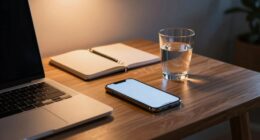
As daylight saving time ends and evenings get darker earlier, your screen use at night can wreck your sleep by suppressing melatonin and confusing your body’s natural cues. Blue light from devices like phones, tablets, and TVs inhibits melatonin production, making it harder to fall asleep and reducing sleep quality. To protect your rest, set a screen cutoff an hour before bed, switch to night mode, and develop relaxing routines. Keep exploring to learn how to improve your sleep even more.
Key Takeaways
- Limit screen use at least one hour before bed to reduce blue light exposure and support melatonin production.
- Use night mode or blue light filters on devices, but combine them with other calming pre-sleep activities.
- Create a sleep-friendly environment by dimming lights and keeping screens out of the bedroom.
- Establish a consistent, relaxing bedtime routine to signal your body it’s time to sleep.
- Practice relaxation techniques to counteract evening stimulation and improve overall sleep quality after DST.

As daylight saving time ends and evenings grow darker earlier, many people find themselves spending more time in front of screens after sunset. This shift means your evenings are now filled with more TV shows, social media scrolling, or late-night work on your devices. While it’s tempting to unwind with screens, this habit can seriously impact your sleep. The culprit is blue light exposure, which is emitted by most screens—smartphones, tablets, computers, and TVs. Blue light suppresses melatonin, the hormone that signals to your body that it’s time to sleep. When melatonin production is disrupted, falling asleep becomes harder, and your sleep quality diminishes. That leaves you feeling tired and groggy the next day, creating a cycle that’s tough to break.
To protect your sleep, setting screen time limits becomes essential. You might think about establishing a cutoff time—say, no screens an hour before bed. This gives your brain a chance to wind down naturally without the interference of blue light. If you’re not ready to completely cut out screens, consider activating night mode or blue light filters on your devices. These features reduce blue light emissions and can make a noticeable difference in your ability to fall asleep. Keep in mind, though, that these filters aren’t foolproof. Combining them with other strategies, like reading a book or practicing relaxation techniques, can help you transition more smoothly into sleep. Additionally, understanding the impact of blue light on melatonin can motivate you to modify your habits for better rest.
Being mindful of your evening screen habits also involves creating a conducive environment for rest. Dim the lights in your room, keep screens out of the bedroom if possible, and establish a relaxing pre-sleep routine. Instead of scrolling, try activities that don’t involve screens—listening to calming music, journaling, or gentle stretches. These activities help signal to your body that it’s time to wind down, counteracting the stimulating effects of blue light exposure.

Logitech Brio 4K Webcam, Video Calling, Noise-Cancelling mic, HD Auto Light Correction, Wide Field of View, Windows Hello Works with Microsoft Teams, Zoom, Google Meet, PC/Mac/Laptop/MacBook/Tablet
Spectacular video quality: superb resolution, frame rate, color, and detail, featuring autofocus and 5x digital zoom; this Ultra...
As an affiliate, we earn on qualifying purchases.
Frequently Asked Questions
How Does Screen Time Affect Sleep Quality During DST Changes?
Your screen time during DST changes can disrupt sleep quality by increasing screen addiction, which makes it harder to stick to good sleep hygiene. The blue light from screens suppresses melatonin, delaying sleep onset and reducing restfulness. To protect your sleep, limit evening screen use, especially close to bedtime, and establish a relaxing pre-sleep routine. Prioritizing sleep hygiene helps your body adjust and prevents DST-related sleep disturbances.
Are There Specific Types of Screens That Are Better or Worse for Sleep?
You should avoid screens with high blue light and keep their brightness low, as these are worse for your sleep. Devices like e-readers with adjustable settings or using glasses that block blue light can help. Smartphones and tablets emit more blue light and tend to have brighter screens, making them less sleep-friendly. Opt for dimmer, blue-light-reducing screens in the evening to protect your sleep quality during DST changes.
What Are Effective Strategies to Reduce Screen Exposure Before Bedtime?
To reduce screen exposure before bedtime, establish screen-free routines at least 30 to 60 minutes prior to sleep. Turn off bedtime electronics like smartphones and tablets, and instead engage in relaxing activities such as reading a book, listening to calming music, or practicing meditation. These habits help signal to your brain that it’s time to wind down, making it easier to fall asleep and improve sleep quality after DST.
Can Blue Light Glasses Improve Sleep During Daylight Saving Time?
Yes, blue light glasses can improve your sleep during daylight saving time by protecting your eyes from blue light exposure that disrupts sleep hygiene. Wearing these glasses in the evening helps reduce blue light’s impact on melatonin production, making it easier for you to fall asleep and stay asleep. Incorporate them into your nightly routine to support better sleep, especially when your schedule shifts with DST.
How Long Does It Typically Take to Adjust Sleep Patterns After DST?
You usually need about a week to fully adjust your sleep patterns after DST. During this time, your body experiences circadian shifts that can cause sleep inertia, making mornings feel tougher. Notably, studies show it takes roughly 4 to 7 days for your internal clock to realign with the new schedule. To ease this transition, stick to consistent sleep and wake times, and limit evening screen exposure.

ONEMIX 42" LED Desk Lamp with Clamp, Architect Desk Light with Remote, Adjustable 4-Segment Bar, 1800LM Bright, Eye-Caring Desk Lamp for Home Office, Reading, Study, Dual Monitors, Workbench(Black)
Ultra-Wide & Super-Bright Light Bar: This 42-inch LED desk lamp features a 4-segment architect-style light bar with independently...
As an affiliate, we earn on qualifying purchases.
Conclusion
Remember, staying off screens at least an hour before bed can markedly improve your sleep quality. After daylight saving time, many experience a 20% drop in sleep quality, leading to fatigue and reduced focus. Don’t let evening screens wreck your rest—prioritize winding down and disconnecting. Your body needs this time to reset and recharge. By making small changes, you’ll wake up feeling refreshed and ready to face the day, even after DST shifts.

Anker PowerConf C200 2K Webcam for PC/Laptop/Mac, Computer Camera, Low-Light Correction, AI-Noise Canceling Mics, Adjustable Field of View, Built-in Privacy Cover, Stereo Mics, for Meeting
2K Ultra-Clear Resolution: Enjoy sharp, detailed video with this 2K resolution webcam for professional-grade conferences, enhancing your PC...
As an affiliate, we earn on qualifying purchases.

Zoom Lighting for Computer, Adjustable Desk Lighting for Video Calls, 30 Light Modes Video Conference Light, Desk Ring Light with Stand for Webcam, Meetings, Live Stream, Home Office. CRI 97.8
Uniform and Soft Illumination: LitONES desk video conference light utilizes advanced edge-lit technology, delivering even and gentle lighting...
As an affiliate, we earn on qualifying purchases.