
Choosing the best Thunderbolt monitor for MacBook can be challenging, especially with so many options offering varying features and price points. The Dell 27 Plus 4K USB-C Monitor stands out as a versatile all-rounder with excellent image quality and reliable performance. For those seeking a professional-grade display, the LG 32U990A-S 32-Inch Ultrafine 6K Nano IPS offers exceptional color accuracy and ultra-high resolution. The main tradeoffs in this category usually revolve around balancing display size, resolution, connectivity options, and price. Keep reading for a detailed breakdown to find the perfect fit for your needs.
Key Takeaways
- The top monitors prioritize high resolution, with 4K and 6K models leading the way for detailed visuals.
- Connectivity, especially multiple Thunderbolt ports and USB-C, is essential for seamless MacBook integration.
- Color accuracy and factory calibration are crucial for creative professionals, making certain monitors more suitable for design work.
- Size and ergonomic features vary widely—larger screens and adjustable stands add versatility but at a higher cost.
- Premium models often include additional features like KVM switches and HDR, which benefit power users but may be unnecessary for casual use.
| Dell 27 Plus 4K USB-C Monitor – S2725QC |  | Best Overall for Versatile 4K Performance | Size: 27 inches | Resolution: 3840 x 2160 (4K) | Refresh Rate: 120Hz | VIEW LATEST PRICE | See Our Full Breakdown |
| BenQ MA270U 27″ 4K UHD Monitor for MacBook Pro/Air with USB-C, P3 Color, Adjustable Stand | 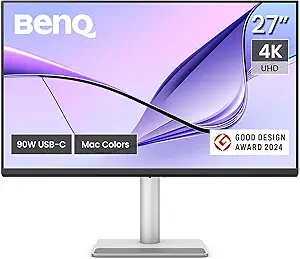 | Best for Ergonomic and Color Calibration | Display Size: 27 Inches | Resolution: 3840 x 2160 (4K UHD) | Display Technology: IPS LED | VIEW LATEST PRICE | See Our Full Breakdown |
| LG 32U990A-S 32-Inch Ultrafine 6K Nano IPS Professional Monitor with Thunderbolt 5 |  | Best for High-Resolution Creative Work | Display Size: 32 inches | Resolution: 6144 x 3456 (6K) | Pixel Density: 224 PPI | VIEW LATEST PRICE | See Our Full Breakdown |
| Samsung 34” ViewFinity Series Ultra-WQHD Curved Computer Monitor (LS34C650TANXGO, 2024) |  | Best for Immersive Productivity with Curved Design | Screen Size: 34 inches | Display Type: Ultra-WQHD, Curved (1000R) | Resolution: 3440 x 1440 | VIEW LATEST PRICE | See Our Full Breakdown |
| Dell UltraSharp U3225QE 32-Inch 4K UHD IPS Monitor with Thunderbolt Hub |  | Best Overall Large Thunderbolt Monitor for MacBook | Size: 32 inches | Resolution: 3840 x 2160 (4K UHD) | Refresh Rate: 120Hz | VIEW LATEST PRICE | See Our Full Breakdown |
| BenQ PD2725U 27-Inch 4K UHD IPS Monitor with Thunderbolt 3, USB-C, KVM Switch, Factory-Calibrated, Pantone, and HDR |  | Best Professional-Grade 4K Monitor for MacBook | Display Size: 27 Inches | Resolution: 3840 x 2160 (4K UHD) | Display Technology: IPS LCD | VIEW LATEST PRICE | See Our Full Breakdown |
More Details on Our Top Picks
Dell 27 Plus 4K USB-C Monitor – S2725QC
The Dell S2725QC stands out as the best overall choice because it balances impressive 4K visuals with a high 120Hz refresh rate, making it well-suited for both work and light gaming. Compared with the LG UltraFine 6K, it offers a more affordable entry into 4K displays without sacrificing color accuracy, thanks to its 99% sRGB coverage. Its low blue light technology and integrated speakers enhance daily comfort, though it does limit power delivery to 65W, which might slow down charging for power-hungry MacBooks. The absence of a built-in USB hub might be a drawback for users who want more connectivity options. Overall, this monitor is a flexible all-rounder for Mac users who want quality visuals and smooth performance without a premium price tag.
Pros:- Vivid 4K visuals with accurate colors
- Smooth 120Hz refresh rate for gaming and work
- Low blue light technology reduces eye strain
- Single USB-C cable simplifies desk setup
Cons:- Limited to 65W power delivery via USB-C
- No built-in USB hub or additional ports
Best for: Creative professionals and casual users who need a reliable, high-quality 4K display with good refresh rates and comfort features.
Not ideal for: Power users requiring higher charging wattage or extensive USB port options, or gamers seeking ultra-high refresh rates.
- Size:27 inches
- Resolution:3840 x 2160 (4K)
- Refresh Rate:120Hz
- Response Time:0.03ms
- Color Coverage:99% sRGB
- Connectivity:USB-C (up to 65W)
Bottom line: This monitor offers a well-rounded package for Mac users who prioritize color accuracy and smooth performance at an accessible price.
BenQ MA270U 27″ 4K UHD Monitor for MacBook Pro/Air with USB-C, P3 Color, Adjustable Stand
The BenQ MA270U makes a compelling case for Mac users who value precise color calibration and ergonomic flexibility. Its P3 wide color gamut ensures vivid, true-to-life visuals that are ideal for creative work, similar to the LG UltraFine but at a slightly lower resolution. The adjustable stand, supporting height, tilt, swivel, and pivot, makes it easier to achieve a comfortable viewing position, unlike the Dell S2725QC, which has a fixed stand. While its 60Hz refresh rate isn’t suited for fast-paced gaming, it excels for detailed editing and color-sensitive tasks. Its 90W power delivery via USB-C streamlines setup, but higher-end options like the LG 6K provide even more color accuracy and resolution for professional workflows. This monitor fits Mac creatives who prioritize color integrity and ergonomic comfort.
Pros:- Vibrant P3 wide color gamut calibrated for Mac
- Fully adjustable ergonomic stand
- Seamless USB-C with 90W power delivery
- High contrast ratio of 2000:1
Cons:- Limited to 60Hz refresh rate, not ideal for gaming
- Higher price compared to basic 4K monitors
Best for: Photographers, designers, and video editors needing accurate colors and ergonomic adjustments.
Not ideal for: Gamers or users seeking very high refresh rates or extra USB ports, as it focuses more on color calibration and ergonomics.
- Display Size:27 Inches
- Resolution:3840 x 2160 (4K UHD)
- Display Technology:IPS LED
- Color Gamut:P3
- Ports:2 HDMI, 2 USB-C (90W)
- Stand Adjustments:Height, Tilt, Swivel, Pivot
Bottom line: This monitor is ideal for Mac creatives who need precise color and flexible ergonomics over high refresh rates or gaming features.
LG 32U990A-S 32-Inch Ultrafine 6K Nano IPS Professional Monitor with Thunderbolt 5
The LG UltraFine evo 6K is designed for demanding creative professionals who need exceptional detail and color accuracy, making it stand out against more common 4K options like the BenQ or Dell. Its 6144 x 3456 resolution offers a staggering pixel density, perfect for high-resolution editing and retouching, while Thunderbolt 5 connectivity simplifies integration with the latest MacBooks. The Nano IPS Black panel provides deep contrast and HDR support, elevating visual fidelity for professional workflows. The large 32-inch size and high price point mean it’s best suited for users with dedicated workspace and substantial hardware, as its high-resolution display demands powerful graphics for optimal performance. If your work revolves around precision and detail, this monitor is tailored to your needs.
Pros:- Stunning 6K resolution with high pixel density
- Versatile connectivity including Thunderbolt 5
- Accurate color reproduction with wide gamut and HDR
- Ergonomic stand with multiple adjustments
Cons:- Premium price makes it costly for many users
- Large size may require significant desk space
- High hardware demand for full performance
Best for: Creative professionals requiring high-resolution, color-accurate displays for editing, retouching, and visual work.
Not ideal for: Casual users or gamers who don’t need 6K detail or HDR support, or those with limited desk space due to its size.
- Display Size:32 inches
- Resolution:6144 x 3456 (6K)
- Pixel Density:224 PPI
- Color Coverage:99.5% Adobe RGB, 98% DCI-P3
- Contrast Ratio:2000:1
- Connectivity:Thunderbolt 5, HDMI 2.1, DisplayPort 2.1
Bottom line: This monitor is best suited for professionals who need the highest resolution and color accuracy for creative workflows on Mac.
Samsung 34” ViewFinity Series Ultra-WQHD Curved Computer Monitor (LS34C650TANXGO, 2024)
The Samsung ViewFinity LS34C650TANXGO offers an expansive 34-inch curved display that enhances immersion and productivity, especially compared to traditional flat monitors like the Dell or BenQ. Its ultra-wide 21:9 aspect ratio and HDR10 support make it suitable for multitasking, video editing, and general use. The inclusion of Thunderbolt 4 with 90W charging simplifies MacBook connections, while the ergonomic stand and eye-care features contribute to comfort during long sessions. However, the 100Hz refresh rate isn’t available in all modes like Picture-by-Picture, and some features like AMD FreeSync support are limited to specific ports. This monitor is well-suited for users who prefer an immersive curved display for multitasking and creative work but don’t need ultra-high refresh rates for gaming.
Pros:- Immersive 34-inch curved display enhances productivity
- HDR10 support for better visual quality
- Thunderbolt 4 with 90W charging simplifies MacBook setup
- Ergonomic adjustments and eye-care technology
Cons:- Limited refresh rate in some modes, not ideal for gaming
- HDR brightness may be limited in high ambient light
Best for: Professionals who want an immersive, curved display for multitasking and creative tasks with solid connectivity options.
Not ideal for: Gamers or those seeking ultra-high refresh rates or extremely high resolutions for detailed editing; limited to 100Hz in some modes.
- Screen Size:34 inches
- Display Type:Ultra-WQHD, Curved (1000R)
- Resolution:3440 x 1440
- Refresh Rate:100Hz
- HDR:HDR10
- Connectivity:Thunderbolt 4, HDMI, DisplayPort
Bottom line: This monitor is a strong choice for users who prioritize an immersive viewing experience and versatile connectivity for multitasking and creative work.
Dell UltraSharp U3225QE 32-Inch 4K UHD IPS Monitor with Thunderbolt Hub
The Dell UltraSharp U3225QE stands out for its expansive 32-inch 4K UHD display, making it ideal for users who prioritize screen real estate and vibrant visuals. Compared with the BenQ PD2725U, this Dell offers a larger workspace, which benefits multitasking and detailed editing. Its seamless Thunderbolt hub allows for easy peripheral connectivity, reducing cable clutter—a key advantage over smaller displays. However, the premium price reflects its high-end features, and full functionality requires compatible Thunderbolt ports, which might limit some MacBook models. This monitor is a strong choice for creative professionals and power users needing a large, vivid display with versatile connectivity, but those on a tighter budget or with older MacBooks may find it less accessible.
Pros:- Vivid 4K UHD display with sharp images and vibrant colors
- Large 32-inch screen ideal for multitasking and detailed work
- Versatile Thunderbolt hub for peripherals and data transfer
- Sleek, modern design with slim bezels
Cons:- Premium price may be prohibitive for some users
- Requires compatible Thunderbolt ports to access full features
- 120Hz refresh rate is high but may be unnecessary for typical productivity
Best for: Mac users who need a large, high-resolution display for multitasking, creative work, or detailed editing.
Not ideal for: Users with older MacBooks lacking Thunderbolt 3/4 ports or those seeking a more budget-friendly option.
- Size:32 inches
- Resolution:3840 x 2160 (4K UHD)
- Refresh Rate:120Hz
- Display Type:IPS LED
- Connectivity:Thunderbolt hub
- HDR:Yes
Bottom line: This monitor works best for Mac users who want a large, color-rich display with robust connectivity, accepting the higher investment and port requirements.
BenQ PD2725U 27-Inch 4K UHD IPS Monitor with Thunderbolt 3, USB-C, KVM Switch, Factory-Calibrated, Pantone, and HDR
The BenQ PD2725U excels for professionals needing precise color accuracy and extensive connectivity in a more compact 27-inch size. Compared to the Dell U3225QE, it offers factory calibration and a wider color gamut, making it better suited for color-sensitive workflows like photo editing and design. Its multiple ports, including Thunderbolt 3, USB-C, HDMI, and DisplayPort, enhance flexibility, and the ergonomic stand allows for a tailored viewing experience. However, the 60Hz refresh rate may disappoint gamers or users seeking ultra-smooth motion, and its higher price point can be a barrier for budget-conscious buyers. This monitor is ideal for creative professionals who require accurate colors and versatile connections but less so for fast-paced gaming or entry-level setups.
Pros:- Factory-calibrated with 100% sRGB and wide P3 coverage for color accuracy
- Multiple connectivity options including Thunderbolt 3, USB-C, HDMI, and DisplayPort
- Ergonomic adjustments for height, tilt, swivel, and pivot
- Supports daisy chaining for dual 4K displays
Cons:- 60Hz refresh rate limits fast-motion responsiveness
- Higher price point may be too steep for some budgets
- Power consumption could add to operational costs over time
Best for: Mac professionals focused on color accuracy and flexible connectivity, such as photographers, designers, and video editors.
Not ideal for: Gamers or users seeking high refresh rates for fast-paced gaming or smooth motion.
- Display Size:27 Inches
- Resolution:3840 x 2160 (4K UHD)
- Display Technology:IPS LCD
- Contrast Ratio:1200:1
- Refresh Rate:60 Hz
- Ports:2 HDMI, 1 DisplayPort, 2 USB-C, 4 USB 3.0, 1 Thunderbolt 3
Bottom line: This monitor suits Mac users who prioritize professional-grade color accuracy and flexible connectivity, accepting the modest refresh rate and higher cost.

How We Picked
The monitors included in this roundup were selected based on their compatibility with MacBook through Thunderbolt and USB-C, ensuring easy connectivity and high data transfer speeds. We evaluated performance aspects such as display resolution, color accuracy, and build quality, alongside usability features like ergonomic adjustments and extended port options. Price-to-value ratio was also a key factor, with a focus on models that deliver professional features without unnecessary extras. The ranking reflects a balance between performance, versatility, and price, favoring options that excel for both general use and specialized tasks like content creation.Factors to Consider When Choosing Best Thunderbolt Monitor For Macbook
When choosing the best Thunderbolt monitor for MacBook, it’s important to consider several key factors that impact compatibility, usability, and longevity. The right monitor should not only match your current needs but also accommodate future upgrades or workflow changes. Being aware of potential pitfalls can help you avoid overspending on features you don’t need or selecting a display that underperforms in critical areas.Resolution and Screen Size
Higher resolutions like 4K or 6K provide sharper images and more workspace, which benefits creative professionals and multitaskers alike. However, larger screens with ultra-high resolutions come at a premium and may require more powerful hardware for optimal performance. Choosing the right balance depends on your space constraints and the tasks you prioritize, such as photo editing or general productivity.
Connectivity and Ports
Thunderbolt and USB-C ports are essential for seamless MacBook integration, allowing for fast data transfer and charging through a single cable. Consider monitors with multiple Thunderbolt ports if you plan to connect several devices or peripherals. Be cautious of models with limited ports, as you might need additional hubs or adapters, which add clutter and complexity.
Color Accuracy and Calibration
For creative work, factory calibration and support for wide color gamuts like P3 or Adobe RGB are vital. These features ensure your colors remain consistent and accurate across different devices and outputs. Less accurate monitors may be sufficient for general use but can cause frustration when working on visual projects.
Ergonomics and Design
Adjustable stands, swivel, tilt, and height controls can greatly improve comfort during prolonged use. Larger monitors or ultrawide screens offer increased productivity but can take up more desk space. Consider your workspace layout and whether the monitor’s ergonomics match your daily workflow.
Additional Features and Future-proofing
Features like KVM switches, HDR support, and built-in speakers add value for specific workflows or entertainment. While these extras can enhance usability, they often come at a higher cost. Prioritize features that align with your primary use case to avoid paying for unnecessary bells and whistles.
Frequently Asked Questions
Will a Thunderbolt monitor charge my MacBook?
Many Thunderbolt monitors can provide charging power to MacBooks, often up to 85W or more, which simplifies desk setup by reducing cable clutter. However, not all models support charging at high wattages, so it’s important to verify the monitor’s power delivery specifications. Choosing a monitor with sufficient wattage ensures your MacBook stays charged during heavy use, especially for demanding tasks like video editing or gaming.
Is 4K resolution enough for professional photo editing on MacBook?
Yes, 4K resolution offers a sharp and detailed display suitable for most photo editing needs, especially if the monitor supports good color accuracy and wide color gamuts. However, for professional-grade work, 6K or higher displays like the LG 32U990A-S provide even greater detail and color fidelity, reducing the need for external calibration or additional screens. Always check for factory calibration and color support when choosing a monitor for editing.
Can I connect multiple monitors to my MacBook via Thunderbolt?
Many MacBooks support multiple external displays, especially newer models with Thunderbolt 3 or 4 ports. Using a Thunderbolt dock or a monitor with multiple Thunderbolt ports makes this easier, enabling a multi-screen setup for increased productivity. Be aware of your MacBook’s specific GPU capabilities to avoid overloading your system, which can cause performance issues or connectivity problems.
Are ultrawide monitors worth it for MacBook users?
Ultrawide monitors like the Samsung ViewFinity Series enhance productivity by providing more horizontal workspace, which is beneficial for multitasking and creative workflows. However, they tend to cost more and require more desk space, and some MacBook models may not fully support ultrawide resolutions without additional adapters or hardware. Consider your workflow needs and desk size before opting for an ultrawide display.
Is a higher refresh rate necessary for MacBook users?
For most MacBook users, especially those focused on productivity, a higher refresh rate (e.g., 120Hz) is not essential unless you plan to use the monitor for gaming or high-frame-rate video editing. Standard 60Hz or 75Hz screens are sufficient for everyday use, but higher refresh rates can make the interface feel smoother and more responsive during navigation or creative tasks.
Conclusion
For general users seeking a reliable, high-quality display, the Dell 27 Plus 4K USB-C Monitor offers excellent value and performance. Creative professionals will find the LG 32U990A-S ideal due to its exceptional color accuracy and ultra-high resolution. Those willing to invest in premium features should consider the BenQ PD2725U for its factory calibration and versatile connectivity. Beginners or casual users should focus on models with straightforward features and good ergonomics, while power users needing multiple ports or advanced calibration will benefit from higher-end options. Your choice ultimately depends on your specific workflow and budget.