Treat your 2FA backup codes like precious keys to your digital life. Store them securely offline—use a locked safe or encrypted password manager—and avoid saving them on easily accessible devices or cloud services. Never share your codes, and review them regularly to guarantee they remain secure and up to date. Proper storage prevents lockouts and keeps your accounts safe. Stay with us to discover essential tips on managing your backup codes effectively.
Key Takeaways
- Store backup codes offline in secure locations like safes or encrypted password managers.
- Generate and save backup codes immediately during 2FA setup, avoiding plain text files or cloud storage.
- Keep backup codes separate from devices to prevent theft or hacking risks.
- Regularly review and regenerate backup codes if compromised or used.
- Treat backup codes with the same security as passwords to prevent permanent account lockout.

Two-factor authentication (2FA) adds an extra layer of security to your online accounts, but what happens if you lose access to your primary device? That’s where 2FA backup codes come into play. These codes act as a safety net, guaranteeing you can regain access even if your usual authentication method is unavailable. To follow security best practices, you should treat these backup codes with the same level of caution as your passwords. Store them securely and never share them with anyone. Think of these codes as your personal keys—they’re only for you, and losing them could lock you out of your accounts entirely.
When you set up 2FA, many services give you the option to generate backup codes. These are a series of one-time-use codes that can be used in place of your primary authentication method. It’s essential to download or write these down immediately and keep them in a safe, private place. Avoid saving them in plain text files on your device or cloud storage, where they could be vulnerable to hacking. Instead, consider a secure offline location like a locked safe or a dedicated password manager with secure note features. This way, you maintain control over your recovery options and reduce the risk of losing access due to device failure or theft.
Having backup codes stored properly aligns with security best practices because it minimizes the chances of being completely locked out of your accounts. If your phone gets lost, stolen, or damaged, and you haven’t saved your backup codes, you might face lengthy recovery procedures or even permanent loss of access. Many services have additional recovery options, such as verifying your identity through email or answering security questions, but these can be less convenient or more intrusive. Backup codes provide a quick, reliable way to regain entry without delays. Additionally, understanding the wave and wind of potential security threats helps you stay prepared.
It’s also wise to periodically review your stored backup codes and regenerate them if you suspect they’ve been compromised or after you’ve used some. Keeping your recovery options up to date helps ensure continuous access and prevents potential security gaps. Remember, your backup codes are a vital part of your security strategy—treat them accordingly. By storing your backup codes securely and understanding the recovery options available, you safeguard your digital life against unforeseen circumstances. Protect your accounts now by managing your backup codes responsibly; your future access depends on it.

Samsonite Lumbar Support Pillow for Office Chair, Lower Back Support for Car, Back Pillow Desk Chair Cushion with Memory Foam, Improved Posture Backrest
- All-Day Comfort: Memory foam contours to your spine
- Adjustable and Secure: Fits with adjustable straps for stability
- Enhanced Airflow: Ventilated mesh cover promotes cooling
As an affiliate, we earn on qualifying purchases.
Frequently Asked Questions
Can I Generate Backup Codes Without Logging Into My Account?
No, you can’t generate backup codes without logging into your account because doing so requires your authentication. Skipping login can jeopardize your security implications, leaving your account vulnerable. Proper backup code management involves generating and storing codes securely through your account settings. Always log in safely to create new backup codes, ensuring you have access if your primary 2FA method becomes unavailable. Avoid shortcuts that compromise your account security.
How Often Should I Regenerate My 2FA Backup Codes?
Studies show that 60% of account breaches involve compromised 2FA backup codes. You should regenerate your backup codes every 3 to 6 months to follow security best practices. Regular code regeneration minimizes risks if codes are lost or stolen. Keep your backup codes up to date, store them securely, and avoid reusing old ones. This habit guarantees your account stays protected against evolving security threats.
Are Backup Codes Valid Across Different Devices?
Backup codes are generally valid across different devices, but you should verify the specific service’s device compatibility. Keep in mind, codes may have an expiration date, so use them promptly. If you switch devices or notice expired codes, regenerate your backup codes to ensure continued access. Always store your backup codes securely, and don’t rely on them past their expiration to avoid login issues.
What Should I Do if I Lose All Backup Codes?
If you lose all backup codes, don’t panic. Start your account recovery process by verifying your identity through your email or phone number. Contact the service’s support team if needed. Consider setting up alternative authentication methods, like biometric login or app-based 2FA, to prevent future issues. Always keep backup options safe and accessible to avoid being locked out and ensure you can restore access easily.
Can Backup Codes Be Shared With Trusted Friends?
Sharing security, especially 2FA backup codes with trusted friends, isn’t advisable. While it might seem helpful in emergencies, it risks exposing your accounts if those codes fall into the wrong hands. Instead, store backup codes securely yourself, and only share access through official recovery options. Trust is essential—only share your codes with people you absolutely trust, and even then, do so cautiously to protect your online security.

Lumbar Support Pillow for Office Chair,Mothers Day Gifts for Mom, Back Support Pillow for Car, Office Supplies, Chair Cushions, Back Pain Relief Improve Posture, Mesh Cover Double Adjustable Straps
- Extended Adjustable Straps: Fits more chairs securely
- Ergonomic Back Support: Relieves back pain and tightness
- Supports Proper Posture: Maintains natural spine curve
As an affiliate, we earn on qualifying purchases.
Conclusion
Now that you know how essential 2FA backup codes are, don’t leave them to chance. Store them securely—you wouldn’t want to be caught with your pants down when access is denied. Treat these codes like your lifeline; a little effort now saves you a lot of trouble later. Remember, it’s better to be safe than sorry. Keep your backup codes safe, and you’ll be able to face any digital hurdle with confidence.
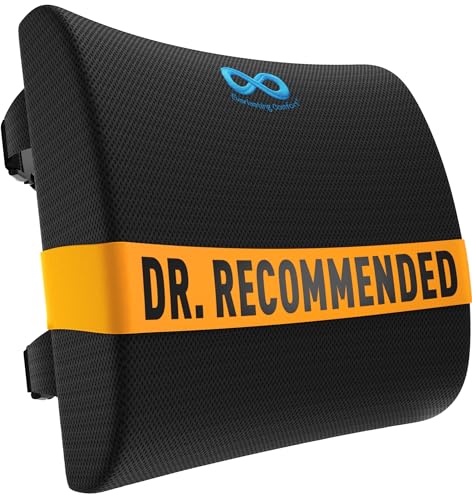
Everlasting Comfort The Original Lumbar Support Pillow for Office Chair - Improves Posture, Promotes Back Pain Relief - Superior Back Support for Gaming and Desk Chairs - Lumbar Pillow for Car, Couch
- High-Density Memory Foam: Provides firm, long-lasting support
- Supports Natural Spine Curve: Gently aligns your back for comfort
- Promotes Better Posture: Reduces slouching and fatigue
As an affiliate, we earn on qualifying purchases.
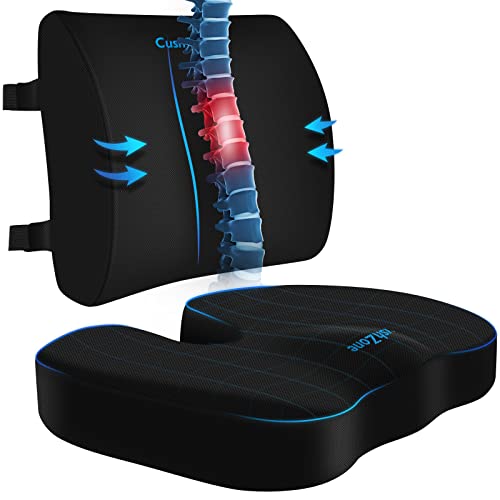
CushZone Seat Cushion and Lumbar Support Pillow for Office Chair, Black
- Ergonomic Dimensions for Comfort: Sized for most users with ergonomic design
- High-Quality Materials: Made of durable fabric with quality zippers
- Non-Slip and Adjustable Fit: Non-slip bottom and adjustable straps for stability
As an affiliate, we earn on qualifying purchases.