
Finding the best monitor for reading and writing requires balancing comfort, clarity, and eye health. The LG 27US500-W Ultrafine 27-Inch 4K UHD HDR10 IPS Monitor stands out for its sharp resolution and color accuracy, ideal for long reading sessions. The LG 24U411A-B offers a budget-friendly option with features like Flicker Safe and Reader Mode, reducing eye strain. For those seeking a high-quality display with excellent ergonomics, the BenQ MA270U provides adjustable height and USB-C connectivity. Readers face tradeoffs between screen size, resolution, and eye comfort; continue reading for a detailed breakdown of each option.
Key Takeaways
- High-resolution 4K displays significantly improve reading clarity but often come at a higher price point.
- Eye comfort features like Flicker Safe, Reader Mode, and low blue light are essential for prolonged use without fatigue.
- Color accuracy and wide viewing angles matter more for writers involved in color-sensitive tasks than for general reading.
- Size matters: larger screens enhance multitasking but can be overwhelming in small workspaces.
- Ergonomic adjustments such as height, tilt, and swivel are vital for maintaining comfort during long writing sessions.


More Details on Our Top Picks
LG 27US500-W Ultrafine 27-Inch 4K UHD HDR10 IPS Monitor
The LG 27US500-W stands out for delivering a stunning 4K UHD resolution combined with a wide DCI-P3 color gamut, making reading and writing sessions visually comfortable and vibrant. Its IPS panel offers wide viewing angles, reducing color shift when viewed from different positions—a feature that surpasses many budget options like the Samsung 27″ Essential S3, which lacks 4K resolution. The ergonomic tilt adjustment adds flexibility for long periods of use, but the absence of built-in speakers means you’ll need external audio if needed. Compared with the Dell S2725QS, this monitor emphasizes color accuracy and visual comfort over high refresh rates or gaming features, making it more suitable for extended reading and writing rather than fast-paced tasks.
Pros:- Vivid 4K UHD display with a wide color spectrum for detailed, vibrant visuals
- Ergonomic tilt adjustment enhances comfort during long use
- Supports HDR10 for improved contrast and color depth
- Onscreen control allows easy customization
Cons:- No built-in speakers, requiring external audio setup
- Limited to tilt adjustment, lacking height or swivel flexibility
- Requires external devices for audio playback
Best for: Professionals, students, or writers who prioritize crisp, accurate visuals for long reading and writing sessions
Not ideal for: Users needing integrated speakers or high refresh rates for gaming or multimedia consumption
- Size:27 inches
- Resolution:3840×2160 (4K UHD)
- Contrast Ratio:1000:1
- Color Gamut:90% DCI-P3
- HDR:HDR10
- Panel Type:IPS
Bottom line: This monitor is ideal for those seeking high-resolution, color-accurate visuals for extended reading and writing, with some ergonomic compromises.
NEEWER F700 7″ Camera Field Monitor with Touch Screen, 2000nit Brightness, 4K HDMI Loop, HDR, 3D LUT, and Battery Pack
The NEEWER F700 excels in outdoor or brightly lit environments thanks to its astonishing 2000nit brightness, far surpassing typical monitors like the Samsung 27″ Essential S3. Its 7-inch size makes it highly portable but less suitable for prolonged reading sessions at a desk. The touch screen interface and support for 4K HDMI loop-in/out provide professional-grade flexibility, perfect for on-the-go editors or writers who need a compact yet powerful tool. While complex for beginners due to its menu system, it offers customizable 3D LUTs for precise color grading—more than what most monitors designed for reading provide. Compared to larger monitors, this one trades off screen real estate for portability and brightness, making it ideal for outdoor use or quick review tasks.
Pros:- Extraordinary 2000nit brightness for outdoor clarity
- Supports 4K HDMI loop for professional workflows
- Customizable 3D LUTs for accurate color grading
- Multiple power options, including NP-F batteries
Cons:- Additional accessories like batteries and cables sold separately
- Relatively heavy with batteries attached, less portable than smaller screens
- Complex menu system may challenge beginners
Best for: Photographers, videographers, or writers working outdoors or in brightly lit spaces who need a portable, bright display
Not ideal for: Users seeking a large, dedicated workstation monitor for extended reading and writing at a desk
- Display Size:7 inches
- Resolution:1920×1080
- Brightness:2000nit
- Contrast Ratio:1000:1
- Touch Screen:Yes
- Battery Runtime:2.4 hours with NP-F750
Bottom line: This monitor is perfect for mobile professionals needing a bright, color-accurate display outdoors but less suited for traditional desk use.
Dell 27 Plus 4K Monitor – S2725QS – 27-inch 4K (3840 x 2160) 120Hz IPS Display with AMD FreeSync Premium, sRGB 99%, Integrated Speakers, Ash White
The Dell S2725QS offers a compelling blend of high-resolution clarity and color accuracy, making it a strong contender for long reading and writing sessions. Its 120Hz refresh rate and AMD FreeSync Premium improve visual smoothness, especially if you switch between work and casual gaming or multimedia. The 99% sRGB coverage ensures vibrant, true-to-life colors, surpassing the more basic HDR support of the LG 27US500-W. However, its limited ergonomic adjustments might cause discomfort during extended use. Compared to the LG 27US500-W, this model emphasizes color accuracy and a sleek aesthetic but at a higher cost, making it better suited for users who value visual fidelity alongside productivity.
Pros:- Sharp 4K resolution with accurate, vibrant color reproduction
- 120Hz refresh rate for smooth visuals during multitasking
- Blue light reduction features for extended reading comfort
- Modern, sleek design in ash white
Cons:- Higher price relative to basic monitors
- Limited ergonomic adjustments for long-term comfort
- No USB ports for additional connectivity
Best for: Content creators, writers, or professionals demanding color precision and high resolution for detailed work
Not ideal for: Gamers or users requiring extensive ergonomic adjustments or ultra-wide viewing angles
- Size:27 inches
- Resolution:3840 x 2160 (4K)
- Refresh Rate:120Hz
- Color Coverage:99% sRGB
- Contrast Ratio:1500:1
- HDR:Ready
Bottom line: Ideal for professionals seeking precise color and high resolution for detailed reading and writing tasks, with a sleek design and smooth visuals.
SANSUI 27 Inch Curved 240Hz Gaming Monitor with HDR and FreeSync
The SANSUI 27 Inch Curved monitor is primarily designed for gaming, with a blazing 240Hz refresh rate and a 1500R curvature that enhances immersion. While its 1080P resolution limits pixel detail compared to 4K options like the LG or Dell, the high refresh rate and fast response times can benefit reading and writing in terms of reduced motion blur and eye comfort during extended sessions. Its HDR support and color accuracy (130% sRGB) add to its appeal, though it sacrifices some resolution clarity. Compared with the NEEWER F700, this monitor is less portable but offers a more traditional desktop experience. It’s best for users who prioritize smooth, immersive visuals over ultra-high resolution.
Pros:- High 240Hz refresh rate for ultra-smooth visuals
- Curved design enhances immersion and reduces eye strain
- Excellent color accuracy with HDR support
- Fast 1ms response time to reduce motion blur
Cons:- Limited to 1080P resolution, less pixel detail for reading
- No built-in speakers or USB ports
- Primarily for gaming, not professional color work
Best for: Gamers or users who value high refresh rates and immersive curved displays for extended reading and writing
Not ideal for: Professional editors or writers needing 4K resolution or color accuracy for detailed work
- Size:27 inches
- Resolution:Full HD 1080P
- Refresh Rate:240Hz
- Curvature:1500R
- Color Gamut:130% sRGB
- Response Time:1ms
Bottom line: Best suited for users who want an immersive, fast-paced display experience with decent color reproduction, rather than high-resolution clarity.
Samsung 27″ Essential S3 (S36GD) Series FHD Curved Computer Monitor, 100Hz, Game Mode, Eye Comfort, HDMI & D-sub, LS27D366GANXZA, 2024
The Samsung S3 Series offers a 27-inch curved display with a 100Hz refresh rate, tailored for users seeking an engaging visual experience without high-end features. Its curved design enhances immersion, making it a solid choice for casual reading or writing, especially in environments where eye comfort technology reduces strain. While it doesn’t offer 4K resolution or professional-grade color accuracy like the Dell or LG models, its affordability and basic connectivity make it appealing for students or casual users. The lack of built-in speakers and limited ergonomic adjustments are notable tradeoffs, but for those on a budget, it provides a decent balance of features for light productivity and entertainment.
Pros:- Curved display enhances viewing comfort and immersion
- Affordable price point for basic reading and writing tasks
- Eye comfort technology reduces eye strain during extended use
- Versatile connectivity options
Cons:- Limited to Full HD resolution, less sharp for detailed reading
- No built-in speakers or advanced ergonomic features
- Primarily suited for casual use, not professional workloads
Best for: Students or casual users seeking an affordable, curved monitor for everyday reading and writing
Not ideal for: Professionals needing precise color fidelity or extensive ergonomic customization
- Size:27 inches
- Resolution:FHD (1920×1080)
- Curvature:1800R
- Refresh Rate:100Hz
- Eye Comfort:Yes
- Ports:HDMI, D-sub
Bottom line: A budget-friendly curved monitor suitable for casual reading and writing, with some ergonomic compromises.
Acer 27-Inch FHD IPS Monitor with 120Hz Refresh Rate, 1ms Response, and FreeSync Compatibility
This Acer monitor stands out for its combination of high refresh rate and accurate color reproduction, making it suitable for long hours of reading and writing without eye strain. Compared with the LG 24U411A-B, it offers a faster response time and a more vibrant IPS display, though it’s limited to Full HD resolution, which may not satisfy those seeking ultra-sharp detail. Its 120Hz refresh rate smooths scrolling and reduces flicker, enhancing reading comfort. However, the stand only tilts, lacking height adjustment, and it does not include built-in speakers, which could be a drawback for multimedia use. This model is a solid choice for users prioritizing visual fidelity and smooth motion, especially if budget constraints keep 4K aside.
Pros:- High refresh rate (120Hz) enhances scrolling and reduces flicker
- Excellent color accuracy with 99% sRGB coverage
- Fast 1ms response time minimizes motion blur
Cons:- Limited to Full HD resolution, not 4K
- No built-in speakers or height adjustment
Best for: Readers and writers who want a smooth, color-accurate display with fast response times and are okay with 1080p resolution.
Not ideal for: Professionals needing 4K clarity or those seeking extensive ergonomic adjustments, as the stand is limited to tilt only.
- Display Size:27 Inches
- Resolution:1920 x 1080
- Display Type:IPS LCD
- Refresh Rate:120Hz
- Response Time:1ms VRB
- Color Gamut:99% sRGB
Bottom line: This monitor makes the most sense for users who prioritize smooth visuals and accurate colors over ultra-high resolution.
Samsung 24” (S40GD) Borderless Business Monitor with IPS Panel, 100Hz Refresh Rate, Eye Saver Mode, Ergonomic Design, Game Picture Mode, LS24D402GANXGO, 3 Yr Warranty
The Samsung S40GD offers a vibrant IPS display with a sleek, borderless design, ideal for those who spend hours reading or writing at their desk. Its 100Hz refresh rate provides smooth scrolling, comparable to the LG 24U411A-B but with a focus on ergonomic features like height adjustment and pivot, making it easier to customize for comfort. Unlike the Acer, it emphasizes user health with Eye Saver Mode and flicker-free tech, reducing eye fatigue. While the refresh rate is slightly lower than the Acer, it compensates with superior ergonomic flexibility and a modern look. Limited to basic connectivity options and some adjustment controls, it’s best suited for office environments rather than gamers or multimedia creators.
Pros:- Vivid and consistent colors across wide angles
- Ergonomic stand with height adjustment and pivot
- Blue light reduction and flicker-free technology for eye comfort
Cons:- Default refresh rate may require manual setting adjustments
- Stand adjustment options are somewhat limited
Best for: Office workers and students who need adjustable ergonomics and eye comfort for prolonged reading and writing sessions.
Not ideal for: Gamers or multimedia professionals requiring higher refresh rates or extensive connectivity options.
- Size:24 inches
- Panel Type:IPS
- Refresh Rate:100Hz
- Features:Borderless, Eye Saver Mode, Height Adjustable
- Warranty:3 years
Bottom line: This monitor is a wise choice for those prioritizing ergonomic setup and eye comfort during long work sessions.
LG 32UR500K-B 32-Inch 4K UHD HDR10 Monitor with Built-in Speakers
The LG 32UR500K-B excels in delivering stunning 4K visuals with wide DCI-P3 color coverage, making it ideal for detailed reading, writing, and creative tasks. Its HDR10 support adds depth to visuals, and the built-in stereo speakers provide decent audio without extra peripherals. Compared to the BenQ MA270U, it offers a larger screen and higher resolution, but at 60Hz, it’s less suited for fast-paced gaming. Its adjustable tilt enhances ergonomic comfort, though it lacks USB-C or DisplayPort, potentially limiting connectivity options. This monitor best suits users who need high-resolution clarity and vivid colors for text-intensive tasks or creative editing.
Pros:- Vivid 4K UHD display with wide color coverage
- HDR10 support enhances visual depth
- Built-in stereo speakers with Waves MaxxAudio
Cons:- Limited to 60Hz refresh rate, not ideal for gaming
- No USB-C or DisplayPort connectivity
Best for: Creative professionals and serious readers who want immersive 4K visuals with good audio and color fidelity.
Not ideal for: High-end gamers or users requiring high refresh rates for fast action, as it is limited to 60Hz.
- Display Size:32 inches
- Resolution:3840 x 2160
- Display Technology:VA LED
- HDR Support:HDR10
- Brightness:250 nits
- Contrast Ratio:1000:1
Bottom line: This monitor is perfect for those prioritizing detailed visuals and color accuracy over high refresh rates.
BenQ MA270U 27″ 4K Monitor for MacBook – USB-C, 90W Power, P3 Color, Adjustable Stand
The BenQ MA270U is tailored for MacBook users seeking precise color calibration with P3 wide color gamut and 4K resolution. Its single USB-C connection simplifies workspace setup, delivering both display and power (90W), ideal for a clutter-free desk. Compared to the LG 32UR500K-B, it offers a smaller, more portable form factor with professional-grade color accuracy. The adjustable stand provides comprehensive ergonomic options, making it suitable for prolonged reading or writing sessions. However, its higher price reflects these premium features, and it’s primarily optimized for Mac environments, potentially limiting compatibility for other systems. This monitor suits creatives and professionals who need excellent color fidelity and seamless connectivity.
Pros:- Vibrant P3 wide color gamut calibrated for Mac
- Single USB-C connection for display and power
- Fully adjustable stand with height, tilt, swivel, pivot
Cons:- Higher price due to premium features
- Limited compatibility outside Mac environments
Best for: MacBook users and creative professionals who require precise color and ergonomic flexibility in a compact form.
Not ideal for: Users on Windows platforms or those seeking ultra-high-resolution displays beyond 4K.
- Display Size:27 inches
- Resolution:3840 x 2160
- Color Gamut:P3
- Connectivity:2 HDMI, 2 USB-C
- Power Delivery:90W
- Stand Adjustments:Height, tilt, swivel, pivot
Bottom line: This monitor makes perfect sense for Mac-centric workflows and color-critical tasks with ergonomic needs.
LG 24U411A-B 24-inch Full HD IPS Computer Monitor, 120Hz, HDR10, Reader Mode, Flicker Safe, HDMI, Slim Stand Base, Black
The LG 24U411A-B offers a compact, affordable solution for those who need a reliable display for reading and writing. Its 120Hz refresh rate and 1ms response time promote smooth scrolling, reducing eye fatigue over long periods. The HDR10 support and Reader Mode adjust brightness and color warmth, providing a more comfortable viewing experience. Compared with the Acer KB272, it provides a similar refresh rate but with a more modern, slim design and additional eye comfort features. Its limited connectivity options and lack of ergonomic adjustments make it less ideal for multi-monitor setups or extended ergonomic customization. This monitor is best for users seeking a budget-friendly, high-performance display for daily tasks.
Pros:- Vivid, accurate colors with 99% sRGB coverage
- Smooth 120Hz refresh rate and 1ms response
- Flicker Safe and Reader Mode for eye comfort
Cons:- Limited to HDMI only, no DisplayPort or USB-C
- No built-in speakers or height adjustment
Best for: Budget-conscious users who prioritize smooth motion and eye-friendly features for reading and writing tasks.
Not ideal for: Professionals needing extensive ergonomic adjustments or multi-port connectivity.
- Screen Size:24 inches
- Resolution:1920 x 1080
- Panel Type:IPS
- Refresh Rate:120Hz
- HDR Support:HDR10
- Features:Reader Mode, Flicker Safe
Bottom line: This monitor provides excellent value for those needing a responsive, eye-friendly display without extra features.
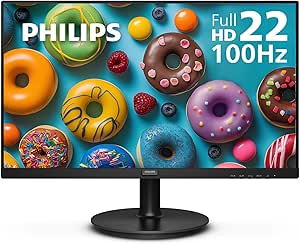
Philips 22 inch Class Full HD Monitor with Adaptive Sync and 100Hz Refresh Rate
This Philips 22-inch monitor stands out for its vibrant Full HD resolution combined with a VA panel that delivers high contrast and wide viewing angles, making it a solid option for extended reading and writing sessions. Compared to larger displays like the LG 27US500-W, this model sacrifices size for a more space-efficient footprint, which can be ideal for smaller desks. The 100Hz refresh rate and Adaptive-Sync technology provide smooth visuals, beneficial if you switch between reading and light multimedia tasks. However, its limited port options—just HDMI and VGA—may restrict connectivity, and its smaller size could feel restrictive for users who prefer larger text or multiple windows open simultaneously. The absence of built-in speakers may also be a downside for those seeking an all-in-one setup. This pick makes the most sense for users who prioritize a compact, high-contrast display with smooth visuals and minimal desk clutter.
Pros:- Vivid Full HD display with high contrast for comfortable reading
- Wide viewing angles ensure consistent visibility from different positions
- Smooth visuals thanks to 100Hz refresh rate and Adaptive-Sync technology
Cons:- Limited port selection, only HDMI and VGA
- Small screen size may be restrictive for multitasking or large text
Best for: Desk-bound readers and writers with limited space who want vivid visuals and reliable performance.
Not ideal for: Users needing multiple connectivity options or a larger workspace; those who prefer built-in speakers or a bigger screen for multitasking.
- Size:22 inches (21.5 inches viewable)
- Resolution:1920 x 1080 (Full HD)
- Refresh Rate:100Hz
- Panel Type:VA
- Contrast:High contrast with brighter whites and deeper blacks
- Viewing Angle:178/178 degrees
- Ports:HDMI x1, VGA x1
- Features:LowBlue Mode, Adaptive Sync
- Warranty:4 years advance replacement
Bottom line: This monitor is best suited for users who want a compact, visually sharp display that handles reading and writing well without unnecessary extras.

How We Picked
The monitors in this roundup were selected based on a combination of display quality, eye comfort features, ergonomic flexibility, and overall usability. Priority was given to models that excel at reducing eye strain, providing sharp text clarity, and offering adjustable stands for personalized comfort. We also considered build quality, connectivity options, and value for money. The ranking reflects a balance between performance in reading and writing tasks and practical tradeoffs like price and size, ensuring there’s a suitable choice for different user needs.Factors to Consider When Choosing Best Monitor For Reading And Writing
Choosing the best monitor for reading and writing involves evaluating several factors that impact comfort, clarity, and usability. While high resolution and color accuracy are important, features that reduce eye strain often make a bigger difference during long sessions. Ergonomics and connectivity options also play crucial roles in creating a productive setup. Understanding these factors can help you avoid common pitfalls like choosing a screen that’s too small or lacking eye comfort features.Display Resolution and Size
Higher resolution monitors, such as 4K, deliver sharper text and more detailed images, reducing eye strain during extended reading or writing. However, larger screens can become overwhelming in tight spaces or for users who prefer a more compact setup. A 24-27 inch size often strikes a good balance for most desks, but those with space and budget can opt for 32 inches or larger for enhanced multitasking. Remember, larger screens may require more powerful hardware to drive the higher resolution smoothly.
Eye Comfort Features
Features like flicker-free technology, low blue light modes, and adjustable brightness significantly reduce eye fatigue during prolonged use. Monitors with ‘Reader Mode’ or similar presets can soften harsh white backgrounds, making long reading sessions more comfortable. Skipping these features might save money upfront but can lead to discomfort and headaches over time. Prioritizing eye comfort options is especially critical if you spend several hours daily working on the screen.
Ergonomic Flexibility
Adjustable stands for height, tilt, swivel, and pivot enable you to set the monitor at an optimal eye level, preventing neck and shoulder strain. Monitors lacking ergonomic options can cause discomfort during extended use, even if the display quality is excellent. For writers and readers, a comfortable posture isn’t just a luxury but a necessity for sustained productivity. Investing in a model with robust ergonomic features can pay dividends in long-term comfort.
Connectivity and Additional Features
USB-C, HDMI, and DisplayPort options provide flexibility to connect with various devices. USB-C is especially useful for modern laptops, offering charging and data transfer in one cable. Built-in speakers or hubs can reduce clutter, while anti-glare coatings help minimize reflections. Be cautious of monitors with limited ports or poor build quality, as these can hinder a seamless workflow. Think about your specific device ecosystem and future needs when choosing connectivity features.
Price and Value
While high-end monitors offer premium features like 4K resolution, extensive ergonomic adjustments, and color accuracy, they come at a premium price. Budget options may lack some comfort or clarity features but can still serve well for casual reading and writing tasks. Assess your long-term needs and budget carefully—sometimes investing more upfront results in better comfort and productivity, saving money and discomfort later.
Frequently Asked Questions
Is a 4K monitor worth it for reading and writing?
Yes, a 4K monitor can significantly enhance text clarity, making reading easier and reducing eye strain. The higher pixel density results in sharper fonts and smoother details, which is particularly beneficial for long hours of work. However, it requires a more powerful computer and can be more expensive. If your primary focus is comfortable reading and writing without needing color-critical work, a 4K display offers noticeable benefits worth considering.
What eye comfort features should I prioritize?
Look for flicker-free technology, low blue light modes, and adjustable brightness settings. These features help minimize eye fatigue and headaches, especially during extended sessions. Monitors with ‘Reader Mode’ or similar presets can further soften harsh backgrounds. Skipping these features might save money initially but can lead to discomfort, making long-term use more challenging.
Is larger screen size always better for reading and writing?
Not necessarily. While larger screens provide more space for multitasking and larger text, they can also be overwhelming in small workspaces or lead to increased eye movement. A 24-27 inch monitor is typically ideal for most users, offering a good balance between size and comfort. Larger screens are better suited for dedicated workspaces with ample room and higher-resolution displays to avoid scaling issues.
How important is ergonomic adjustment for long-term use?
Ergonomic flexibility is vital for maintaining good posture and preventing strain during extended use. Features like height adjustment, tilt, and swivel allow you to position the monitor at eye level, reducing neck and shoulder tension. Monitors lacking these adjustments can cause discomfort over time, even if the display quality is excellent. Investing in an ergonomic model can improve comfort and productivity significantly.
Should I pay more for a monitor with better color accuracy?
If your work involves color-sensitive tasks, such as photo editing or design, investing in a monitor with high color accuracy is worthwhile. For purely reading and writing tasks, color accuracy is less critical, and you can prioritize features like eye comfort and ergonomics instead. However, a good-quality IPS panel with decent color reproduction still benefits general readability and reduces eye fatigue.