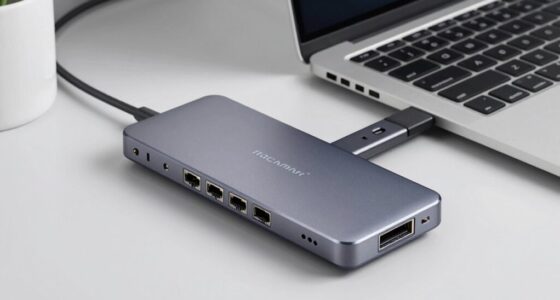
Finding the best docking station with dual 4K support and 100W power delivery can significantly enhance your workspace. The VisionTek VT1200DL stands out for its universal compatibility, while the Plugable Thunderbolt 4 Dock offers robust performance for Mac and Windows users. Key tradeoffs in this category include balancing port variety, build quality, and price. Some docks excel in display support but lack sufficient charging power, while others prioritize versatility over compactness. Continue reading for a detailed comparison to help you identify the best fit for your needs.

Get comfort and recovery gear delivered free with Prime
- Fast, free delivery on millions of items
- Prime Video, Amazon Music and more included
- Member-only deals all year
Complete the kit



Key Takeaways
- Dual 4K support at 60Hz is common, but few docks handle higher refresh rates reliably at 4K.
- Most top options offer 100W power delivery, but the number of additional ports varies widely.
- Compatibility with both Windows and Mac is crucial; some docks favor one platform over the other.
- Build quality and stability differ considerably, affecting long-term durability.
- Price often correlates with port selection, build quality, and brand reputation, so choose based on your specific needs.
| VisionTek VT1200DL Universal Dual Monitor Docking Station USB-C |  | Best Overall for Versatile Dual 4K Setup | Display Support: Dual 4K monitors via HDMI/DP | Power Passthrough: Up to 100W | Compatibility: Windows, macOS, ChromeOS | VIEW LATEST PRICE | See Our Full Breakdown |
| WAVLINK Triple Monitors Docking Station with Dual DisplayPort, HDMI, 8K@30Hz, 100W Power Delivery, USB-C/A, Ethernet, SD/TF, Microphone/Audio |  | Best for High-Resolution Triple Monitor Enthusiasts | Monitor Support: Triple monitors with dual DisplayPort and HDMI | Max Resolution: 8K@30Hz | Power Delivery: 100W | VIEW LATEST PRICE | See Our Full Breakdown |
| Plugable Thunderbolt 4 Dock, 100W Charging, Dual HDMI, 13 Ports for Windows and Mac |  | Best for Professional Dual 4K with Thunderbolt Performance | Video Output: Dual HDMI or single 8K | Data Transfer Speed: 40Gbps | Power Delivery: 100W | VIEW LATEST PRICE | See Our Full Breakdown |
| TobenONE Laptop Docking Station with 3 Monitors, 8 USB Ports, 150W Power Adapter, 4K Support, Ethernet, SD/TF Card Reader for Windows/Chrome OS |  | Best for High-Power Multi-Display Workstations | Monitor Support: Triple 4K via HDMI, DisplayPort | Power Delivery: 100W to laptop, 150W adapter | USB Ports: 8 USB ports supporting 10Gbps | VIEW LATEST PRICE | See Our Full Breakdown |
| Docking Station Dual Monitor 4K HDMI 13-in-1 USB C Hub for Laptop MacBook |  | Best for MacBook Users Needing Dual 4K Support | Number of HDMI ports: 2 | DisplayPort: 1 | Power delivery: 100W | VIEW LATEST PRICE | See Our Full Breakdown |
| WAVLINK Laptop Docking Station Dual HDMI 4K@60Hz, 100W PD, USB-A, Ethernet, SD/TF |  | Best Overall for Versatile Dual 4K Connectivity | Number of USB ports: 3 USB-A, 2 USB-C | Video Output: Dual HDMI 4K@60Hz | Power Delivery: 100W input, 85W output | VIEW LATEST PRICE | See Our Full Breakdown |
| WAVLINK DisplayLink Docking Station, Dual Monitor for Mac M1/M2/M3/M4 & Windows, 14-in-1 with 100W Power Delivery, 2 DP/2 HDMI 4K, SD/TF, 5 USB Ports, Ethernet, Audio |  | Best for Multi-OS Compatibility and High-Resolution Flexibility | Ports: 2 DisplayPort, 2 HDMI, 5 USB-A 5Gbps, SD/TF, Ethernet, audio jacks | Display Support: Dual 5K or 4K monitors | Power Delivery: Up to 100W via USB-C | VIEW LATEST PRICE | See Our Full Breakdown |
| docking station with dual 4k and 100w | Power Delivery | Compatibility | Ethernet |
|---|---|---|---|
| VisionTek VT1200DL Universal D | — | Windows, macOS, ChromeOS | — |
| WAVLINK Triple Monitors Dockin | 100W | Windows only, supports DP1.4+DSC | 2.5G Ethernet |
| Plugable Thunderbolt 4 Dock | 100W | Windows 10/11, macOS with Thunderbolt 4 | — |
| TobenONE Laptop Docking Statio | 100W to laptop, 150W adapter | Windows, Chrome OS | 2.5Gbps Ethernet |
| Docking Station Dual Monitor 4 | 100W | — | Gigabit Ethernet |
| WAVLINK Laptop Docking Station | 100W input, 85W output | — | Gigabit Ethernet |
| WAVLINK DisplayLink Docking St | Up to 100W via USB-C | Windows 10/11, Mac OS 11.x-15.x, Chrome OS, Linux | — |
More Details on Our Top Picks
VisionTek VT1200DL Universal Dual Monitor Docking Station USB-C
This docking station stands out for its broad compatibility and simplicity, supporting dual 4K monitors through a single connection, making it ideal for users who need a straightforward, reliable setup. Compared with the Plugable Thunderbolt 4 Dock, it offers similar dual 4K support but with less emphasis on ultra-high-speed data transfer. Its reliance on DisplayLink technology means some systems require driver installation, which can complicate setup, and it doesn’t support resolutions beyond 4K. The power passthrough up to 100W ensures your laptop charges while working, but the absence of an included charger adds a minor extra cost. Overall, this pick makes the most sense for professionals seeking a versatile, plug-and-play dock that works across multiple OSes without breaking the bank.
Pros:- Supports dual 4K monitors for improved multitasking
- Single USB-C or USB-A connection reduces desk clutter
- Universal compatibility across Windows, macOS, and ChromeOS
- Power passthrough up to 100W for charging devices
Cons:- Charger not included, requiring additional purchase
- Requires DisplayLink drivers for some systems, adding setup complexity
- Limited to dual 4K support; no 8K or higher resolutions
Best for: Office workers or remote professionals needing reliable dual 4K displays with broad device compatibility
Not ideal for: Power users who require the highest possible resolution beyond 4K or ultra-high-speed data transfer without driver dependencies
- Display Support:Dual 4K monitors via HDMI/DP
- Power Passthrough:Up to 100W
- Compatibility:Windows, macOS, ChromeOS
- Connection Type:USB-C or USB-A
- Additional Ports:USB, Ethernet, audio
- Driver Requirement:DisplayLink drivers needed for some systems
Our verdict“Ideal for users who want a dependable, all-in-one dual 4K dock compatible across multiple platforms.”
WAVLINK Triple Monitors Docking Station with Dual DisplayPort, HDMI, 8K@30Hz, 100W Power Delivery, USB-C/A, Ethernet, SD/TF, Microphone/Audio
This dock excels in high-resolution, triple-monitor setups, supporting up to 8K@30Hz, which surpasses most dual 4K docks like the VisionTek. Its 100W power delivery is suitable for charging most laptops, but it’s limited to Windows systems with DP1.4+DSC support, making compatibility a concern for Mac users. The inclusion of multiple USB ports, SD/TF slots, and 2.5G Ethernet makes it a comprehensive hub, but without Mac support, it’s less flexible for Apple users. The tradeoff for its high-resolution capability is system-specific compatibility and the need for a compatible high-end laptop, which limits universal use. This dock suits power users and professionals focused on demanding visual workflows needing maximum resolution and port variety.
Pros:- Supports triple monitors with dual DisplayPort and HDMI
- Max resolution up to 8K@30Hz for demanding visual workflows
- Fast data transfer with 10Gbps USB ports and 2.5G Ethernet
- 100W power delivery for charging laptops
Cons:- Limited compatibility to Windows with DP1.4+DSC support
- Requires specific high-end laptops for full 8K and triple display support
- Charger not included, adding to setup costs
Best for: Designers, gamers, or professionals with Windows laptops who require triple 4K or 8K displays and high data throughput
Not ideal for: Mac users or those with older laptops lacking DP1.4+DSC support, due to limited compatibility and resolution support
- Monitor Support:Triple monitors with dual DisplayPort and HDMI
- Max Resolution:8K@30Hz
- Power Delivery:100W
- USB Ports:3×USB-C/A 10Gbps, 2×USB 2.0
- Ethernet:2.5G Ethernet
- Compatibility:Windows only, supports DP1.4+DSC
Our verdict“Best suited for Windows users working with high-res multi-monitor setups demanding maximum resolution and port versatility.”
Plugable Thunderbolt 4 Dock, 100W Charging, Dual HDMI, 13 Ports for Windows and Mac
The Plugable Thunderbolt 4 Dock offers premium performance with 40Gbps data transfer speeds, supporting dual 4K 60Hz HDMI displays or an 8K display, making it ideal for demanding professional workflows. Its 13 ports include Thunderbolt, USB, Ethernet, and SD card slots, providing a flexible and high-speed workstation. Compared to the VisionTek, it emphasizes speed and Thunderbolt compatibility, but this comes with a higher price tag and a need for a Thunderbolt 4-enabled machine. Mac users benefit from full Thunderbolt support, unlike some other docks. The main tradeoff is that full feature support depends on system compatibility, and older Macs may see limited functionality. This dock suits IT professionals and power users who prioritize performance and expandability.
Pros:- High-speed 40Gbps Thunderbolt 4 performance
- Supports dual 4K 60Hz HDMI or 8K display
- 13 versatile ports including Ethernet and SD slots
- Provides 100W power delivery for charging laptops
Cons:- Requires Thunderbolt 4 or USB4 compatible system for full features
- Higher cost compared to simpler docks
- Limited compatibility with older Macs
Best for: Power users and professionals with Thunderbolt 4-compatible Windows or Mac systems needing maximum performance
Not ideal for: Owners of systems without Thunderbolt 4 or USB4, as they won’t access the full speed and features
- Video Output:Dual HDMI or single 8K
- Data Transfer Speed:40Gbps
- Power Delivery:100W
- Ports:13 including Thunderbolt 4, USB, Ethernet, SD
- Compatibility:Windows 10/11, macOS with Thunderbolt 4
- Certification:Intel Evo
Our verdict“Best for users demanding top-tier performance and expandability on Thunderbolt 4 systems.”
TobenONE Laptop Docking Station with 3 Monitors, 8 USB Ports, 150W Power Adapter, 4K Support, Ethernet, SD/TF Card Reader for Windows/Chrome OS
The TobenONE dock supports three 4K monitors via HDMI, DisplayPort, and USB-C, making it a strong choice for multitasking and productivity. Its 150W power adapter delivers up to 100W to laptops, comparable to the other picks but with more headroom for peripherals. Its 8 USB ports and SD/TF card readers provide extensive connectivity, surpassing the more limited port selections of other options like the Docking Station Dual Monitor 4K HDMI. However, it lacks support for Mac systems and doesn’t specify weight, which might be a concern for portability. Its plug-and-play feature simplifies setup, but system compatibility is limited primarily to Windows and Chrome OS. This dock excels for power users with demanding peripheral needs who prioritize a high wattage power supply.
Pros:- Supports three 4K monitors for enhanced multitasking
- Powerful 150W adapter with 100W to laptop
- Multiple USB ports and SD/TF slots for extensive connectivity
- Plug-and-play with no driver needed
Cons:- Not compatible with Mac systems
- Lack of specific weight info may indicate bulkiness
- Limited to Windows and Chrome OS
Best for: Windows or Chrome OS users seeking a robust, triple 4K monitor setup with high power delivery and multiple USB ports
Not ideal for: Mac users or those seeking a lightweight, portable dock, as it’s tailored mainly for Windows and Chrome OS
- Monitor Support:Triple 4K via HDMI, DisplayPort
- Power Delivery:100W to laptop, 150W adapter
- USB Ports:8 USB ports supporting 10Gbps
- Ethernet:2.5Gbps Ethernet
- Compatibility:Windows, Chrome OS
- Additional Features:SD/TF Card Reader
Our verdict“Perfect for Windows and Chrome OS users who need a high-power, multi-monitor hub with extensive ports.”
Docking Station Dual Monitor 4K HDMI 13-in-1 USB C Hub for Laptop MacBook
This 13-in-1 dock supports dual 4K HDMI displays along with DisplayPort, offering a broad array of connectivity options for MacBook users. It mirrors features of the VisionTek but with added versatility through multiple USB ports and an Ethernet jack. Its support for 4K@60Hz on both HDMI ports makes it suitable for high-quality visual work on MacBooks, although extended display support is limited compared to Windows systems that can handle multiple extended desktops via MST. Power delivery of 100W ensures charging, but on MacOS, the extended mode may be restricted, limiting multitasking capabilities. The main tradeoff is limited extended display support, making it better suited for mirror displays rather than extensive workflows. This dock is best for Mac users who prioritize high-quality dual display output over complex multi-monitor configurations.
Pros:- Supports dual 4K HDMI displays at 60Hz for high-quality visuals
- Multiple USB and Ethernet ports for versatile connectivity
- Supports 100W power delivery for MacBook charging
- Plug-and-play setup with minimal fuss
Cons:- Limited support for extended desktops on MacOS
- No support for more than two monitors in extended mode
- Some features may be limited on older Mac models
Best for: MacBook users seeking reliable dual 4K HDMI display support with solid connectivity options
Not ideal for: Windows users needing multiple extended displays or more advanced multi-monitor setups
- Number of HDMI ports:2
- DisplayPort:1
- Power delivery:100W
- USB ports:Multiple USB 3.1 and 3.0
- Ethernet:Gigabit Ethernet
- Max resolution:4K@60Hz on both HDMI ports
Our verdict“Ideal for MacBook users who want reliable dual 4K display output with broad port options, but not for those needing extensive multi-monitor workflows.”
WAVLINK Laptop Docking Station Dual HDMI 4K@60Hz, 100W PD, USB-A, Ethernet, SD/TF
This WAVLINK model stands out for pairing high-quality dual 4K @60Hz HDMI outputs with robust connectivity options, making it ideal for professionals who need crisp visuals and reliable performance. Compared to the WAVLINK DisplayLink Dock, it offers more straightforward plug-and-play functionality without driver requirements, but it sacrifices some of the higher resolution options available on the DisplayLink. Its 100W power delivery ensures fast charging for most laptops, yet it doesn’t include a charger, meaning you must supply your own, which could be inconvenient. The multiple USB ports, Ethernet, and SD/TF card slots support a seamless workflow, but the requirement for a compatible Windows laptop with USB-C video output limits Mac users. Overall, this station excels for Windows users seeking a straightforward, high-performance dual 4K solution with solid port options and power delivery.
Pros:- Supports dual 4K monitors at 60Hz for crisp visuals
- Offers reliable 100W power delivery
- Includes multiple USB-A, Ethernet, and SD/TF ports
Cons:- Not compatible with Mac OS systems
- Requires a 20V/5A/100W charger (not included)
Best for: Windows professionals who need reliable dual 4K outputs and extensive port selections without complex setup.
Not ideal for: Mac users or those with unsupported laptops, as compatibility is limited and driver setup may be required.
- Number of USB ports:3 USB-A, 2 USB-C
- Video Output:Dual HDMI 4K@60Hz
- Power Delivery:100W input, 85W output
- Ethernet:Gigabit Ethernet
- SD/TF Slots:Yes
- Audio Jack:3.5mm
Our verdict“This dock is an excellent choice for Windows users seeking dual 4K displays with high power and port versatility.”
WAVLINK DisplayLink Docking Station, Dual Monitor for Mac M1/M2/M3/M4 & Windows, 14-in-1 with 100W Power Delivery, 2 DP/2 HDMI 4K, SD/TF, 5 USB Ports, Ethernet, Audio
This WAVLINK model excels at supporting dual 4K or even 5K monitors, making it ideal for users who need exceptional visual clarity across platforms. Unlike the previous USB-C-based station, this relies on DisplayLink technology, which means drivers are required—potentially complicating setup but offering broader OS compatibility, including Mac, Chrome OS, and Linux. It supports high-resolution dual monitors at 4K or 5K, surpassing the single 4K limit of the WAVLINK HDMI model, though it may introduce slight latency or driver-related issues during intensive tasks. Its broad compatibility and 130W power adapter make it suitable for various laptops, but the reliance on drivers can be a hurdle for users expecting plug-and-play. This station is perfect for multi-platform professionals who prioritize high-resolution displays and versatile OS support over simplicity.
Pros:- Supports dual 4K/5K displays for sharp visuals
- Broad OS compatibility including Mac and Windows
- Includes 130W power adapter for fast charging
Cons:- Requires driver installation, not plug-and-play
- Potential driver conflicts or latency issues during intensive use
Best for: Professional users needing high-resolution multi-OS support with reliable power delivery and multiple display options.
Not ideal for: Gamers or users with Linux systems who require plug-and-play performance, as driver installation can be an inconvenience.
- Ports:2 DisplayPort, 2 HDMI, 5 USB-A 5Gbps, SD/TF, Ethernet, audio jacks
- Display Support:Dual 5K or 4K monitors
- Power Delivery:Up to 100W via USB-C
- Compatibility:Windows 10/11, Mac OS 11.x-15.x, Chrome OS, Linux
- Power Adapter:130W
Our verdict“This dock is best suited for professionals needing high-resolution multi-OS support with flexible connectivity, accepting driver setup as a tradeoff.”

How We Picked
The products were evaluated based on their ability to support dual 4K displays at 60Hz or higher, delivering at least 100W power for charging laptops. We prioritized compatibility across major operating systems, including Windows and Mac, along with port variety and build quality. Performance stability, especially in handling high-resolution displays and multiple peripherals simultaneously, was a key factor. Price-value ratio and user reviews also influenced the rankings, ensuring that each pick offers a distinct advantage for different types of users.| docking station with dual 4k and 100w | Compatibility |
|---|---|
| VisionTek VT1200DL Universal D | Windows, macOS, ChromeOS |
| WAVLINK Triple Monitors Dockin | Windows only, supports DP1.4+DSC |
| Plugable Thunderbolt 4 Dock | Windows 10/11, macOS with Thunderbolt 4 |
| TobenONE Laptop Docking Statio | Windows, Chrome OS |
| Docking Station Dual Monitor 4 | — |
| WAVLINK Laptop Docking Station | — |
| WAVLINK DisplayLink Docking St | Windows 10/11, Mac OS 11.x-15.x, Chrome OS, Linux |
Factors to Consider When Choosing Best Docking Station With Dual 4k And 100w
Choosing the right docking station involves balancing several factors beyond just display support and power delivery. Understanding your specific device compatibility, port needs, and workspace setup is essential for making an informed decision. Here are the key considerations to keep in mind when selecting a docking station with dual 4K and 100W support.Display Support and Refresh Rate
While most docks advertise dual 4K support, not all perform equally at higher refresh rates. Some docks handle 4K at 60Hz smoothly, which is ideal for most productivity tasks, but others may struggle with refresh rates above 30Hz. Verify the specifications carefully, especially if you plan to use your displays for gaming or high-refresh-rate applications. Proper display support also depends on the GPU capabilities of your laptop and the dock’s chipset.
Power Delivery and Charging
100W charging supports most modern laptops, but some docks may have limitations on power delivery to peripherals or additional ports. Consider how much power your specific device needs and whether the dock can deliver that consistently. Also, check if the dock provides pass-through charging, which allows you to power your laptop while connected to multiple peripherals without sacrificing charge speed.
Port Selection and Expandability
Beyond video and charging, assess what other ports are vital—such as Ethernet, SD card readers, USB-A, or additional USB-C ports. Many docks compromise on port variety to keep costs down or reduce size, so prioritize the ones that match your workflow. If you frequently connect external drives or peripherals, ensure the dock supports fast data transfer speeds with high-quality USB or Thunderbolt ports.
Build Quality and Compatibility
The longevity and stability of a docking station depend heavily on its build quality. Premium materials and reliable chipsets reduce display flickering, connection drops, and overheating issues. Compatibility also matters—check if the dock explicitly supports your OS version, especially with newer Macs or Windows laptops with specific requirements. Some docks are optimized for certain platforms, which can influence overall performance.
Size, Design, and Ease of Use
Size and design influence how well the dock fits into your workspace. Compact docks are easier to carry but may limit port options, while larger models often include more features. Ease of setup and driver installation are also worth considering—docks with plug-and-play functionality save time and frustration. Think about cable management features and whether the dock complements your workspace aesthetic for a seamless setup.
Frequently Asked Questions
Can I connect two 4K monitors with a dock that supports dual 4K?
Yes, most docks that advertise dual 4K support are capable of connecting two 4K monitors simultaneously, but performance depends on the GPU and the dock’s chipset. It’s important to verify whether the dock handles 4K at 60Hz, which is ideal for fluid motion, or if it only manages 30Hz. Also, ensure your laptop’s graphics card supports dual 4K output at the desired refresh rate for a smooth experience.
Will a dock with 100W power delivery charge my laptop under heavy load?
Most docks providing 100W are designed to charge laptops efficiently during typical usage, but under heavy workloads—such as gaming or intensive processing—the charging rate may slow down. It’s wise to check your laptop’s power requirements and confirm that the dock can deliver consistent wattage at peak usage. Some docks also offer pass-through charging, which maintains power delivery even when multiple peripherals are connected.
Are all docks compatible with MacBooks, especially newer M1/M2 models?
Compatibility varies among docks. Many are designed with Windows in mind but also support MacBooks, including newer M1 and M2 models. However, some features like high refresh rate display support or Ethernet stability may differ. It’s best to verify the manufacturer’s compatibility list and read user reviews focusing on Mac compatibility to avoid potential issues with display or peripheral connections.
Can I use a dock with multiple displays and peripherals for gaming or creative work?
While many docks can handle dual 4K displays for productivity, gaming and creative work demand higher refresh rates and stable connections. Docks supporting 4K at 60Hz are suitable for most creative tasks, but for gaming, you should look for docks explicitly rated for higher refresh rates and low latency. Keep in mind that the GPU of your laptop and the dock’s chipset play a significant role in overall performance and stability.
How do I choose a dock that’s future-proof for upcoming devices?
To future-proof, select a dock with Thunderbolt 4 or USB-C with the latest standards, as these offer broader compatibility and higher bandwidth for upcoming devices. Look for docks that support 100W charging, multiple display outputs, and a healthy number of ports for expansion. Additionally, choose reputable brands with firmware update support, ensuring your dock remains compatible with future hardware updates.
Conclusion
For general users seeking reliable dual 4K display support with efficient charging, the VisionTek VT1200DL offers a balanced mix of performance and versatility. Power users or creative professionals who need maximum port variety and stability should consider the WAVLINK DisplayLink Dock or Plugable Thunderbolt 4 Dock. Beginners or those on a budget might prefer a more compact, straightforward option like the Docking Station Dual Monitor 4K HDMI. For those with specific platform needs, ensure the dock explicitly supports your OS. Overall, matching your device requirements with performance, port needs, and budget will lead to the best choice.
Halloween Picks
halloween
As an affiliate, we earn on qualifying purchases.