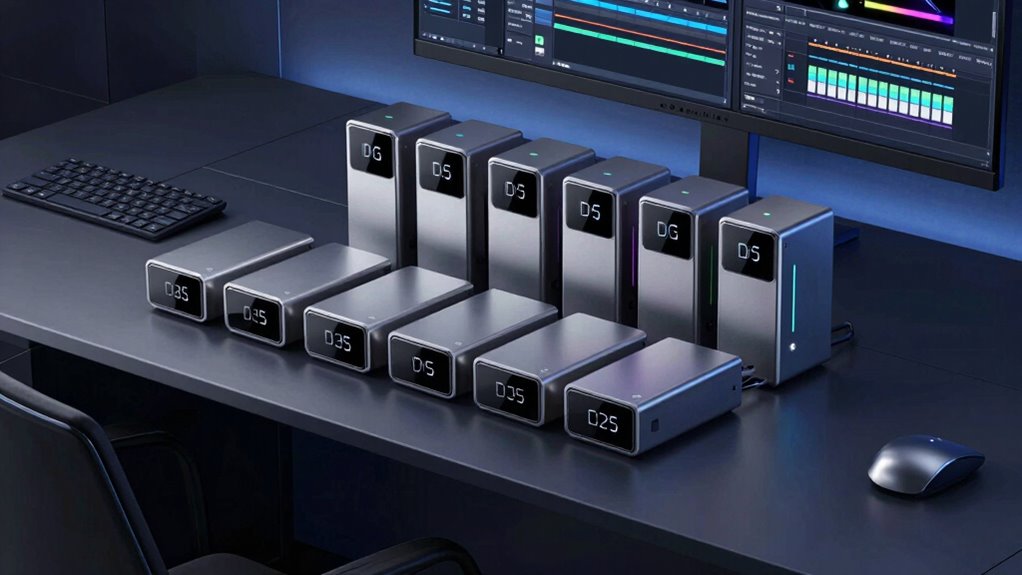

For 2026, I recommend the top DAS enclosures like the WAVLINK NVMe with cooling, USB4 NVMe M.2, and ORICO Thunderbolt portable SSD, all offering blazing speeds and efficient heat management for 4K and 8K editing. The TERRAMASTER D1 and 40Gbps M.2 enclosures also excel in reliability and performance. If you want detailed insights on each of these options and tips on choosing the right one, keep going forward.
Key Takeaways
- Prioritize enclosures supporting high transfer speeds (up to 80Gbps with Thunderbolt 5) for seamless large video file editing.
- Choose models with effective cooling solutions like fans or heat sinks to prevent thermal throttling during intensive tasks.
- Ensure compatibility with multiple storage options, including NVMe SSDs and large-capacity HDDs, for flexible workflows.
- Opt for portable, durable designs with multiple high-speed ports (Thunderbolt 4, USB4) for easy on-the-go editing.
- Select enclosures certified for stable performance and reliable power delivery to safeguard data during extended editing sessions.
| WAVLINK NVMe SSD Enclosure with Cooling Fan |  | High-Speed Powerhouse | Data Transfer Speed: Supports up to 80Gbps (Thunderbolt 5), over 6000MB/s read/write | Cooling System: Active cooling with large turbo fan and aluminum housing | Compatibility: M.2 NVMe 2280, Thunderbolt 5+ only | VIEW LATEST PRICE | See Our Full Breakdown |
| USB4 NVMe M.2 SSD Enclosure with Cooling |  | Quiet Performance | Data Transfer Speed: Up to 40Gbps (USB4), 3000MB/s | Cooling System: Passive cooling, aluminum casing with fins | Compatibility: M.2 NVMe (2230-2280), USB4, Thunderbolt 3/4/5 | VIEW LATEST PRICE | See Our Full Breakdown |
| ORICO 2TB Thunderbolt Portable SSD with Cooling |  | Premium Portable | Data Transfer Speed: Up to 80Gbps (Thunderbolt 5), 5800MB/s read | Cooling System: Fanless, CNC aluminum alloy enclosure | Compatibility: M.2 NVMe 2280, Thunderbolt 5, backward compatible | VIEW LATEST PRICE | See Our Full Breakdown |
| TERRAMASTER D1 NVMe SSD Enclosure with USB-C |  | Heavy-Duty Reliability | Data Transfer Speed: Up to 40Gbps, 3853MB/s | Cooling System: Fanless, all-aluminum with triple heat dissipation | Compatibility: M.2 NVMe 2280, Thunderbolt 3/4/5, USB-C | VIEW LATEST PRICE | See Our Full Breakdown |
| 40Gbps M.2 NVMe Enclosure with Cooling Fan |  | Cooling-Enhanced Speed | Data Transfer Speed: Supports 40Gbps, 8TB capacity per SSD | Cooling System: Built-in cooling fan, thermal pads, aluminum casing | Compatibility: M.2 NVMe 2280, USB4, Thunderbolt 3/4/5 | VIEW LATEST PRICE | See Our Full Breakdown |
| MAIWO 4-Bay SATA RAID Enclosure with Cooling Fan |  | Multi-Drive Capacity | Data Transfer Speed: Up to 5Gbps (USB 3.1), no specific high-speed benchmark | Cooling System: Dual ball-bearing fans, honeycomb vents, manual switch | Compatibility: M.2 NVMe 2230-2280, USB-C, Thunderbolt 3/4/5 | VIEW LATEST PRICE | See Our Full Breakdown |
| ORICO NVME M.2 External SSD Enclosure 32TB |  | High-Capacity Solution | Data Transfer Speed: Supports up to 40Gbps, individual SSDs up to 10Gbps | Cooling System: All-aluminum, with cooling vents, no fan | Compatibility: M-Key NVMe 2230-2280, USB4, Thunderbolt 3/4/5 | VIEW LATEST PRICE | See Our Full Breakdown |
| eGPU Enclosure with Thunderbolt 3/4 Support and Charging |  | External GPU Boost | Data Transfer Speed: Supports Thunderbolt 3/4, no specified max speed | Cooling System: Fanless, CNC aluminum, passive heat dissipation | Compatibility: PCIe x16, compatible with Thunderbolt 3/4, USB-C | VIEW LATEST PRICE | See Our Full Breakdown |
| M.2 2230 NVMe SSD Enclosure with MagSafe |  | Compact Flexibility | Data Transfer Speed: Supports 10Gbps (USB-C), no specific speed benchmark | Cooling System: No active cooling, design relies on aluminum casing | Compatibility: M.2 NVMe 2230, USB-C, MagSafe compatible | VIEW LATEST PRICE | See Our Full Breakdown |
| 3.5” Hard Drive Enclosure with Power Adapter |  | Budget Workhorse | Data Transfer Speed: Up to 5Gbps (USB 3.0), no specific benchmark | Cooling System: Passive cooling via aluminum case, no fan | Compatibility: SATA HDD/SSD, no NVMe support, USB 3.0 | VIEW LATEST PRICE | See Our Full Breakdown |

More Details on Our Top Picks
-

USB4 M.2 NVMe PCIe SSD Enclosure 40Gbps, Designed for Always-on Mac mini Setups, Tool-Free, Dual-Sided Cooling, Thunderbolt 4/3 & USB4/3.2 Compatible, Fits M1/M2 M3/M4, Supports 2230/2242/2260/2280
【Always-On Ready for Mac mini M4】 Engineered for continuous 24/7 operation, supporting long-running background tasks, automation workflows, and...
As an affiliate, we earn on qualifying purchases.
WAVLINK NVMe SSD Enclosure with Cooling Fan
If you’re serious about high-speed data transfer for video editing, the WAVLINK NVMe SSD Enclosure with Cooling Fan is a standout choice. It supports up to 80Gbps transfer speeds with the JHL9480 chipset, doubling Thunderbolt 4/USB4 and vastly surpassing USB 3.2 Gen 2. With sequential read speeds over 6000MB/s and write speeds over 5000MB/s on Thunderbolt 5 devices, it’s perfect for handling large files and intensive tasks. The aluminum housing, combined with a turbo fan, keeps temperatures low during heavy workloads. Plug-and-play and compatible with M.2 NVMe SSDs, it delivers reliable, blazing-fast performance for professional video editors.
- Data Transfer Speed:Supports up to 80Gbps (Thunderbolt 5), over 6000MB/s read/write
- Cooling System:Active cooling with large turbo fan and aluminum housing
- Compatibility:M.2 NVMe 2280, Thunderbolt 5+ only
- Storage Capacity:Supports SSDs in 2280, no max capacity specified
- Port Type:Thunderbolt 5 cable included
- Form Factor:External enclosure, portable
- Additional Feature:Supports Thunderbolt 5 only
- Additional Feature:Aluminum alloy housing
- Additional Feature:Includes silicone heat sink
-
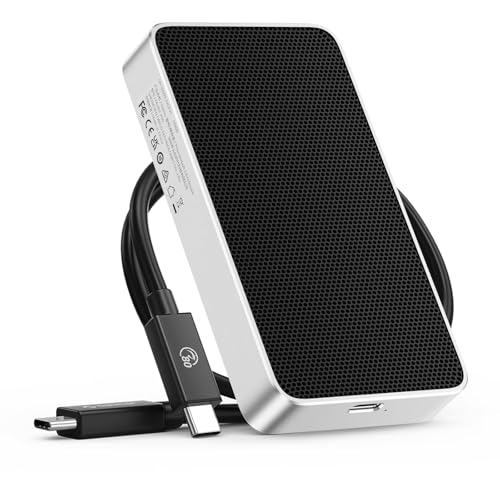
ORICO 80Gbps 2TB Portable SSD, 5800MB/s R 3300MB/s W Portable Fanless Cooling Design, Aluminum Alloy, Compatible with Thunderbolt 5/4/3, Ultra-Fast External SSD, for Video Editing/Photography/Design
Up to 80Gbps Bandwidth – Experience lightning-fast Thunderbolt 5 performance with up to 80Gbps bandwidth, delivering ultra-smooth data...
As an affiliate, we earn on qualifying purchases.
USB4 NVMe M.2 SSD Enclosure with Cooling
For video editors and professionals handling large 4K or 8K files, the USB4 NVMe M.2 SSD Enclosure with Cooling offers exceptional transfer speeds up to 40Gbps, ensuring quick access and smooth workflow. Its support for PCIe Gen4x4 SSDs guarantees maximum performance, perfect for demanding workloads. The aircraft-grade aluminum casing with raised fins provides efficient passive cooling without noise or dust from fans. Its tool-free, spring-loaded design allows for easy SSD swaps, while compatibility with multiple operating systems and Thunderbolt/USB4 devices makes it versatile. Built for durability, this enclosure delivers reliable, high-speed data transfer suitable for professional video editing anytime, anywhere.
- Data Transfer Speed:Up to 40Gbps (USB4), 3000MB/s
- Cooling System:Passive cooling, aluminum casing with fins
- Compatibility:M.2 NVMe (2230-2280), USB4, Thunderbolt 3/4/5
- Storage Capacity:Supports NVMe SSDs, no max capacity specified
- Port Type:USB4 Type-C port
- Form Factor:Portable, compact aluminum
- Additional Feature:Tool-free quick installation
- Additional Feature:Dual-side heat fins
- Additional Feature:Compatible with MacBook Pro
-

TERRAMASTER D1 SSD Plus 40Gbps M.2 NVMe SSD Enclosure - Aluminum M.2 Enclosure USB Type-C, Compatible with USB 4/3.2/3.1/3.0/2.0, Thunderbolt 5/4/3, Mobile App for Data Backup Included (Diskless)
Ultra-Fast 40Gbps Transfer Speeds: Experience pro-level speeds with this D1 SSD Plus 40Gbps NVMe enclosure, delivering read/write speeds...
As an affiliate, we earn on qualifying purchases.
ORICO 2TB Thunderbolt Portable SSD with Cooling
The ORICO 2TB Thunderbolt Portable SSD with Cooling stands out as an ideal choice for video editors who demand blazing-fast data transfer speeds without sacrificing portability. It offers up to 80Gbps bandwidth with Thunderbolt 5, enabling seamless real-time editing of large 4K and 8K videos. Its high-performance 2TB SSD reaches speeds of 5800MB/s read and 3300MB/s write, perfect for handling demanding workflows. Crafted from CNC aluminum, it dissipates heat efficiently without a fan, ensuring silent operation and stability. Compact and lightweight at just over 10 ounces, it’s designed to go wherever your creative projects take you.
- Data Transfer Speed:Up to 80Gbps (Thunderbolt 5), 5800MB/s read
- Cooling System:Fanless, CNC aluminum alloy enclosure
- Compatibility:M.2 NVMe 2280, Thunderbolt 5, backward compatible
- Storage Capacity:2TB SSD included, supports larger SSDs
- Port Type:Thunderbolt 5, USB-C
- Form Factor:Portable, lightweight
- Additional Feature:Magnetic attachment design
- Additional Feature:Supports dual-system stability
- Additional Feature:Compact lightweight form
TERRAMASTER D1 NVMe SSD Enclosure with USB-C
Designed for demanding video editors and professionals, the TERRAMASTER D1 NVMe SSD Enclosure with USB-C delivers ultra-fast transfer speeds up to 40Gbps, making it ideal for handling 4K footage, large backups, and time-sensitive workflows. Tested with a 990 PRO 4TB drive, it achieves speeds of 3853MB/s read and 3707MB/s write, capable of transferring a 3GB file in just one second. Its all-aluminum, fanless design guarantees excellent heat dissipation, keeping SSDs cool during intensive tasks. Compatible with Thunderbolt 5/4/3 and USB 4/3.2/3.1, it’s versatile for various devices, making it a robust choice for high-speed data expansion.
- Data Transfer Speed:Up to 40Gbps, 3853MB/s
- Cooling System:Fanless, all-aluminum with triple heat dissipation
- Compatibility:M.2 NVMe 2280, Thunderbolt 3/4/5, USB-C
- Storage Capacity:Supports SSDs up to 8TB each
- Port Type:Thunderbolt 5/4/3, USB-C
- Form Factor:Enclosure, rugged, travel-ready
- Additional Feature:Triple-sized heat dissipation
- Additional Feature:Supports bootable macOS
- Additional Feature:Includes mobile backup app
40Gbps M.2 NVMe Enclosure with Cooling Fan
If you need lightning-fast data transfer and reliable cooling in a compact package, this 40Gbps M.2 NVMe enclosure with a cooling fan stands out as a top choice for video editors in 2026. It supports transfer speeds up to 40Gbps and can expand storage up to 8TB, making it perfect for handling large video files and intensive projects. The built-in cooling fan, thermal pads, and aluminum alloy casing keep temperatures low, ensuring stable performance and longevity. Its sleek, lightweight design makes it easy to carry everywhere, and it’s compatible with multiple interfaces and operating systems, offering versatile, high-speed storage on the go.
- Data Transfer Speed:Supports 40Gbps, 8TB capacity per SSD
- Cooling System:Built-in cooling fan, thermal pads, aluminum casing
- Compatibility:M.2 NVMe 2280, USB4, Thunderbolt 3/4/5
- Storage Capacity:Supports SSDs up to 8TB, total 32TB
- Port Type:USB4, Thunderbolt 3/4/5
- Form Factor:Small, portable with cooling fan
- Additional Feature:Attractive compact design
- Additional Feature:Includes thermal pads
- Additional Feature:Supports multiple USB interfaces
MAIWO 4-Bay SATA RAID Enclosure with Cooling Fan
For serious video editors seeking reliable, high-capacity storage, the MAIWO 4-Bay SATA RAID Enclosure with Cooling Fan offers an excellent solution. It supports four 3.5-inch SATA drives, reaching up to 96TB total capacity, perfect for 4K editing, film production, or large media libraries. With 8 RAID modes and a clone function, managing backups and data security is straightforward. The USB 3.1 Gen 2 Type-C interface ensures fast transfer speeds up to 5Gbps. Its dual fans and honeycomb vents keep temperatures in check during heavy workloads, while the manual speed switch helps balance noise and cooling efficiency.
- Data Transfer Speed:Up to 5Gbps (USB 3.1), no specific high-speed benchmark
- Cooling System:Dual ball-bearing fans, honeycomb vents, manual switch
- Compatibility:M.2 NVMe 2230-2280, USB-C, Thunderbolt 3/4/5
- Storage Capacity:Supports 4x 3.5″ drives, up to 96TB total
- Port Type:USB-C, Thunderbolt 3/4/5
- Form Factor:Desktop enclosure, rackmount capable
- Additional Feature:Manual 3-speed fan switch
- Additional Feature:Supports multiple RAID modes
- Additional Feature:96TB maximum capacity
ORICO NVME M.2 External SSD Enclosure 32TB
Looking for an enclosure that can handle massive video files with lightning-fast speeds? The ORICO NVME M.2 External SSD Enclosure 32TB is perfect for that. It supports PCIe-based all-flash storage, offering up to 40Gbps bandwidth via USB 4.0, with individual drives reaching 10Gbps read/write speeds. It supports M-Key NVMe SSDs up to 8TB each, totaling 32TB across four drives. Its compact, lightweight design with an all-aluminum body ensures durability and efficient heat dissipation. Plus, it operates silently below 30 decibels, making it an ideal, high-performance solution for demanding video editing workflows on the go.
- Data Transfer Speed:Supports up to 40Gbps, individual SSDs up to 10Gbps
- Cooling System:All-aluminum, with cooling vents, no fan
- Compatibility:M-Key NVMe 2230-2280, USB4, Thunderbolt 3/4/5
- Storage Capacity:Supports 4 x 8TB SSDs, total 32TB
- Port Type:USB-C, Thunderbolt 3/4/5
- Form Factor:Compact, portable, high-capacity
- Additional Feature:Shock-resistant solid-state
- Additional Feature:Built-in cooling fan
- Additional Feature:Supports 8TB per drive
eGPU Enclosure with Thunderbolt 3/4 Support and Charging
An eGPU enclosure with Thunderbolt 3/4 support and charging is ideal for video editors who need powerful graphics performance on their laptops without sacrificing portability. It seamlessly connects via Thunderbolt or USB4, supporting NVIDIA, AMD, and PCIe expansion cards for versatile use. With an officially certified JHL7440 controller, it offers stable, efficient GPU performance. The enclosure includes a standard ATX PSU mount, supporting 500W+ 80PLUS Gold power supplies (not included) and up to 85W Power Delivery to charge your laptop. Easy to set up with the included Thunderbolt 4 cable, it’s a flexible solution for enhancing demanding editing workflows.
- Data Transfer Speed:Supports Thunderbolt 3/4, no specified max speed
- Cooling System:Fanless, CNC aluminum, passive heat dissipation
- Compatibility:PCIe x16, compatible with Thunderbolt 3/4, USB-C
- Storage Capacity:Supports high-capacity PCIe cards, no explicit limit
- Port Type:Thunderbolt 3/4, USB-C
- Form Factor:Enclosure with PCIe slot, larger setup
- Additional Feature:Supports graphics cards
- Additional Feature:Supports PCIe expansion
- Additional Feature:Includes power supply mount
M.2 2230 NVMe SSD Enclosure with MagSafe
The M.2 2230 NVMe SSD Enclosure with MagSafe stands out as the perfect choice for mobile professionals who need fast, reliable storage during on-the-go video editing. Its dual-sided MagSafe design ensures secure attachment to iPhones, stands, or tripods, while a MagSafe ring allows compatibility with non-MagSafe devices. Easy to install in minutes, it supports 10Gbps speeds, perfect for 4K ProRes recording and editing. The enclosure offers seamless data transfer, expands storage, and keeps your device powered with its PD-enabled USB-C port. Compact and versatile, it’s ideal for videographers, photographers, and editors who demand mobility without compromising performance.
- Data Transfer Speed:Supports 10Gbps (USB-C), no specific speed benchmark
- Cooling System:No active cooling, design relies on aluminum casing
- Compatibility:M.2 NVMe 2230, USB-C, MagSafe compatible
- Storage Capacity:Supports M.2 NVMe SSDs, capacity up to 2TB per SSD
- Port Type:USB-C with MagSafe
- Form Factor:Pocket-sized, mobile
- Additional Feature:MagSafe-compatible design
- Additional Feature:Supports 4K ProRes
- Additional Feature:PD-enabled charging port
3.5” Hard Drive Enclosure with Power Adapter
If you need a reliable enclosure that can handle large storage capacities and offers seamless compatibility, a 3.5” Hard Drive Enclosure with Power Adapter is an excellent choice for video editors in 2026. It supports SATA I/II/III HDDs and SSDs up to 20TB, compatible with Windows, Mac, Linux, ChromeOS, and gaming consoles like PS5 and Xbox One. With high-speed transfer using UASP protocol, it delivers read speeds up to 336 MB/s and transfer rates up to 5 Gbps. Made from sturdy ABS with good ventilation, it includes a power adapter, USB cable, and LED indicators, ensuring stability and easy use for demanding editing tasks.
- Data Transfer Speed:Up to 5Gbps (USB 3.0), no specific benchmark
- Cooling System:Passive cooling via aluminum case, no fan
- Compatibility:SATA HDD/SSD, no NVMe support, USB 3.0
- Storage Capacity:Supports HDDs/SSDs up to 20TB
- Port Type:USB 3.0 Type-A, no Thunderbolt
- Form Factor:Classic external HDD enclosure
- Additional Feature:Supports SATA I/II/III
- Additional Feature:Auto-sleep energy saver
- Additional Feature:Shock-proof sponge pads
Factors to Consider When Choosing a DAS Enclosure for Video Editing

When selecting a DAS enclosure for video editing, I focus on key factors like data transfer speed, device compatibility, and heat management. It’s crucial to take into account storage options and whether the enclosure offers RAID or backup features to protect my work. By evaluating these points, I can choose a solution that meets my workflow needs efficiently.
Data Transfer Speed
Choosing a DAS enclosure with high data transfer speeds is vital for efficient video editing, especially when working with large 4K and 8K files. Faster speeds, like 80Gbps or 40Gbps, cut down transfer times considerably, keeping your workflow smooth. Enclosures supporting Thunderbolt 5 or USB4 protocols deliver the quickest data rates, which are essential for high-resolution editing. To maximize transfer speeds, pairing these enclosures with compatible NVMe SSDs—such as PCIe 4.0 x4—is necessary. The quality of your cables and connections also impacts performance; certified cables ensure you reach peak speeds. Additionally, effective heat dissipation, through active cooling or heat sinks, prevents throttling during prolonged high-speed transfers, maintaining consistent performance and safeguarding your data.
Compatibility With Devices
Selecting the right DAS enclosure requires ensuring it supports your device interfaces, such as Thunderbolt 5, Thunderbolt 4, USB4, or USB 3.2, so it seamlessly connects to your editing workstation. You also need to verify that it’s compatible with your SSD type and size, like 2280 M-Key or B+M Key, for straightforward installation. Compatibility with your operating system is essential—whether you use Windows, macOS, Linux, or specific devices like MacBook Pro, M1, M2, or iPad Pro. Additionally, check if the enclosure works with your existing cables and ports, ensuring the connection matches your device’s inputs. Finally, consider features like hot-swapping and plug-and-play support, which can streamline your workflow during intensive video editing sessions.
Cooling and Heat Dissipation
Ensuring efficient cooling and heat dissipation is essential for maintaining ideal performance in a DAS enclosure during intensive video editing workflows. I look for enclosures with active cooling systems like turbo fans or heat sink fins, which help keep temperatures in check. Aluminum alloy housings are excellent because their high thermal conductivity aids passive heat dissipation during long, high-speed data transfers. Enclosures with multiple cooling fins or honeycomb vents boost airflow, preventing heat buildup during demanding tasks. Additionally, thermal pads and well-placed vents support device stability and extend the lifespan of NVMe SSDs. Proper cooling not only prevents thermal throttling but also guarantees sustained read/write speeds necessary for seamless editing of 4K and 8K videos.
Storage Capacity Options
When evaluating DAS enclosures for video editing, storage capacity options play a vital role in meeting your project demands. These enclosures support a range of capacities, from 1TB up to 96TB or more, depending on the number and size of drives installed. Larger storage needs typically require multi-bay enclosures, such as 4-bay or 8-bay units, to accommodate significant data sets. It’s important to verify that the enclosure supports the maximum capacity of your drives, especially for large SSDs or HDDs like 8TB or 24TB models. Some enclosures offer flexible configurations, allowing mixing different drive sizes to optimize storage. When choosing, consider your future storage needs to guarantee the enclosure’s maximum supported capacity aligns with your long-term video editing requirements.
RAID and Backup Features
RAID and backup features are essential considerations because they directly impact the safety and performance of your video editing storage. Different RAID configurations, like RAID 0, 1, 5, and 10, offer various balances of speed and redundancy, allowing you to customize your setup based on your needs. Enclosures with dedicated clone functions simplify data duplication, saving time and reducing errors during backups. Reliable backup options, such as scheduled backups and seamless data duplication, protect your high-value video files from hardware failures or corruption. Support for multiple RAID modes means you can optimize for speed or security, ensuring your workflow remains smooth and your data stays safe. Prioritizing these features helps maintain uninterrupted editing and peace of mind.
Port Selection and Types
Choosing the right port options for your DAS enclosure is essential because it directly affects compatibility and data transfer speeds. I recommend selecting an enclosure with multiple ports like Thunderbolt 3/4, USB 3.2, and USB4 to guarantee seamless connectivity across various devices and workflows. Look for high-speed interfaces such as Thunderbolt 5 or USB4, capable of reaching up to 80Gbps or 40Gbps, which are crucial for editing 4K and 8K videos efficiently. Make sure the port type matches your computer’s available ports, whether it’s USB-C or Thunderbolt, to avoid adapters or connection issues. Enclosures with versatile port configurations, including dual Thunderbolt and USB, allow daisy-chaining multiple devices. Also, verify that the ports support hot-swapping and plug-and-play features for quick, hassle-free drive management.
Portability and Design
A compact and lightweight DAS enclosure is essential for anyone who needs to move their video editing setup frequently. It makes transportation seamless, whether I’m switching between work sites or traveling. Durable materials like aluminum alloy or sturdy plastics safeguard my drives during transit and handling, giving me peace of mind. Integrated handles or slim profiles make carrying and storing the enclosure straightforward, fitting easily into bags or backpacks. The small form factor minimizes space requirements, allowing me to pack my gear efficiently. Plus, designs with integrated cooling solutions, such as fans or heat sinks, help maintain performance stability during mobile use. Overall, a thoughtful combination of portability and robust design ensures my editing setup remains reliable and easy to manage on the go.
Power and Connectivity
When selecting a DAS enclosure for video editing, it’s important to think about how well it handles power and connectivity. I look for enclosures that support multiple high-speed interfaces like Thunderbolt 5, Thunderbolt 4, USB4, and USB 3.x, ensuring versatile connectivity. Power delivery is vital—I prefer enclosures that provide at least 85W of charging power to keep my devices powered and charged simultaneously. Compatibility is also key; I verify support for my operating system, whether Windows, macOS, or Linux, and specific devices like MacBooks or tablets. Fast data transfer speeds, such as 80Gbps via Thunderbolt 5 or 40Gbps via USB4, are essential to handle large video files efficiently. Additional ports or daisy-chaining options can help expand my setup without sacrificing performance.
Frequently Asked Questions
Which DAS Enclosures Offer the Best Heat Dissipation for Prolonged Editing Sessions?
I recommend DAS enclosures with robust cooling features like built-in fans or heat sinks for prolonged editing sessions. Models like the OWC ThunderBay or LaCie 2big Dock offer excellent heat dissipation, thanks to their efficient airflow design and high-quality materials. These enclosures keep your drives cool, preventing overheating and maintaining peak performance during intensive editing tasks, making them reliable choices for demanding workflows.
What Is the Compatibility Range of These Enclosures With Different Operating Systems?
Imagine a bridge connecting worlds—these enclosures do just that for your OS needs. I’ve found that most high-quality DAS enclosures are compatible with Windows, macOS, and Linux, often supporting multiple versions. They’re designed with versatile interfaces like Thunderbolt, USB-C, and eSATA, ensuring smooth integration. So, whether you’re on a Mac or a PC, these enclosures adapt seamlessly, making them a reliable choice for any editing setup.
How Do Different Cooling Solutions Impact Data Transfer Speeds?
Different cooling solutions notably impact data transfer speeds by managing heat generated during high-speed data transfer. Active cooling, like fans, keeps components cool, reducing thermal throttling and maintaining ideal speeds. Passive cooling, such as heatsinks, is quieter but less effective at dissipating heat. Proper cooling prevents overheating, ensuring consistent performance and faster data transfer, which is essential for demanding tasks like video editing.
Are There Enclosures Specifically Optimized for 8K or 4K Video Editing?
Yes, there are enclosures specifically optimized for 8K and 4K video editing. I look for models with high-speed Thunderbolt 3 or 4 interfaces, robust cooling, and support for multiple drives to handle large files seamlessly. These enclosures often feature optimized firmware for fast data transfer and reliable performance, ensuring I can work smoothly with massive video files without bottlenecks. They’re essential tools for professional video editors like me.
What Are the Most Portable DAS Enclosures Suitable for On-The-Go Editing?
Imagine carrying a sleek, powerful toolbox in your pocket—that’s what I look for in portable DAS enclosures. For on-the-go editing, I recommend compact, lightweight options like the OWC ThunderBlade or LaCie Mobile SSD. They’re like trusty sidekicks, offering fast speeds and durability without the bulk. With these, I can edit 4K or 8K footage seamlessly anywhere, turning any coffee shop or airport lounge into my mobile editing studio.
Conclusion
Choosing the right DAS enclosure is like finding the perfect lens—it can make or break your footage. I once struggled with slow transfers that stalled my workflow, but upgrading to a top-tier enclosure changed everything. With speed and reliability, you’ll feel like you’re wielding a superpower—turning hours of editing into minutes. Invest wisely, and your video projects will flow seamlessly, letting your creativity shine without technical hiccups.