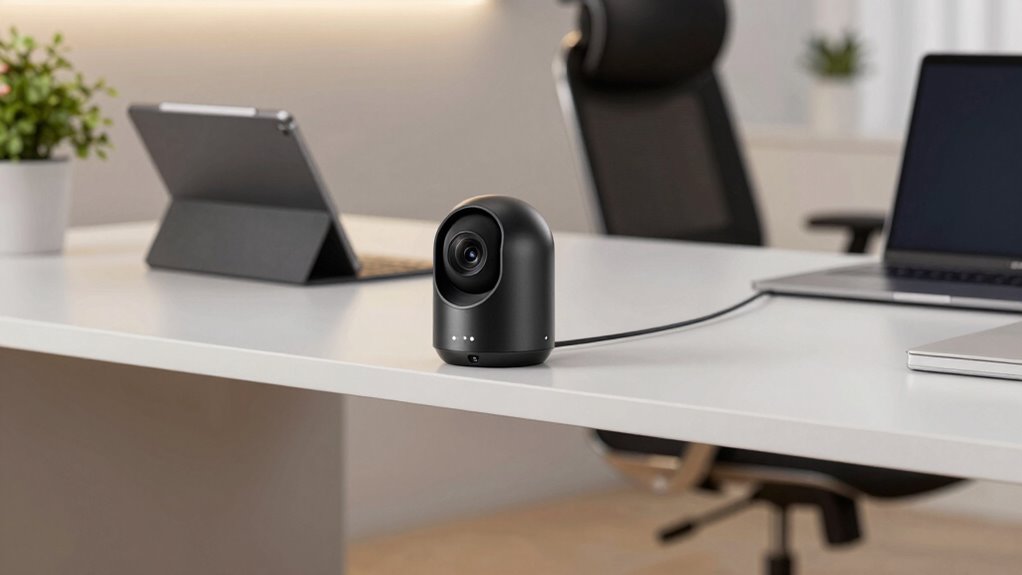

An indoor security camera for a home office should capture useful detail without making privacy, setup, or storage harder than they need to be. My best overall pick is the Eufy Security 4K Indoor Camera E30, which pairs high-resolution video with pan-and-tilt coverage and no required subscription. The Blink Mini 2K+ two-pack stands out for covering two viewpoints, while the SensForge 2.5K includes a 64GB card for buyers who want local recording. The main tradeoffs are coverage versus a fixed view, cloud convenience versus local control, and extra features versus a simpler setup. Read on for the full breakdown and guidance on matching a camera to your office, privacy needs, and recording habits.

Get comfort and recovery gear delivered free with Prime
- Fast, free delivery on millions of items
- Prime Video, Amazon Music and more included
- Member-only deals all year
Complete the kit



Key Takeaways
- The Eufy E30 leads this lineup for detail and coverage: its 4K resolution and pan-and-tilt design suit an office where one camera needs to watch more than a single fixed angle.
- The Blink Mini 2K+ two-pack favors coverage across locations: two cameras can monitor a doorway and desk area, though buyers should compare storage and subscription requirements before choosing a system.
- Local recording is a meaningful differentiator: SensForge includes a 64GB SD card, while several competing models offer local and cloud storage options that may vary by configuration.
- Multi-camera packs can solve blind spots better than a single feature-rich camera: the Tapo, Blurams, LaView, and GNCC packs offer multiple units, but their stated video resolution and movement features differ.
- Some products are less tailored to a private office: clock-style cameras and the Tapo SolarCam C402 Kit have specific placement or power considerations, so buyers should check whether their design suits an occupied workspace.
| Blink Mini 2K+ Indoor Security Camera (2-Pack) |  | Best for Simple Two-Desk Coverage | Camera resolution: 2K (2560 x 1440) | Field of view: 138° diagonal | Frame rate: Up to 24/25 FPS | VIEW ON AMAZON | See Our Full Breakdown |
| Eufy Security 4K Indoor Camera E30, No Subscription, Pan and Tilt |  | Best for High-Detail Room Coverage | Resolution: 4K Ultra-High Definition | Pan and tilt: Yes | Night vision: Color and infrared | VIEW ON AMAZON | See Our Full Breakdown |
| Blurams 2K Indoor Security Camera, 2-Pack |  | Best Value for Two-Room Tracking | Resolution: 2K | Coverage: 360° pan and tilt | Connectivity: Dual-band Wi-Fi 6, 2.4GHz and 5GHz | VIEW ON AMAZON | See Our Full Breakdown |
| Anona 4K UHD Indoor Camera, Pet/Dog/Baby Security Camera with Phone App, 360° Pan-Tilt, Dual-Band Wi-Fi 6, Auto-Tracking, Person/Pet/Baby Crying Detection, Privacy Mode, Two-Way Audio, 2 Pack |  | Best 4K Two-Camera Feature Set | Resolution: 4K UHD (8 MP) | Zoom: 8× optical digital zoom | Pan and tilt: 355° pan and 110° tilt | VIEW ON AMAZON | See Our Full Breakdown |
| Clock Camera with 1080P HD Live Video, AI Motion Alerts, Night Vision, Dual-Band WiFi, Local & Cloud Storage, Indoor Security Camera |  | Best Discreet Desk-Side Option | Resolution: 1080P HD | Night vision: Yes | Wi-Fi: Dual-band 2.4GHz / 5GHz | VIEW ON AMAZON | See Our Full Breakdown |
| SensForge 2.5K Indoor Pan-Tilt Security Camera |  | Best for Subscription-Free Coverage | Resolution: 2.5K | Pan-tilt range: 360° horizontal, 90° vertical | Wi-Fi: Dual-band 2.4GHz and 5GHz | VIEW ON AMAZON | See Our Full Breakdown |
| Kasa 1080p Indoor Pan/Tilt Wired Security Camera, Baby & Pet Monitor | 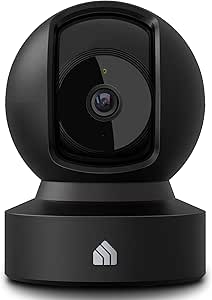 | Best for Vertical Room Coverage | Resolution: 1080p HD | Pan-tilt range: 360° horizontal, 113° vertical | Night vision: Up to 30 feet | VIEW ON AMAZON | See Our Full Breakdown |
| Blink Mini 2K+ Indoor Security Camera (2-Pack) |  | Best Two-Camera Starter Set | Video resolution: 2K | Number of cameras: 2 | Night vision: Yes | VIEW ON AMAZON | See Our Full Breakdown |
| Tapo 1080p Pan/Tilt Security Camera for Baby Monitor, Pet Camera, C201 |  | Best for Expandable Local Storage | Resolution: 1080p Full HD | Pan-tilt range: 360° horizontal, 114° vertical | Night vision: Up to 30 feet | VIEW ON AMAZON | See Our Full Breakdown |
| Tapo 1080P Indoor Security Camera (4-Pack) |  | Best for Multi-Room Coverage | Number of cameras: 4 | Resolution: 1080p HD | Night vision: Up to 40 feet | VIEW ON AMAZON | See Our Full Breakdown |
| GNCC 2K Indoor Security Cameras, 4-Pack with Pan/Tilt, Motion Tracking, and Two-Way Audio | 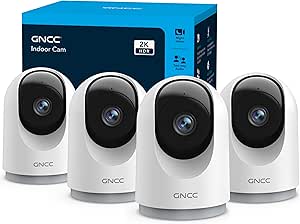 | Best for Multi-Room Coverage | Resolution: 2K; 3 MP | Camera quantity: 4 | Pan/tilt range: 355° horizontal; 90° vertical | VIEW ON AMAZON | See Our Full Breakdown |
| Aivisee Clock Camera – Nanny Cam with 1080P HD Video, AI Motion Detection, Night Vision, Dual-Band 2.4/5GHz WiFi, Bluetooth Setup, Local & Cloud Storage |  | Best for a Low-Profile Desk Setup | Resolution: 1080p | Viewing angle: 150° | Night vision: Infrared | VIEW ON AMAZON | See Our Full Breakdown |
| Tapo SolarCam C402 Kit – 1080p Security Camera with Solar Power |  | Best for a Home Office with an Exterior View | Resolution: 1080p | Power: Solar panel and battery; up to 180 days of battery life stated | Solar charging: 45 minutes of sun stated to provide a full day | VIEW ON AMAZON | See Our Full Breakdown |
| LaView 1080p Indoor Wi-Fi Security Cameras, 4-Pack | 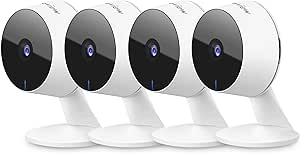 | Best for Shared Household Monitoring | Resolution: 1080p; 2.1 MP | Camera quantity: 4 | Night vision range: Up to 33 ft | VIEW ON AMAZON | See Our Full Breakdown |
| VSTARCAM 2K Dual Lens Indoor Security Camera with 360° PTZ, Color Night Vision, WiFi 6, No-Drill Mount, 2-Way Audio, Local & Cloud Storage |  | Best for Flexible Single-Camera Coverage | Resolution: 2K Ultra-HD | Lens arrangement: 30° fixed lens and 360° PTZ lens | Night vision: Full-color | VIEW ON AMAZON | See Our Full Breakdown |
| indoor security camera for home office | Storage | Resolution | Night vision | Audio |
|---|---|---|---|---|
| Blink Mini 2K+ Indoor Security | — | — | — | — |
| Eufy Security 4K Indoor Camera | Local SD card; card sold separately | 4K Ultra-High Definition | Color and infrared | — |
| Blurams 2K Indoor Security Cam | MicroSD up to 256GB; card not included; optional cloud storage | 2K | Color and infrared | — |
| Anona 4K UHD Indoor Camera | AES-128 encrypted cloud or microSD up to 512GB; card not included | 4K UHD (8 MP) | — | — |
| Clock Camera with 1080P HD Liv | Cloud and microSD up to 256GB | 1080P HD | Yes | — |
| SensForge 2.5K Indoor Pan-Tilt | 64GB SD card included | 2.5K | — | Two-way talk |
| Kasa 1080p Indoor Pan/Tilt Wir | MicroSD up to 256GB or cloud storage | 1080p HD | Up to 30 feet | Two-way audio |
| Blink Mini 2K+ Indoor Security | Cloud storage; optional Blink Subscription Plan for smart detection and cloud storage | — | Yes | Two-way audio |
| Tapo 1080p Pan/Tilt Security C | MicroSD up to 512GB or cloud storage | 1080p Full HD | Up to 30 feet | Two-way audio |
| Tapo 1080P Indoor Security Cam | MicroSD up to 512GB or cloud storage | 1080p HD | Up to 40 feet | Two-way audio with built-in siren |
| GNCC 2K Indoor Security Camera | SD card (not included) or optional cloud storage | 2K; 3 MP | Yes | Two-way audio |
| Aivisee Clock Camera | TF card up to 256 GB (not included) or cloud storage | 1080p | Infrared | — |
| Tapo SolarCam C402 Kit | MicroSD up to 512 GB | 1080p | Full-color, up to 30 ft | Two-way audio with built-in microphone and speaker |
| LaView 1080p Indoor Wi-Fi Secu | MicroSD up to 128 GB; 30-day cloud storage trial | 1080p; 2.1 MP | — | Two-way audio with noise cancellation |
| VSTARCAM 2K Dual Lens Indoor S | MicroSD up to 256 GB; free 3-day cloud storage | 2K Ultra-HD | Full-color | Two-way audio |
More Details on Our Top Picks
Blink Mini 2K+ Indoor Security Camera (2-Pack)
The Blink Mini 2K+ two-pack suits a home office where you want a straightforward view of two separate work areas without a camera that pans around the room. Its 2K resolution and 138° diagonal field of view can help capture more desk-area detail than the 1080P Clock Camera, while the small, light bodies are easy to place on shelves. Two-way audio adds a way to speak through the app, and Alexa compatibility may fit an existing Alexa setup. The tradeoff is that both cameras need continuous power, and cloud storage and smart detection features require an optional subscription. Unlike the Blurams 2K 2-Pack, this set has no pan-and-tilt coverage, so you need to position each camera carefully; it is a better fit for fixed viewpoints than monitoring a changing room layout.
Pros:- 2K video provides more image detail than the 1080P Clock Camera.
- Two cameras can cover separate office areas.
- Two-way audio includes noise cancellation.
- Compact, lightweight cameras are easy to place and install.
Cons:- Smart detection and cloud storage require an optional subscription.
- No pan-and-tilt movement, so each camera has a fixed view.
- Both cameras need continuous power and are not battery-operated.
Best for: Home-office workers who want fixed views of two desks or entry points and already use Alexa.
Not ideal for: People who need one camera to follow movement around a room, or who want smart detection and cloud features without a subscription.
- Camera resolution:2K (2560 x 1440)
- Field of view:138° diagonal
- Frame rate:Up to 24/25 FPS
- Connectivity:2.4 GHz 802.11b/g/n Wi-Fi
- Camera size:2 x 2 x 1.57 inches each
- Camera weight:65 g each
- Included:2 cameras, stands, mounting screws, power adapters, and USB-C cables
Our verdict“Choose this two-pack for simple, fixed 2K coverage of two office areas, but pick the Blurams set if you need pan-and-tilt tracking.”
Eufy Security 4K Indoor Camera E30, No Subscription, Pan and Tilt
The Eufy Security 4K Indoor Camera E30 is the strongest fit here when one home-office camera needs to cover a broad area and capture fine detail. Its 4K recording with pan and tilt can follow activity across the room, unlike the fixed-view Blink Mini 2K+ cameras. Color and infrared night vision give it a useful range of lighting options, while AI detection and auto-tracking can reduce the need to watch a live feed continuously. Local SD-card storage also avoids a required subscription, though the card is sold separately and there is no cloud-storage option listed. A key compromise for Apple Home users: HomeKit support is limited to 1080P, not 4K. Pick it over the Anona 4K pair if you prefer one camera and local recording; choose Anona for two-camera coverage.
Pros:- 4K resolution captures more detail than the 2K Blink and Blurams models.
- Pan, tilt, and auto-tracking broaden coverage from a single camera.
- Local SD-card recording avoids a required subscription.
- Color and infrared night vision support different lighting conditions.
Cons:- SD card must be purchased separately.
- Storage is local only, with no cloud option listed.
- HomeKit support is limited to 1080P rather than full 4K.
Best for: Remote workers who want one pan-and-tilt 4K camera, local recording, and compatibility with major smart-home platforms.
Not ideal for: Apple Home users who expect 4K through HomeKit, or buyers who want cloud storage or a multi-camera kit.
- Resolution:4K Ultra-High Definition
- Pan and tilt:Yes
- Night vision:Color and infrared
- Storage:Local SD card; card sold separately
- Connectivity:Wi-Fi
- Smart-home compatibility:HomeKit, Alexa, and Google Assistant
- Power:Plug-in
Our verdict“Pick the E30 for a single, detail-focused pan-and-tilt camera with local storage, but look to the Anona pair for broader multi-camera coverage.”
Blurams 2K Indoor Security Camera, 2-Pack
For a home office split between a desk and another activity area, the Blurams 2K 2-Pack brings pan-and-tilt coverage to both camera positions. Its 360° movement and automatic tracking make it more adaptable than the fixed Blink Mini 2K+ pair, while AI motion, person, and sound detection can help distinguish activity from a static view. Dual-band Wi-Fi 6 and local microSD support add flexibility; the cards are not included, and cloud storage requires a subscription. Resolution is 2K rather than 4K, so the Eufy E30 or Anona may suit buyers prioritizing maximum image detail. For office monitoring, this set makes more sense when coverage of two spaces matters more than 4K sharpness. It is indoor-only, so it should not be placed where weather exposure is possible.
Pros:- Two cameras provide coverage for separate office areas.
- 360° pan-and-tilt movement and automatic tracking follow activity.
- AI detection includes motion, people, and sound.
- Supports local microSD storage up to 256GB and dual-band Wi-Fi 6.
Cons:- MicroSD cards are not included.
- Cloud storage requires a subscription.
- Indoor-only design cannot handle outdoor exposure.
Best for: People who want two cameras to track movement across separate indoor workspaces and prefer local recording.
Not ideal for: Buyers who need 4K detail, included memory cards, or weather-resistant cameras for an exposed entry.
- Resolution:2K
- Coverage:360° pan and tilt
- Connectivity:Dual-band Wi-Fi 6, 2.4GHz and 5GHz
- Detection:AI motion, person, and sound detection
- Tracking:Automatic pet and human tracking
- Night vision:Color and infrared
- Storage:MicroSD up to 256GB; card not included; optional cloud storage
- Quantity:2 cameras
Our verdict“Choose Blurams when two-room tracking and local storage matter more than the sharper 4K footage offered by Eufy and Anona.”
Anona 4K UHD Indoor Camera, Pet/Dog/Baby Security Camera with Phone App, 360° Pan-Tilt, Dual-Band Wi-Fi 6, Auto-Tracking, Person/Pet/Baby Crying Detection, Privacy Mode, Two-Way Audio, 2 Pack
The Anona 4K two-pack is aimed at buyers who want high-resolution, moving coverage from both cameras rather than a single-room monitor. Each unit combines 4K UHD video, pan-and-tilt movement, and auto-tracking, with detection for people, pets, and baby crying. That mix gives it a broader detection brief than the Eufy E30, whose supplied details emphasize AI detection and auto-tracking without listing those specific alert types. Anona also offers local microSD recording up to 512GB or encrypted cloud storage, but cards are not included. The tradeoff is its 15 fps frame rate, which may make motion look less smooth than the Blink Mini 2K+ at up to 24/25 FPS. It is corded, too, so camera placement depends on access to power.
Pros:- Two 4K cameras combine detailed video with room-moving coverage.
- Detection includes people, pets, and baby crying.
- Pan, tilt, and auto-tracking can follow activity around a room.
- Supports encrypted cloud storage or microSD cards up to 512GB.
Cons:- The 15 fps frame rate may look less smooth than Blink’s listed maximum of 24/25 FPS.
- MicroSD cards are not included.
- Continuous corded power limits placement flexibility.
Best for: Home-office households that want two moving 4K cameras, detailed person or pet alerts, and a choice of local or cloud storage.
Not ideal for: Buyers who prioritize smoother-looking motion, cordless placement, or included microSD cards.
- Resolution:4K UHD (8 MP)
- Zoom:8× optical digital zoom
- Pan and tilt:355° pan and 110° tilt
- Connectivity:Dual-band 2.4GHz / 5GHz Wi-Fi 6
- AI detection:Person, pet, and baby crying
- Storage:AES-128 encrypted cloud or microSD up to 512GB; card not included
- Frame rate:15 fps
- Power:Corded electric, 5V, 10W
Our verdict“Pick Anona for two feature-rich 4K tracking cameras and flexible storage, but choose Blink if smoother motion and simpler fixed views matter more.”
Clock Camera with 1080P HD Live Video, AI Motion Alerts, Night Vision, Dual-Band WiFi, Local & Cloud Storage, Indoor Security Camera
The Clock Camera takes a different approach to a home-office camera: it pairs monitoring with a digital clock, making it less visually camera-like than the separate units in the Blink Mini 2K+ or Blurams packs. Its 1080P video, night vision, and AI motion alerts cover basic remote monitoring, while dual-band Wi-Fi and Bluetooth setup are intended to simplify connection. Local microSD and cloud storage are both listed, giving buyers a choice that the local-only Eufy E30 does not offer. The compromise is image detail: its 1080P resolution trails the 2K Blink and Blurams cameras and the 4K Eufy and Anona models. The supplied specs also do not list pan-and-tilt movement or two-way audio, so this is better for a fixed desk-side view than active room tracking or conversation.
Pros:- Clock form combines a camera with a functional digital clock.
- AI motion alerts and night vision support monitoring beyond daylight hours.
- Dual-band Wi-Fi and Bluetooth setup are listed.
- Supports local microSD storage up to 256GB or cloud storage.
Cons:- 1080P resolution provides less detail than the 2K and 4K alternatives.
- No pan-and-tilt movement is listed, so the view is fixed.
- MicroSD card is not included, and remote access requires Wi-Fi.
Best for: Workers who want a fixed, less camera-like monitor on a desk or shelf, with local or cloud storage options.
Not ideal for: Buyers who need 2K or 4K detail, pan-and-tilt tracking, or two-way audio for speaking into the room.
- Resolution:1080P HD
- Night vision:Yes
- Wi-Fi:Dual-band 2.4GHz / 5GHz
- Storage:Cloud and microSD up to 256GB
- Features:AI motion detection, Bluetooth setup, and loop recording
- Power:Indoor power
Our verdict“Choose this clock-style camera for a discreet fixed view and flexible storage, but select Blurams or Eufy if you need sharper footage and room tracking.”
SensForge 2.5K Indoor Pan-Tilt Security Camera
For a home office where one camera needs to watch a broad area, the SensForge combines 2.5K video with 360° horizontal and 90° vertical pan-tilt movement. Human and pet detection can help distinguish relevant activity from routine movement, while the included 64GB SD card gives you local recording without a cloud plan. Its dual-band Wi-Fi also offers a 5GHz connection option that the 2.4GHz-only Kasa EC71 and Tapo C201 lack. The tradeoff is that its vertical movement is narrower than those two models, and some AI extras—video summaries and highlight reels—require a Pro Membership. App availability is limited to the US and Canada, and this is strictly an indoor camera. I’d choose it for sharper, locally stored footage, not for paid-plan-free access to every AI feature.
Pros:- 2.5K resolution provides more detail than the 1080p Kasa EC71 and Tapo C201.
- 360° horizontal pan gives broad room coverage.
- Included 64GB SD card supports local storage without a subscription.
- Dual-band 2.4GHz and 5GHz Wi-Fi offers more network flexibility than 2.4GHz-only alternatives.
Cons:- AI video summaries and highlight reels require an optional Pro Membership.
- App availability is limited to the US and Canada.
- Indoor-only design rules it out for monitoring outdoor entrances.
Best for: Home-office owners who want sharper footage, pan-tilt coverage, and included local storage without relying on a cloud subscription.
Not ideal for: Buyers outside the US or Canada, or anyone who wants AI video summaries without a membership or needs outdoor monitoring.
- Resolution:2.5K
- Pan-tilt range:360° horizontal, 90° vertical
- Wi-Fi:Dual-band 2.4GHz and 5GHz
- Storage:64GB SD card included
- Detection:Human, pet, and motion detection
- Audio:Two-way talk
Our verdict“Choose SensForge if you want 2.5K pan-tilt monitoring with an SD card included, and skip it if its regional app limits or paid AI extras are a mismatch.”
Kasa 1080p Indoor Pan/Tilt Wired Security Camera, Baby & Pet Monitor
The Kasa EC71’s 113° vertical tilt is its clearest advantage for a home office: it can look across a desk area and adjust higher or lower than the SensForge, whose vertical range is 90°. Its 360° horizontal movement, motion tracking, and night vision up to 30 feet make it a flexible option for checking a room remotely, while two-way audio lets you speak through the camera. The compromise is 1080p video and 2.4GHz-only Wi-Fi; the SensForge offers sharper 2.5K footage and dual-band connectivity. The EC71 supports microSD and cloud storage, but the card is not included and full cloud features may involve a subscription. I’d favor it when adjustable framing and familiar smart-home compatibility matter more than higher resolution or included storage.
Pros:- 113° vertical tilt covers more up-and-down area than the SensForge’s 90° range.
- 360° horizontal pan and motion tracking help follow activity around the room.
- Night vision reaches up to 30 feet.
- Works with Alexa and Google Home.
Cons:- 1080p resolution is lower than the SensForge’s 2.5K video.
- MicroSD card is not included.
- Uses 2.4GHz Wi-Fi and may require a cloud subscription for full storage features.
Best for: People who want a pan-tilt office camera with generous vertical framing, motion tracking, and Alexa or Google Home compatibility.
Not ideal for: Buyers who want 2.5K detail, dual-band Wi-Fi, or local recording ready to use without purchasing a microSD card.
- Resolution:1080p HD
- Pan-tilt range:360° horizontal, 113° vertical
- Night vision:Up to 30 feet
- Storage:MicroSD up to 256GB or cloud storage
- Wi-Fi:2.4GHz
- Smart-home compatibility:Alexa and Google Home
- Audio:Two-way audio
Our verdict“Pick the Kasa EC71 for broad vertical framing and motion tracking, but choose SensForge if sharper video and included local storage matter more.”
Blink Mini 2K+ Indoor Security Camera (2-Pack)
When a single camera cannot cover both a desk and an office doorway, this two-camera Blink Mini 2K+ set offers a simple way to monitor separate spots. Its 2K video and enhanced two-way audio are useful for checking a room and speaking through the camera, and mounting kits, cables, and power adapters are included. Unlike the pan-tilt SensForge or Tapo C201, the supplied details do not list movable coverage, so placement matters more: each unit watches its installed view rather than sweeping around the room. Smart detection and cloud storage depend on an optional subscription, making this less appealing if you want local recording without ongoing service. It works with Alexa, but its weather resistance requires a separate adapter. I’d choose it for straightforward two-location monitoring, not for subscription-free recording or one-camera, whole-room coverage.
Pros:- Two cameras let you monitor separate locations in the office.
- 2K resolution offers more detail than the 1080p Kasa EC71 and Tapo C201.
- Two-way audio includes improved noise-canceling audio.
- Mounting kits, USB cables, and power adapters are included.
Cons:- Smart detection features require a subscription plan.
- Cloud storage is a paid service after the trial.
- Weather resistance requires a separately sold power adapter.
Best for: Home-office owners who want two fixed-view cameras to monitor separate areas, such as a desk and an entry point, with Alexa support.
Not ideal for: Buyers seeking pan-tilt tracking, included local storage, or smart detection and cloud recording without a subscription.
- Video resolution:2K
- Number of cameras:2
- Night vision:Yes
- Audio:Two-way audio
- Smart-home compatibility:Alexa
- Storage:Cloud storage; optional Blink Subscription Plan for smart detection and cloud storage
- Included accessories:Mounting kits, USB cables, and power adapters
- Weather resistance:Optional weather-resistant power adapter sold separately
Our verdict“Choose the Blink Mini 2K+ two-pack for easy, fixed-view coverage of two office areas, but look elsewhere if you need pan-tilt control or local recording.”
Tapo 1080p Pan/Tilt Security Camera for Baby Monitor, Pet Camera, C201
The Tapo C201 makes sense for a home office where you want pan-tilt monitoring and a large local-storage ceiling without starting with a cloud plan. It supports microSD cards up to 512GB, twice the stated maximum capacity of the Kasa EC71, though you need to supply the card yourself. Its 360° horizontal and 114° vertical range can frame more of a room than the SensForge’s 90° vertical movement, while night vision reaches up to 30 feet. Video is 1080p, so the SensForge and Blink Mini 2K+ offer more resolution. The C201 also uses 2.4GHz Wi-Fi rather than dual-band. For an office user who values adjustable coverage and the option to keep recordings locally, that is a sensible trade; anyone prioritizing finer detail should look at a higher-resolution camera.
Pros:- 360° horizontal and 114° vertical movement provide broad adjustable framing.
- Supports microSD cards up to 512GB, exceeding the Kasa EC71’s stated 256GB limit.
- Night vision reaches up to 30 feet.
- Supports both local microSD and cloud storage.
Cons:- 1080p resolution is lower than the SensForge and Blink Mini 2K+.
- MicroSD card is not included.
- Uses 2.4GHz Wi-Fi, and advanced cloud features require a subscription.
Best for: Home-office users who want adjustable room coverage and the option to store footage locally on a high-capacity microSD card.
Not ideal for: Buyers who want 2K or 2.5K detail, dual-band Wi-Fi, or a microSD card included in the box.
- Resolution:1080p Full HD
- Pan-tilt range:360° horizontal, 114° vertical
- Night vision:Up to 30 feet
- Storage:MicroSD up to 512GB or cloud storage
- Wi-Fi:2.4GHz
- Audio:Two-way audio
- Smart-home compatibility:Alexa and Google Home
Our verdict“Choose the Tapo C201 if expandable local storage and wide pan-tilt coverage matter more than higher-resolution video or dual-band Wi-Fi.”
Tapo 1080P Indoor Security Camera (4-Pack)
This Tapo four-pack suits a home office that is part of a larger monitoring setup: you can place cameras across several rooms instead of relying on one pan-tilt view. Four cameras and night vision up to 40 feet make it more suited to distributed coverage than the single Tapo C201, whose listed night-vision range is 30 feet. Each unit records at 1080p and includes two-way audio with a built-in siren, while local microSD storage avoids a cloud subscription if you supply cards. The tradeoffs are fixed viewing angles—the product data does not list pan-tilt—and 2.4GHz-only Wi-Fi. Unlike the Blink Mini 2K+ two-pack, this set provides twice as many cameras but has lower stated resolution. I’d pick it when camera quantity and local recording matter more than movable framing or finer detail.
Pros:- Four cameras support monitoring several rooms at once.
- Night vision reaches up to 40 feet, compared with 30 feet for the Tapo C201.
- Two-way audio includes a built-in siren.
- Local microSD storage is available without a subscription.
Cons:- MicroSD cards for local storage are sold separately.
- 2.4GHz-only Wi-Fi offers less band flexibility than dual-band cameras such as SensForge.
- 1080p resolution is lower than the 2K Blink Mini 2K+.
Best for: People who want to monitor a home office plus several other rooms with multiple cameras and local microSD recording.
Not ideal for: Buyers who need pan-tilt coverage, 2K detail, dual-band Wi-Fi, or local recording media included.
- Number of cameras:4
- Resolution:1080p HD
- Night vision:Up to 40 feet
- Storage:MicroSD up to 512GB or cloud storage
- Wi-Fi:2.4GHz
- Audio:Two-way audio with built-in siren
- Smart-home compatibility:Alexa and Google Home
Our verdict“Choose this Tapo four-pack for broad, multi-room monitoring with local-storage options, but skip it if a movable camera view or higher resolution is your priority.”
GNCC 2K Indoor Security Cameras, 4-Pack with Pan/Tilt, Motion Tracking, and Two-Way Audio
For a home office that needs coverage in several rooms, I’d pick the GNCC four-camera kit over a single camera like the VSTARCAM: four 2K units can cover an office, entryway, and other indoor areas, while pan/tilt and motion tracking help each camera follow activity across its view. Two-way audio adds a way to speak through the app, and night vision supports monitoring after work hours. The main tradeoff is setup and ongoing recording: these are corded cameras that need nearby power and Wi-Fi, and local recording requires a separately supplied SD card. Optional cloud storage may add a cost. Compared with the LaView four-pack, GNCC offers higher stated resolution and pan/tilt movement, but LaView lists web access and shared access for larger households.
Pros:- Four cameras can cover multiple rooms.
- 2K, 3 MP video with night vision.
- Pan/tilt movement and motion tracking follow activity across the camera view.
- Two-way audio and Alexa and Google Assistant compatibility.
Cons:- SD cards are not included, and cloud storage is optional.
- Corded power and Wi-Fi are needed for setup and use.
- Four cameras take more space and setup than a single-camera option.
Best for: Home-office owners who want to monitor several indoor areas and value movable 2K cameras with two-way audio.
Not ideal for: People who need a single discreet desk camera, lack nearby outlets or reliable Wi-Fi, or want included local storage without arranging an SD card.
- Resolution:2K; 3 MP
- Camera quantity:4
- Pan/tilt range:355° horizontal; 90° vertical
- Night vision:Yes
- Audio:Two-way audio
- Storage:SD card (not included) or optional cloud storage
- Connectivity:Wi-Fi
- Power:Corded electric; 5 V, 3 W
Our verdict“Choose GNCC if you want movable 2K coverage across several rooms and can supply power and storage for each camera.”
Aivisee Clock Camera – Nanny Cam with 1080P HD Video, AI Motion Detection, Night Vision, Dual-Band 2.4/5GHz WiFi, Bluetooth Setup, Local & Cloud Storage
The Aivisee’s clock form is its clearest advantage for a home office: it looks more like a desk accessory than the GNCC or LaView cameras, which are visibly designed for surveillance. Its 150° viewing angle can take in a broad section of a room from a tabletop, while motion alerts, infrared night vision, and remote viewing cover basic check-ins. Dual-band Wi-Fi and Bluetooth-assisted setup may also suit offices where 2.4 GHz and 5 GHz networks are both available. The tradeoff is less flexibility once positioned: the listing describes a fixed-focus camera and no pan/tilt, so it cannot follow movement like the GNCC. It is also video-only, with no two-way talk listed. Local recording needs a separate TF card, and cloud storage is an option rather than an included long-term recording plan.
Pros:- Clock design blends into a home-office desk.
- 150° viewing angle covers a wide area from a fixed position.
- Supports both 2.4 GHz and 5 GHz Wi-Fi, with Bluetooth-assisted setup.
- Night vision, motion alerts, and local or cloud recording options.
Cons:- Fixed-focus tabletop camera has no listed pan/tilt or motion tracking.
- Video-only design does not provide two-way audio.
- TF card is not included, and cloud storage may involve additional costs.
Best for: Remote workers who want a tabletop camera that blends into a desk or office and mainly need wide-angle video and motion alerts.
Not ideal for: Buyers who need two-way conversation, active pan/tilt tracking, or a camera whose monitoring purpose is plainly visible.
- Resolution:1080p
- Viewing angle:150°
- Night vision:Infrared
- Detection:AI motion detection with smartphone alerts
- Wi-Fi:Dual-band 2.4 GHz and 5 GHz
- Storage:TF card up to 256 GB (not included) or cloud storage
- Mounting:Tabletop
- Power source:Battery powered
Our verdict“Choose the Aivisee if a discreet-looking, wide-angle desk camera matters more than camera movement or two-way audio.”
Tapo SolarCam C402 Kit – 1080p Security Camera with Solar Power
The Tapo SolarCam C402 is a different kind of pick for an office: it is best suited to watching an exterior-facing window, porch, or entry near the workspace, rather than covering a desk or interior room. Its solar panel and battery reduce the need for a nearby outlet, while IP65 weather resistance supports outdoor placement where a standard indoor camera such as the LaView four-pack is not designed to operate. Full-color night vision, two-way audio, and a built-in siren add useful features for monitoring an approach to the home. That flexibility comes with conditions: solar charging needs direct sunlight and performance can fall in cold or cloudy weather; the listed operating minimum is 32°F. Its 1080p resolution is also lower than the GNCC and VSTARCAM 2K options, and it is not the right fit for a desk-side view.
Pros:- Solar panel and battery support wire-free placement.
- IP65 weather resistance suits outdoor monitoring near a home office.
- Full-color night vision listed up to 30 feet.
- Two-way audio, spotlights, and a built-in siren provide response options.
Cons:- Solar charging depends on direct sunlight and may perform poorly in cold or cloudy conditions.
- 1080p resolution is lower than the 2K GNCC and VSTARCAM options.
- Google Assistant streaming is limited to Chromecast and Nest displays.
Best for: Home-office workers who want to monitor an outdoor entrance or window-adjacent area without running a power cable to the camera.
Not ideal for: People seeking a dedicated indoor desk camera, or anyone without a sunny mounting location above 32°F for the solar panel.
- Resolution:1080p
- Power:Solar panel and battery; up to 180 days of battery life stated
- Solar charging:45 minutes of sun stated to provide a full day
- Weather resistance:IP65
- Night vision:Full-color, up to 30 ft
- Storage:MicroSD up to 512 GB
- Audio:Two-way audio with built-in microphone and speaker
- Operating temperature minimum:32°F
Our verdict“Pick the Tapo SolarCam if your office-security need is watching a nearby outdoor approach without relying on a wall outlet.”
LaView 1080p Indoor Wi-Fi Security Cameras, 4-Pack
LaView makes sense when several people need access to multiple rooms: the four-camera kit supports access sharing with up to 20 people, and feeds can be viewed in the app or a web browser. That browser option can be handy when a home-office worker wants a view on a computer rather than only a phone. Compared with the GNCC four-pack, LaView offers 33-foot infrared night vision and broad sharing, but its 1080p cameras lack the GNCC’s listed pan/tilt and motion tracking. The fixed 84° field of view means placement matters more if you need to cover a larger area. Local recording supports microSD cards up to 128GB, while the cloud option is listed as a 30-day trial. It also only supports 2.4 GHz Wi-Fi, so it will not suit a network that relies on 5 GHz access.
Pros:- Four cameras can monitor several rooms at once.
- Web browser access complements app viewing.
- Feeds can be shared with up to 20 people.
- Infrared night vision is listed up to 33 feet, with two-way audio.
Cons:- Supports 2.4 GHz Wi-Fi only.
- Fixed 84° field of view offers less coverage flexibility than pan/tilt models.
- MicroSD cards are limited to 128GB, and cloud storage is listed as a 30-day trial.
Best for: Households or small home offices that want four fixed indoor views and need to share access among several people.
Not ideal for: Buyers who need pan/tilt tracking, 5 GHz Wi-Fi, outdoor use, or the higher resolution offered by the GNCC and VSTARCAM models.
- Resolution:1080p; 2.1 MP
- Camera quantity:4
- Night vision range:Up to 33 ft
- Field of view:84°
- Audio:Two-way audio with noise cancellation
- Connectivity:2.4 GHz Wi-Fi
- Storage:MicroSD up to 128 GB; 30-day cloud storage trial
- Access:LaView app and web browser; sharing with up to 20 people
Our verdict“Choose LaView for shared access to several fixed indoor views, but select GNCC if camera movement and 2K detail matter more.”
VSTARCAM 2K Dual Lens Indoor Security Camera with 360° PTZ, Color Night Vision, WiFi 6, No-Drill Mount, 2-Way Audio, Local & Cloud Storage
For a home office where one camera must cover more than one direction, VSTARCAM’s dual-lens layout is the standout: a 30° fixed lens adds a steady view while the 360° PTZ lens can move around the room. That gives it a different advantage from the GNCC four-pack, which offers several cameras for broader multi-room coverage, and from the fixed-view LaView units. Its 2K video and full-color night vision are appealing for checking a workspace in varied lighting, while no-drill mounting can spare walls or ceilings from holes. There are limits to weigh: the listing gives no specific night-vision range, and the stated six-month battery life may vary with use. Free cloud storage covers only three days; the longer-term local option requires a microSD card, and remote access depends on Wi-Fi.
Pros:- Dual lenses combine a fixed view with 360° PTZ movement.
- 2K resolution and full-color night vision.
- No-drill ceiling or wall mounting avoids permanent holes.
- Supports microSD recording and three days of free cloud storage.
Cons:- Six-month battery-life claim may vary with usage.
- Free cloud history is limited to three days.
- Remote access requires Wi-Fi, and the listing gives no night-vision range.
Best for: Remote workers who want one movable camera with a second fixed view, flexible mounting, and local recording options.
Not ideal for: People who need several cameras for separate rooms, guaranteed long-term cloud history, or operation without Wi-Fi for remote viewing.
- Resolution:2K Ultra-HD
- Lens arrangement:30° fixed lens and 360° PTZ lens
- Night vision:Full-color
- Connectivity:Wi-Fi 6; 2.4/5 GHz
- Storage:MicroSD up to 256 GB; free 3-day cloud storage
- Mounting:No-drill ceiling or wall mount
- Battery life:Up to 6 months
- Audio:Two-way audio
Our verdict“Pick VSTARCAM if one camera needs to provide both a fixed view and movable room coverage, with the understanding that cloud history is short.”

How We Picked
I compared these options around the needs of a home office: useful image detail for identifying people and activity, coverage of the room, practical alerts and two-way audio, privacy controls, recording choices, and ease of setup. I also weighed pack size and included equipment, since a second camera or memory card can change the real usefulness of a setup. Product names and listed features informed the comparison; where a listing does not specify a detail, I do not treat that feature as guaranteed.
The ranking gives priority to cameras that balance office-relevant coverage, recording flexibility, and clear video rather than relying on a long feature list alone. The Eufy E30 ranks first for its stated 4K video, pan-and-tilt design, and no-subscription positioning. Multi-camera sets rank well for monitoring separate office angles, while simpler 1080p models suit buyers who value a straightforward view over extra detail. Niche designs, such as clock cameras and the solar-powered C402 kit, rank lower for a typical desk setup because their form or power approach may not fit every room.
| indoor security camera for home office | Audio |
|---|---|
| Blink Mini 2K+ Indoor Security | — |
| Eufy Security 4K Indoor Camera | — |
| Blurams 2K Indoor Security Cam | — |
| Anona 4K UHD Indoor Camera | — |
| Clock Camera with 1080P HD Liv | — |
| SensForge 2.5K Indoor Pan-Tilt | Two-way talk |
| Kasa 1080p Indoor Pan/Tilt Wir | Two-way audio |
| Blink Mini 2K+ Indoor Security | Two-way audio |
| Tapo 1080p Pan/Tilt Security C | Two-way audio |
| Tapo 1080P Indoor Security Cam | Two-way audio with built-in siren |
| GNCC 2K Indoor Security Camera | Two-way audio |
| Aivisee Clock Camera | — |
| Tapo SolarCam C402 Kit | Two-way audio with built-in microphone and speaker |
| LaView 1080p Indoor Wi-Fi Secu | Two-way audio with noise cancellation |
| VSTARCAM 2K Dual Lens Indoor S | Two-way audio |
Factors to Consider When Choosing Indoor Security Camera For Home Office
Choosing a camera for an office is not just a question of resolution. I would first decide what the camera must cover, when it should record, and how comfortable I am with its placement and data storage. These broader choices can prevent buying features that add complexity without improving office security.
Choose a View That Fits the Room
A fixed camera works well when the doorway, desk, or equipment shelf sits within one clear frame. Pan-and-tilt models can cover more of a room, but movement does not mean every angle is monitored at the same time. For a large or L-shaped office, two simpler cameras may offer more dependable coverage than one camera that rotates between areas. Think about whether the camera needs to follow movement or simply show who entered and what happened near a particular point. Avoid placing it where a monitor, bright window, or open door routinely blocks the view.
Match Resolution to the Detail You Need
Higher resolution can make distant details easier to inspect, but it does not automatically produce a useful image in every room. Camera position, lighting, lens angle, and network conditions all affect what appears in recorded footage. A 1080p model may be enough for a small office doorway, while a 2K or 4K option can make sense when the camera must cover a wider area or capture finer detail. Higher-resolution recording may also use more storage and bandwidth, so consider those needs before paying for a spec you may not use. Prioritize a clean view of the entry and work area over resolution alone.
Decide How You Want Footage Stored
Cloud recording can make clips easier to access away from home, while local storage can reduce reliance on a paid service and keep recordings tied to equipment you control. A camera advertised with local storage may still require a separately purchased memory card, so check what is included. Also review how long recordings are kept, whether motion clips overwrite older files, and what happens if the internet connection drops. For a home office, decide whether you need continuous recording or only event clips; the choice affects storage capacity and how quickly useful footage can be found. Do not assume that a no-subscription label means every recording feature is available without conditions.
Treat Privacy as a Placement and Routine Question
A camera in a workspace can capture private calls, documents, or other people, not just security events. Point it toward an entrance or equipment rather than a screen displaying sensitive information, and avoid views into spaces used for personal activities. If a model has a privacy mode, check how it works and whether you can activate it quickly when the office is in use. Set a routine for turning off recording during confidential meetings instead of relying on memory alone. For shared homes or workspaces, tell other occupants where cameras are placed and what they record.
Check Wi-Fi, Power, and Mounting Before You Buy
A camera is only useful if it can keep a stable connection from its intended spot. Check whether your Wi-Fi reaches the office and whether the camera supports the network band you plan to use; dual-band support does not fix a weak signal. Most listed indoor models are wired, so confirm that a power outlet is close enough and that the cable will not cross a walkway. No-drill mounts can help renters, but their fit and stability depend on the surface and camera position. A solar kit is aimed at different power constraints and may add little value in an office with convenient outlet access.
Buy for the Alerts You Can Actually Use
Motion tracking and person or pet detection can reduce unnecessary notifications, but the labels alone do not tell you how well alerts will fit a busy office. A fan, moving curtains, pets, or activity outside a window can create distractions if sensitivity zones are not adjustable. Two-way audio is useful for speaking to someone near the camera, but it may not replace a dedicated office intercom or clear phone call. Before relying on alerts, decide who will receive them and whether they should be active during work hours, after hours, or both. Keep notifications focused on meaningful areas so frequent low-value alerts do not train you to ignore them.
Frequently Asked Questions
Is a 4K camera worth choosing over a 1080p model for a home office?
4K is most useful when the camera covers a broad room or when you need more image detail from farther away. In a compact office with a camera aimed at a doorway, 1080p may already show the activity you care about. Higher resolution can also increase storage and network demands, so check the recording options alongside the video specification. If you are choosing between sharper video and a second camera that removes a blind spot, the extra viewpoint may matter more. The Eufy E30 is the clearest 4K choice in this roundup, while several Tapo models offer simpler 1080p coverage.
Should I use one pan-and-tilt camera or a multi-camera pack?
One pan-and-tilt camera can scan a room from a single position, which is convenient when activity moves around one open space. It cannot show every direction at once, so a moving camera may miss activity outside its current view. A multi-camera pack can watch a doorway and desk area simultaneously, though it adds devices to set up and manage. For a small, open office, a movable camera may be enough; for separate entrances or corners, multiple fixed viewpoints can be more dependable. Compare the total number of views you need before prioritizing movement features.
Can I avoid a cloud subscription and still save useful footage?
Some cameras in this lineup advertise local storage or include a memory card, which can support recording without relying solely on cloud plans. Check whether the card is included, what recording modes work locally, and whether clips remain accessible when the internet is down. Local storage may require you to retrieve footage from the device or app, depending on the model. Cloud service can make remote access and clip handling more convenient, but its terms and ongoing costs should be checked before purchase. The SensForge listing specifically includes a 64GB SD card, while other models describe storage options without the same included-card detail.
Where should I point an office camera to protect privacy?
Aim the camera at the entry, shared equipment, or another area where security matters, rather than directly at a computer screen or paperwork. Keep the lens away from views into bedrooms, bathrooms, or other private spaces. If clients, coworkers, or household members use the room, make the camera’s presence and recording behavior clear to them. A privacy mode can help during meetings, but check how quickly it can be activated and whether it stops recording or only changes the camera’s view. Reviewing the frame after installation can reveal reflections or background details you did not intend to capture.
Do I need a camera with person or pet detection for an office?
Detection features can be helpful if ordinary motion alerts would be triggered by routine activity, pets, or movement outside a window. For an office that is empty after hours, basic motion alerts may be enough to flag unexpected activity. Detection tools are not a substitute for carefully setting the camera’s view and notification schedule, and their availability can differ by model or service plan. If a pet shares the office, pet detection may help separate routine movement from a person entering, but check the specific camera’s listed capabilities. Choose alerts based on the events you want to act on, not on the number of detection labels in a listing.
Conclusion
For most home offices, I would choose the Eufy Security 4K Indoor Camera E30 as the best overall thanks to its stated 4K detail, pan-and-tilt coverage, and no-required-subscription positioning. For best value through multi-room coverage, compare the Blink Mini 2K+ two-pack with the Tapo and Blurams packs based on the number of views and recording approach you need. The best premium-style pick is the Eufy E30 for buyers who prioritize high-resolution coverage; the best for beginners is a straightforward 1080p option such as the Tapo C201 if pan-and-tilt monitoring is useful. For a specific need, choose the SensForge 2.5K if an included local-storage card matters, or a multi-camera pack if one camera cannot cover your office’s entry and work area. Before deciding, check power access, privacy controls, and storage details for the exact model and configuration.
Halloween Picks
halloween
As an affiliate, we earn on qualifying purchases.