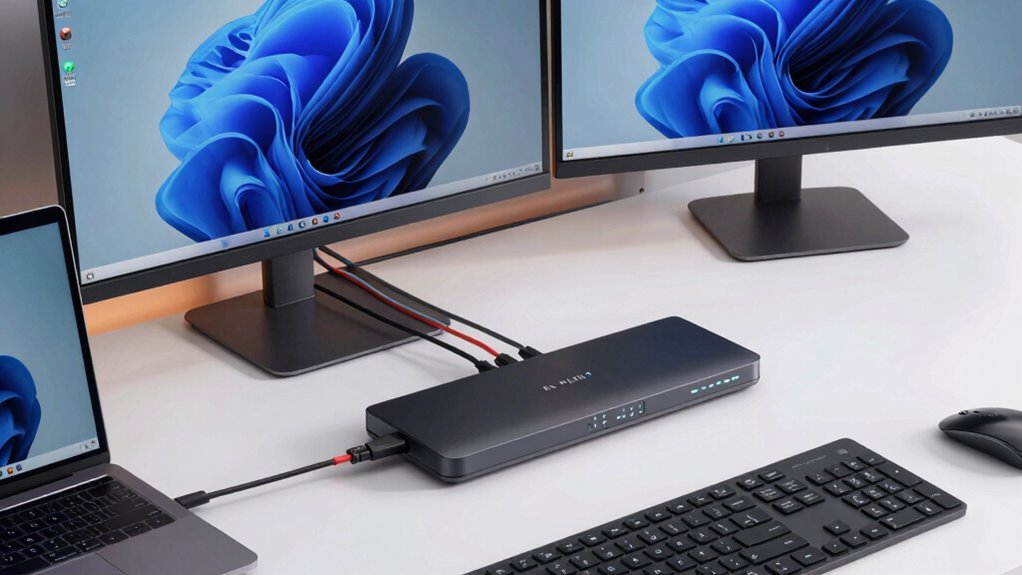
Finding a reliable KVM switch for Mac and PC can streamline your workflow by allowing easy control of multiple computers with a single keyboard, monitor, and mouse. The Hearvo USB 3.0 HDMI KVM Switch stands out as the overall best due to its 4K@60Hz support and user-friendly design, ideal for most users. For those needing dual monitor support, the AV Access KVM Switch Dock offers impressive 4K dual outputs with 60W power delivery, making it perfect for multitasking professionals. A key tradeoff in this category is balancing features like resolution, multi-device support, and ease of use against higher costs. Keep reading for a detailed breakdown of the top options to find the best fit for your setup.
Key Takeaways
- High-resolution support (4K and 8K) varies significantly, impacting display quality for professional use.
- Dual monitor support is common but often comes with increased cost and complexity; choose based on your workflow needs.
- Power delivery (PD) and Ethernet integration add convenience but may increase the price and setup complexity.
- Unified control options like remote switches and hotkeys improve usability but may reduce simplicity for basic setups.
- Build quality and compatibility with multiple OSes (Mac, Windows, Linux) are crucial for durability and versatility.
| Hearvo USB 3.0 HDMI KVM Switch for 2 Computers 1 Monitor, 4K@60Hz, S7232H | 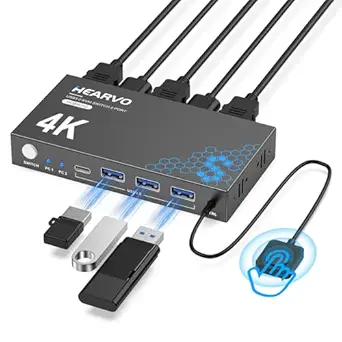 | Best Overall for High-Quality Single-Monitor Control | Input Ports: 2 HDMI | USB Ports: 4 (3 USB-A + 1 USB-C) | Resolution Support: 4K@60Hz, HDCP 2.2, 4K@30Hz, 2K, 3D, 1080P | VIEW ON AMAZON | See Our Full Breakdown |
| AV Access KVM Switch Dock for 2 Monitors and 2 Laptops, 4K Dual Monitor KVM Switch with 60W PD, Ethernet, Plug & Play |  | Best for Multi-Device, Multi-Monitor Efficiency | Number of Monitors: 2 | Supported Resolutions: 4K@60Hz | USB Ports: 2 USB-C, 4 USB 2.0, 2 USB 3.0 | VIEW ON AMAZON | See Our Full Breakdown |
| DisplayPort KVM Switch for 2 Monitors and 2 Computers, 4K@144Hz, USB 3.0, Dual Display Support |  | Best for High-Refresh-Rate Dual Monitor Enthusiasts | Resolution: 3840×2160@144Hz | DisplayPort Version: 1.4 | USB Ports: 4 USB 3.0 | VIEW ON AMAZON | See Our Full Breakdown |
| KVM Switch for Dual Monitors and Dual Computers with USB-C and HDMI/DP Input, 13-in-1 Docking Station, 100W PD, 4K60Hz/120Hz, Aluminum Case, Plug and Play |  | Best for Sleek, High-Performance Multi-Device Workspaces | Max Resolution: 4K60Hz/120Hz | Input Ports: USB-C, HDMI, DisplayPort | Output Ports: HDMI, DisplayPort | VIEW ON AMAZON | See Our Full Breakdown |
| UGREEN 8K@60Hz HDMI KVM Switch for 4 Computers with 4 USB 3.0 Ports and Cables |  | Best for Ultra-High-Resolution Multi-Computer Control | Resolution: 8K@60Hz | USB Ports: 4 USB 3.0 | Supported HDMI: 2.0/1.4 | VIEW ON AMAZON | See Our Full Breakdown |
| USB 3.0 HDMI KVM Switch 4K@60Hz for 4 Computers with 3 USB 3.0 Ports |  | Best for High-Resolution Multi-Device Setups | Number of Ports: 4 | Maximum Resolution: 3840×2160@60Hz | USB Ports: 3 USB 3.0 and 1 USB-C | VIEW ON AMAZON | See Our Full Breakdown |
| Hearvo USB 3.0 HDMI + USB-C KVM Switch for 1 Monitor and 2 Computers |  | Best for Dual-Computer Home or Office Setups | Input Ports: HDMI + USB-C for Computer 1, USB-C for Computer 2 | USB Ports: 3 USB-A + 1 USB-C | Video Resolution: 4K@60Hz | VIEW ON AMAZON | See Our Full Breakdown |
| AV Access KVM Switch Docking Station for MacBook and Desktop PC, Dual 4K HDMI, 2 Monitors, 2 Computers, 100W Power Delivery, Ethernet, Plug & Play |  | Best for Professional Multi-Device Docking with Dual Monitors | Compatibility: MacBook (various M chips), Windows | Display Support: Dual 4K HDMI | Ports: 2 HDMI, 3 USB 3.0, 2 USB 2.0, USB-C, Ethernet | VIEW ON AMAZON | See Our Full Breakdown |
| MINIX K1 USB-C KVM Switch for 2 Computers, 4K@120Hz HDR, 100W PD, Aluminum Design, Compatible with Windows, Mac, Linux, Android |  | Best for High-Performance Gaming and Creative Use | Monitor Support: 1 monitor | Display Resolution: 4K@120Hz HDR | USB Ports: 2 USB-C, 2 USB-A | VIEW ON AMAZON | See Our Full Breakdown |
| Unitek 2-Port Dual Monitor KVM Switch with 4K@60Hz HDMI and DisplayPort, 3 USB 3.0 Ports, Aluminum | 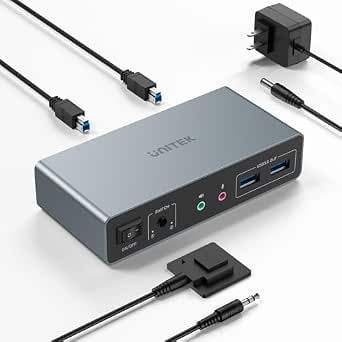 | Best for Dual-Display Office Environments | Input Ports: 2 HDMI, 2 DisplayPort | Output Ports: 2 HDMI, 2 DisplayPort | USB Ports: 3 USB 3.0 | VIEW ON AMAZON | See Our Full Breakdown |
| TobenONE KVM Switch for 2 Monitors and 2 Computers with Dual HDMI 4K@60Hz, USB 5 Ports, 100W PD, Wired Remote |  | Best Overall for High-Resolution Dual Displays and USB Peripherals | Monitor Support: Dual HDMI 4K@60Hz | USB Ports: 5 (2× USB-A 3.2, 1× USB-C, 2× USB 2.0) | Power Delivery: 100W PD | VIEW ON AMAZON | See Our Full Breakdown |
| USB 3.0 HDMI KVM Switch 4 Computers 4K60Hz 4-Port with Remote Control |  | Best for Multi-Computer Environments with Broad OS Compatibility | Number of Computers: 4 | Resolution Support: 4K@60Hz | USB Ports: 4 USB 3.0 | VIEW ON AMAZON | See Our Full Breakdown |
| HDMI KVM Switch 2 Monitors 2 Computers – 8K@60Hz, 4K@120Hz, 4 Port USB 3.0 Hub, Wired Remote, Plug & Play |  | Best for Ultra-High-Resolution Multi-Display Control | Resolution Support: 8K@60Hz, 4K@120Hz | Number of Monitors: 2 | Number of Computers: 2 | VIEW ON AMAZON | See Our Full Breakdown |
| UGREEN HDMI KVM Switch for 2 Monitors and 2 Computers, 4K@60Hz, with 4 USB 3.0 Ports, Includes HDMI and USB Cables, Power Adapter, and Controller |  | Best for Versatile Multi-Device Control with Bundled Cables | Number of Monitors: 2 | Number of Computers: 2 | Resolution Support: 4K@60Hz | VIEW ON AMAZON | See Our Full Breakdown |
| UGREEN 8K@60Hz HDMI DisplayPort KVM Switch for 3 Monitors and 2 Computers |  | Best for Multi-Monitor Professional Setups and 8K Resolutions | Resolution: 8K@60Hz, 4K@240Hz | Ports: 2 DisplayPort 1.4, 1 HDMI 2.1 | USB Ports: 4 USB 3.0 | VIEW ON AMAZON | See Our Full Breakdown |
| kvm switch for mac and pc | USB Ports | Compatibility |
|---|---|---|
| Hearvo USB 3.0 HDMI KVM Switch | 4 (3 USB-A + 1 USB-C) | Windows 7/8/10/11, Vista, XP, Linux, Mac |
| AV Access KVM Switch Dock for | 2 USB-C, 4 USB 2.0, 2 USB 3.0 | USB-C laptops supporting DP Alt Mode and MST |
| DisplayPort KVM Switch for 2 M | 4 USB 3.0 | — |
| KVM Switch for Dual Monitors a | — | — |
| UGREEN 8K@60Hz HDMI KVM Switch | 4 USB 3.0 | Windows, MacOS, Linux, gaming consoles |
| USB 3.0 HDMI KVM Switch 4K@60H | 3 USB 3.0 and 1 USB-C | — |
| Hearvo USB 3.0 HDMI + USB-C KV | 3 USB-A + 1 USB-C | Windows, macOS, Linux |
| AV Access KVM Switch Docking S | — | MacBook (various M chips), Windows |
| MINIX K1 USB-C KVM Switch for | 2 USB-C, 2 USB-A | Windows, Mac, Linux, Android |
| Unitek 2-Port Dual Monitor KVM | 3 USB 3.0 | Various OS including Windows, Mac, Linux |
| TobenONE KVM Switch for 2 Moni | 5 (2× USB-A 3.2, 1× USB-C, 2× USB 2.0) | Thunderbolt 5/4/3, USB4, USB-C, HDMI 1.4+ |
| USB 3.0 HDMI KVM Switch 4 Comp | 4 USB 3.0 | Windows, Mac OS, Linux, Unix |
| HDMI KVM Switch 2 Monitors 2 C | 4 USB 3.0 | — |
| UGREEN HDMI KVM Switch for 2 M | 4 (3× USB-A, 1× USB-C) | — |
| UGREEN 8K@60Hz HDMI DisplayPor | 4 USB 3.0 | — |
More Details on Our Top Picks
Hearvo USB 3.0 HDMI KVM Switch for 2 Computers 1 Monitor, 4K@60Hz, S7232H
This Hearvo KVM switch excels for users who prioritize crisp visuals and straightforward setup. Its support for 4K@60Hz makes it ideal for creative work or media consumption, outperforming many basic models that max out at 1080p or 60Hz. Compared to the UGREEN 8K@60Hz switch, this model offers a simpler, more reliable experience for dual computer setups without the complexity of ultra-high resolution, though it lacks wireless options and is limited to two computers. The inclusion of multiple USB 3.0 ports ensures fast data transfer, making it suitable for demanding peripherals. However, it requires physical connections and may need external power for some devices, which could be inconvenient for minimalists. Overall, this pick makes the most sense for users who need high-quality display performance paired with reliable switching in a compact form.
Pros:- Supports 4K resolution at 60Hz for crisp, detailed visuals
- Includes multiple USB 3.0 ports for fast peripheral connections
- Switching via button or remote offers flexible control
Cons:- Requires physical connection setup, no wireless option
- Limited to two computers, not suitable for larger setups
- May need external power for high-demand peripherals
Best for: Power users needing sharp visuals and fast data transfer between two computers with a single monitor setup.
Not ideal for: Those seeking wireless switching capabilities or expanding beyond two connected computers.
- Input Ports:2 HDMI
- USB Ports:4 (3 USB-A + 1 USB-C)
- Resolution Support:4K@60Hz, HDCP 2.2, 4K@30Hz, 2K, 3D, 1080P
- Switching Methods:Button and Wired Remote
- Compatibility:Windows 7/8/10/11, Vista, XP, Linux, Mac
- Additional Features:Adaptive EDID, Plug and Play
Our verdict“Best suited for users who need reliable, high-quality 4K visuals with easy control for two computers.”
AV Access KVM Switch Dock for 2 Monitors and 2 Laptops, 4K Dual Monitor KVM Switch with 60W PD, Ethernet, Plug & Play
This AV Access dock stands out for users who need to control two laptops with dual monitors and multiple peripherals from a single station. Its 12-in-1 connectivity, including dual 4K@60Hz outputs and fast charging at 60W per port, surpasses simpler KVMs like the Hearvo by offering expanded workspace and power capabilities. Compared with the UGREEN 8K switch, it focuses more on professional multitasking, though it is limited to USB-C laptops supporting DP Alt Mode and MST, and macOS devices only mirror displays. The setup is plug-and-play, making it accessible even for less tech-savvy users, but it isn’t compatible with 5K displays or G-Sync/FreeSync, which may matter for gamers. This product is best for professionals who need a versatile, dual-monitor setup with charging and network features in one dock.
Pros:- Supports dual 4K monitors at 60Hz with high refresh rates
- Provides 60W charging for two laptops simultaneously
- Includes Ethernet and SD card slots for expanded connectivity
Cons:- Limited to USB-C laptops supporting DP Alt Mode and MST
- Mac users can only mirror displays, not extend
- Not compatible with 5K monitors or adaptive sync tech
Best for: Professional users managing multiple laptops and requiring dual 4K displays with charging and network capabilities.
Not ideal for: Gamers or users with non-USB-C laptops or 5K monitor needs, due to compatibility limitations.
- Number of Monitors:2
- Supported Resolutions:4K@60Hz
- USB Ports:2 USB-C, 4 USB 2.0, 2 USB 3.0
- Ethernet:1G
- Power Delivery:60W per PC
- Compatibility:USB-C laptops supporting DP Alt Mode and MST
Our verdict“Ideal for professionals seeking a versatile docking station that manages dual 4K displays and multiple peripherals efficiently.”
DisplayPort KVM Switch for 2 Monitors and 2 Computers, 4K@144Hz, USB 3.0, Dual Display Support
This DisplayPort switch is tailored for users demanding high visual fidelity and fast refresh rates, such as gamers or creative professionals. Supporting 4K@144Hz, it surpasses many HDMI-based switches like the Hearvo in refresh rate, though it requires multiple cables and an external power supply for stable operation. Unlike the AV Access dock, it offers extended and copy display modes, providing flexibility for different workflows. The lack of hotkey switching and complex cabling make it less ideal for quick toggling or minimal setups. Its reliance on external power and multiple cables makes it more complex to install but ensures stable performance at demanding resolutions and refresh rates. This makes it suitable for users who prioritize performance over simplicity.
Pros:- Supports 4K@144Hz for ultra-smooth visuals
- Dual monitor support with extended and copy modes
- Stable operation with external power supply
Cons:- Requires multiple DisplayPort and USB cables for each computer
- No hotkey switching, only panel or external controller
- Cable management can be complex due to multiple connections
Best for: Gamers or creative professionals needing high-refresh-rate dual monitor control with stable performance.
Not ideal for: Casual users seeking quick, wireless switching or simpler setups without extensive cabling.
- Resolution:3840×2160@144Hz
- DisplayPort Version:1.4
- USB Ports:4 USB 3.0
- Bandwidth:48Gbps
- Data Transfer Rate:5Gbps
- Power Supply:12V DC adapter
Our verdict“Best for high-performance dual monitor setups where refresh rate and stability are critical, despite cable complexity.”
KVM Switch for Dual Monitors and Dual Computers with USB-C and HDMI/DP Input, 13-in-1 Docking Station, 100W PD, 4K60Hz/120Hz, Aluminum Case, Plug and Play
This compact aluminum KVM switch makes a compelling choice for users who want a clean, professional look combined with high performance. Supporting dual monitors with resolutions up to 4K@120Hz on DisplayPort and 4K@60Hz on HDMI, it excels for demanding workflows. Its 100W power delivery simplifies charging laptops while maintaining a tidy workspace, a step above many basic switches that lack power options. Compared to the UGREEN 8K switch, it offers broader high-refresh-rate support and a durable design, but it requires Thunderbolt 3/4 or compatible ports for full functionality, limiting some Mac users. The switch can only support copy mode on macOS, which may limit extended display options for Mac users. Still, its sleek design and comprehensive features suit those seeking a compact, high-res, multi-device station.
Pros:- Supports 4K@120Hz on DisplayPort, 4K@60Hz on HDMI
- Provides 100W power delivery for charging
- Aluminum case offers durability and style
Cons:- Requires Thunderbolt 3/4 or compatible ports for full features
- MacOS only supports copy mode, not extend
- Limited hotkey switching, only wired or front panel controls
Best for: Designers or professionals needing dual high-refresh-rate displays with a minimalist aesthetic and high power output.
Not ideal for: Users with non-Thunderbolt ports or those requiring full extended display support on Macs.
- Max Resolution:4K60Hz/120Hz
- Input Ports:USB-C, HDMI, DisplayPort
- Output Ports:HDMI, DisplayPort
- Power Delivery:100W PD
- Materials:Aluminum alloy
- Switching Methods:Wired button, front panel control
Our verdict“Ideal for professionals demanding dual high-refresh-rate displays in a sleek, durable package, with some limitations on Mac compatibility.”
UGREEN 8K@60Hz HDMI KVM Switch for 4 Computers with 4 USB 3.0 Ports and Cables
This UGREEN switch is designed for users who need to connect four computers to a single monitor, supporting astonishing 8K@60Hz resolution. Its ability to handle ultra-high resolution makes it ideal for professional video editing or high-end gaming setups, outperforming many 4K-only switches like the Hearvo in maximum resolution. The inclusion of four USB 3.0 ports ensures fast data transfer, and the plug-and-play design simplifies operation. However, it does not support hotkey switching, requiring manual button presses or remote control, and needs external power for operation, which could be a drawback for minimal setups. Compatibility is broad, but it isn’t suited for docking station use or setups requiring G-Sync/FreeSync. This switch delivers exceptional resolution for demanding multi-computer environments.
Pros:- Supports up to 8K@60Hz resolution for crystal-clear visuals
- Includes four USB 3.0 ports for fast data transfer
- Supplies cables for easy setup and use
Cons:- No hotkey switching, only manual or remote control
- Requires external power source for operation
- Limited compatibility with docking stations or gaming sync tech
Best for: Power users managing multiple high-resolution systems needing 8K output and extensive USB connectivity.
Not ideal for: Casual users or those seeking wireless or hotkey switching, as it relies on physical controls and external power.
- Resolution:8K@60Hz
- USB Ports:4 USB 3.0
- Supported HDMI:2.0/1.4
- HDCP:2.3/2.2/1.4
- Switching Methods:Button or remote
- Compatibility:Windows, MacOS, Linux, gaming consoles
Our verdict“Best suited for high-end environments where maximum resolution and multiple system control are necessary, despite limited ease of switching.”
USB 3.0 HDMI KVM Switch 4K@60Hz for 4 Computers with 3 USB 3.0 Ports
This 4-port HDMI KVM switch stands out by supporting 4K resolution at 60Hz across four computers, making it ideal for users who need crisp visuals on multiple devices. Compared to the Unitek 2-Port Dual Monitor KVM, it offers more ports and higher resolution, but it lacks hotkey switching and relies solely on buttons or remote control, which can be less convenient. The inclusion of multiple cables simplifies setup, yet manual switching might slow down workflows for those switching frequently. Its support for HDMI, USB 3.0, and USB-C ensures broad compatibility and quick data transfer—perfect for demanding creative or professional environments. The tradeoff is that it’s less flexible for users seeking hotkey or keyboard-based switching, and manual toggling can be a hassle during intense work sessions.
Pros:- Supports 4K resolution at 60Hz for sharp, vibrant display quality
- Includes multiple cables for immediate setup
- Easy switching via buttons or remote control
Cons:- Lacks hotkey switching, leading to less convenience during frequent toggling
- Requires manual switching which may slow workflow
Best for: Power users managing high-resolution multi-device workstations who prefer straightforward, plug-and-play operation.
Not ideal for: Users requiring quick keyboard shortcuts for switching or those who need to switch frequently without manual intervention.
- Number of Ports:4
- Maximum Resolution:3840×2160@60Hz
- USB Ports:3 USB 3.0 and 1 USB-C
- Switching Methods:Button and remote control
- Included Cables:HDMI, USB3.0, power, USB controller, wire-desktop controller
- Supported Devices:Multiple computers with HDMI and USB-C
Our verdict“This switch is best suited for users prioritizing high display quality and simple setup over rapid toggling convenience.”
Hearvo USB 3.0 HDMI + USB-C KVM Switch for 1 Monitor and 2 Computers
The Hearvo KVM switch simplifies sharing a single monitor, keyboard, and mouse between two computers, with support for HDMI and USB-C inputs at 4K@60Hz. Compared to the AV Access Dual Monitor Dock, it offers a more streamlined, dual-input solution but limits users to just two computers, making it less versatile for larger setups. Its support for multiple USB ports and easy control via buttons and remote ensures straightforward operation for everyday users. However, the absence of audio support could be a drawback for multimedia tasks, and setting up multiple cables might be cumbersome for some. This device makes sense for those who want reliable dual-system switching without the complexity of more advanced multi-monitor configurations, but it’s not suitable for users needing multi-monitor support or audio features.
Pros:- Supports 4K@60Hz for high-quality visuals
- Multiple USB ports for peripherals
- Easy switching with buttons and remote control
Cons:- Limited to two computers, reducing flexibility
- No audio support, limiting multimedia use
Best for: Home office users or professionals who need to switch between two computers with minimal fuss and limited space.
Not ideal for: Power users or those with multi-monitor needs, as it only supports a single display and lacks audio support.
- Input Ports:HDMI + USB-C for Computer 1, USB-C for Computer 2
- USB Ports:3 USB-A + 1 USB-C
- Video Resolution:4K@60Hz
- Switching Methods:Button and wired remote
- Compatibility:Windows, macOS, Linux
Our verdict“This switch offers a simple, reliable solution for dual-computer setups needing high-res display and peripheral sharing without advanced features.”
AV Access KVM Switch Docking Station for MacBook and Desktop PC, Dual 4K HDMI, 2 Monitors, 2 Computers, 100W Power Delivery, Ethernet, Plug & Play
This dual HDMI KVM docking station excels for users needing to connect a MacBook and a Windows PC simultaneously to two 4K displays, supporting professional multitasking. Its support for dual monitors and 100W power delivery ensures smooth, high-quality visuals and device charging, outperforming many single-monitor switches like the UGREEN HDMI KVM. Compared with simpler options, the AV Access dock offers EDID emulation for stable display output, although dual monitor support on M1/M2 Macs is limited—one monitor may black out unless using M3 Macs or closing the lid. Its extensive port array makes it perfect for busy workstations, but the limited dual monitor support for some MacBooks and the higher complexity mean it’s less suited for casual or single-display users.
Pros:- Supports dual 4K HDMI displays for multitasking
- Includes 100W power delivery for fast charging
- Comprehensive port selection for peripherals and network
Cons:- Limited dual monitor support for M1/M2 MacBooks, with potential display blackouts
- More complex setup compared to simpler switches
Best for: Professionals managing Mac and Windows systems requiring dual 4K displays and robust port options.
Not ideal for: Casual users or those with only a single monitor, as the multi-display support is limited and setup can be complex.
- Compatibility:MacBook (various M chips), Windows
- Display Support:Dual 4K HDMI
- Ports:2 HDMI, 3 USB 3.0, 2 USB 2.0, USB-C, Ethernet
- Power Delivery:100W
- Switching Method:Button or remote
- Additional Features:EDID emulation, plug & play
Our verdict“Ideal for demanding professionals needing stable dual-monitor switching between Mac and PC with extensive peripheral support, despite some dual display limitations on certain MacBooks.”
MINIX K1 USB-C KVM Switch for 2 Computers, 4K@120Hz HDR, 100W PD, Aluminum Design, Compatible with Windows, Mac, Linux, Android
The MINIX K1 stands out with support for ultra-high refresh rates of 120Hz HDR at 4K, making it a top choice for gamers or creators needing smooth visuals. Its USB-C ports and 100W charging capacity match the needs of modern, high-performance setups, outperforming the USB 3.0-based options like the Hearvo for raw graphics and refresh rate. The compact aluminum build offers durability and style, but it requires an HDMI 2.1 cable (not included), adding a small extra cost, and only supports one monitor at a time. While it excels for high-res, fast-paced visuals, it’s less suitable for users needing multi-monitor setups or those with older computers lacking USB-C, limiting versatility.
Pros:- Supports 4K@120Hz HDR for ultra-smooth visuals
- Built-in 100W USB-C PD for fast charging
- Compact, durable aluminum design
Cons:- Requires HDMI 2.1 cable (sold separately)
- Supports only one monitor at a time, limiting multi-display workflows
Best for: Gamers, video editors, or high-end creative professionals seeking ultra-smooth 4K visuals and fast device charging.
Not ideal for: Users with older PCs or multiple monitors, since it supports only one display and requires HDMI 2.1 cables not included.
- Monitor Support:1 monitor
- Display Resolution:4K@120Hz HDR
- USB Ports:2 USB-C, 2 USB-A
- Power Delivery:100W
- Compatibility:Windows, Mac, Linux, Android
- Additional Requirements:HDMI 2.1 cable (not included)
Our verdict“This switch is perfect for high-performance gaming or creative work demanding the highest refresh rates and fast charging, but not for multi-monitor setups.”
Unitek 2-Port Dual Monitor KVM Switch with 4K@60Hz HDMI and DisplayPort, 3 USB 3.0 Ports, Aluminum
The Unitek dual monitor KVM switch offers robust support for multi-monitor setups with dual HDMI and DisplayPort outputs, supporting 4K@60Hz. Its multiple USB 3.0 ports and remote control provide flexibility and quick switching between two computers, making it a solid choice for office or home workflows. Compared to the AV Access dock, it emphasizes dual-display support rather than single or dual monitor limitations. The aluminum case adds durability, but it’s designed mostly for desktop use and requires multiple cables, which could complicate setups in tight spaces. This device is ideal for those needing dual monitors and multiple USB peripherals, but it’s overkill for single-display users or portable setups.
Pros:- Supports dual 4K@60Hz via HDMI and DisplayPort
- Multiple USB 3.0 ports for fast peripheral access
- Remote control for quick switching
Cons:- Designed for desktop use only, not portable
- Requires multiple cables, which can clutter spaces
Best for: Professionals or power users needing dual monitor support with quick, reliable switching in a desktop environment.
Not ideal for: Laptops without space for multiple cables or users seeking portable or single-monitor solutions.
- Input Ports:2 HDMI, 2 DisplayPort
- Output Ports:2 HDMI, 2 DisplayPort
- USB Ports:3 USB 3.0
- Max Resolution:4K@60Hz
- HDMI Version:HDMI 2.0
- Compatibility:Various OS including Windows, Mac, Linux
Our verdict“This switch is tailored for multi-monitor, multi-peripheral setups in office environments that prioritize stability and quick access over portability.”
TobenONE KVM Switch for 2 Monitors and 2 Computers with Dual HDMI 4K@60Hz, USB 5 Ports, 100W PD, Wired Remote
This TobenONE model stands out for supporting dual 4K monitors at 60Hz, making it ideal for users who need crisp visuals on multiple screens. Compared with the HDMI KVM Switch 2 Monitors 2 Computers, it offers more USB ports and higher power delivery, which benefits those with many peripherals and laptops that demand fast charging. However, its support is limited to one laptop and one desktop, unlike multi-laptop setups, and it only supports extended display mode on macOS, which could constrain Mac users needing mirrored displays. The EDID emulation and auto-wake features simplify setup and ensure reliable operation. Still, older HDMI 1.4 ports might restrict compatibility with legacy devices, requiring attention to port versions.
Pros:- Supports dual 4K@60Hz for crisp, detailed visuals
- Multiple USB ports and 100W power delivery for peripherals and charging
- Auto-wake and EDID emulation for seamless operation
Cons:- Limited to one laptop and one desktop at a time
- macOS only supports extended display, not mirrored
Best for: Professionals or gamers needing dual 4K displays with high USB peripheral support, primarily for single-user setups.
Not ideal for: Teams or power users requiring multiple computers or multi-laptop switching, due to its single-laptop/desktops support limitation.
- Monitor Support:Dual HDMI 4K@60Hz
- USB Ports:5 (2× USB-A 3.2, 1× USB-C, 2× USB 2.0)
- Power Delivery:100W PD
- Video Resolution:4K@60Hz or 1440P@120Hz
- Compatibility:Thunderbolt 5/4/3, USB4, USB-C, HDMI 1.4+
- Supported Devices:Laptop & Desktop (not supporting 2 laptops/desktops simultaneously)
Our verdict“This switch suits users who need high-quality dual monitors and robust USB support for a single workstation.”
USB 3.0 HDMI KVM Switch 4 Computers 4K60Hz 4-Port with Remote Control
This USB 3.0 KVM switch makes switching among four computers smooth and straightforward, thanks to remote control and pushbutton options. Compared with the HDMI KVM Switch 2 Monitors 2 Computers, it supports more computers and offers broader OS compatibility—including Linux and Unix—ideal for busy offices or educational setups. Its support for 4K@60Hz ensures sharp visuals, but it lacks hotkey switching, which might be inconvenient for advanced users. The device’s metal housing adds durability, and the broad compatibility simplifies integration into diverse environments. Nevertheless, it requires compatible HDMI and DisplayPort cables, and it doesn’t support wireless switching, limiting flexibility slightly.
Pros:- Supports four computers with 4K@60Hz visuals
- Remote control and pushbutton switching for ease
- Broad OS support including Linux and Unix
Cons:- No hotkey switching, limiting quick toggling
- Requires specific HDMI/DisplayPort cables for 4K@60Hz
Best for: Educational or office setups needing to manage multiple computers with simple remote switching.
Not ideal for: Single-user or gaming setups that prioritize ultra-high resolution or fast switching methods like hotkeys.
- Number of Computers:4
- Resolution Support:4K@60Hz
- USB Ports:4 USB 3.0
- Switching Modes:Remote control and pushbutton
- Compatibility:Windows, Mac OS, Linux, Unix
- Material:Metal
Our verdict“This switch is well-suited for multi-computer environments demanding broad OS compatibility and straightforward switching.”
HDMI KVM Switch 2 Monitors 2 Computers – 8K@60Hz, 4K@120Hz, 4 Port USB 3.0 Hub, Wired Remote, Plug & Play
This HDMI KVM switch excels at delivering extremely high resolutions, supporting up to 8K@60Hz and 4K@120Hz, making it perfect for professional video work or high-end gaming. Compared to the UGREEN HDMI KVM Switch for 2 Monitors and 2 Computers, it offers higher resolutions and a more premium build with a wired remote for easy switching. Its power stability and USB 3.0 hub facilitate fast data transfer, but it requires an external power supply to perform at its best, which could complicate setups. The device limits users to two computers and two monitors, which might not suit larger multi-device environments, and it only supports HDMI connections, excluding DisplayPort options.
Pros:- Supports 8K@60Hz and 4K@120Hz for exceptional visuals
- Includes a wired remote for easy switching
- Powered for stable performance with USB 3.0 hub
Cons:- Requires external power, adding setup complexity
- Limited to two computers and monitors
Best for: Video editors or gamers needing ultra-high-resolution multi-monitor setups with reliable switching.
Not ideal for: Basic users or those with multiple computers beyond two, as it doesn’t support more devices or DisplayPort connections.
- Resolution Support:8K@60Hz, 4K@120Hz
- Number of Monitors:2
- Number of Computers:2
- USB Ports:4 USB 3.0
- Remote Control:Wired remote included
- Housing Material:Metal
Our verdict“Designed for users demanding the highest resolutions and reliable switching in high-end visual workflows.”
UGREEN HDMI KVM Switch for 2 Monitors and 2 Computers, 4K@60Hz, with 4 USB 3.0 Ports, Includes HDMI and USB Cables, Power Adapter, and Controller
The UGREEN HDMI KVM switch offers a balanced combination of high-resolution support and comprehensive accessories, including HDMI and USB cables, making setup straightforward. Compared with the HDMI KVM Switch 2 Monitors 2 Computers, it provides more flexible switching options via button and desktop controller, plus supporting HDR for enhanced visuals. Its inclusion of multiple cables and power adapters simplifies initial setup but may limit portability. It does not support hotkey switching and relies on an external power supply for full USB peripheral functionality, making it less ideal for mobile or minimalist setups.
Pros:- Supports 4K@60Hz and HDR for vivid visuals
- Includes multiple cables and power adapters
- Switches via button or desktop controller for versatility
Cons:- No hotkey support for quick toggling
- Requires external power for full USB functionality
Best for: Professionals needing flexible switching with included cables for quick deployment in fixed workspaces.
Not ideal for: Users seeking wireless or hotkey switching, or those with a preference for minimal cable clutter.
- Number of Monitors:2
- Number of Computers:2
- Resolution Support:4K@60Hz
- USB Ports:4 (3× USB-A, 1× USB-C)
- Included Cables:4 HDMI, 2 USB A
- Power Supply:Included
Our verdict“This switch is a strong choice for users who value comprehensive accessories and flexible, wired switching options.”
UGREEN 8K@60Hz HDMI DisplayPort KVM Switch for 3 Monitors and 2 Computers
This UGREEN model supports three monitors and ultra HD resolutions up to 8K@60Hz, making it suitable for demanding creative or professional environments. Compared with the HDMI KVM Switch 2 Monitors 2 Computers, it handles more displays and higher resolutions, but with the tradeoff of requiring both computers to support triple-monitor outputs, which could limit compatibility. It also does not support EDID emulation, potentially causing display detection issues. The cable length for 8K resolution is limited to 2 meters, which might affect flexibility in larger setups. Its inclusion of multiple cables and a desktop controller provides convenience for fixed installations.
Cons:- Requires both computers to support triple-monitor output
- No EDID emulation, risking display detection issues
Best for: Creative professionals or engineers managing multi-monitor workflows with high-resolution requirements.
Not ideal for: Home users or setups with limited space or budget, due to the need for compatible triple-output systems and higher complexity.
- Resolution:8K@60Hz, 4K@240Hz
- Ports:2 DisplayPort 1.4, 1 HDMI 2.1
- USB Ports:4 USB 3.0
- Supported Systems:Windows, MacOS, Linux
- Cable Length:Within 2 meters for 8K
- Power Supply:Included
Our verdict“This switch is tailored for high-end multi-monitor setups demanding ultra HD resolutions and multiple peripherals.”

How We Picked
These products were evaluated based on their performance, build quality, compatibility, ease of use, and feature set tailored for Mac and PC users. Priority was given to devices supporting high resolutions like 4K and 8K, ensuring future-proofing for demanding applications. Ease of installation and management, including features like remote switching and multi-port support, were also key criteria. We considered value for money by comparing features relative to price, aiming to highlight options suitable for different budgets and technical needs. Final rankings reflect a balance of performance, versatility, and user convenience, helping buyers find the best fit for their specific setups.Factors to Consider When Choosing Kvm Switch For Mac And Pc
When choosing a KVM switch for Mac and PC, consider several factors that influence compatibility, usability, and future-proofing. A good KVM switch should support your display resolutions, connect seamlessly with your preferred peripherals, and integrate easily into your existing setup. Evaluating these factors carefully helps avoid common pitfalls like limited compatibility or insufficient ports, ensuring your investment offers reliable performance across devices and workflows.Resolution and Video Support
Ensuring your KVM switch supports at least 4K resolution at 60Hz is essential for crisp visuals, especially if you work with high-resolution content or multiple monitors. Some premium models support 8K or higher, offering extra future-proofing. Be aware that higher resolutions often come with increased costs and sometimes require more powerful hardware. Check the compatibility of your monitors and graphics cards to prevent bottlenecks or display issues.
Number of Ports and Device Support
The number of USB, HDMI, DisplayPort, and Ethernet ports determines how many devices you can connect simultaneously. Consider your current setup and potential future expansion—adding more ports might mean a bigger, more complex device. Dual monitor support is common but can be costly; decide if a single or dual output meets your needs. Keep in mind that more ports often mean higher prices and slightly larger units, so balance your needs with available space and budget.
Compatibility and Ease of Use
Verify that the KVM switch supports macOS, Windows, and Linux if you use multiple operating systems. Features like hotkey switching, remote controls, or dedicated buttons make switching between devices faster and more intuitive. A plug-and-play design reduces setup complexity, especially for non-technical users. Be cautious with models that require complex driver installations or firmware updates, as these can complicate your setup.
Power Delivery and Networking
Many advanced KVM switches include Power Delivery (PD) to charge connected laptops, reducing clutter and the need for separate chargers. Ethernet ports add network stability, especially useful in office environments. While these features increase convenience, they often come at a higher price and may add to the device’s size and complexity. Decide if these extras justify the cost based on your daily workflow and device needs.
Build Quality and Price
Quality materials and solid construction extend the lifespan of your KVM switch. Aluminum enclosures tend to be more durable and heat-dissipating. Cheaper models may save money initially but could suffer from reliability issues over time. Balance your budget with the importance of durability, especially if you plan to use the switch heavily or in a professional environment. Sometimes investing more upfront results in better long-term performance and fewer frustrations.
Frequently Asked Questions
Will a KVM switch work with my 4K monitor and high-refresh-rate gaming setup?
Most modern 4K@60Hz KVM switches are capable of supporting high-resolution displays, but if you require higher refresh rates like 120Hz or 144Hz, you’ll need to verify that the switch explicitly supports these specs. Many switches advertise 4K@60Hz, but few can handle 4K at higher refresh rates simultaneously for gaming or professional video editing. It’s essential to check the detailed specifications and ensure your graphics hardware is compatible to avoid performance bottlenecks.
Can I use a KVM switch with a MacBook and a desktop PC simultaneously?
Yes, most KVM switches listed in this roundup support both Mac and PC, often with specific compatibility modes or drivers. However, some models may require specific USB-C or Thunderbolt adapters for MacBook connections. Ensure the switch supports macOS and check whether it needs additional drivers or configurations for seamless operation. Compatibility varies, so selecting a model explicitly supporting Mac is advisable for hassle-free performance.
What should I consider if I want to connect multiple monitors to my KVM switch?
Connecting multiple monitors requires a KVM switch with dual or even triple video outputs, often supporting HDMI, DisplayPort, or DVI. Verify the resolution and refresh rate support for each monitor to prevent display issues. Keep in mind that multi-monitor setups can increase the device’s complexity and cost. Also, ensure your graphics cards can handle multiple outputs at the desired resolution, and check if the switch can manage the combined bandwidth without compromising image quality.
Are wireless or software-based KVM solutions better than hardware switches?
Wireless and software-based KVM options can offer flexibility, but they often introduce latency, compatibility issues, and security concerns. Hardware KVM switches provide more reliable, instant switching and are generally more compatible with high-performance setups. For professional or gaming environments where latency matters, dedicated hardware switches are usually the better choice. Wireless solutions might suit casual or temporary needs but fall short in stability and speed.
How important is build quality when choosing a KVM switch?
Build quality directly impacts the device’s durability and longevity, especially if you frequently switch between devices or transport your setup. A sturdy, well-constructed KVM switch can resist wear, prevent loose connections, and dissipate heat effectively. Cheaper plastic models may break or fail over time, leading to costly replacements or downtime. Investing in a robust, high-quality switch ensures consistent performance and a longer lifespan, making it worth the extra cost in most cases.
Conclusion
For most users seeking a reliable, versatile solution, the Hearvo USB 3.0 HDMI KVM Switch offers excellent performance at a reasonable price, making it ideal for general productivity. Those with multi-monitor setups or professional workflows should consider the AV Access KVM Switch Dock for its dual monitor support and power delivery. If budget is a concern, the UGREEN HDMI KVM Switch provides solid features without breaking the bank. For power users or creative professionals, investing in premium options with 8K support and extensive ports can future-proof your setup. Whether you’re a beginner, a power user, or somewhere in between, choosing the right KVM switch depends on your specific needs and setup complexity.