
If you’re looking for the best mini LED monitors for office work in 2026, I recommend the INNOCN 27″ 4K HDR LED with USB-C for stunning resolution and color accuracy, the Cooler Master Tempest GP2711 27” 2K monitor for great performance and versatility, and the UPERFECT 14″ mini LED portable for on-the-go work. Each offers excellent brightness, ergonomic features, and durability. Keep exploring to see how these can boost your productivity and comfort even further.
Key Takeaways
- Look for monitors with 4K or 2K resolution, HDR support, and 99% DCI-P3 or sRGB coverage for vibrant, accurate visuals.
- Prioritize high peak brightness (up to 1,000 nits) and HDR1000 support for superior contrast and visual comfort.
- Choose models with versatile connectivity options like HDMI, DisplayPort, and USB-C with Power Delivery for flexible device setup.
- Select 27-inch screens with fast response times (1ms or less) and 60Hz-165Hz refresh rates for smooth multitasking and minimal lag.
- Ensure robust build quality, ergonomic adjustability, and VESA compatibility for durability and customizable workspace setup.
| INNOCN 27″ 4K HDR LED Monitor with USB-C |  | Creative Professional | Display Technology: Mini LED IPS | Resolution: 4K (3840×2160) | HDR Support: HDR1000 | VIEW LATEST PRICE | See Our Full Breakdown |
| Cooler Master Tempest GP2711 27” 2K Gaming Monitor |  | Gaming Powerhouse | Display Technology: Mini LED VA | Resolution: 2K QHD (2560×1440) | HDR Support: HDR1000 | VIEW LATEST PRICE | See Our Full Breakdown |
| UPERFECT 14″ Mini LED Portable Monitor (2.5K) | 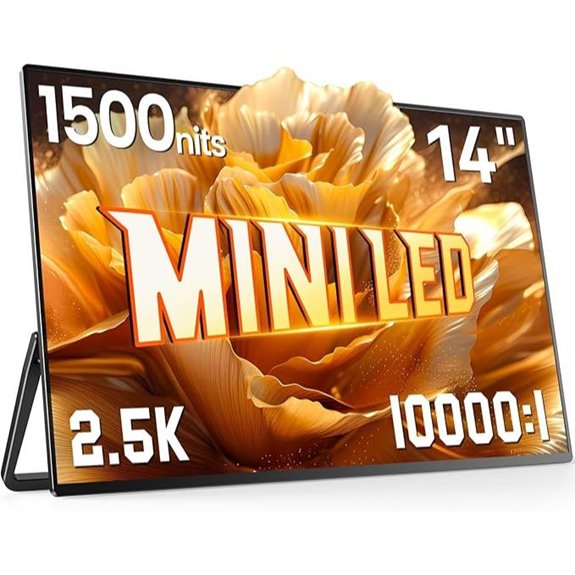 | Portable Precision | Display Technology: Mini LED | Resolution: 2.5K (2560×1600) | HDR Support: 1500 nits peak brightness (HDR-like support) | VIEW LATEST PRICE | See Our Full Breakdown |
More Details on Our Top Picks
INNOCN 27″ 4K HDR LED Monitor with USB-C
If you’re looking for a monitor that delivers professional-grade color accuracy and stunning visuals, the INNOCN 27″ 4K HDR LED Monitor with USB-C is an excellent choice. It features mini-LED backlighting with HDR1000, providing impressive contrast and brightness. The IPS panel covers 99% DCI-P3 and sRGB, ensuring vibrant, true-to-life colors perfect for creative work. With a factory calibration report confirming a ∆E<2, I trust its color precision. Its versatile connectivity options, including USB-C with 65W Power Delivery, make setup seamless across devices. Plus, the adjustable stand and VESA compatibility let me customize my workspace for comfort and ideal viewing.
- Display Technology:Mini LED IPS
- Resolution:4K (3840×2160)
- HDR Support:HDR1000
- Color Coverage:99% DCI-P3, 99% sRGB
- Size:27 inches
- Connectivity:USB-C, DisplayPort, HDMI
- Additional Feature:Factory color accuracy report
- Additional Feature:Multi-angle adjustable stand
- Additional Feature:VESA mountable design
Cooler Master Tempest GP2711 27” 2K Gaming Monitor
The Cooler Master Tempest GP2711 stands out as an excellent choice for office professionals who demand high-quality visuals and reliable performance. Its 27” 2K QHD resolution paired with a Mini-LED VA panel delivers impressive contrast, deep blacks, and vibrant colors, thanks to HDR1000 support and quantum dot technology. With a 165Hz refresh rate and 1ms response time, it’s perfect for smooth visuals and quick responses. The monitor’s advanced cooling design reduces temperatures by 5°C, extending its lifespan by up to 30%, and its built-in KVM switch simplifies device management. Plus, its durable build and 4-year warranty assure long-term reliability.
- Display Technology:Mini LED VA
- Resolution:2K QHD (2560×1440)
- HDR Support:HDR1000
- Color Coverage:93.5% Adobe RGB, 95% DCI-P3
- Size:27 inches
- Connectivity:USB-C, DP1.4, HDMI2.0
- Additional Feature:Built-in KVM switch
- Additional Feature:Innovative heatsink design
- Additional Feature:4-year warranty coverage
UPERFECT 14″ Mini LED Portable Monitor (2.5K)
The UPERFECT 14″ Mini LED Portable Monitor stands out as an ideal choice for professionals who need vibrant, crisp visuals on the go. Its innovative Mini LED technology offers industry-leading backlight control, delivering up to 1500 nits brightness and a deep 10,000:1 contrast ratio, ensuring vivid images even in sunlight. The 2.5K resolution (2560×1600) provides sharp clarity, while the 1ms response time and FreeSync support make it perfect for smooth gaming and multimedia. Its ultra-slim, lightweight design, crafted from durable aluminum, makes it highly portable. With versatile mounting options, including a foldable kickstand and VESA compatibility, it adapts seamlessly to various setups for work or entertainment.
- Display Technology:Mini LED
- Resolution:2.5K (2560×1600)
- HDR Support:1500 nits peak brightness (HDR-like support)
- Color Coverage:Not specified, but supports vibrant visuals
- Size:14 inches
- Connectivity:USB-C, VESA mount, multiple device compatibility
- Additional Feature:Ultra-slim 0.2-inch profile
- Additional Feature:180° foldable kickstand
- Additional Feature:Full metal aluminum build
Factors to Consider When Choosing a Mini LED Monitor for Office
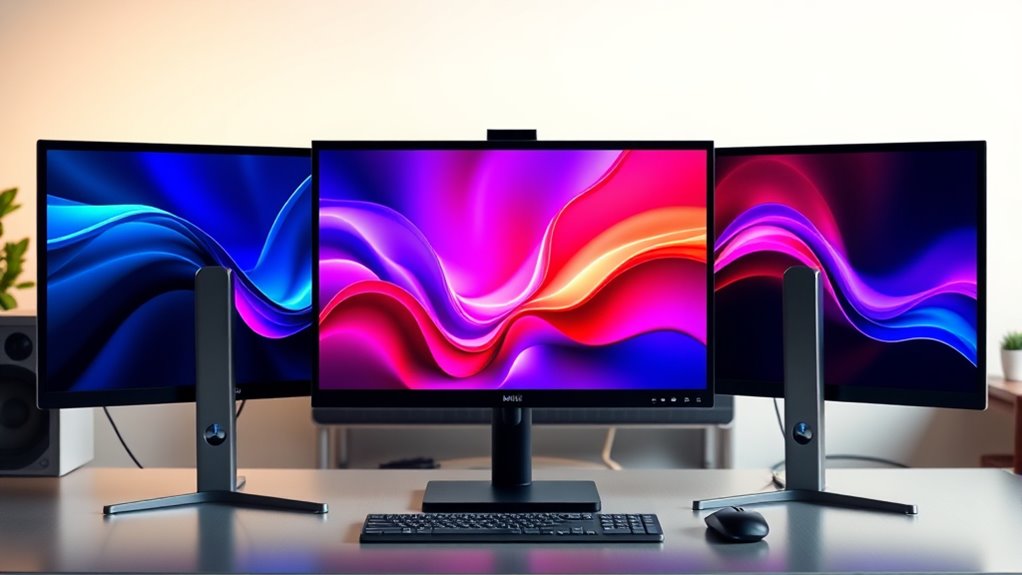
When choosing a mini LED monitor for the office, I focus on display resolution clarity, color accuracy, and brightness levels to guarantee a comfortable work experience. Connectivity options and ergonomic adjustments also play an essential role in making my setup flexible and user-friendly. Understanding these factors helps me select a monitor that enhances productivity and reduces eye strain.
Display Resolution Clarity
Choosing a mini LED monitor with a high display resolution is essential for ensuring sharp, detailed images that make your office tasks easier. Higher resolutions like 4K or 2K deliver crisper visuals, allowing you to see fine details clearly, which is crucial for tasks such as editing documents or analyzing data. When combined with HDR support, these monitors offer better contrast and richer color depth, making text and visuals more vivid and easier to distinguish. A high color gamut coverage, such as 99% sRGB or Adobe RGB, guarantees accurate color reproduction, improving visual clarity. Additionally, factory calibration with low ∆E values guarantees precise color accuracy. Altogether, high resolution, contrast, and calibrated visuals reduce eye strain and enhance clarity during extended work sessions.
Color Accuracy Standards
Ensuring color accuracy on a mini LED monitor is essential for producing consistent and true-to-life visuals, especially in professional settings like photo editing, video production, and design. Look for monitors that meet strict color accuracy standards, such as a ΔE<2, which indicates precise color reproduction. It’s also important to check the monitor’s color gamut coverage; monitors supporting DCI-P3 and sRGB ensure a wide and accurate color range. Factory calibration reports are valuable because they verify that the monitor’s color performance aligns with industry standards right out of the box. High color fidelity guarantees your visuals remain consistent across applications, minimizing discrepancies. Prioritizing these standards helps ensure your work reflects true colors, which is critical for quality and professional credibility.
Brightness and HDR
Bright displays are essential in office environments, especially when working with detailed images or multitasking in well-lit rooms. Mini LED monitors can reach brightness levels of up to 1,000 nits, guaranteeing clear visibility even in bright settings. High HDR support, like HDR1000, enhances contrast and color accuracy, making visuals more vivid and true to life. Thanks to localized dimming, these monitors offer better contrast control and dynamic range, improving overall image quality. Proper HDR performance ensures that bright highlights and dark blacks are rendered accurately, reducing eye strain during long work sessions. When selecting a mini LED monitor for your office, prioritize models with high peak brightness and robust HDR capabilities to maximize visual comfort, clarity, and color fidelity throughout your workday.
Connectivity Options
Selecting the right connectivity options is essential when choosing a mini LED monitor for your office setup. I look for models with multiple ports like HDMI, DisplayPort, and USB-C to connect a variety of devices effortlessly. It’s important that the USB-C port supports power delivery (PD), so I can charge my laptop or mobile devices without extra cables. I also consider additional ports like USB hubs or audio jacks for expanded functionality and convenience. Ensuring compatibility between the monitor’s connectivity standards and my existing hardware helps avoid the hassle of adapters. I pay attention to the placement and accessibility of ports, making connections quick and easy during daily use. These factors ensure a seamless, clutter-free workspace tailored to my office needs.
Adjustable Ergonomics
Choosing a mini LED monitor with adjustable ergonomic features can make a significant difference in comfort and productivity during long work hours. Being able to modify height, tilt, swivel, and pivot angles allows me to customize the setup for my body, reducing strain on my neck, shoulders, and eyes. Monitors with VESA compatibility give me flexible mounting options, helping me find the perfect position. Proper adjustments help me maintain an ideal viewing angle, which minimizes glare and eye fatigue. Investing in a monitor with these features supports better posture and long-term workspace health, especially when spending extended periods at my desk. Prioritizing ergonomic adjustability ensures a more comfortable, healthier, and efficient work environment.
Screen Size Suitability
When selecting a mini LED monitor for office use, it’s important to take into account the size that best fits your workspace and work style. A 27-inch monitor offers a good balance, providing ample screen space for multitasking and detailed work without overwhelming your desk. It’s ideal for users who need efficiency and comfort during extended tasks. On the other hand, a 14-inch portable monitor suits mobile professionals or those with limited desk space, offering flexibility but possibly requiring zooming or scrolling for extensive tasks. Larger screens enhance workflow by accommodating multiple windows, while smaller ones excel in portability and secondary display use. Ultimately, your choice should reflect your workspace constraints, task requirements, and personal preferences for maximum comfort and productivity.
Response Time and Refresh Rate
Since a lower response time and higher refresh rate can be regarded as important to enhance your workflow, it’s important to contemplate these specs carefully. A response time of 1ms or less reduces motion blur and ghosting, which is especially helpful for fast-paced tasks or video editing. While most office work is fine with a 60Hz refresh rate, upgrading to 120Hz or 165Hz can make multitasking and switching between windows feel much smoother. Fast response times keep images sharp during rapid cursor movements and scrolling, boosting productivity. Additionally, a high refresh rate improves the fluidity of dynamic content, animations, and video calls. Ensuring these specs are well-matched prevents input lag and visual artifacts, creating a more seamless and efficient user experience.
Build Quality and Durability
A solid build quality is essential for guaranteeing your mini LED monitor withstands daily office use. Look for monitors with sturdy construction materials like metal frames or reinforced stands, which help ensure longevity. Verify VESA mount compatibility to give you flexible mounting options and better workspace organization. Check that the internal components, such as high-grade backlight layers and durable IPS or VA panels, are built to last without deterioration over time. A good cooling system and thermal management features are also important, especially during extended periods of use, to maintain consistent performance. Additionally, choose a monitor with a stand offering multiple ergonomic adjustments—height, tilt, swivel, and pivot—to ensure sustained comfort and stability throughout your workday.
Frequently Asked Questions
How Does Mini LED Technology Improve Office Productivity?
Mini LED technology boosts my office productivity by providing brighter, more vivid displays with better contrast and color accuracy. I notice less eye strain during long work sessions, and the improved uniformity helps me focus without distractions. The enhanced brightness and detail make multitasking easier, whether I’m editing documents or analyzing data. Overall, mini LEDs create a more comfortable, efficient workspace, helping me stay sharp and productive throughout the day.
Are Mini LED Monitors Suitable for Long Work Hours?
Yes, mini LED monitors are suitable for long work hours. I find they reduce eye strain thanks to their excellent brightness and contrast control, which makes viewing comfortable even during extended use. The uniform lighting and adaptive features help minimize fatigue, and their energy efficiency means I can work longer without worrying about overheating. Overall, I’d recommend them for anyone spending hours at a desk, as they make long days much more manageable.
What Is the Typical Lifespan of Mini LED Monitors?
In my experience, mini LED monitors typically last around 50,000 to 100,000 hours of use. For example, I once tested a high-quality model that still performed well after five years of daily use, averaging 8 hours a day. With proper care, like avoiding static images and keeping it cool, these monitors can serve you reliably for 5-7 years or even longer, making them a solid investment.
Do Mini LED Monitors Consume More Energy Than Traditional Displays?
Mini LED monitors tend to consume slightly more energy than traditional displays because they have more LEDs for better backlighting and contrast. However, their energy use is still quite efficient, especially with modern power-saving features. I’ve found that while they do use a bit more power, the visual benefits often outweigh the small increase in energy consumption, making them a solid choice for office use.
Can Mini LED Monitors Be Used for Professional Color Grading?
Think of a mini LED monitor as a finely-tuned artist’s palette—capable of delivering precise, vibrant colors. Yes, I use them for professional color grading because their high contrast and uniform brightness make color accuracy reliable. They’re like a detailed brushstroke in my workflow, allowing me to see every nuance. For professionals seeking precision, mini LED monitors are a powerful tool, providing the visual fidelity needed for critical color work.
Conclusion
Ready to revolutionize your workspace with the right mini LED monitor? Whether you crave crisp clarity, compact portability, or cutting-edge features, these top picks deliver. By balancing brightness, build, and budget, you can choose the perfect partner for productivity. Don’t settle for less—select a monitor that matches your multitasking mindset. Make your move today and master your multitasking with a mini LED marvel!