Finding a reliable portable webcam for travel meetings can be challenging, as you need a device that balances high-quality video, compact size, and ease of use. The Jabra PanaCast 20 stands out as the best overall choice for its 4K resolution and AI-powered features, making it ideal for professional settings on the go. The Insta360 Link 2 offers advanced AI tracking and HDR for those who prioritize versatility, while the NexiGo N60 provides a budget-friendly option with solid 1080p video quality. The main tradeoffs involve balancing portability with feature set and price—more compact models may sacrifice some image quality or advanced features, while high-end options tend to be bulkier or pricier. Continue reading for a detailed breakdown of each option to find the best fit for your travel meeting needs.

Get comfort and recovery gear delivered free with Prime
- Fast, free delivery on millions of items
- Prime Video, Amazon Music and more included
- Member-only deals all year
Complete the kit



Key Takeaways
- The best webcams combine high resolution with compact, travel-friendly designs.
- AI features like tracking and framing significantly enhance remote meeting experiences.
- Price varies widely; premium models offer more features but are less portable.
- Built-in microphones and speakers are critical for seamless communication on the go.
- Tradeoffs often involve balancing size, features, and budget—consider your priorities carefully.
| Jabra PanaCast 20 Conferencing Camera – 4K Ultra-HD, AI-Powered Zoom & Lighting Optimization |  | Best Overall for Professional Travel Meetings | Resolution: 4K Ultra-HD | Camera Megapixels: 13 MP | Weight: 100 g | VIEW ON AMAZON | See Our Full Breakdown |
| NexiGo N60 1080P Webcam with Microphone, Privacy Cover, and Software Control |  | Best Value for Budget-Conscious Travelers | Resolution: 1920 x 1080 at 30fps | Lens: 3.6mm glass lens | Microphone: Built-in noise-canceling | VIEW ON AMAZON | See Our Full Breakdown |
| j5create 360 Degree All Around Meeting Webcam with 1080P HD Camera and Microphone |  | Best for Group or Wide-Angle Travel Meetings | Video Resolution: 1080P HD | Field of View: 360° | Microphone: High Fidelity Omnidirectional | VIEW ON AMAZON | See Our Full Breakdown |
| OBSBOT Meet 2 4K Webcam for PC with AI Framing, Autofocus, Gesture Control, HDR, Dual Microphones, 60 FPS |  | Best for High-Quality Streaming and AI Features on the Go | Sensor: 1/2″ CMOS | Resolution: 4K UHD | Frame Rate: 60 FPS | VIEW ON AMAZON | See Our Full Breakdown |
| NUROUM C10 1080P Conference Webcam with Microphone and Speaker | 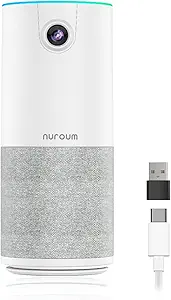 | Best All-in-One for Small, Hybrid Meetings | Resolution: 1080P@30fps | Field of View: 90° | Microphone: 4 noise-canceling MEMS mics | VIEW ON AMAZON | See Our Full Breakdown |
| Insta360 Link 2 4K Webcam for PC/Mac with AI Tracking and HDR |  | Best Overall for Versatile Professional Use | Sensor: 1/2″ | Resolution: 4K | Features: AI Tracking, HDR, Gesture Control, Noise-Canceling Mic, Auto Focus, Bokeh, DeskView, Whiteboard Mode | VIEW ON AMAZON | See Our Full Breakdown |
| Webcam for PC, HD 1080P USB Plug-and-Play Computer Web Camera, Ideal for Video Calls, Streaming, and Gaming |  | Best for Simplicity and Compatibility | Resolution: 1080P HD | Connection: USB 2.0/3.0 | Frame Rate: 30 fps | VIEW ON AMAZON | See Our Full Breakdown |
| OBSBOT Tiny 2 Lite 4K Webcam for PC, AI Tracking PTZ Streaming Camera |  | Best for Advanced Content Creators and Streamers | Sensor: 1/2″ CMOS | Resolution: 4K | Frame Rate: 60 FPS | VIEW ON AMAZON | See Our Full Breakdown |
| Logitech C920x HD Pro PC Webcam 1080p/30fps with Light Correction and Dual Mics |  | Best for Reliable, Everyday Use | Resolution: 1080p/30fps | Light Correction: Yes | Autofocus: Yes | VIEW ON AMAZON | See Our Full Breakdown |
| Insta360 Link 2C 4K Webcam for PC/Mac |  | Best for Creative and Dynamic Presentations | Sensor: 1/2″ | Resolution: 4K | HDR: Yes | VIEW ON AMAZON | See Our Full Breakdown |
| Anker PowerConf C200 2K Webcam for PC and Mac | 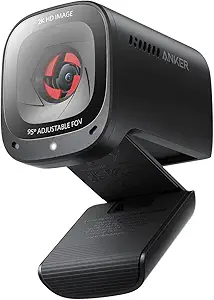 | Best Overall for Versatile Professional Use | Resolution: 2K Ultra-Clear | Microphone: Dual mics with AI Noise Cancellation | Low-Light Performance: Yes | VIEW ON AMAZON | See Our Full Breakdown |
| Logitech Brio 101 Full HD 1080p Webcam for Streaming and Meetings – Black |  | Best Value for Basic Travel Meetings | Resolution: 1080p Full HD | Auto-Light Correction: Yes | Built-in Microphone: Yes | VIEW ON AMAZON | See Our Full Breakdown |
| portable webcam for travel meeting | Resolution | Compatibility |
|---|---|---|
| Jabra PanaCast 20 Conferencing | 4K Ultra-HD | — |
| NexiGo N60 1080P Webcam with M | 1920 x 1080 at 30fps | USB 2.0/3.0, Mac OS X 10.7+, Windows 7/8/10/11 |
| j5create 360 Degree All Around | — | — |
| OBSBOT Meet 2 4K Webcam for PC | 4K UHD | — |
| NUROUM C10 1080P Conference We | 1080P@30fps | — |
| Insta360 Link 2 4K Webcam for | 4K | Windows, Mac |
| Webcam for PC | 1080P HD | Windows XP/7/8/10/11, Mac |
| OBSBOT Tiny 2 Lite 4K Webcam f | 4K | PC, Laptop, Streaming platforms |
| Logitech C920x HD Pro PC Webca | 1080p/30fps | Windows 11, Mac, Nintendo Switch |
| Insta360 Link 2C 4K Webcam for | 4K | PC and Mac, Windows, Zoom, Teams, Twitch |
| Anker PowerConf C200 2K Webcam | 2K Ultra-Clear | Windows 7 or later, macOS 10.11 or later |
| Logitech Brio 101 Full HD 1080 | 1080p Full HD | — |
More Details on Our Top Picks
Jabra PanaCast 20 Conferencing Camera – 4K Ultra-HD, AI-Powered Zoom & Lighting Optimization
The Jabra PanaCast 20 stands out for delivering near-professional 4K quality in a portable form, making it ideal for frequent travelers who need sharp visuals without sacrificing quality. Its AI-powered zoom and adaptive lighting create clear, well-framed images even in challenging environments, surpassing the standard 1080p options like the NexiGo N60. However, its reliance on USB-A to USB-C limits compatibility with some modern devices, and it lacks an integrated microphone, so you’ll need a separate audio solution. Compared to bulkier setups, this webcam offers a sleek, lightweight design with a protective case, perfect for those prioritizing high-quality video on the go. The main tradeoff is that it’s primarily a visual upgrade; for complete conferencing, a dedicated microphone remains necessary.
Pros:- Exceptional 4K Ultra-HD resolution for sharp video quality
- AI-driven zoom and lighting optimize image automatically
- Compact design with protective carrying case
Cons:- Limited to USB-A to USB-C connection, reducing compatibility
- No built-in microphone, requiring additional audio equipment
Best for: Travelers who need crisp, professional-quality video with minimal fuss and are willing to carry a dedicated mic separately.
Not ideal for: Users expecting an all-in-one solution with integrated audio and simple plug-and-play that works seamlessly across all devices without adapters.
- Resolution:4K Ultra-HD
- Camera Megapixels:13 MP
- Weight:100 g
- Connectivity:USB-A to USB-C
- Included Accessories:Protective Carry Case
Our verdict“This webcam is best for professionals who prioritize top-tier visuals and can manage separate audio accessories.”
NexiGo N60 1080P Webcam with Microphone, Privacy Cover, and Software Control
The NexiGo N60 offers reliable 1080p video at a budget-friendly price, making it a practical choice for travelers who want decent quality without extra frills. Its built-in noise-canceling microphone improves audio clarity, and the privacy cover adds security for on-the-go use, outperforming basic webcams that lack these features like the NUROUM C10. While it’s compatible with most operating systems and USB standards, it doesn’t support gaming consoles and might require firmware updates for optimal audio performance. Its straightforward plug-and-play design makes setup quick, but it doesn’t offer the ultra-high resolution or AI features found on more premium models like the OBSBOT Meet 2. It’s a solid choice for everyday remote meetings with minimal hassle.
Pros:- Clear 1080p video quality suitable for most meetings
- Built-in noise-canceling microphone enhances call clarity
- Privacy cover adds security for travel use
- Plug-and-play setup with broad OS support
Cons:- Limited to 1080p resolution, not ideal for high-detail needs
- Firmware updates may be necessary for optimal audio
Best for: Travelers seeking a dependable, easy-to-use webcam for regular video calls on laptops or desktops, especially those on a budget.
Not ideal for: Power users wanting 4K quality or advanced AI framing features for high-stakes professional presentations.
- Resolution:1920 x 1080 at 30fps
- Lens:3.6mm glass lens
- Microphone:Built-in noise-canceling
- Compatibility:USB 2.0/3.0, Mac OS X 10.7+, Windows 7/8/10/11
- Privacy Cover:Yes
Our verdict“This webcam provides reliable, decent-quality video for travelers prioritizing affordability and simplicity.”
j5create 360 Degree All Around Meeting Webcam with 1080P HD Camera and Microphone
The j5create 360° Webcam excels at capturing entire rooms or wide areas, making it perfect for small team meetings or collaborative sessions on the move. Its 1080p resolution ensures decent clarity, though it doesn’t match the sharpness of 4K options like the PanaCast 20. Its omnidirectional microphone picks up voices from all directions, useful in dynamic environments, but may require app permissions and firmware updates for optimal operation—similar to the NUROUM C10 but with broader coverage. This camera’s multiple display modes and full 360° view make it less suitable for tight, individual-focused meetings but incredibly useful for capturing group interactions without needing multiple devices. Its lack of specific privacy features could be a concern for security-conscious users.
Pros:- Provides full 360° coverage for group meetings
- High-quality 1080p resolution for clear visuals
- Plug-and-play compatibility with major conferencing apps
Cons:- Requires app permissions and firmware updates for best performance
- Limited low-light performance info available
Best for: Travelers conducting small group meetings or team check-ins in varied locations where capturing a wide field of view is essential.
Not ideal for: Solo professionals or those needing detailed, close-up video for individual tasks, as the wide-angle can distort images.
- Video Resolution:1080P HD
- Field of View:360°
- Microphone:High Fidelity Omnidirectional
- Connectivity:USB-C
- Display Modes:Six modes
Our verdict“This webcam is ideal for small team or collaborative travelers needing broad room coverage and easy setup.”
OBSBOT Meet 2 4K Webcam for PC with AI Framing, Autofocus, Gesture Control, HDR, Dual Microphones, 60 FPS
The OBSBOT Meet 2 offers a compact yet powerful 4K solution with AI framing, autofocus, HDR, and gesture control, making it a versatile choice for professionals who want premium features in a portable form. Its 60 FPS frame rate delivers smooth video, outperforming many 4K webcams that max out at 30 fps, like the Jabra PanaCast 20. Its AI framing keeps subjects perfectly centered, and the dual microphones provide clear audio, but extended use can cause it to heat up, which might affect performance. While it provides excellent image quality and user-friendly AI controls, some customization options are limited, and it requires a USB-C port for optimal operation. This model best suits users who need high-quality visuals combined with interactive features for dynamic travel meetings.
Pros:- Sharp 4K resolution with 60 FPS for smooth, detailed video
- AI framing and autofocus for professional composition
- Gesture control enhances user interaction
Cons:- Can overheat during long sessions
- Limited customization options in software
Best for: Travel professionals and streamers who require high-fidelity video with intelligent framing and easy gesture controls.
Not ideal for: Users needing extensive software customization or those with older devices lacking USB-C ports, as it may not perform optimally otherwise.
- Sensor:1/2″ CMOS
- Resolution:4K UHD
- Frame Rate:60 FPS
- Microphones:Dual omni-directional
- Connectivity:USB-C
Our verdict“This webcam is best for those who want premium 4K quality and smart features in a portable design for travel use.”
NUROUM C10 1080P Conference Webcam with Microphone and Speaker
The NUROUM C10 combines camera, microphone, and speaker into a single portable device, simplifying setup for small meetings or hybrid work environments. Its 1080p camera with a 90° wide-angle lens provides a broad view suitable for team collaborations, outperforming basic webcams that lack integrated audio components like the NexiGo N60. Its all-in-one design means fewer cables and less clutter, ideal for quick setups on the move. However, its voice pickup range of 10 feet limits use in larger spaces, and firmware updates are sometimes necessary for advanced features, similar to other integrated solutions. While it’s perfect for small, intimate meetings, larger groups or high-fidelity audio demands may require additional equipment.
Pros:- All-in-one camera, microphone, and speaker setup
- Wide 90° field of view for small groups
- Easy plug-and-play with broad platform compatibility
Cons:- Limited microphone range at 10 feet
- Requires firmware updates for some features
Best for: Travelers needing a compact, integrated video solution for small team or hybrid meetings in confined spaces.
Not ideal for: Larger teams or those requiring extensive microphone range and high-fidelity speaker output for bigger rooms.
- Resolution:1080P@30fps
- Field of View:90°
- Microphone:4 noise-canceling MEMS mics
- Voice Pickup Range:10 ft
- Connectivity:USB-C, USB-A adapter included
Our verdict“This all-in-one device suits travelers who prioritize simplicity and compactness for small meetings.”
Insta360 Link 2 4K Webcam for PC/Mac with AI Tracking and HDR
The Insta360 Link 2 stands out for delivering high-quality 4K video with HDR and exceptional low-light performance, making it ideal for travel professionals who need crisp visuals regardless of lighting conditions. Its AI tracking and gesture controls add a layer of hands-free convenience that’s hard to match, especially compared to the simpler Logitech C920x. However, the Insta360’s reliance on software setup and incompatibility with ARM-based Windows systems can be a hurdle for some users. Its professional-grade audio with noise cancellation complements its video capabilities, making it a solid choice for serious remote work or streaming. The main tradeoff is its limited compatibility, requiring a bit more technical setup, but this is balanced by its superior video quality and features.
Pros:- Exceptional 4K video with HDR and low-light performance
- Advanced AI tracking and gesture controls for hands-free operation
- Professional-grade noise-canceling audio
Cons:- Limited compatibility with ARM-based Windows systems
- Requires dedicated software setup for full feature access
Best for: Travel professionals or streamers needing top-tier 4K quality with AI tracking and versatile modes
Not ideal for: Users seeking plug-and-play simplicity or with ARM-based Windows devices, due to compatibility issues
- Sensor:1/2″
- Resolution:4K
- Features:AI Tracking, HDR, Gesture Control, Noise-Canceling Mic, Auto Focus, Bokeh, DeskView, Whiteboard Mode
- Compatibility:Windows, Mac
- Privacy Mode:Automatic tilt down after inactivity
Our verdict“This webcam is perfect for travel professionals who prioritize high-quality visuals and advanced tracking but don’t mind some setup complexity.”
Webcam for PC, HD 1080P USB Plug-and-Play Computer Web Camera, Ideal for Video Calls, Streaming, and Gaming
This 1080P webcam offers straightforward, reliable video quality suitable for most travel meetings, especially for users who value ease of use over ultra-high resolution. Its plug-and-play setup works seamlessly across Windows and Mac, contrasting with the more feature-rich but complex options like the Insta360 Link 2. While it handles basic low-light correction well, it lacks features like AI tracking or gesture controls, making it less suited for dynamic presentations or hands-free operation. Its broad compatibility and simplicity make it perfect for quick setups, but those needing advanced framing will find it limited. It’s a reliable choice for straightforward video calls, especially if portability and ease are priorities.
Pros:- Easy plug-and-play setup compatible with multiple OS
- Reliable 1080P video quality for clear calls
- Automatic low-light correction for versatility
Cons:- No built-in microphone included
- Limited to 30 fps, not ideal for fast-paced streaming
Best for: Travel users who want dependable 1080p quality without fuss or extra features
Not ideal for: Content creators or professionals needing AI tracking or multi-mode shooting, due to its basic feature set
- Resolution:1080P HD
- Connection:USB 2.0/3.0
- Frame Rate:30 fps
- Cable Length:1.5 meters
- Compatibility:Windows XP/7/8/10/11, Mac
- Light Adjustment:Automatic low-light correction
Our verdict“This webcam suits travelers seeking simple, dependable HD video without the complexity of advanced features.”
OBSBOT Tiny 2 Lite 4K Webcam for PC, AI Tracking PTZ Streaming Camera
The OBSBOT Tiny 2 Lite offers a compelling mix of 4K resolution at 60 FPS with AI tracking and gesture control, making it well-suited for professional streamers or frequent travelers who want to look polished while staying hands-free. Its multiple shooting modes and customizable presets give it a flexibility that surpasses the basic Logitech C920x, especially for dynamic content or multi-angle needs. However, the lack of detailed info on its microphone quality and the potential need for technical knowledge for SDK customization are key considerations. This model excels in smooth, high-res streaming but requires a bit more setup and familiarity to maximize its potential, making it ideal for tech-savvy users or content creators on the go.
Pros:- Smooth 4K resolution at 60 FPS for high-quality streaming
- Advanced AI tracking and gesture control for hands-free operation
- Multiple shooting modes and customizable presets
Cons:- Limited publicly available info on microphone quality
- May require technical knowledge for SDK and hotkey customization
Best for: Professional streamers or content creators needing high-quality 4K video with AI tracking and multiple modes
Not ideal for: Travelers seeking a simple, plug-and-play webcam or those uncomfortable with technical setup
- Sensor:1/2″ CMOS
- Resolution:4K
- Frame Rate:60 FPS
- Tracking Modes:Upper body, hand tracking
- Features:HDR, Microphones, Preset modes, SDK support
- Compatibility:PC, Laptop, Streaming platforms
Our verdict“This webcam is best for tech-savvy users and content creators who need high-res, smooth video with advanced tracking features.”
Logitech C920x HD Pro PC Webcam 1080p/30fps with Light Correction and Dual Mics
The Logitech C920x is a dependable choice for everyday travel meetings, offering solid 1080p video at 30 fps paired with effective light correction and dual microphones for natural sound. Compared to the Insta360 Link 2, it lacks AI tracking and advanced modes but shines in simplicity and broad compatibility, including with devices like the Nintendo Switch. Its autofocus and light correction help maintain a clear image in fluctuating lighting conditions, though the absence of a privacy shutter or zoom features limits its customization. This webcam makes sense for users who prioritize straightforward functionality and reliable video quality without the need for complex setup or extra features.
Pros:- Reliable 1080p/30fps video quality
- Automatic light correction for variable lighting
- Dual stereo microphones for natural audio
Cons:- No privacy shutter included
- Lacks zoom or pan features
Best for: Travelers or remote workers who want a straightforward, dependable webcam for regular meetings
Not ideal for: Content creators or streamers needing AI tracking, multiple modes, or high frame rates
- Resolution:1080p/30fps
- Light Correction:Yes
- Autofocus:Yes
- Microphones:Dual stereo
- Compatibility:Windows 11, Mac, Nintendo Switch
- Additional Software:3-month XSplit VCam license
Our verdict“This webcam suits those seeking a simple, reliable device for daily video calls without the need for advanced features.”
Insta360 Link 2C 4K Webcam for PC/Mac
The Insta360 Link 2C shares many features with the Link 2 but adds specialized modes like DeskView and Whiteboard, making it ideal for creative professionals or educators on the move. Its auto framing, HDR, and AI noise-canceling mic ensure clear visuals and audio during travel, whether for streaming or business meetings. The 4K resolution and low-light performance surpass many basic webcams, and the mode options cater well to presentations or collaborative work. The main limitation is its incompatibility with ARM-based Windows systems and Windows Hello Face Recognition, which may restrict some users. Still, for those needing a versatile webcam with creative modes, the Link 2C offers a compelling package.
Pros:- High-quality 4K video with HDR and low-light support
- Auto framing and gesture control for dynamic use
- Specialized modes for presentation and collaboration
Cons:- Incompatibility with ARM-based Windows systems
- Currently incompatible with Windows Hello Face Recognition
Best for: Travelers who deliver presentations or collaborative sessions requiring creative modes like DeskView or Whiteboard
Not ideal for: Users with ARM Windows devices or those seeking plug-and-play simplicity, due to compatibility issues
- Sensor:1/2″
- Resolution:4K
- HDR:Yes
- Auto Framing:Yes
- AI Noise-Canceling Mic:Yes
- Modes:DeskView, Whiteboard
- Compatibility:PC and Mac, Windows, Zoom, Teams, Twitch
Our verdict“This webcam targets professionals needing versatile, creative features for travel presentations but requires compatible hardware.”
Anker PowerConf C200 2K Webcam for PC and Mac
The Anker PowerConf C200 stands out for delivering sharp 2K video quality, which surpasses the standard Full HD offerings like the Logitech Brio 101, making it ideal for high-detail meetings and presentations. Its AI noise-canceling microphones ensure clear audio, even in noisy environments, a significant advantage over basic built-in mics. The webcam’s low-light performance is effective without additional lighting, and customizable viewing angles provide flexible framing options. However, it relies on software for angle adjustments and lacks a physical mute button for the microphone, which could be inconvenient during quick privacy needs. Compared to simpler webcams, the C200 offers more professional features but requires compatibility with specific operating systems. This pick makes the most sense for remote workers or small teams seeking high-quality, adaptable video without excessive complexity.
Pros:- High-quality 2K video resolution for detailed clarity
- Effective AI noise cancellation for clear audio
- Good low-light performance without extra lighting
- Customizable viewing angles for flexible framing
Cons:- Requires software for adjusting viewing angles
- Limited to Windows and macOS, no Linux or mobile support
- No built-in microphone mute button for quick privacy
Best for: Professionals who need high-resolution video and flexible framing for travel meetings
Not ideal for: Travelers who prefer plug-and-play simplicity without software dependencies or are using unsupported operating systems
- Resolution:2K Ultra-Clear
- Microphone:Dual mics with AI Noise Cancellation
- Low-Light Performance:Yes
- Viewing Angles:65°, 78°, 95°
- Compatibility:Windows 7 or later, macOS 10.11 or later
- Privacy Cover:Yes
Our verdict“This webcam is best suited for professionals who need detailed video quality and flexible features in a portable package.”
Logitech Brio 101 Full HD 1080p Webcam for Streaming and Meetings – Black
The Logitech Brio 101 offers reliable 1080p video quality with auto-light correction, making it a solid choice for those who prioritize ease of use and affordability. Its built-in microphone provides clear audio for most typical meetings, and the privacy shutter adds a quick security feature. Its plug-and-play USB-A connection ensures straightforward setup, especially for users who don’t want to deal with additional drivers or software. Compared to the Anker C200, the Brio 101 sacrifices some resolution and advanced features but makes up for it with simplicity and cost-effectiveness. The basic color options might not match all travel setups, and it lacks USB-C compatibility, which could be a drawback for newer devices. This webcam is ideal for travelers who need a dependable, no-fuss option for occasional meetings.
Pros:- High-quality 1080p video with auto-light correction
- Built-in microphone with clear audio
- Privacy shutter for quick security
- Easy plug-and-play setup
Cons:- Limited to USB-A connection, no USB-C support
- Basic color options may not suit all setups
- Lower resolution than 2K or 4K options
Best for: Travelers seeking a straightforward, budget-friendly webcam for regular video calls
Not ideal for: Power users needing ultra-high resolution or advanced framing features, or those with USB-C-only devices
- Resolution:1080p Full HD
- Auto-Light Correction:Yes
- Built-in Microphone:Yes
- Privacy Shutter:Yes
- Connection:USB-A
- Made with Recycled Plastic:77% post-consumer plastic
Our verdict“This webcam suits travelers who want a reliable, easy-to-use device without extra fuss or high cost.”

How We Picked
This lineup was curated based on a combination of performance, portability, usability, build quality, and value. We prioritized webcams that are explicitly designed or suitable for travel, meaning they are lightweight, compact, and easy to set up in different environments. Features like high resolution, AI framing, and integrated audio were key factors, as they directly impact meeting quality in mobile contexts. We also considered user-friendly controls and durability, ensuring these webcams can handle frequent transport without issues. Ultimately, the ranking balances these factors to highlight options for various budgets and professional needs, from entry-level to premium models.Factors to Consider When Choosing Portable Webcam For Travel Meetings
Choosing the right portable webcam for travel meetings involves evaluating several key factors. Beyond basic video quality, consider how easily the device can be packed, set up, and operated in different environments. Features like AI tracking or built-in microphones can greatly improve your experience but may add size or cost. It’s also important to assess compatibility with your devices, power requirements, and how future-proof the model is. Being aware of common pitfalls, like overspending on unnecessary features or selecting models that are too bulky, can help you make smarter choices.Portability and Size
For travel, the primary consideration is how compact and lightweight the webcam is. Larger models with extensive features may look appealing but can become cumbersome to carry around. Look for slim, foldable designs or those with dedicated travel cases. Keep in mind that smaller devices might have fewer ports or features, so balance size with your functional needs. A portable webcam should fit easily into a bag or pocket without sacrificing too much image quality or usability.
Video Quality and Resolution
High resolution, such as 4K or 1080p, ensures clear video during meetings, especially important when presenting or sharing detailed visuals. However, higher resolution models typically demand more bandwidth and processing power. For frequent travel, 1080p is usually sufficient and more manageable, but if you prioritize crisp visuals and your setup can handle it, a 4K webcam may be worth the extra size and cost. Consider your typical meeting environment—good lighting can also mitigate the need for ultra-high resolution.
AI and Autofocus Features
AI-driven features like auto-framing, tracking, and gesture control can make meetings feel more professional without requiring manual adjustments. These features are especially valuable when working in unpredictable environments or when you need to move around during calls. However, they often come at a higher price and might increase the device’s size or power consumption. Decide if these features are worth the added complexity or if a straightforward webcam will suffice for your needs.
Built-in Audio and Compatibility
Clear audio is vital for effective communication, so webcams with integrated microphones or speakers can streamline your setup. Check whether these features meet your quality expectations—some models include noise-canceling mics, which are great for noisy environments. Compatibility is another key factor; ensure the webcam works seamlessly with your laptop, tablet, or smartphone, and that it supports your preferred video conferencing platforms. Universal plug-and-play USB connections typically make setup easier and more reliable.
Battery Life and Power
If you plan to use your webcam away from power sources, consider models with built-in batteries or low power consumption. While many webcams are powered via USB, some advanced models may include their own batteries, allowing more flexible positioning. Be mindful that longer battery life often increases size and weight, so weigh this against your portability needs. Also, check if the device requires additional accessories like external power banks for extended use.
Frequently Asked Questions
Can I use a portable webcam with my smartphone?
Many portable webcams are designed for use with computers, but some models support mobile devices through compatible apps or adapters. Ensure the webcam explicitly states mobile compatibility or offers an app for your device. Using a webcam with a smartphone might require additional accessories, such as USB-C or Lightning adapters. Keep in mind that performance and ease of setup can vary, so check user reviews for mobile use cases before purchasing.
How does AI tracking impact travel webcam performance?
AI tracking significantly enhances the user experience by automatically following your movements and keeping you centered in the frame. This feature reduces the need for manual adjustments during meetings, especially useful when working in dynamic environments or small spaces. However, AI tracking can increase the device’s size and power consumption, and may add to the cost. For frequent travelers who move around during calls, this feature can be a real time-saver.
Is 4K resolution necessary for travel meetings?
While 4K resolution offers sharper images, it isn’t always necessary for effective communication. 1080p webcams are generally sufficient for most travel meetings, especially when bandwidth or processing power is limited. Higher resolution models tend to be bulkier and more expensive, and may require faster internet connections. Consider your typical meeting setup—if you often share detailed visuals or want the highest quality, then a 4K webcam can be a good investment.
What is the best way to protect my webcam during travel?
Using a dedicated travel case or protective pouch is the simplest way to safeguard your webcam. Many models come with or support custom cases designed to prevent scratches and damage. Avoid leaving the webcam loose in your bag, especially if you travel frequently or on rough routes. Additionally, some webcams feature privacy covers that can be quickly closed when not in use, adding an extra layer of protection during transit.
How important is audio quality in a portable travel webcam?
Audio quality often rivals video in importance, as clear communication depends heavily on good sound. Look for webcams with built-in microphones that include noise suppression and echo cancellation. If your meetings tend to be noisy, investing in models with quality microphones can make a noticeable difference. For maximum flexibility, consider combining a good webcam with a portable external microphone if your budget allows.
Conclusion
For most travelers seeking a balance of quality and portability, the Jabra PanaCast 20 offers outstanding 4K video with AI features, making it the top overall choice. If you’re on a tighter budget or prefer a straightforward plug-and-play experience, the NexiGo N60 provides reliable 1080p performance at a lower price. For those who prioritize advanced AI tracking and versatile features, the Insta360 Link 2 shines as a premium option. Beginners or infrequent travelers will benefit from simpler, more affordable models, while power users or professionals should consider higher-end options with AI capabilities. Ultimately, your decision should align with your typical travel environment, meeting needs, and budget constraints.
Columbus Day / Indigenous Peoples' Day Picks
long weekend sales
As an affiliate, we earn on qualifying purchases.