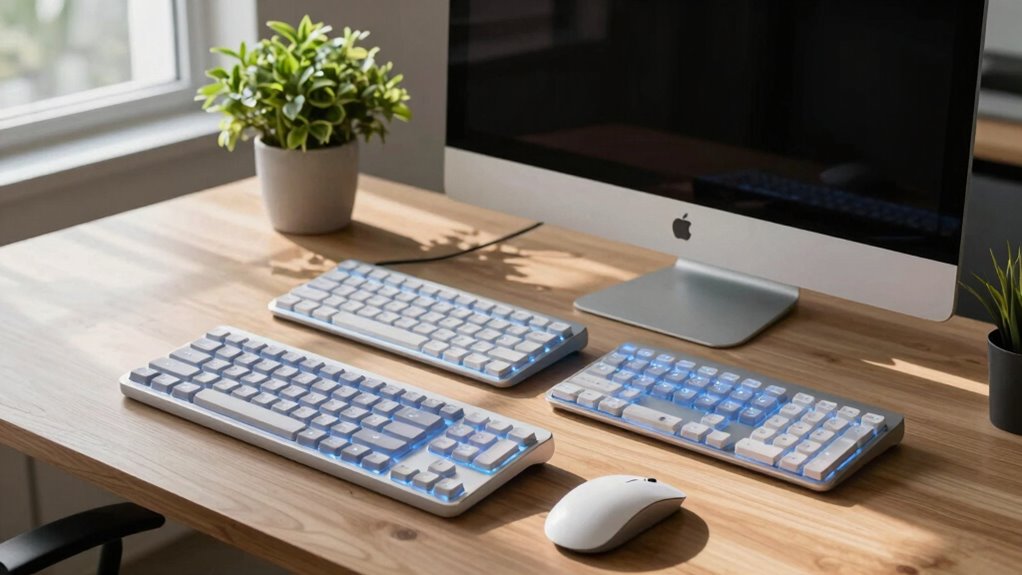
Searching for a split keyboard for Mac can be daunting, with options ranging from ergonomic designs to highly customizable mechanical models. The Kinesis mWave stands out as the best overall pick due to its ergonomic layout and programmability, perfect for long typing sessions. For those seeking wireless convenience, the Kinesis Freestyle2 Blue offers reliable Bluetooth connectivity with a split design that reduces strain. If budget is a concern, the Macally Wired Ergonomic Keyboard provides solid features at a lower price point. Keep in mind that tradeoffs often involve compromises between build quality, customization, and price. Continue reading for a detailed breakdown of each option to find the best fit for your needs.

Get comfort and recovery gear delivered free with Prime
- Fast, free delivery on millions of items
- Prime Video, Amazon Music and more included
- Member-only deals all year
Complete the kit



Key Takeaways
- Ergonomic separation and adjustable configurations are key for comfort during extended use.
- Wireless models offer greater flexibility but may trade off some responsiveness or battery life.
- Mechanical switches improve typing feel but tend to increase noise and cost.
- Compatibility with Mac-specific keys and shortcuts varies across models, affecting usability.
- Higher-priced options typically offer more customization, build quality, and advanced features.
| Kinesis mWave Ergonomic Keyboard for Mac (White) with Mechanical Switches, Bluetooth & USB, Programmable, Backlit |  | Best Overall for Customizable Ergonomics and Comfort | Connectivity: Bluetooth & USB | Switch Type: Mechanical | Backlit: Yes | VIEW ON AMAZON | See Our Full Breakdown |
| Kinesis Freestyle2 Ergonomic Keyboard with VIP3 Lifters for Mac (9″ Separation) |  | Best for Adjustable Ergonomic Separation and Tenting | Separation: up to 9 inches | Tenting angles: 5, 10, or 15 degrees | Layout: Standard Mac | VIEW ON AMAZON | See Our Full Breakdown |
| Kinesis Freestyle2 Blue Wireless Ergonomic Keyboard for Mac |  | Best Wireless with Multi-Device Pairing and Long Battery Life | Design: Split ergonomic, up to 9 inches separation | Connectivity: Bluetooth wireless | Battery: Rechargeable Lithium polymer, up to 6 months | VIEW ON AMAZON | See Our Full Breakdown |
| Macally Wired Ergonomic Keyboard for Mac with Backlit Keys and Wrist Rest | 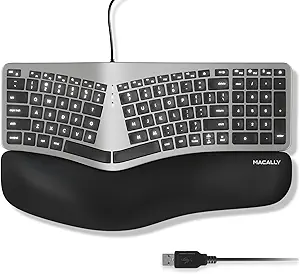 | Best Wired Ergonomic Keyboard for Plug-and-Play Comfort | Compatibility: MacBook Pro/Air, iMac, Mac mini | Backlit Keys: Yes, LED with 3 brightness levels | Connection: Wired USB-A | VIEW ON AMAZON | See Our Full Breakdown |
| Macally Ergonomic Wireless & Wired Split Keyboard for Mac with Rechargeable Battery |  | Best Multi-Device Wireless and Wired Hybrid for Mac | Compatible Devices: Macbook, Macbook Pro, iMac, iPad, iPhone | Connectivity Technology: Bluetooth, USB-C/A | Switch Type: Scissor-switch | VIEW ON AMAZON | See Our Full Breakdown |
| Kinesis Freestyle Edge RGB Plus Split Mechanical Keyboard with Hotswap Tactile Switches, RGB Lighting, Ergonomic Design, Detachable Palm Support, Fully Programmable, Mac Keycaps, Lift Kit |  | Best Overall for Power Users and Customization | Compatible Devices: PC | Connectivity Technology: USB-A | Additional Features: Fully Programmable, RGB Lighting, Hotswap Tactile Switches, Lift Kit | VIEW ON AMAZON | See Our Full Breakdown |
| Macally Wired Ergonomic Keyboard for Mac – USB Hub, Backlit Keys, Dual USB C + A Plug, Split Design, Padded Wrist Cushion – Space Gray |  | Best for Budget-Conscious Mac Users Needing Basic Ergonomics | Connectivity: Wired USB | Backlit Keys: Yes, white LED with 3 brightness levels | Number of Keys: 100 | VIEW ON AMAZON | See Our Full Breakdown |
| Cloud Nine ErgoPRO Full-Size Mechanical Split Ergonomic Keyboard for Mac |  | Best for Long-Term, Heavy-Duty Use and Customization | Compatible Devices: MAC, PC | Connectivity Technology: USB-A, USB-C | Additional Features: Ergonomic, Split Keyboard, RGB Lighting, Hot-swappable Switches | VIEW ON AMAZON | See Our Full Breakdown |
| Kinesis Freestyle2 USB Keyboard for Mac (9″ Standard Separation), Black |  | Best for Adjustable Comfort and Simplicity | Compatible Devices: Mac OS X 10.4 or newer, iOS Devices | Connectivity: USB | Number of Keys: 94 | VIEW ON AMAZON | See Our Full Breakdown |
| Kinesis USB Freestyle2 Keyboard for Mac (20″ Extended Separation) |  | Best for Maximum Separation and Ergonomic Customization | Design: Split ergonomic with up to 20″ separation | Layout: Standard Mac layout with hotkeys | Switch Type: Low-force membrane switches | VIEW ON AMAZON | See Our Full Breakdown |
| split keyboard for mac | Switch Type |
|---|---|
| Kinesis mWave Ergonomic Keyboa | Mechanical |
| Kinesis Freestyle2 Ergonomic K | Low-force membrane |
| Kinesis Freestyle2 Blue Wirele | — |
| Macally Wired Ergonomic Keyboa | Scissor switches |
| Macally Ergonomic Wireless & W | Scissor-switch |
| Kinesis Freestyle Edge RGB Plu | Mechanical |
| Macally Wired Ergonomic Keyboa | — |
| Cloud Nine ErgoPRO Full-Size M | Tactile |
| Kinesis Freestyle2 USB Keyboar | — |
| Kinesis USB Freestyle2 Keyboar | Low-force membrane switches |
More Details on Our Top Picks
Kinesis mWave Ergonomic Keyboard for Mac (White) with Mechanical Switches, Bluetooth & USB, Programmable, Backlit
The Kinesis mWave stands out for its wave-shaped layout and padded palm support, offering a high level of ergonomic comfort that benefits prolonged typing sessions. Its extensive programmability allows for deep customization, surpassing even the flexibility of the Kinesis Freestyle2 Blue. While it delivers on comfort and connection options with Bluetooth and USB, it requires batteries, which can be a drawback for those seeking a purely wireless experience. Compared to the Macally Wired Ergonomic Keyboard, it sacrifices wired simplicity for wireless versatility, making it ideal for users prioritizing comfort and customization over plug-and-play convenience. The lack of specified battery life or wireless range could be a concern for mobile users, but overall, this keyboard is best suited for dedicated Mac users who want a personalized ergonomic solution.
Pros:- Ergonomic wave layout with padded palm support for sustained comfort
- Multiple connection options via Bluetooth and USB
- Highly programmable with extensive key customization
Cons:- Requires batteries, adding to maintenance
- Limited to Mac compatibility, reducing versatility for Windows users
- No specified wireless range or battery life information
Best for: Mac users who prioritize comfort, extensive programmability, and flexible connectivity for their daily work or creative tasks.
Not ideal for: Users needing a lightweight, entirely wireless setup with long battery life or those who prefer wired simplicity without batteries.
- Connectivity:Bluetooth & USB
- Switch Type:Mechanical
- Backlit:Yes
- Compatibility:macOS
- Color:White
- Includes:USB C-to-A cable, magnetic feet, batteries, quick start guide
Our verdict“This pick suits Mac users seeking a highly customizable, ergonomic keyboard with versatile connectivity, accepting some tradeoffs in convenience and battery management.”
Kinesis Freestyle2 Ergonomic Keyboard with VIP3 Lifters for Mac (9″ Separation)
The Kinesis Freestyle2 excels in offering adjustable separation up to 9 inches and multiple tenting angles, making it ideal for users who want a tailored ergonomic fit. Its standard Mac layout with hotkeys simplifies transition for Apple users, but it requires some initial setup to find the most comfortable splay and tenting angles. Compared with the Kinesis mWave, it offers more flexibility in physical configuration but lacks the programmable depth of the mWave. This model is better suited for those who prefer to customize their keyboard’s physical arrangement over advanced key remapping or backlighting. Its reliance on membrane switches and the need for assembly are potential downsides for those seeking a plug-and-play experience or a more durable switch type.
Pros:- Adjustable separation and tenting for personalized ergonomic comfort
- Standard Mac layout with hotkeys for ease of use
- Includes accessories like VIP3 tenting and palm supports
Cons:- Requires assembly and adjustment for best ergonomics
- Limited to Mac layout, some compatibility issues with Windows
- No backlit keys or advanced programmability
Best for: Mac users who want a highly adjustable ergonomic keyboard that can be fine-tuned for maximum comfort and customization.
Not ideal for: Users seeking a ready-to-use, low-maintenance keyboard without assembly or those preferring mechanical switches.
- Separation:up to 9 inches
- Tenting angles:5, 10, or 15 degrees
- Layout:Standard Mac
- Switch type:Low-force membrane
- Included accessories:VIP3 tenting, palm supports
Our verdict“This model fits Mac users who want a highly customizable physical ergonomic setup, accepting some effort in assembly and setup.”
Kinesis Freestyle2 Blue Wireless Ergonomic Keyboard for Mac
The Kinesis Freestyle2 Blue provides the convenience of wireless connectivity with Bluetooth and can pair with multiple devices, making it ideal for Mac users juggling different Apple devices. Its separation up to 9 inches allows for a natural, ergonomic position, while the rechargeable battery offers up to six months of use—far exceeding many competitors. Compared to the wired Macally Wired Ergonomic Keyboard, it offers freedom of movement but sacrifices the tactile feel of mechanical keys for membrane switches. Its lack of backlit keys might be a drawback for late-night work, and setup for optimal splay adjustment can take some time. This keyboard is best for Mac users who prioritize multi-device flexibility and long battery life over the tactile feedback of mechanical keys.
Pros:- Wireless Bluetooth connection supporting multiple devices
- Up to six months of rechargeable battery life
- Split ergonomic design for natural positioning
Cons:- No backlit keys, limiting visibility in dark settings
- Setup required to optimize splay and positioning
- Limited to Mac OS X 10.4+ and iOS
Best for: Mac users who want a wireless ergonomic keyboard with multi-device support and long-lasting battery life for flexible workspace setups.
Not ideal for: Those preferring mechanical switches or needing backlit keys for low-light environments, or Windows users looking for cross-platform compatibility.
- Design:Split ergonomic, up to 9 inches separation
- Connectivity:Bluetooth wireless
- Battery:Rechargeable Lithium polymer, up to 6 months
- Range:30 feet
- Compatibility:Mac OS X 10.4+, iOS
- Included:Linking cable, pivot tether, USB charging cable
Our verdict“Ideal for Mac users seeking a wireless, multi-device ergonomic keyboard with long battery life and flexible positioning, with some compromises on tactile feel and backlighting.”
Macally Wired Ergonomic Keyboard for Mac with Backlit Keys and Wrist Rest
The Macally Wired Ergonomic Keyboard provides a straightforward, wired solution with a split, curved design and padded wrist support that appeals to users seeking immediate comfort. Its backlit keys with adjustable brightness enhance usability in low-light environments, and the familiar Mac layout simplifies transitioning from other Apple peripherals. Compared to wireless options like the Kinesis Freestyle2 Blue, it offers a plug-and-play experience with no setup for wireless pairing, but at the cost of limited mobility. The wired connection might be restrictive for those who prefer a clutter-free workspace or need flexibility. Its design may feel bulky for users accustomed to slim keyboards, but it delivers reliable, out-of-the-box ergonomic support for Mac users who prioritize simplicity and comfort.
Pros:- Split and curved ergonomic design reduces fatigue
- Backlit keys with adjustable brightness for visibility
- Plug-and-play wired connection for instant use
Cons:- Wired connection limits mobility and workspace flexibility
- May require adaptation to the split layout over a few days
- Design may be bulkier than slim modern keyboards
Best for: Mac users seeking a reliable, wired ergonomic keyboard with backlit keys and immediate plug-and-play setup.
Not ideal for: Those who prioritize wireless connectivity or need a highly portable keyboard, or users who dislike wired setups and bulky designs.
- Compatibility:MacBook Pro/Air, iMac, Mac mini
- Backlit Keys:Yes, LED with 3 brightness levels
- Connection:Wired USB-A
- Layout:100-key MacOS with 16 shortcuts
- Switch Type:Scissor switches
- Wrist Support:Padded wrist rest
Our verdict“Best suited for Mac users who want a dependable, ergonomic wired keyboard with backlit keys and straightforward setup, accepting some workspace constraints.”
Macally Ergonomic Wireless & Wired Split Keyboard for Mac with Rechargeable Battery
The Macally Ergonomic Split Keyboard combines wireless and wired options, making it highly versatile for Mac users managing multiple devices. Its split, space-saving layout enhances comfort and allows easy switching between up to three devices via Bluetooth or USB-C/A, surpassing some single-device models like the Kinesis mWave in multi-device flexibility. The rechargeable battery lasts around two months, but it doesn’t support backlit keys, which could be limiting in low light. Its scissor-switch keys deliver a familiar feel, but some users might find the lack of backlighting inconvenient for late-night work. This keyboard makes the most sense for users who prioritize multi-device support and wireless flexibility over tactile feedback or backlit keys.
Pros:- Supports up to 3 devices via Bluetooth and USB-C/A
- Split ergonomic layout for comfortable typing
- Rechargeable battery with up to 2 months of use
Cons:- No backlit keys, limiting use in dark environments
- Limited to Mac ecosystem, not cross-platform
- Requires charging every 1-2 months depending on usage
Best for: Mac users who need a versatile, multi-device ergonomic keyboard with rechargeable power and wireless options, especially in multi-device workflows.
Not ideal for: Those who prefer backlit keys or require a keyboard primarily for Windows systems, as this model is optimized for Mac and lacks backlighting.
- Compatible Devices:Macbook, Macbook Pro, iMac, iPad, iPhone
- Connectivity Technology:Bluetooth, USB-C/A
- Switch Type:Scissor-switch
- Keyboard Layout:QWERTY
- Number of Keys:86
- Battery:500mAh rechargeable
Our verdict“Great for Mac users needing a flexible, rechargeable, multi-device ergonomic keyboard, accepting some limitations in lighting and cross-platform compatibility.”
Kinesis Freestyle Edge RGB Plus Split Mechanical Keyboard with Hotswap Tactile Switches, RGB Lighting, Ergonomic Design, Detachable Palm Support, Fully Programmable, Mac Keycaps, Lift Kit
The Kinesis Freestyle Edge RGB Plus stands out for its highly customizable, split mechanical design that reduces strain during marathon typing sessions. Unlike the Macally Wired Ergonomic Keyboard, which offers straightforward comfort, this model provides hotswap tactile switches, allowing users to tailor switch feel or replace them easily—ideal for enthusiasts or those who want a personalized experience. Its fully programmable keys enable deep customization, perfect for productivity or creative workflows. However, its bulkier form and higher price make it less suited for small desks or budget-conscious buyers. The RGB lighting adds visual flair but may be unnecessary for purely functional use. This pick suits power users who value flexibility and ergonomic comfort, even at the expense of portability.
Pros:- Highly customizable with fully programmable keys
- Hotswap tactile switches for easy maintenance and personalization
- Ergonomic split design reduces wrist strain during long sessions
- RGB lighting enhances aesthetic appeal
Cons:- Bulky footprint may clutter small desks
- Higher price point due to advanced features
- Requires Windows 10 or later, limiting Mac compatibility
Best for: Mac users who prioritize extensive customization, ergonomic comfort, and don’t mind a larger setup
Not ideal for: Users seeking a compact, lightweight keyboard or those with limited desk space
- Compatible Devices:PC
- Connectivity Technology:USB-A
- Additional Features:Fully Programmable, RGB Lighting, Hotswap Tactile Switches, Lift Kit
- Switch Type:Mechanical
- Layout:QWERTY
- Hand Orientation:Ambidextrous
Our verdict“This keyboard is best suited for power users and enthusiasts who want deep customization and ergonomic benefits despite its size and cost.”
Macally Wired Ergonomic Keyboard for Mac – USB Hub, Backlit Keys, Dual USB C + A Plug, Split Design, Padded Wrist Cushion – Space Gray
The Macally Wired Ergonomic Keyboard offers a straightforward split design with backlit keys and a built-in USB hub, making it a solid choice for those who want comfort without complexity. Compared to the Cloud Nine ErgoPRO, which provides full customization and mechanical switches, this model emphasizes simplicity and affordability. Its wired connection ensures reliable performance but limits portability, especially compared to wireless options. The padded wrist cushion and split layout help reduce repetitive strain, yet it lacks the advanced features like programmable keys or switch customization. This keyboard makes sense for Mac users who need an ergonomic setup on a tight budget and prefer plug-and-play simplicity.
Pros:- Ergonomic split design reduces wrist strain
- Built-in USB hub enhances connectivity options
- Backlit keys improve visibility in low light
- Compatible with multiple Apple devices without batteries
Cons:- Wired connection limits portability
- Lacks customization features or mechanical switches
- No wireless option available
Best for: Mac users seeking an ergonomic, wired keyboard with built-in USB ports for everyday work and comfort
Not ideal for: Power users wanting customizable or mechanical switches, or those preferring wireless setups
- Connectivity:Wired USB
- Backlit Keys:Yes, white LED with 3 brightness levels
- Number of Keys:100
- USB Ports:2 USB A, 1 USB C
- Design:Split ergonomic with padded wrist cushion
- Color:Space Gray
Our verdict“This keyboard is ideal for Mac users who want basic ergonomic comfort and versatile connectivity without extra complexity.”
Cloud Nine ErgoPRO Full-Size Mechanical Split Ergonomic Keyboard for Mac
The Cloud Nine ErgoPRO offers a full-size, highly customizable split mechanical keyboard that caters to serious Mac users who need comfort and durability. Its open-source QMK firmware and RGB lighting allow for deep personalization, surpassing the limited customization options of the Kinesis Freestyle Edge. Its aluminum frame and Kailh Box Brown switches provide a premium, durable build, but this also makes it more complex to set up—requiring some technical prowess. It’s not suited for users seeking plug-and-play simplicity or those on a budget. The absence of backlit keys and the higher cost could be deterrents, but for long-term, intensive use, it delivers unmatched durability and flexibility.
Pros:- Full-size, ergonomic split layout reduces wrist fatigue
- Open-source firmware and RGB lighting for deep customization
- Hot-swappable switches enable easy modification
- Sturdy aluminum frame ensures longevity
Cons:- Requires technical knowledge for firmware setup
- Higher price point may be prohibitive for some
- No backlit keys for low-light work
Best for: Tech-savvy professionals and programmers who want a durable, customizable keyboard for extended use
Not ideal for: Casual users or those who prefer a simple, plug-and-play setup without firmware tinkering
- Compatible Devices:MAC, PC
- Connectivity Technology:USB-A, USB-C
- Additional Features:Ergonomic, Split Keyboard, RGB Lighting, Hot-swappable Switches
- Switch Type:Tactile
- Keyboard Layout:QWERTY
- Mechanical Switch Model:kailh_box_brown
Our verdict“This model suits power users who prioritize durability, customization, and long-term ergonomic comfort over ease of setup and affordability.”
Kinesis Freestyle2 USB Keyboard for Mac (9″ Standard Separation), Black
The Kinesis Freestyle2 USB offers a versatile, adjustable split design with up to 9 inches of separation, making it a flexible option for Mac users who need tailored ergonomic support. Its straightforward layout with hotkeys and low-force tactile switches promotes comfort and reduces fatigue. Compared to the more advanced Freestyle Edge RGB Plus, this model is simpler and more portable, but it lacks customization options like programmable keys or RGB lighting. Its plug-and-play nature makes setup easy, yet the limited separation may not satisfy users seeking maximum ergonomic adjustment. This keyboard is well-suited for those who want simple, adjustable comfort without added features or complexity.
Pros:- Adjustable separation up to 9 inches for personalized ergonomics
- Standard Mac layout with hotkeys for productivity
- Low-force tactile switches reduce finger effort
- Plug-and-play compatibility with Mac OS X
Cons:- Limited to wired connection, affecting portability
- No wireless or backlit features
- Separation adjustment may be insufficient for some ergonomic needs
Best for: Mac users who want a reliable, adjustable split keyboard for daily comfort and straightforward use
Not ideal for: Enthusiasts seeking extensive customization or mechanical switches, or users needing wireless features
- Compatible Devices:Mac OS X 10.4 or newer, iOS Devices
- Connectivity:USB
- Number of Keys:94
- Number of Sections:2
- Color:Black
- Enclosure Material:Metal, Plastic
Our verdict“This keyboard is best for Mac users who want adjustable ergonomic support in a straightforward, reliable package.”
Kinesis USB Freestyle2 Keyboard for Mac (20″ Extended Separation)
The Kinesis Freestyle2 for Mac with 20 inches of separation is designed for users who need the ultimate in ergonomic positioning. Its extensive split allows for natural hand, wrist, and forearm alignment, making it an excellent option for those with specific ergonomic concerns or repetitive strain issues. Unlike the Macally Wired Ergonomic Keyboard, which offers a fixed split, this model’s extensive adjustability provides more tailored comfort. It uses low-force membrane switches, which are comfortable but less tactile than mechanical options. While the setup requires space and adjustment time, this model caters to dedicated ergonomic users who prioritize long-term health over portability or compactness.
Pros:- Up to 20 inches of separation for optimal ergonomic positioning
- Standard Mac layout with hotkeys and multimedia keys
- Plug-and-play with Mac OS X
- Adjustable for personalized comfort
Cons:- No backlit keys, less suitable for low-light conditions
- Requires ample space for maximum separation
- No wireless option, limiting mobility
Best for: Mac users with specific ergonomic needs or those prone to repetitive strain, seeking maximum separation
Not ideal for: Users with limited desk space or those seeking a lightweight, portable keyboard
- Design:Split ergonomic with up to 20″ separation
- Layout:Standard Mac layout with hotkeys
- Switch Type:Low-force membrane switches
- Compatibility:Mac OS X 10.4+
- Included:Keyboard, linking cable, detachable pivot tether, Quick Start Guide
Our verdict“This keyboard suits dedicated ergonomic enthusiasts who want maximum separation for comfort, accepting its size and lack of backlit features.”

How We Picked
The products in this roundup were evaluated based on several criteria: ergonomic design, build quality, compatibility with Mac, customization options, connectivity (wired vs wireless), and overall value. We prioritized models that specifically target Mac users, ensuring seamless integration with macOS shortcuts and keys. Each product was assessed on ease of setup, durability, and how well it balances comfort with functionality. The ranking reflects a blend of these factors, aiming to highlight options suitable for a range of budgets and preferences, from beginner-friendly to premium features.| split keyboard for mac | Switch Type |
|---|---|
| Kinesis mWave Ergonomic Keyboa | Mechanical |
| Kinesis Freestyle2 Ergonomic K | Low-force membrane |
| Kinesis Freestyle2 Blue Wirele | — |
| Macally Wired Ergonomic Keyboa | Scissor switches |
| Macally Ergonomic Wireless & W | Scissor-switch |
| Kinesis Freestyle Edge RGB Plu | Mechanical |
| Macally Wired Ergonomic Keyboa | — |
| Cloud Nine ErgoPRO Full-Size M | Tactile |
| Kinesis Freestyle2 USB Keyboar | — |
| Kinesis USB Freestyle2 Keyboar | Low-force membrane switches |
Factors to Consider When Choosing Split Keyboard For Mac
Choosing the right split keyboard for Mac involves balancing comfort, functionality, and budget. It’s important to consider how adjustable the split design is, whether the keyboard offers wireless connectivity, and if it supports Mac-specific keys and shortcuts. Additionally, the type of switches, build quality, and extra features like backlit keys or programmability can significantly impact your experience. Making an informed decision helps prevent frustration and ensures the keyboard adapts to your workflow over time.Ergonomics and Adjustability
An ergonomic layout reduces strain during long typing sessions, especially for those with repetitive stress concerns. Look for split keyboards that offer adjustable tenting or separation angles, allowing you to customize their position to fit your posture. Some models feature modular designs, enabling you to change the separation width or tilt, which can greatly improve comfort and reduce fatigue. Avoid fixed designs if you need personalized positioning, as improper alignment can cause discomfort over time.
Connectivity Options
Wireless keyboards provide greater freedom of movement and a cleaner workspace, but may introduce latency or battery management concerns. Bluetooth remains the most common wireless standard, offering compatibility with Mac and most devices. Wired options, often via USB-C or USB-A, deliver consistent responsiveness and eliminate battery worries, but limit placement flexibility. Consider your workspace setup and whether you prefer the convenience of wireless or the reliability of wired connections.
Switch Types and Typing Feel
Mechanical switches are favored for their tactile feedback and durability, but they can be louder and more expensive. Membrane or rubber dome switches tend to be quieter and more affordable, making them suitable for office environments. If you prioritize a specific typing feel, test different switch types—linear, tactile, or clicky—to see what suits your style best. Remember, switch choice impacts sound levels, comfort, and long-term satisfaction.
Compatibility and Customization
Ensure the keyboard fully supports Mac-specific functions, including command keys, function row, and media controls. Some models come with Mac-specific keycaps or software for remapping keys, improving usability. Customization features like programmable keys, backlighting, and layer switching are beneficial if you want tailored shortcuts or aesthetics. Be cautious with generic keyboards lacking Mac support, as they may require workarounds or lose key functions.
Price and Build Quality
Higher-priced split keyboards often offer premium materials, better build quality, and advanced features, which can justify the investment for heavy users. Budget options tend to be simpler, with fewer customization options or less durable construction. Consider how often you’ll use the keyboard and whether the investment aligns with your workflow. A well-built keyboard can last for years, saving money and frustration in the long run.
Frequently Asked Questions
Can I use a split keyboard with my MacBook or iMac?
Yes, most split keyboards designed for Mac are compatible with MacBook or iMac, especially those that connect via Bluetooth or USB-C. Confirm that the keyboard supports macOS-specific keys and shortcuts, which many models do. Some keyboards may require initial setup or driver installation, but once configured, they should function seamlessly. Always check compatibility details before purchasing to ensure smooth integration with your Apple devices.
Are wireless split keyboards reliable enough for daily use?
Wireless split keyboards generally provide reliable connectivity, especially those using Bluetooth 5.0 or later. They eliminate cable clutter and offer greater flexibility, making them suitable for daily work. However, they rely on batteries or rechargeable power, so keeping the device charged is essential. For most users, modern wireless keyboards deliver responsiveness comparable to wired models, but occasional latency or connection drops can occur in crowded wireless environments.
What should I consider when choosing switches for a split keyboard?
Switch choice impacts your typing experience significantly. Mechanical switches come in various types: linear, tactile, and clicky, each providing different feedback levels. Linear switches are quiet and smooth, tactile switches offer noticeable feedback, and clicky switches produce audible clicks. Consider your environment—if you work in a shared space, quieter switches may be better. Also, check if the switches are hot-swappable, allowing you to change them later without soldering.
Is a fully customizable split keyboard worth the extra cost?
For users who spend many hours typing or require specific workflows, a fully customizable keyboard can be a worthwhile investment. Features like programmable keys, multiple layers, RGB lighting, and adjustable tenting enable you to tailor the device to your needs. However, if you only need basic functionality or are new to ergonomic keyboards, simpler models may suffice. The decision depends on how much value you place on personalization and long-term flexibility.
Should I prioritize wired or wireless for a split keyboard?
Choosing between wired and wireless depends on your workspace and preferences. Wired keyboards offer the most reliable connection with zero latency, ideal for fast-paced tasks or gaming. Wireless options provide cleaner setups and increased flexibility, suitable for home offices or shared desks. Consider your environment—if stability is paramount, a wired model might be better; for mobility and tidiness, wireless is often more convenient.
Conclusion
For general office use and long-term comfort, the Kinesis mWave stands out as the best overall choice, thanks to its ergonomic design and extensive customization options. Budget-conscious buyers should consider the Macally Wired Ergonomic Keyboard for reliable performance at a lower price. Those seeking a premium experience with advanced features will find the Kinesis Freestyle Edge RGB Plus offers excellent build quality and programmability. Beginners or casual users might prefer simpler wired models, while professionals needing maximum flexibility should lean toward wireless, adjustable options. Ultimately, your decision should align with your specific workflow, comfort preferences, and budget constraints.
Columbus Day / Indigenous Peoples' Day Picks
long weekend sales
As an affiliate, we earn on qualifying purchases.