If you’re searching for the best monochrome laser printer for high volume, you’re looking for a machine that combines speed, durability, and cost-efficiency. The HP LaserJet Enterprise M608n stands out as the top overall choice thanks to its robust build and high-yield toner options. The Brother MFC-L5915DW offers a versatile all-in-one experience, perfect for offices needing scanning and copying alongside printing. But these choices come with tradeoffs—higher upfront costs versus long-term savings, or complexity versus ease of use. Continue reading for a detailed breakdown of the best options tailored to different high-volume needs.

Get comfort and recovery gear delivered free with Prime
- Fast, free delivery on millions of items
- Prime Video, Amazon Music and more included
- Member-only deals all year
Complete the kit



Key Takeaways
- The top-ranked models balance high duty cycles with manageable running costs, essential for sustained high-volume printing.
- Features like duplex printing and large paper trays significantly reduce user intervention and improve efficiency.
- Premium options tend to include advanced connectivity and touchscreens, but often come at a higher price point.
- The best value picks provide high capacity and low-cost toner options without the premium features.
- Ease of setup and maintenance varies widely; models with straightforward user interfaces and reliable support tend to be more suitable for busy environments.
| HP LaserJet Enterprise M608n Monochrome Laser Printer (Renewed) |  | Best Overall for High-Volume Office Environments | Print Speed: Up to 65 ppm | Input Capacity: 650 sheets | Connectivity: Gigabit Ethernet | VIEW LATEST PRICE | See Our Full Breakdown |
| Brother MFC-L5915DW All-in-One Monochrome Laser Printer with Scanner and Copier |  | Best for Versatile Office Use with High-Volume Scanning | Print Speed: 50 ppm | Auto Document Feeder: 70 pages | Scanning Speed: 56 ipm | VIEW LATEST PRICE | See Our Full Breakdown |
| Brother HL-L2480DW Wireless Monochrome Laser Printer with Copy and Scan |  | Best Compact for Small Spaces with Basic High-Volume Needs | Printer Type: Monochrome Laser | Functions: Print, Copy, Scan | Connectivity: Wi-Fi, Ethernet, USB | VIEW LATEST PRICE | See Our Full Breakdown |
| Brother HL-L2460DW Wireless Monochrome Laser Printer with Duplex and Mobile Printing |  | Best for Home Offices and Small Teams with Mobile Needs | Print Speed: 36 pages per minute | Connectivity: Wi-Fi, Ethernet, USB | Paper Capacity: 250 sheets | VIEW LATEST PRICE | See Our Full Breakdown |
| Lexmark MS632dwe Monochrome Laser Printer with Duplex Printing and Touch Screen |  | Best for High-Volume, User-Friendly Office Printing | Print Speed: Up to 50 ppm | Duplex Printing: Integrated | Touch Screen: 4.3-inch color | VIEW LATEST PRICE | See Our Full Breakdown |
| HP LaserJet Pro 3001dw Wireless Black & White Printer |  | Best Overall for Small Office Wireless Printing | Print Speed: Up to 35 pages per minute | Connectivity: Wi-Fi, Ethernet, Bluetooth | Supported Devices: Microsoft, Mac, AirPrint, Android, Chromebook | VIEW LATEST PRICE | See Our Full Breakdown |
| Lexmark MX721ade Monochrome Laser Printer with Duplex and 7-inch Touch Screen |  | Best for High-Volume, High-Speed Printing | Print Type: Monochrome laser | Duplex Printing: Integrated | Print Speed: Up to 65 ppm | VIEW LATEST PRICE | See Our Full Breakdown |
| Brother HL-L5210DWT Monochrome Laser Printer with Dual Paper Trays and High-Yield Toner |  | Best for Cost-Efficient High-Volume Printing | Print Speed: Up to 48 ppm | Paper Trays: Dual trays, 250 and 520 sheets | Total Paper Capacity: Up to 1,390 sheets | VIEW LATEST PRICE | See Our Full Breakdown |
| HP LaserJet Enterprise M507n Monochrome Printer with Built-in Ethernet |  | Best for Enterprise Security and Managed Environments | Model: M507n | Printer Type: Monochrome laser | Connectivity: Built-in Ethernet | VIEW LATEST PRICE | See Our Full Breakdown |
| HP LaserJet Pro MFP 3101sdw Wireless Black and White All-in-One Laser Printer |  | Best for Small Teams Needing All-in-One Functionality | Print Speed: Up to 35 ppm | Functions: Print, Scan, Copy | Duplex: Auto 2-sided | VIEW LATEST PRICE | See Our Full Breakdown |
| HP LaserJet Enterprise M507dn Monochrome Printer with Ethernet & Duplex Printing | 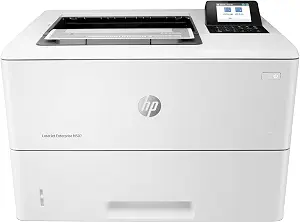 | Best for High-Security, High-Volume Business Environments | Print Speed: up to 45 ppm | Input Capacity: 650 sheets | Display: 2.7-inch LCD | VIEW LATEST PRICE | See Our Full Breakdown |
| Brother HL-6210DW Monochrome Duplex Wireless Laser Printer |  | Best for Fast, Cost-Effective Office Printing with Wireless Flexibility | Print Speed: 50 ppm | Main Tray Capacity: 520 sheets | Expandable Tray Capacity: up to 1,660 sheets | VIEW LATEST PRICE | See Our Full Breakdown |
| Brother MFC-L2820DW Wireless Monochrome All-in-One Laser Printer |  | Best for Small Offices with Limited Space and Moderate Volume Needs | Print Speed: up to 36 ppm | Scan Speed: up to 23.6/7.9 ipm | Auto Document Feeder: 50 pages | VIEW LATEST PRICE | See Our Full Breakdown |
| monochrome laser printer for high volume | Print Speed | Connectivity |
|---|---|---|
| HP LaserJet Enterprise M608n M | Up to 65 ppm | Gigabit Ethernet |
| Brother MFC-L5915DW All-in-One | 50 ppm | Gigabit Ethernet, Dual-band Wi-Fi |
| Brother HL-L2480DW Wireless Mo | 36 ppm | Wi-Fi, Ethernet, USB |
| Brother HL-L2460DW Wireless Mo | 36 pages per minute | Wi-Fi, Ethernet, USB |
| Lexmark MS632dwe Monochrome La | Up to 50 ppm | — |
| HP LaserJet Pro 3001dw Wireles | Up to 35 pages per minute | Wi-Fi, Ethernet, Bluetooth |
| Lexmark MX721ade Monochrome La | Up to 65 ppm | — |
| Brother HL-L5210DWT Monochrome | Up to 48 ppm | — |
| HP LaserJet Enterprise M507n M | — | Built-in Ethernet |
| HP LaserJet Pro MFP 3101sdw Wi | Up to 35 ppm | — |
| HP LaserJet Enterprise M507dn | up to 45 ppm | Built-in Ethernet |
| Brother HL-6210DW Monochrome D | 50 ppm | Gigabit Ethernet, dual-band wireless |
| Brother MFC-L2820DW Wireless M | up to 36 ppm | Wireless, Ethernet, USB |
More Details on Our Top Picks
HP LaserJet Enterprise M608n Monochrome Laser Printer (Renewed)
This model stands out for its exceptional printing speed of up to 65 pages per minute, surpassing many competitors like the Lexmark MS632dwe, making it ideal for large offices with demanding print needs. Its massive 650-sheet input capacity significantly reduces paper reloads, a clear advantage over smaller-capacity models like the Brother HL-L2480DW. The advanced security features and gigabit Ethernet ensure reliable, protected network printing, which is essential for sensitive corporate data. However, its focus on monochrome output and high-volume capabilities means it’s less suitable for small offices or those requiring color printing. The design is robust but less flexible for small workspaces due to its size. Compared to the Lexmark MS632dwe, it sacrifices some user interface features for raw speed and capacity. Overall, this pick is best for large-scale, security-conscious operations needing consistent, high-volume black-and-white output.
Pros:- Blazing fast print speed of 65 ppm for high throughput
- Large 650-sheet input minimizes paper reloads
- Enterprise-level security features protect sensitive data
- Reliable gigabit Ethernet connectivity
Cons:- Limited to monochrome printing, no color options
- Bulky design may not fit small offices or tight spaces
Best for: Large enterprises or high-volume departments needing fast, secure monochrome printing with minimal interruptions
Not ideal for: Small offices or users requiring color printing or compact form factors
- Print Speed:Up to 65 ppm
- Input Capacity:650 sheets
- Connectivity:Gigabit Ethernet
- Display:LCD
- Security:Enterprise-level security
Our verdict“This printer is best suited for large, high-demand offices prioritizing speed, security, and capacity over compact size.”
Brother MFC-L5915DW All-in-One Monochrome Laser Printer with Scanner and Copier
This all-in-one model makes a strong case for offices that need more than just printing, offering print and copy speeds up to 50 ppm and high-volume scanning with a 70-page auto document feeder, which outperforms the Brother HL-L2460DW in multitasking. Its flexible connectivity options, including dual-band Wi-Fi and gigabit Ethernet, support diverse office setups. The included high-yield toner cartridge, capable of 3,000 pages, reduces ongoing costs, but the potential expense of replacing toner frequently can add up, especially in very high-volume use. Unlike the Lexmark MS632dwe, which focuses solely on printing, this model offers more multifunctionality but at the expense of some speed and simplicity. Its size and all-in-one features make it a better fit for busy environments needing document management, not just printing. If your office demands scanning, copying, and printing in a high-volume setting, this is a comprehensive choice.
Pros:- High-speed printing and copying at 50 ppm
- High-volume scanning with 70-page auto document feeder
- Flexible dual-band Wi-Fi and Ethernet connectivity
- Cost-efficient with high-yield toner option
Cons:- Limited to monochrome output, no color features
- Toner replacement costs can be high in extensive use
Best for: Medium to large offices that need multifunctionality along with high-volume monochrome printing
Not ideal for: Small offices or those solely interested in printing, as the multifunction features add bulk and complexity
- Print Speed:50 ppm
- Auto Document Feeder:70 pages
- Scanning Speed:56 ipm
- Connectivity:Gigabit Ethernet, Dual-band Wi-Fi
- Toner Cartridge:Includes 3,000-page cartridge
Our verdict“This all-in-one printer suits offices that need high-volume monochrome printing plus multifunction capabilities without compromising speed or security.”
Brother HL-L2480DW Wireless Monochrome Laser Printer with Copy and Scan
Compared with larger, high-capacity models, the Brother HL-L2480DW offers a more compact footprint suitable for small offices or home setups, yet still delivers respectable 36 pages per minute. Its automatic duplex printing and 250-sheet paper capacity support high-volume tasks, though it’s not as fast as the HP M608n or Lexmark MS632dwe. Its wireless and Ethernet options make it versatile for different environments. However, the smaller paper tray and slower speed limit its appeal for very high-volume environments. The toner costs and replacement frequency can be concerns for heavy use, especially since it lacks the large input capacity of more industrial models. This printer is ideal for users who want reliable monochrome output without taking up too much space, but it’s less suited for the most demanding high-volume workflows.
Pros:- Compact size fits small workspaces
- Wireless and Ethernet connectivity for flexible placement
- Automatic duplex printing reduces paper use
- User-friendly 2.7-inch touchscreen interface
Cons:- Limited to 250-sheet paper capacity, less suited for large volumes
- Slower print speed compared to larger models
Best for: Small offices or home offices with moderate high-volume needs and limited space
Not ideal for: Large offices or environments requiring the fastest throughput or large input capacity
- Printer Type:Monochrome Laser
- Functions:Print, Copy, Scan
- Connectivity:Wi-Fi, Ethernet, USB
- Print Speed:36 ppm
- Paper Capacity:250 sheets
- Automatic Duplex:Yes
Our verdict“This printer is best for small offices needing a space-efficient, reliable monochrome printer with decent volume handling.”
Brother HL-L2460DW Wireless Monochrome Laser Printer with Duplex and Mobile Printing
Compared to larger office models, the Brother HL-L2460DW emphasizes speed and mobility, offering 36 pages per minute with automatic duplexing and Wi-Fi for flexible printing from mobile devices via the Brother Mobile Connect App. Its 250-sheet paper tray supports moderate high-volume tasks, but it’s less suited for continuous, large-scale printing like the HP M608n. Its straightforward design and simple interface make it accessible for small teams or home offices. While it lacks Wi-Fi connectivity mention in the product details, it supports mobile printing, making it convenient for remote or on-the-go use. The toner replacement cost remains a consideration for regular high-volume printing. This model is ideal for users needing a balance of speed, wireless connectivity, and compactness, not for the most demanding print environments.
Pros:- Fast 36 ppm print speed
- Automatic duplex printing to save paper
- Wireless and Ethernet options for flexible setup
- Large 250-sheet paper tray
Cons:- No Wi-Fi connectivity explicitly mentioned; relies on mobile app
- Toner replacement can be costly over time
Best for: Home offices or small teams requiring fast, wireless monochrome printing with mobile device support
Not ideal for: Heavy-duty enterprise environments needing large input capacity and maximum speed
- Print Speed:36 pages per minute
- Connectivity:Wi-Fi, Ethernet, USB
- Paper Capacity:250 sheets
- Automatic Duplex:Yes
- Mobile Printing:Yes via Brother Mobile Connect App
Our verdict“This printer fits small teams needing reliable, wireless monochrome printing with mobile device compatibility and good speed.”
Lexmark MS632dwe Monochrome Laser Printer with Duplex Printing and Touch Screen
This model combines impressive 50 pages per minute speed with a 4.3-inch color touch screen, making it ideal for busy offices that want ease of use along with high throughput. Its recommended monthly volume range of 2,000 to 20,000 pages aligns with demanding work environments, surpassing the capabilities of smaller models like the Brother HL-L2480DW. The automatic duplexing supports eco-friendly, cost-efficient operation, while its lack of Wi-Fi could be a limitation for flexible setups, relying instead on Ethernet. Compared to the HP M608n, it offers more user-friendly controls, but it might fall short in raw speed and security features. The energy efficiency rating with Energy Star certification adds value for green-conscious offices. This printer suits organizations needing a high-speed, intuitive device for large-volume monochrome output.
Pros:- High-speed printing at 50 ppm
- Intuitive 4.3-inch color touch screen
- Supports high monthly volume up to 20,000 pages
- Automatic duplexing for paper savings
Cons:- No Wi-Fi connectivity explicitly mentioned, limiting wireless flexibility
- Limited to monochrome printing only
Best for: High-volume office environments needing fast, user-friendly monochrome printing with easy interface
Not ideal for: Small offices or remote setups that require Wi-Fi connectivity and compact form factors
- Print Speed:Up to 50 ppm
- Duplex Printing:Integrated
- Touch Screen:4.3-inch color
- Recommended Monthly Volume:2,000 – 20,000 pages
- Energy Star:Yes
Our verdict“This printer is perfect for large, high-volume offices seeking speed, ease of use, and eco-friendly features in monochrome printing.”
HP LaserJet Pro 3001dw Wireless Black & White Printer
The HP LaserJet Pro 3001dw stands out for its combination of speed, security, and wireless flexibility. With print speeds up to 35 pages per minute, it easily keeps pace with day-to-day office demands, making it a better choice than the HP LaserJet Enterprise M507n for smaller teams. Its wireless and Bluetooth connectivity simplifies multi-device use, though it requires compatible cartridges with chips, which can increase ongoing costs. Designed mainly for monochrome output, it doesn’t offer color options or advanced management features found in larger enterprise models, but it covers the essentials for small offices with high-volume needs. The firmware updates might be necessary to keep security features current, so ongoing maintenance is something to consider. Overall, this model fits offices that prioritize fast, secure wireless printing without the need for extensive management tools.
Pros:- Fast print speeds of up to 35 pages per minute
- Wireless and multi-device connectivity including Bluetooth
- Secure printing with HP Wolf Pro Security
Cons:- Only compatible with original HP cartridges with chips, increasing consumable costs
- Limited to monochrome printing, no color options
- Firmware updates may be required for security features
Best for: Small office teams seeking fast, secure wireless printing with minimal management fuss
Not ideal for: Large enterprises needing advanced security and centralized management or color printing
- Print Speed:Up to 35 pages per minute
- Connectivity:Wi-Fi, Ethernet, Bluetooth
- Supported Devices:Microsoft, Mac, AirPrint, Android, Chromebook
- Auto Duplex:Yes
- Intended Use:Small teams, Office
Our verdict“This printer is ideal for small offices that need reliable, secure wireless monochrome printing without complex management features.”
Lexmark MX721ade Monochrome Laser Printer with Duplex and 7-inch Touch Screen
The Lexmark MX721ade is purpose-built for heavy-duty environments, offering a substantial print speed of up to 65 pages per minute that surpasses the faster Brother HL-L5210DWT. Its integrated duplex printing and large 7-inch color touch screen make daily tasks more efficient, though the high capacity and features might be overkill for smaller or casual users. The extensive recommended monthly volume of 5,000 to 75,000 pages indicates its suitability for large, high-volume workflows, but this also means a higher initial investment. While it’s limited to monochrome, this focus ensures optimized performance for text-heavy documents. Compared with smaller, less expensive models, this is a clear choice for organizations prioritizing speed and volume, but affordability is a tradeoff.
Pros:- High-speed printing up to 65 ppm for rapid throughput
- Built-in duplex for efficiency and cost savings
- Large 7-inch color touch screen simplifies operation
Cons:- High initial cost may be prohibitive for smaller budgets
- Designed solely for monochrome, limiting versatility
- Overkill for low-volume or casual printing environments
Best for: Large offices or print farms requiring maximum speed and volume capacity
Not ideal for: Small businesses or home offices with moderate printing needs and limited budget
- Print Type:Monochrome laser
- Duplex Printing:Integrated
- Print Speed:Up to 65 ppm
- Display:7-inch color touch screen
- Recommended Monthly Volume:5000-75000 pages
Our verdict“This model is best suited for high-demand, high-volume environments where speed and durability are priorities over initial investment cost.”
Brother HL-L5210DWT Monochrome Laser Printer with Dual Paper Trays and High-Yield Toner
The Brother HL-L5210DWT offers a compelling balance of speed and capacity, with up to 48 pages per minute that helps keep up with busy workflows. Its dual paper trays, with a total capacity of 1,390 sheets, make it a standout for organizations that need to minimize paper refills, a feature not available on the HP LaserJet Pro 3001dw. The high-yield toner, capable of 11,000 pages, drives down per-page costs, making it ideal for large-volume tasks. However, its monochrome limit and optional trays—adding to the overall cost—may deter some budget-conscious buyers. Compared with smaller models, it emphasizes capacity and ongoing efficiency, but it requires a larger footprint and initial investment.
Pros:- Fast print speed of up to 48 ppm for efficient output
- Dual paper trays with large capacity for less refilling
- High-yield toner reduces long-term costs
Cons:- Designed only for monochrome printing, limiting versatility
- Additional paper trays are optional, potentially increasing cost
- Larger footprint may be a concern for tight spaces
Best for: Medium to large offices needing high capacity and low running costs
Not ideal for: Small teams or users requiring color printing or compact footprint
- Print Speed:Up to 48 ppm
- Paper Trays:Dual trays, 250 and 520 sheets
- Total Paper Capacity:Up to 1,390 sheets
- Toner Cartridge:High-yield 11,000 pages
- Included Accessories:AC Power Cord, User Documentation
Our verdict“This printer suits busy offices focused on cost-effective, high-volume monochrome printing with minimal downtime for refilling paper.”
HP LaserJet Enterprise M507n Monochrome Printer with Built-in Ethernet
The HP LaserJet Enterprise M507n is designed for large-scale, secure business printing, offering over 200 embedded security features that surpass the capabilities of the HP LaserJet Pro 3001dw. Its Ethernet-only connectivity might limit flexibility compared to wireless models, but it excels in environments where wired security and management are paramount. Its high-security features are ideal for organizations that need to guard sensitive information, although the lack of wireless or mobile printing might be a drawback for smaller teams. The higher cost for optional high-yield cartridges reflects its enterprise focus, and it doesn’t provide the same convenience for remote or mobile workers as wireless models.
Pros:- Over 200 embedded security features for enterprise-grade protection
- Supports mobile printing with compatible solutions
- Centralized management simplifies device oversight
Cons:- Limited to wired Ethernet connectivity, reducing flexibility
- No wireless or Wi-Fi capabilities, less convenient for mobile users
- Higher cost, especially for high-yield cartridges
Best for: Large corporations requiring advanced security and centralized management
Not ideal for: Small offices or teams needing wireless or mobile printing convenience
- Model:M507n
- Printer Type:Monochrome laser
- Connectivity:Built-in Ethernet
- Security Features:Over 200 embedded security features
- Compatible Toner:HP 89A/89X, optional 89Y
Our verdict“This model is best for large organizations with strict security needs and wired infrastructure, but less so for mobile or small teams.”
HP LaserJet Pro MFP 3101sdw Wireless Black and White All-in-One Laser Printer
The HP LaserJet Pro MFP 3101sdw offers versatility for small teams that require printing, scanning, and copying in a single device, making it a flexible alternative to dedicated printers like the Lexmark MX721ade. Its print speed of 35 ppm matches the HP LaserJet Pro 3001dw, but it combines this with an auto document feeder and a 250-sheet input tray, streamlining office workflows. While it doesn’t explicitly mention mobile printing, its wireless setup makes it easy for users to print from various devices. However, it requires cartridges with HP chips or circuitry, which could increase ongoing costs, and it focuses solely on black-and-white tasks. Compared with single-function printers, this MFP provides a balanced package for small offices that need multiple functions without excessive complexity.
Pros:- Fast printing at up to 35 ppm
- Auto duplex printing saves paper and costs
- Includes scan and copy functions for added versatility
Cons:- Requires cartridges with HP chips, increasing consumable costs
- Limited to black-and-white printing only
- No specific mention of mobile printing features
Best for: Small teams needing reliable, multi-function monochrome printing with wireless access
Not ideal for: Offices that require color printing or large-scale high-volume output
- Print Speed:Up to 35 ppm
- Functions:Print, Scan, Copy
- Duplex:Auto 2-sided
- Input Tray Capacity:250 sheets
- Auto Document Feeder:50 sheets
Our verdict“This all-in-one printer suits small teams looking for a reliable, space-efficient monochrome device with multiple functions and wireless connectivity.”
HP LaserJet Enterprise M507dn Monochrome Printer with Ethernet & Duplex Printing
The HP LaserJet Enterprise M507dn stands out for its impressive 45 pages per minute speed and large 650-sheet input capacity, making it ideal for busy offices that need reliable, high-volume output. Compared to the Brother HL-6210DW, which also offers high speed but with slightly less input capacity, this model excels in security with over 200 embedded protections—perfect for businesses handling sensitive documents. However, its lack of wireless connectivity and potentially high initial cost can be drawbacks for smaller or more flexible setups. It’s best suited for organizations prioritizing security and large print volumes over wireless convenience or budget constraints.
Pros:- Print speed of up to 45 pages per minute
- Massive input tray capacity of 650 sheets
- Robust security features with over 200 protections
- Automatic duplex printing for efficiency
Cons:- No built-in wireless connectivity, limiting flexibility
- High initial purchase price for smaller businesses
- Complex setup may overwhelm casual users
Best for: Large enterprises or government agencies needing secure, high-speed printing with large input capacity
Not ideal for: Small offices or startups seeking simple, wireless setup and lower upfront costs
- Print Speed:up to 45 ppm
- Input Capacity:650 sheets
- Display:2.7-inch LCD
- Connectivity:Built-in Ethernet
- Duplex Printing:Automatic
- Security Features:Over 200 protections
Our verdict“This model is perfect for large, security-conscious offices that prioritize speed and capacity over wireless features.”
Brother HL-6210DW Monochrome Duplex Wireless Laser Printer
The Brother HL-6210DW is designed for high-volume office environments needing fast output—delivering 50 pages per minute, slightly faster than the HP M507dn. Its large expandable tray capacity of up to 1,660 sheets greatly reduces downtime for paper refills, making it a strong contender for busy offices. The inclusion of advanced wireless and Ethernet connectivity and high-yield toner cartridges helps lower operational costs over time. Compared with the HP M507dn, this model offers more flexibility with wireless setup and larger paper capacity, but it sacrifices some security features and can be quite large and intimidating for small spaces. It makes the most sense for offices that want speed, capacity, and wireless convenience all in one.
Pros:- Fast printing speed of 50 ppm
- Expandable tray capacity up to 1,660 sheets
- Wireless and Ethernet connectivity for versatile network integration
- High-yield toner cartridges reducing ongoing costs
Cons:- Primarily monochrome, no color options
- Large footprint may be unsuitable for small offices
- Setup can be complex for less tech-savvy users
Best for: Medium to large offices seeking fast, flexible, and cost-efficient monochrome printing
Not ideal for: Small startups or home offices that don’t need high capacity or powerful networking features
- Print Speed:50 ppm
- Main Tray Capacity:520 sheets
- Expandable Tray Capacity:up to 1,660 sheets
- Connectivity:Gigabit Ethernet, dual-band wireless
- Toner Yield:Up to 18,000 pages
- Display:Not specified in data
Our verdict“This pick is ideal for offices that prioritize speed, large capacity, and flexible wireless connectivity in high-volume printing.”
Brother MFC-L2820DW Wireless Monochrome All-in-One Laser Printer
The Brother MFC-L2820DW offers a compact solution for small offices that still need reliable high-speed printing, with up to 36 pages per minute. Its all-in-one design adds scanning, copying, and faxing, making it more versatile than the other two, though it’s primarily suited for moderate volumes rather than the relentless output of larger offices. While its user-friendly 2.7-inch touchscreen simplifies operation, it lacks the capacity and speed of the larger models, making it less ideal for very high-volume environments. Compared to the HP M507dn and Brother HL-6210DW, this model trades off some capacity and speed for compactness, best suited for smaller teams or those with limited space.
Pros:- Compact design fits small office spaces
- Fast print and scan speeds for its size
- Multiple connectivity options including wireless and Ethernet
- All-in-one functionality adds copying and scanning
Cons:- Limited paper capacity compared to larger models
- No color printing capabilities
- Toner replacements can be frequent with high volume use
Best for: Small offices or workgroups needing a space-saving, all-in-one monochrome printer for moderate high-volume tasks
Not ideal for: High-volume, fast-paced environments where large capacity and maximum speed are required
- Print Speed:up to 36 ppm
- Scan Speed:up to 23.6/7.9 ipm
- Auto Document Feeder:50 pages
- Connectivity:Wireless, Ethernet, USB
- Touchscreen:2.7 inches
- Functionality:Print, Scan, Copy, Fax
Our verdict“This model suits small offices needing a space-efficient, reliable monochrome printer with all-in-one features for moderate volume output.”

How We Picked
The printers in this roundup were evaluated based on their ability to handle large print volumes reliably, including duty cycle ratings and toner capacity. We prioritized models with consistent performance, durability, and low maintenance requirements. Ease of use, connectivity options, and initial cost were also key factors, along with ongoing operational expenses. The ranking reflects a balanced view of these criteria—placing top emphasis on high-volume performance and cost-efficiency, while also considering user-friendly features for diverse office environments.Factors to Consider When Choosing Best Monochrome Laser Printer For High Volume
Choosing the best monochrome laser printer for high volume requires assessing several key factors beyond basic specs. It’s important to consider how the printer’s duty cycle aligns with your expected workload, as overestimating capacity can lead to unnecessary expenses, while underestimating can cause frequent breakdowns. Paper handling features, such as large trays and duplex printing, greatly impact efficiency in busy settings. Cost-per-page savings, especially with high-yield toner options, can significantly lower long-term expenses. Additionally, connectivity options and ease of maintenance should influence your decision, ensuring the printer integrates smoothly into your workflow and remains reliable over time.Duty Cycle and Speed
For high-volume environments, a printer’s duty cycle—how many pages it can reliably handle monthly—is a critical metric. Choosing a model with a duty cycle well above your actual needs helps prevent breakdowns and extends the device’s lifespan. Speed, measured in pages per minute (PPM), directly impacts workflow efficiency. Generally, higher speed models are better suited for large offices, but they often come with a higher price tag. Balancing duty cycle and speed ensures you get a machine that can keep up with your workload without unnecessary overspending.
Paper Handling and Capacity
Large paper trays and dual tray options enable continuous printing without frequent refills—vital for high-volume use. Duplex printing reduces paper costs and saves time, especially when printing lengthy documents. It’s worth verifying the maximum tray capacity and whether the printer supports additional paper sources. A model with flexible paper handling options can adapt to different media types, useful for offices printing reports, forms, or labels regularly. Investing in a printer with generous capacity minimizes downtime and maintains productivity.
Cost Efficiency and Toner Options
High-yield toner cartridges significantly decrease the cost per page, making long-term operation more economical. Some models support toner refill kits or remanufactured cartridges, which can save additional money but potentially impact warranty or support. Consider the availability and price of replacement toner cartridges, as frequent replacements can add up quickly. A printer with an acceptable balance of upfront cost and toner capacity often proves more cost-effective over its lifespan, especially for high-volume printing.
Connectivity and Usability
Features like wireless, Ethernet, and mobile printing support streamline workflows and allow multiple users to print easily. A color touchscreen interface can simplify setup and ongoing management, reducing the need for technical support. For busy offices, remote management features and support for network protocols can save time and reduce frustration. Prioritize models that combine advanced connectivity with straightforward user interfaces, enabling staff to operate and troubleshoot with minimal fuss.
Maintenance and Support
Reliable support services and easy-to-access replacement parts minimize downtime during repairs. Some models include automatic alerts for toner replacement or maintenance needs, preventing unexpected interruptions. Ease of cleaning and durability of components also matter in high-use environments. Choosing a brand with a solid reputation for durability and customer service ensures your investment remains productive over the long haul.
Frequently Asked Questions
How do I know if a printer’s duty cycle is enough for my office?
To determine if a duty cycle suits your office, estimate your monthly printing volume and select a printer with a duty cycle rating at least 20-30% higher. This buffer accounts for unexpected spikes or peak periods, reducing the risk of breakdowns. Always check the manufacturer’s specifications and compare them with your actual workload to find a model that can reliably handle your high-volume needs without strain.
Are duplex printers really cost-effective for high-volume printing?
Yes, duplex printers save paper by printing on both sides automatically, which can significantly lower paper costs over time. For high-volume printing, this feature not only reduces expenses but also speeds up the process—less manual intervention is needed. When selecting a duplex model, confirm that its duplexing mechanism is reliable and does not slow down the overall print speed excessively, ensuring a good balance between efficiency and cost savings.
How much should I expect to pay for a reliable high-volume monochrome laser printer?
Prices vary widely based on features and capacity, but a dependable high-volume printer typically costs between $500 and $2,000. Higher upfront costs often correlate with larger trays, higher duty cycles, and advanced connectivity options. Remember, investing in a more expensive model with higher toner yields and durability can reduce ongoing operational costs, making it more economical in the long run.
Is it better to choose a multifunction printer or a dedicated printer for high volume?
Multifunction printers combine printing, scanning, copying, and sometimes faxing, providing versatility that suits many office workflows. However, dedicated printers often excel in speed and durability, specifically designed for high-volume tasks. If your office requires frequent scanning or copying alongside printing, a multifunction device makes sense. But if your primary need is fast, reliable printing, a dedicated high-volume monochrome laser printer might offer better performance and lower maintenance.
What maintenance practices can extend the lifespan of a high-volume monochrome laser printer?
Regularly cleaning the paper feed rollers, keeping the printer free of dust, and replacing toner cartridges at recommended intervals help maintain performance. Using high-quality paper and avoiding jams also reduce wear and tear. Many models include built-in diagnostic tools—taking advantage of these can prevent minor issues from escalating. Consistent maintenance and timely support ensure your machine continues to operate smoothly under heavy workloads.
Conclusion
For those seeking the best overall performance, the HP LaserJet Enterprise M608n offers robust durability and high-yield options suited for large offices. Value-focused buyers should consider models like the Brother HL-L2480DW, which balances capacity and affordability. If you’re willing to invest more upfront for premium features, the Lexmark MX721ade provides advanced touchscreens and extensive paper handling. Beginners or small offices with high-volume needs might find the Brother HL-L2460DW easiest to set up and maintain. Ultimately, your choice depends on your specific workload, budget, and preferred features—this guide aims to match those needs with the right machine.
Columbus Day / Indigenous Peoples' Day Picks
long weekend sales
As an affiliate, we earn on qualifying purchases.