
Welcome to the Ultimate Ergonomic Work Setup Checklist 2026. Whether you’re setting up a home office or upgrading your current workspace, this guide is designed for professionals who value comfort, productivity, and health. We’ve curated a list of essential ergonomic tools and accessories to help you create a workspace that supports your body and enhances your focus.
The checklist is organized into key categories, including chairs, desk accessories, monitors, input devices, foot supports, and recovery tools. Each section provides insights into what makes a great choice, common pitfalls to avoid, and practical tips on sizing and compatibility. Use this guide to make informed decisions and select products that fit your specific needs and space.
To get the most out of this checklist, review each section carefully, consider your workspace dimensions, and prioritize features that promote proper posture and comfort. Remember, the right ergonomic setup can prevent discomfort and boost your overall productivity, making your workday more enjoyable.
Ergonomic Office Chair
An ergonomic office chair is the cornerstone of a healthy workspace. It provides essential support for your back, neck, and shoulders, reducing strain during long hours at your desk. When choosing a chair, consider adjustable features like seat height, lumbar support, and armrests to tailor the fit to your body. Avoid chairs that are too rigid or lack proper support, as they can lead to discomfort and long-term posture issues.
Fit and sizing are critical—your feet should rest flat on the floor, and your knees should be at a 90-degree angle. Look for chairs with a breathable material and adjustable tilt mechanisms. Compatibility with your desk height and available space should also be assessed. Investing in a quality ergonomic chair ensures you maintain proper alignment, which is key to preventing aches and fatigue.
What to look for:
- Adjustable height and tilt
- Lumbar support
- Breathable material
- Compatible with your desk height
- Armrest adjustability
Desk Accessories
Desk accessories like monitor stands are vital for optimizing your workspace. The HUANUO FlowLift™ Dual Monitor Stand allows you to elevate your screens to eye level, reducing neck strain and promoting better posture. Fully adjustable features enable you to customize the height and angle, ensuring ergonomic alignment regardless of your desk setup. A clutter-free workspace also improves focus, making these accessories a smart investment.
When selecting monitor stands, consider the size and weight capacity to ensure compatibility. Look for sturdy construction and adjustable height settings to accommodate multiple monitor configurations. Proper positioning helps prevent eye strain and encourages a natural head position, especially during extended work hours. Don’t forget to check for cable management options to keep your workspace tidy and organized.
What to look for:
- Adjustability
- Sturdy construction
- Compatibility with monitor sizes
- Cable management features
- Ease of installation
HUANUO FlowLift™ Dual Monitor Stand for 13–32" Screens, Fully Adjustable Desk Mo

The HUANUO FlowLift™ dual monitor stand supports 13 to 32-inch screens weighing 4.4 to 19.8 lbs each, offering full motion adjustments including tilt, swivel, and rotation. It helps organize your workspace by elevating monitors off the desk and features built-in cable management for a tidy setup.
Pros:
- Fully adjustable for ergonomic viewing angles
- Supports dual monitors with secure C-clamp and grommet mounting
- Helps organize workspace and reduce clutter
Cons:
- Requires wooden desks; not suitable for glass or plastic desks
- Installation may be difficult on desks with cross beams or panels
- Limited to monitors within specified size and weight range
Best for: Dual monitor users
Not ideal for: Limited adjustability
Bottom line: Choose adjustable, sturdy monitor stands for comfort
Monitor & Stands
Investing in an ergonomic monitor and stand setup is crucial for maintaining good posture. The ergonomic mid-back faux leather drafting chair offers adjustable arms and a supportive backrest, perfect for those who need flexible seating options. Pair it with a height-adjustable monitor stand to keep your screen at eye level, preventing neck and eye strain.
Ensure your monitor size fits your workspace and that the stand offers sufficient height and tilt adjustments. Proper placement is key—your monitor should be directly in front of you, with the top at eye level. This setup minimizes the need to crane your neck or lean forward, which can cause discomfort over time. Compatibility with other accessories and your desk dimensions should also be considered.
What to look for:
- Adjustable height and tilt
- Sturdy base
- Compatibility with monitor size
- Easy to assemble
- Support for multiple monitors
Ergonomic Mid-Back Faux Leather Drafting Chair with Adjustable Arms and Foot Rin
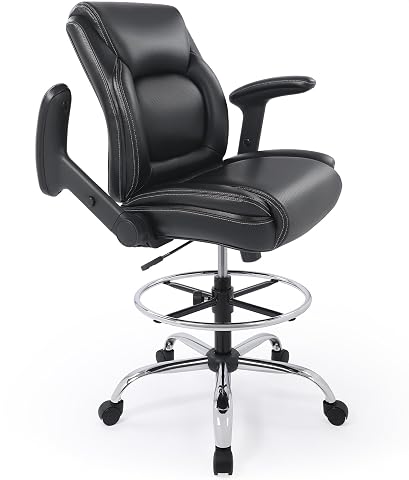
This ergonomic drafting chair features adjustable height, flip-up armrests, a swivel 360º base, and a sturdy foot ring, providing comfort and flexibility for standing or sitting work at desks and drafting tables. Made with durable, skin-friendly faux leather and designed for long-term use, it combines functionality with a sleek aesthetic.
Pros:
- Adjustable height and flip-up armrests for customized comfort
- Sturdy construction with smooth rolling casters
- Ergonomic design with good ventilation and support
Cons:
- Assembly may take some time for some users
- Limited color options (only black mentioned)
Best for: Extended computer use
Not ideal for: Limited adjustability
Bottom line: Select adjustable monitor stands for ergonomic alignment
Keyboard & Mouse
An ergonomic keyboard and mouse setup is essential for preventing repetitive strain injuries. Look for devices with a natural hand position, cushioned wrist rests, and adjustable tilt angles. These features help reduce wrist and forearm fatigue during long typing sessions. Pairing an ergonomic keyboard with a supportive mouse can significantly improve comfort and typing accuracy.
Ensure your keyboard and mouse are compatible with your desk height and workspace layout. Consider wireless options to minimize clutter and allow flexible positioning. Proper placement—keeping your wrists straight and elbows close to your sides—can prevent discomfort and long-term issues. Investing in ergonomic input devices makes a noticeable difference in your overall work comfort.
What to look for:
- Wrist rests
- Adjustable tilt
- Compatibility with workspace
- Wireless connectivity
- Ergonomic shape
Foot Support
A footrest like the Humanscale FM 300 Foot Machine is a simple yet effective addition to any ergonomic setup. Proper foot positioning helps improve circulation, reduce pressure on your lower back, and promote overall comfort. A footrest that is adjustable in height and angle ensures you can customize support to match your desk height and sitting posture.
Look for a stable, non-slip surface that can accommodate different foot sizes comfortably. The right footrest encourages better posture by keeping your hips and knees aligned, which is especially important if your desk is higher than your seated eye level. Incorporating a foot support is a small change with a big impact on overall comfort and health during long work hours.
What to look for:
- Adjustable height and tilt
- Stable non-slip surface
- Size accommodates different feet
- Compatible with desk height
- Easy to clean
Humanscale FM 300 Foot Machine Footrest (Natural)

The Humanscale FM 300 Footrest is an ergonomic, adjustable footrest designed to provide comfort during prolonged sitting. It features a rocking motion with smooth gliding, a durable wood construction with a steel frame, and adjustable height settings to relieve lower back tension.
Pros:
- Adjustable height for personalized comfort
- Smooth rocking motion encourages lower leg engagement
- High-quality durable construction
Cons:
- No warranty provided
- Limited to indoor office or home use
- Price not specified
Best for: High desk setups
Not ideal for: Limited adjustability
Bottom line: Add a footrest for better posture support
Posture & Recovery Tools
Maintaining good posture is easier with tools like a posture corrector or back brace. The Posture Corrector for Women and Men helps realign your shoulders and spine, especially if you tend to slouch or hunch forward. These devices are designed to be worn comfortably during work breaks or even for short periods, reinforcing healthy habits.
Choose a posture tool that fits well and provides adjustable support. Avoid overly restrictive braces that limit movement; instead, look for options that gently remind you to sit upright. Incorporate these tools into your daily routine to prevent long-term musculoskeletal issues. Regular use, combined with ergonomic furniture, creates a comprehensive approach to better posture and recovery.
What to look for:
- Adjustable support
- Comfortable fit
- Lightweight and breathable
- Suitable for long wear
- Easy to put on and remove
Posture Corrector for Women and Men – Back Brace for Rounded Shoulders & Upper B

This adjustable and breathable posture corrector provides targeted support for the upper and lower back, helping to straighten the spine and improve posture. Suitable for both men and women with chest sizes from 28 to 45 inches, it offers discreet, comfortable support for daily wear to alleviate back, neck, and shoulder discomfort.
Pros:
- Adjustable for a personalized fit
- Breathable and lightweight for comfort
- Discreet under clothing for daily use
- Helps alleviate back, neck, and shoulder pain
Cons:
- Requires gradual wear time to see full benefits
- May take time to notice significant posture improvement
- Sizing may not fit very small or very large individuals
Best for: Daily posture correction
Not ideal for: Limited adjustability
Bottom line: Use posture tools to reinforce ergonomic habits
Starting with a budget-first approach, prioritize key ergonomic essentials that offer the greatest impact on comfort and health. Remember, investing in quality support now can prevent discomfort and costly health issues later.
Use this checklist as a practical guide to craft a workspace that supports your well-being and boosts productivity. Small upgrades can make a big difference—happy working!