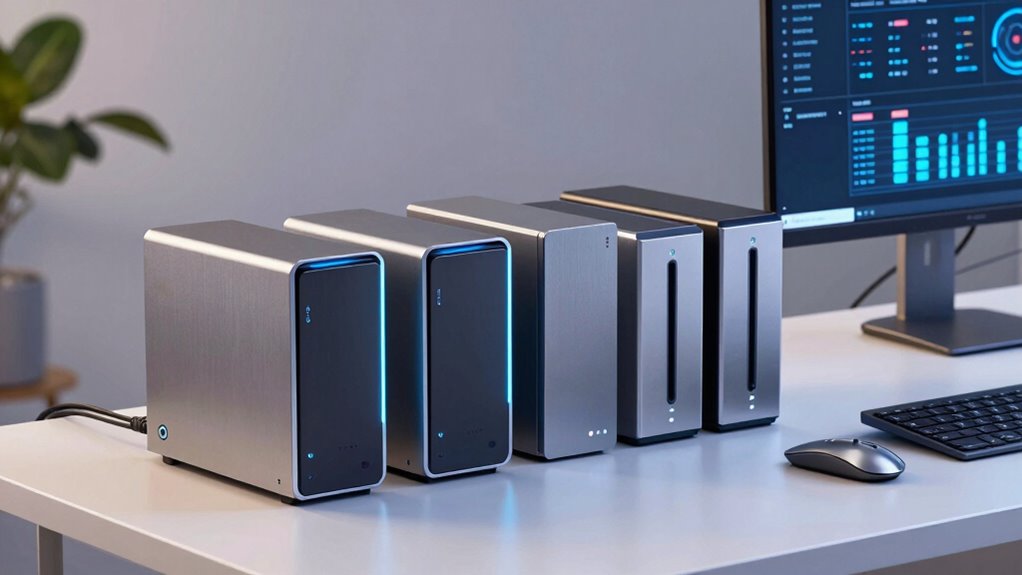

If you’re searching for a NAS to handle home office backups, you’re likely balancing performance, ease of use, and budget. The Synology DS223 stands out as the best overall choice thanks to its user-friendly interface and reliable performance. For those needing more storage, the UGREEN DXP4800 Plus offers expanded capacity suitable for families and small teams. The main tradeoffs in this category involve balancing cost against features like expandability and speed. Continue reading for a detailed breakdown of each option and what makes them a good fit for different needs.

Get comfort and recovery gear delivered free with Prime
- Fast, free delivery on millions of items
- Prime Video, Amazon Music and more included
- Member-only deals all year
Complete the kit

Key Takeaways
- The top-ranked NAS devices combine ease of setup with reliable backup performance, making them suitable for non-technical users.
- Expandability and multiple bays are key for users with growing storage needs, but often come with higher costs.
- Performance specs like CPU and network speed matter most for media-heavy workflows or remote access speed.
- Budget options tend to sacrifice some advanced features but still deliver solid backup reliability for personal use.
- Choosing a NAS for home office backups involves balancing initial investment against long-term flexibility and performance.
| UGREEN NAS DXP4800 GT 4-Bay for Creators, Tech Enthusiasts, and Office Teams |  | Best Overall for Power Users and Heavy-Duty Backups | Processor: AMD Ryzen Embedded R2514, 4 cores, up to 3.70GHz | RAM: 8GB DDR4, expandable to 64GB | Storage Capacity: Up to 144TB (4 bays, SATA drives up to 32TB each, U.2 NVMe SSDs, M.2 SSDs) | VIEW ON AMAZON | See Our Full Breakdown |
| Synology DS225+ Private Cloud Media Server – 2-Bay Diskless NAS with Intel CPU |  | Best for Beginners and Home Media Users | Model: DS225+ | Type: Private Cloud Media Server | Number of Bays: 2 | VIEW ON AMAZON | See Our Full Breakdown |
| Synology DS725+ Expandable NAS Storage – 2-Bay Diskless Private Cloud for Home and Small Business |  | Best for Growing Storage Needs and Small Business | Model Number: DS725+ | Number of Bays: 2 (diskless) | Maximum Storage Capacity: 140 TB with expansion | VIEW ON AMAZON | See Our Full Breakdown |
| UGREEN DXP4800 Plus 4-Bay NAS for Families, Creators & Small Teams |  | Best for Large Capacity, Creators, and Small Workgroups | Digital Storage Capacity: 144 TB | Hard Disk Interface: SATA | Connectivity Technology: Ethernet, HDMI, SATA, USB | VIEW ON AMAZON | See Our Full Breakdown |
| Synology 2-Bay DiskStation DS223j (Diskless) |  | Best Compact NAS for Basic Home and Office Backups | Model Number: DS223j | Number of Bays: 2 | Warranty: 2 years | VIEW ON AMAZON | See Our Full Breakdown |
| UGREEN NAS DH2300 2-Bay Personal Storage for Beginners & Personal Users |  | Best for Entry-Level Personal Use | Digital Storage Capacity: 64 TB | Hard Disk Interface: Serial ATA | Connectivity Technology: Ethernet, HDMI, SATA, USB | VIEW ON AMAZON | See Our Full Breakdown |
| Asustor Drivestor 2 Gen 2 AS1202T 2-Bay NAS Storage, Quad-Core 1.7GHz CPU, 2.5GbE Network, 1GB DDR4, 4K Media Server, Diskless |  | Best for Media Streaming & Personal Cloud | Processor: Realtek RTD1619B quad-core 1.7GHz | Memory: 1GB DDR4 | Network: 2.5GbE Ethernet | VIEW ON AMAZON | See Our Full Breakdown |
| Synology DS425+ 4-Bay Diskless NAS Private Cloud Media Server |  | Best for Business and High-Performance Media Use | Number of Bays: 4 | Type: Diskless NAS | Max Speed: 278 MB/s | VIEW ON AMAZON | See Our Full Breakdown |
| UGREEN NAS DXP2800 2-Bay for Advanced Home Users, Remote Workers & Creators |  | Best for Power Users & Creators | Digital Storage Capacity: 80 TB | Hard Disk Interface: Serial ATA | Connectivity Technology: SATA, Ethernet, USB | VIEW ON AMAZON | See Our Full Breakdown |
| Yxk Zero1 2-Bay Desktop NAS for Home & Personal Storage (Diskless) |  | Best for Beginners & Personal Backup | Number of Items: 1 | Memory: 4GB RAM | Connectivity: 2.5GbE | VIEW ON AMAZON | See Our Full Breakdown |
| Synology DS223 2-Bay Diskless NAS Home & Office Backup Hub | 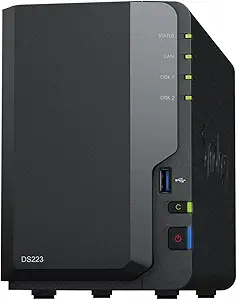 | Best for Centralized Data and Surveillance Integration | Model: DS223 | Type: 2-Bay Diskless NAS | Use: Home & Office Backup | VIEW ON AMAZON | See Our Full Breakdown |
| nas for home office backup | Warranty |
|---|---|
| UGREEN NAS DXP4800 GT 4-Bay fo | — |
| Synology DS225+ Private Cloud | — |
| Synology DS725+ Expandable NAS | 3 years |
| UGREEN DXP4800 Plus 4-Bay NAS | — |
| Synology 2-Bay DiskStation DS2 | 2 years |
| UGREEN NAS DH2300 2-Bay Person | — |
| Asustor Drivestor 2 Gen 2 AS12 | 10 years |
| Synology DS425+ 4-Bay Diskless | 3 years |
| UGREEN NAS DXP2800 2-Bay for A | 2 years |
| Yxk Zero1 2-Bay Desktop NAS fo | 2 Years |
| Synology DS223 2-Bay Diskless | 2 years |
More Details on Our Top Picks
UGREEN NAS DXP4800 GT 4-Bay for Creators, Tech Enthusiasts, and Office Teams
This UGREEN NAS stands out for its powerful AMD Ryzen Embedded processor and expansive storage options, making it ideal for demanding backups and media workflows. Compared to the Synology DS725+’s user-friendly interface, the DXP4800 GT offers raw performance and extensive customizability, but it requires more technical skill to set up and manage. Its dual 10GbE ports and support for multi-TB drives make it a strong choice for those who need fast, scalable storage for large files or multiple users. The main tradeoff is that drives are not included, and its complexity might deter casual users. This pick makes sense for tech-savvy professionals or small teams needing a versatile, high-performance backup solution that goes beyond simple file storage.
Pros:- High-performance AMD Ryzen processor for multitasking and media editing
- Supports up to 144TB with flexible drive options including NVMe SSDs
- Dual 10GbE ports enable ultra-fast data transfer
- Built-in surveillance and virtualization capabilities
Cons:- Drives are not included, increasing initial cost and setup complexity
- Requires technical knowledge for setup and maintenance
- Non-ECC RAM may affect data integrity in critical environments
Best for: Tech enthusiasts, media creators, or small office teams needing high capacity and advanced features
Not ideal for: Home users seeking an easy, plug-and-play backup device without technical setup or expansion needs
- Processor:AMD Ryzen Embedded R2514, 4 cores, up to 3.70GHz
- RAM:8GB DDR4, expandable to 64GB
- Storage Capacity:Up to 144TB (4 bays, SATA drives up to 32TB each, U.2 NVMe SSDs, M.2 SSDs)
- Network:Dual 10GbE ports, support for Link Aggregation
- Connectivity:USB 3.0, USB-C, HDMI, SD card slot
- Security:TLS/SSL, RSA, AES, SHA-512, RAID support
Our verdict“This NAS is best suited for power users who need maximum performance, scalability, and customization for demanding backups and workloads.”
Synology DS225+ Private Cloud Media Server – 2-Bay Diskless NAS with Intel CPU
The Synology DS225+ offers a straightforward setup with a reliable Intel CPU and built-in software ecosystem, making it an excellent choice for users new to NAS. While it doesn’t match the raw power of the UGREEN DXP4800 GT, its user-friendly DiskStation Manager simplifies backups, media streaming, and data sharing. The support for 4K media makes it ideal for families or small offices wanting a private cloud that can handle media and routine backups easily. However, being diskless, it requires separate purchase of drives, and its performance is limited compared to more advanced models like the DXP4800 GT. This NAS is perfect for those prioritizing ease of use and comprehensive software support over raw expansion capabilities.
Pros:- Simple setup with intuitive DiskStation Manager software
- Supports 4K media streaming and private cloud access
- Automated backup options and RAID redundancy
- Includes smart home surveillance with AI detection
Cons:- Requires purchasing drives separately, increasing initial cost
- Limited to two bays, restricting maximum storage
- Less suitable for heavy multi-user workloads
Best for: Home users or small offices seeking easy setup, reliable backups, and media streaming
Not ideal for: Power users requiring high-speed data transfer or extensive customization
- Model:DS225+
- Type:Private Cloud Media Server
- Number of Bays:2
- CPU:Intel
- Connectivity:Ethernet
- Transfer Speed:282 MB/s
Our verdict“This NAS is ideal for beginners and families wanting reliable, easy-to-manage cloud storage and media streaming without complexity.”
Synology DS725+ Expandable NAS Storage – 2-Bay Diskless Private Cloud for Home and Small Business
The Synology DS725+ strikes a balance between ease of use and expansion potential, supporting up to 140TB with an additional DX525 expansion unit. Compared to the DS225+, it offers more scalability and advanced data protection features, making it suitable for small businesses or users planning significant growth. Its SSD caching and multi-layered security provide faster performance and reliable backups. The complexity of setup and need for an expansion unit may be drawbacks for less experienced users, and the initial cost can be higher. This model makes the most sense for those who foresee expanding their data storage and want integrated security and surveillance features.
Pros:- Supports expansion up to 140TB with an auxiliary unit
- Multi-layered data protection including snapshots and RAID
- Built-in surveillance features supporting 30 IP cameras
- Supports SSD caching for improved performance
Cons:- Requires additional expansion unit for maximum capacity
- Setup and management can be complex for newcomers
- Price and additional hardware may increase overall cost
Best for: Small business owners or growing home users needing scalable storage and robust data protection
Not ideal for: Casual users or those with limited technical skills who prefer simple, all-in-one solutions
- Model Number:DS725+
- Number of Bays:2 (diskless)
- Maximum Storage Capacity:140 TB with expansion
- Supported Drives:Up to 7 with expansion
- SSD Slots:2 M.2
- Warranty:3 years
Our verdict“This NAS is suitable for users with growing storage needs who want a scalable, secure, and feature-rich solution for business or advanced home use.”
UGREEN DXP4800 Plus 4-Bay NAS for Families, Creators & Small Teams
The UGREEN DXP4800 Plus offers a massive 144TB capacity and high transfer speeds, making it an excellent choice for multimedia creators, families, or small teams with extensive storage needs. Its robust hardware, including an Intel 5-core CPU and 8GB DDR5 RAM, supports advanced features like Docker containers, virtual machines, and AI-powered photo organization. Compared to the DS223j, which focuses on simplicity, this model provides a more powerful platform for demanding backup and media tasks. The main drawback is that drives are not included, and its setup may be complex for less experienced users. This NAS is best suited for users who need large-scale, versatile storage and are comfortable managing a more feature-rich device.
Pros:- Huge storage capacity up to 144TB for extensive backups and media
- Supports advanced features like Docker and virtual machines
- Fast data transfer speeds with 10GbE and USB 3.0
- Secure private cloud with encryption and user permissions
Cons:- Drives are not included, adding to initial setup cost
- Wired Ethernet only, no Wi-Fi connectivity
- Setup and configuration can be complex for beginners
Best for: Content creators, large families, or small teams needing vast storage and advanced features
Not ideal for: Users seeking a simple, ready-to-use backup solution with minimal setup
- Digital Storage Capacity:144 TB
- Hard Disk Interface:SATA
- Connectivity Technology:Ethernet, HDMI, SATA, USB
- Processor:Intel 5-Core CPU
- Network Ports:1x 10GbE, 1x 2.5GbE
- RAM:8GB DDR5
Our verdict“This NAS suits power users and creators who need large, flexible storage with advanced virtualization and security features.”
Synology 2-Bay DiskStation DS223j (Diskless)
The Synology DS223j is a compact, energy-efficient NAS designed for straightforward backups, file sharing, and basic media streaming. Compared with the larger DS725+, it offers a simpler interface and lower capacity, making it ideal for those who prioritize ease of use over expansion. It’s perfect for creating a private cloud or sharing files across multiple devices at home or small offices. Its two bays limit maximum storage, and it requires users to purchase drives separately, but it excels in low power consumption and simple setup. This device is best for users who want a reliable, entry-level backup solution without the need for extensive features or capacity.
Pros:- Compact, energy-efficient design
- Supports private cloud and multi-device sharing
- Includes automated backup features
- Easy setup for non-technical users
Cons:- Limited to two bays, restricting maximum storage
- Requires separate purchase of drives
- Basic feature set compared to higher-end models
Best for: Small households or offices needing simple, reliable backups and file sharing
Not ideal for: Users with high storage demands or looking for advanced features like virtualization or surveillance
- Model Number:DS223j
- Number of Bays:2
- Warranty:2 years
- Built-In Media:Supported via DiskStation Manager
Our verdict“This NAS is ideal for those seeking a straightforward, energy-efficient backup and file-sharing device for small-scale use.”
UGREEN NAS DH2300 2-Bay Personal Storage for Beginners & Personal Users
The UGREEN NAS DH2300 stands out as the ideal choice for beginners who need straightforward storage without the complexity of advanced features. Compared with the Yxk Zero1, it offers faster file transfer speeds and AI-powered photo organization, making it more suitable for personal media management. However, it lacks Wi-Fi support, requiring a wired Ethernet connection, which could limit flexibility. Its simple setup and large capacity support make it perfect for users just starting to back up personal files, yet its basic feature set might disappoint those wanting more advanced server functions or multimedia capabilities.
Pros:- Easy to set up and use for beginners
- Supports large storage capacity up to 64TB
- Fast file transfer speeds up to 125MB/s
- Includes AI features for photo organization and duplicate detection
Cons:- Does not support Wi-Fi, requiring wired Ethernet connection
- Limited to basic storage and backup functions, not suitable for advanced server needs
Best for: Home users new to NAS who want easy setup and large storage for photos, videos, and backups
Not ideal for: Tech-savvy users needing advanced server functions or Wi-Fi connectivity for flexible placement
- Digital Storage Capacity:64 TB
- Hard Disk Interface:Serial ATA
- Connectivity Technology:Ethernet, HDMI, SATA, USB
- Additional Features:Dust Resistant, LED Light, Password Protection
- Hard Disk Form Factor:3.5 inches
- Compatible Devices:Desktop, Laptop, Smartphone, Tablet, Television
Our verdict“This NAS makes the most sense for beginners seeking reliable, straightforward storage without the need for wireless setup.”
Asustor Drivestor 2 Gen 2 AS1202T 2-Bay NAS Storage, Quad-Core 1.7GHz CPU, 2.5GbE Network, 1GB DDR4, 4K Media Server, Diskless
The Asustor Drivestor 2 Gen 2 AS1202T is well-suited for users who prioritize media streaming and reliable cloud storage, thanks to its fast 2.5GbE network and quad-core processor. Unlike the Yxk Zero1, it offers significantly quicker data transfer speeds and supports 4K media playback, making it better for multimedia use. Its 1GB RAM can limit multitasking, and being diskless, it requires buyers to purchase drives separately, which adds to initial costs. This model is ideal for those who want a simple yet capable media server and personal cloud, but it may feel underpowered for heavy multitasking or enterprise-level use.
Pros:- Fast 2.5GbE network for quick data transfer
- Easy tool-free drive installation
- Reliable quad-core processor for media tasks
- Supports 4K media streaming
Cons:- Limited 1GB RAM may hinder multitasking
- Requires separate purchase of drives, increasing setup cost
Best for: Home media enthusiasts and personal cloud users who want fast streaming and reliable backups
Not ideal for: Users who prefer an all-in-one solution with pre-installed drives or need extensive multitasking capabilities
- Processor:Realtek RTD1619B quad-core 1.7GHz
- Memory:1GB DDR4
- Network:2.5GbE Ethernet
- Drive Bays:2
- Item Dimensions:3.94 x 3.94 x 3.94 inches
- Warranty:10 years
Our verdict“This NAS excels for users focused on media streaming and personal cloud storage with reliable network speeds.”
Synology DS425+ 4-Bay Diskless NAS Private Cloud Media Server
The Synology DS425+ is tailored for users who need a high-capacity, fast, and secure storage solution, especially for media and small business applications. Its high-speed transfer rate of 278 MB/s surpasses many 2- or 3-bay options like the UGREEN DH2300, making it ideal for multiple users and large media files. While its 4-bay design offers flexibility, it requires additional disks, and its setup can be complex for novices. This device is best for those needing robust data protection, multi-user access, and surveillance features in a single package, though its complexity and cost could be overkill for simple backups.
Pros:- High-speed data transfer of 278 MB/s
- Supports multiple concurrent users
- Advanced data protection with RAID and snapshots
- Built-in surveillance system for IP cameras
Cons:- Requires additional disks, increasing initial costs
- Complex setup for users unfamiliar with enterprise features
Best for: Small businesses or advanced home users needing high-speed, multi-user cloud storage and media server capabilities
Not ideal for: Beginners or users seeking a plug-and-play, budget-friendly backup solution
- Number of Bays:4
- Type:Diskless NAS
- Max Speed:278 MB/s
- Supported Users:10+
- Warranty:3 years
Our verdict“This NAS suits users who need high-speed, multi-user access with extensive data protection and surveillance features.”
UGREEN NAS DXP2800 2-Bay for Advanced Home Users, Remote Workers & Creators
The UGREEN NAS DXP2800 is a powerful option for advanced home users, remote workers, and creators needing robust hardware for large files, virtual machines, and AI surveillance. Its support for up to 80TB of storage, along with server-grade hardware, makes it stand out compared to simpler models like the Yxk Zero1. The tradeoff is the absence of included drives and the need for technical skills to set up and optimize the system. It’s tailored for users comfortable with hardware customization and requiring a versatile, high-performance NAS capable of supporting demanding multimedia and virtualization tasks.
Pros:- Highly powerful hardware capable of managing large files and virtual machines
- Supports up to 80TB storage with multiple drive options
- Includes AI-powered surveillance features
- Compatible with multiple OS and device types
Cons:- HDDs and SSDs must be purchased separately
- Setup and configuration require technical knowledge
Best for: Power users, media creators, and technical professionals who want maximum performance and storage flexibility
Not ideal for: Beginners or casual users seeking a simple, plug-and-play backup device
- Digital Storage Capacity:80 TB
- Hard Disk Interface:Serial ATA
- Connectivity Technology:SATA, Ethernet, USB
- Enclosure Material:Plastic
- Hardware Platform:x86
- Warranty:2 years
Our verdict“This NAS is designed for advanced users who need high performance, extensive storage, and multimedia capabilities without compromise.”
Yxk Zero1 2-Bay Desktop NAS for Home & Personal Storage (Diskless)
The Yxk Zero1 offers a straightforward, secure storage solution tailored for personal use and beginners. Its simple setup, remote access, and support for Docker containers make it flexible for those exploring personal cloud options. Compared with the UGREEN DH2300, it has a slightly more limited speed but is easier for absolute novices to handle. Its 2-bay design limits expansion, and since drives are not included, initial costs can add up. This device is perfect for those who want a no-fuss, private backup system with some room for advanced features like Docker containers.
Pros:- Easy to set up and use, ideal for beginners
- Supports remote access and private cloud setup
- Supports Docker for advanced customization
- Secure with encryption and permissions
Cons:- Hard drives must be purchased separately
- Limited to 2 bays, restricting storage expansion
Best for: Beginners or users who want simple, private file storage and remote access without advanced server features
Not ideal for: Power users or those needing large-scale storage and high-speed media streaming
- Number of Items:1
- Memory:4GB RAM
- Connectivity:2.5GbE
- Supported Features:Docker Support, Private Cloud
- Warranty:2 Years
- Supported Features:Remote Access, File Sharing
Our verdict“This NAS is best suited for beginners seeking a secure, simple, private backup and file sharing solution.”
Synology DS223 2-Bay Diskless NAS Home & Office Backup Hub
The Synology DS223 stands out for its ability to serve as a reliable hub for both data backup and surveillance, making it ideal for users who want an all-in-one solution. Unlike the Synology DS225+, which offers a more powerful CPU for media transcoding, the DS223 focuses on ease of data sharing and automated backups, though it’s limited to just two drive bays. Its support for transforming IP cameras into surveillance cameras adds flexibility for home and small office security, a feature not present in budget models like the UGREEN NAS DH2300. However, the need for users to install their own disks and the potentially complex setup process for beginners can be barriers. Compared with larger NAS units, its size and bays might limit expansion, but for those prioritizing simple, centralized storage with security features, it’s a practical choice.
Pros:- Centralizes data from multiple devices for easy access
- Supports professional file collaboration and version control
- Automated backup options, including cloud and external drives
- Transforms IP cameras into a surveillance system
Cons:- Requires additional disks to operate, adding initial cost and setup time
- Setup may be complicated for users unfamiliar with NAS configurations
- Limited to 2 drive bays, restricting future expansion
Best for: Small business owners or tech-savvy home users seeking a compact, all-in-one backup and surveillance solution.
Not ideal for: Beginners or users needing extensive storage capacity—its limited bays and setup complexity can be challenging.
- Model:DS223
- Type:2-Bay Diskless NAS
- Use:Home & Office Backup
- Features:File sharing, automated backups, surveillance support
- Warranty:2 years
Our verdict“This NAS is well-suited for users who want a compact, versatile device that combines backup, file sharing, and security features, provided they are comfortable with initial setup and limited expansion.”

How We Picked
In selecting these NAS devices, I focused on key criteria that matter most for home office backups: performance, ease of use, build quality, expandability, and overall value. Devices had to demonstrate reliable data transfer speeds, straightforward setup processes, and robust build quality suitable for continuous daily use. I prioritized models that support common backup protocols and offer user-friendly interfaces, especially for users without advanced IT skills. The ranking reflects a combination of these factors, with a slight preference for devices that balance cost and features suited for home offices, small teams, and personal users.Factors to Consider When Choosing Nas For Home Office Backups
Choosing the right NAS for home office backups requires considering several factors beyond just storage capacity. The first consideration is performance—look for models with sufficient CPU and network speeds to handle backups without lag. Ease of setup and user interface are also critical, especially if you’re not technically inclined. Expandability can be a smart investment for future growth but often increases initial costs. Reliability, build quality, and support are essential to ensure your backups stay safe and accessible. Finally, consider the ecosystem—compatibility with your existing devices and backup software can streamline your workflow and reduce frustration.Performance and Speed
Performance specs like CPU power and network interface speeds directly impact how quickly your backups are completed. For home office backups, a NAS with gigabit Ethernet is a minimum, but models with 2.5GbE or 10GbE options provide faster throughput. A faster CPU helps manage multiple backup tasks or media streaming without lag. Think about your backup size and frequency; if you handle large files or multiple devices, investing in higher performance can save time and reduce frustration.
Ease of Use and Setup
For non-technical users, a NAS with a simple, intuitive interface can make the difference between a smooth experience and ongoing headaches. Look for models with guided setup wizards, mobile apps, and clear documentation. A well-designed app ecosystem allows for easier management and monitoring. If you prefer plug-and-play solutions, prioritize pre-configured options or those with minimal setup steps. Remember, complicated interfaces can discourage regular backups, risking data safety.
Expandability and Scalability
Many users underestimate their future storage needs. Choosing a NAS with multiple bays or expansion options can accommodate future data growth without needing a new device. However, expandability often comes with higher upfront costs and complexity. Consider whether a 2-bay model suffices now, or if investing in a 4-bay or modular system offers better long-term value. Balance your current budget with anticipated future needs to avoid frequent replacements.
Build Quality and Reliability
A NAS housing should be durable, well-ventilated, and designed for continuous operation. Look for models with reputable brands that offer solid warranty and support services. Reliability ensures your backups aren’t compromised by hardware failures, which can be devastating for data integrity. Avoid overly cheap or obscure brands that lack user reviews or support channels, as these can lead to costly downtime or data loss.
Compatibility and Ecosystem
Ensure the NAS integrates smoothly with your existing devices, operating systems, and backup software. Compatibility with common protocols like SMB, AFP, or NFS broadens your options. Consider whether the vendor offers mobile app support for remote backups or monitoring. A compatible, ecosystem-friendly device reduces setup time and ongoing management headaches, especially if you’re managing backups across multiple devices or platforms.
Frequently Asked Questions
Can I use a NAS for both backups and media streaming at the same time?
Yes, many NAS devices are designed to handle multiple tasks simultaneously, including backups and media streaming. Devices with higher CPU performance and multiple network ports facilitate this dual use without significant slowdown. However, running both functions concurrently can impact backup speeds if hardware resources are limited. Carefully consider the NAS’s performance specs if you plan to stream 4K videos or run other demanding applications alongside backups.
How much storage do I need for home office backups?
The required storage depends on your data volume and growth expectations. For most home offices, starting with 2-4TB is sufficient for documents, photos, and small media libraries. If you handle larger files or plan to expand, opting for a device with more bays or the ability to add drives later offers peace of mind. Remember, choosing a NAS with some headroom ensures you won’t need to replace or upgrade prematurely.
Is it better to buy a diskless NAS or a pre-filled one?
Buying a diskless NAS gives you the flexibility to choose your own drives, which can be cost-effective and allow for better quality or larger capacity drives. However, it requires some technical know-how to set up and configure. Pre-filled models are simpler, often coming with drives included and ready to use, making them ideal for users who want a straightforward setup. Consider your comfort level with hardware and whether you prefer convenience or customization.
What security features should I look for in a NAS for home backups?
Security features like encrypted data transfer, user access controls, and regular firmware updates are essential for protecting your backups. Some models support VPN access for remote management, which adds an extra layer of security. Additionally, look for built-in malware protection and automatic firmware patching. These features help safeguard your sensitive data against cyber threats and unauthorized access, especially when remote access is involved.
How often should I back up my home office data to a NAS?
For most home offices, a daily backup schedule balances data safety with convenience, especially for critical documents and recent files. Some users prefer real-time or continuous backup options, which automatically sync data as changes occur. The frequency depends on how often your data updates and your tolerance for potential data loss. Automating backups and setting reminders can help ensure consistent data protection without manual intervention.
Conclusion
For most home office users, the Synology DS223 offers the best overall balance of ease, performance, and value. If you need more storage capacity upfront, the UGREEN DXP4800 Plus is a strong choice for families and small teams. Beginners or those with limited technical skills should consider pre-configured models with simple interfaces. Power users or those with larger data needs might lean toward expandable 4-bay options like the Synology DS425+. Ultimately, selecting the right NAS depends on your current needs and future growth plans, but these options provide clear paths for reliable, secure backups in 2026.
Black Friday Picks

Vitamix 5200 Blender with 64 oz. Container, Black
As an affiliate, we earn on qualifying purchases.