This checklist is for anyone who wants a calmer desk area with cables that stay organized and out of the way. It covers common cable-management options, from routing cords under the desk to keeping a power strip in place.

Get comfort and recovery gear delivered free with Prime
- Fast, free delivery on millions of items
- Prime Video, Amazon Music and more included
- Member-only deals all year
The sections follow the job each item does: contain cables, guide them along a surface, bundle them together, or plan a tidy pass-through or mounting point. Product picks appear where provided; the final two sections offer selection advice without naming a specific product.
Start by tracing where your cables need to go and checking the space around your desk. Then compare each option with your desk layout, cable count, and attachment surfaces. Use the checklist to narrow choices, and check dimensions and installation requirements before buying.
Under-Desk Cable Tray
An under-desk tray gives cables a dedicated route beneath the work surface, which can help keep them from hanging into leg space. The listed pick is the Ascrono Original Under Desk Cable Management Tray, Black, 40.6 inches. Before choosing a tray, map where cords enter and leave the desk, and note any legs, braces, or drawers that could interfere with installation.
A common mistake is treating the stated length as proof that the tray will fit. Measure the usable span under your desk, including the space needed to reach outlets and devices. Also check how the tray attaches and whether that method suits your desk material and underside. Leave room for cable bends and connectors; a tightly packed channel can make it harder to add or remove a cord later.
Think about access as well as appearance. If you routinely unplug equipment, a route that is easy to reach may be more practical than one that hides every cable. Keep heavier bundles supported and avoid routing cords where your knees, chair, or desk controls may catch them. Match the tray’s dimensions and mounting approach to your setup before committing.
What to look for:
- Tray length that fits the usable underside span
- Attachment method compatible with the desk
- Clearance from legs, braces, drawers, and controls
- Space for plugs and comfortable cable bends
- Access for adding or removing cords
Ascrono Original Under Desk Cable Management Tray, Black, 40.6 inches

This under desk cable management tray conceals cords, power strips, and adapters, keeping your workspace tidy and organized. Made from fire-retardant fabric, it supports up to 66 lbs and offers versatile mounting options for various desk setups.
Pros:
- Conceals cords and power strips for a tidy workspace
- Supports a large capacity for multiple devices
- Easy to install with versatile mounting options
Cons:
- Limited to a length of 40.6 inches, may not fit larger desks
- Fabric material may wear over time with heavy use
Best for: desks with a clear underside span for a cable route
Not ideal for: setups where the mounting area is obstructed or incompatible
Bottom line: Measure the underside and check the attachment method before choosing this tray.
Cable Management Box
A cable management box can gather loose cords and connections in one contained area. The listed pick is the Extra-Large Wooden Cable Management Box with Magnetic Lid. Its extra-large format may suit a setup with several items to organize, but the product name alone does not establish its interior capacity or opening layout. Compare its listed dimensions with the actual cords, adapters, or power strip you intend to place inside.
One frequent mistake is choosing a box by appearance without checking where cables need to enter and exit. Look for openings positioned to match your outlet and device arrangement, and consider whether plugs can sit without being sharply bent. The magnetic lid may make access convenient, but confirm that it closes with your planned contents in place. Avoid cramming components together; leave room to arrange cables and reach connections you may need to unplug.
Measure the intended location, including the space needed to lift or slide the lid. Consider whether the box will sit on the floor, shelf, or desk and whether that position keeps cords clear of walking paths and chair movement. A box organizes the area it contains, so plan the cable route from the desk to the box and onward to the outlet before settling on placement.
What to look for:
- Exterior and interior dimensions for your intended contents
- Cable openings aligned with the route to outlets and devices
- Enough space for plugs without tight bends
- Lid access with the box in its planned position
- Placement that keeps cords clear of movement paths
Extra-Large Wooden Cable Management Box with Magnetic Lid

This freestanding cable management box hides power strips and cords in home offices or living spaces. Made from solid acacia or beech wood, it has a magnetic lid and includes cable sleeves and clips.
Pros:
- Fits chargers of different heights, including standing MacBook chargers
- Solid wood construction offers a plastic-free option
- Includes cable sleeves and clips
- Magnetic lid helps keep the box securely closed
Cons:
- Listed for indoor use only
- Dimensions provided do not include the box height
Best for: setups that need a single place to gather cables and connections
Not ideal for: locations without clearance for the box and lid access
Bottom line: Check the dimensions and cable openings against the exact items you plan to contain.
Adhesive Cable Clips
Adhesive clips can guide individual cords along a desk edge or another suitable surface. The listed pick is XHF 3/4" Self-Adhesive Black Cable Zip Tie Mounts, 100 pcs with 8" Zip. With 100 pieces listed, the set may support multiple routing points, but the product name does not specify how well its adhesive suits every surface or environment.
A common mistake is applying adhesive before planning the route. First decide where each cord should travel, then check that the surface is clean, dry, and suitable for the mount. Confirm that the mount dimensions and included zip ties work with your cables, and leave enough slack near devices that move or need unplugging. Avoid pulling a cord taut between clips; gentle slack helps keep connections accessible and reduces strain at the ends.
Pay attention to the intended use of each clip. These are mounts paired with zip ties, so think through whether you want a more fixed bundle or expect to change cables frequently. Space the mounts to support the route without forcing tight corners, and keep them away from areas where hands, chair arms, or desk controls may snag the cables. If a surface is textured, dusty, or otherwise uncertain, verify adhesion suitability before relying on it.
What to look for:
- Mount size appropriate for the cable bundle
- Adhesive suited to the chosen surface
- Enough included ties for the planned routing points
- Slack near devices that move or need unplugging
- Clip placement clear of hands, chair movement, and controls
XHF 3/4" Self-Adhesive Black Cable Zip Tie Mounts, 100 pcs with 8" Zip Ties, Scr
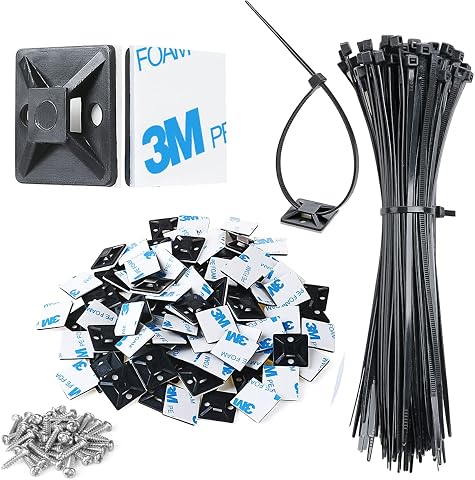
These high-quality adhesive zip tie mounts are made from durable PA66 nylon and 3M strong adhesive, suitable for outdoor use. They are ideal for managing various cables such as computer, TV, and holiday lights, providing a secure and organized solution without tools.
Pros:
- Durable and weather-resistant for outdoor use
- Easy to install with adhesive backing and screws
- Includes comprehensive set of mounts, ties, and screws
Cons:
- Adhesive may require 24 hours to fully cure
- Not reusable once adhered
- Surface must be clean for optimal adhesion
Best for: routing cables along compatible desk or wall surfaces
Not ideal for: frequently changing routes or unsuitable adhesive surfaces
Bottom line: Plan the route first and confirm surface compatibility before sticking mounts in place.
Reusable Cable Ties
Reusable ties bundle cords together while allowing later adjustments. The listed pick is VELCRO Brand ONE-WRAP Cable Ties, 8in x 1/2in, Black, 100 Pack. The reusable design can be useful when your setup changes, but the listed length and width should be checked against the size of each bundle rather than assumed to fit every grouping.
A common mistake is tightening a tie until the cables are compressed or difficult to separate. Bundle only cords that follow the same route, and leave room to identify and remove individual cables. Check the tie length around the largest planned bundle, including any plugs or connectors that need to pass through the route. Keep delicate or frequently moved cords arranged so the tie does not create a sharp bend or pull at a port.
Use ties as part of a route, not as a substitute for planning one. Bundles may still need clips, a tray, or another support to keep them from dropping into leg space. If you expect to add equipment, leave some adjustment room and avoid tying every cable into a single oversized group. The listed 8-inch ties are a starting point; compare the stated dimensions with your actual bundle and decide how often you need to reopen it.
What to look for:
- Tie length that wraps the intended bundle
- Width suited to the cords being gathered
- Separate bundles for cords following different routes
- Enough slack to avoid pulling at ports
- Extra adjustment room for likely setup changes
VELCRO Brand ONE-WRAP Cable Ties, 8in x 1/2in, Black, 100 Pack

These reusable VELCRO cable ties are designed for easy cord management, allowing you to bundle and organize wires quickly and securely. Suitable for indoor and outdoor use, they help eliminate clutter and tripping hazards while providing a damage-free, adjustable solution for home, office, or professional setups.
Pros:
- Reusable and adjustable for versatile use
- Easy to secure with pre-cut, slotted design
- Suitable for indoor and outdoor applications
- Effective for organizing multiple types of cables
Cons:
- May not be suitable for very heavy or large cables
- Limited to 8-inch length, less ideal for very long cords
Best for: organizing cords that may need to be adjusted or separated
Not ideal for: large bundles that exceed the listed tie dimensions
Bottom line: Measure your bundles and leave enough slack for access and cable movement.
Desk Grommet Kit
A desk grommet can provide a pass-through point for cables between the work surface and the space below. Since no specific product is listed here, choose based on your desk’s existing opening or the opening you are prepared to make. Measure the hole diameter and desk thickness, and compare those measurements with the kit’s stated fit range before buying.
A common mistake is choosing a grommet by its outside appearance without checking the opening it requires. If the desk already has a cutout, measure it carefully at more than one point and check whether its edge is clean and accessible. For a new opening, confirm that the desk material and underside support the installation method, and make sure the planned location avoids braces, drawers, and other hardware. Consider the cable bundle size and whether plugs need to pass through, not just bare cords.
Plan the route on both sides of the desk. Leave enough slack above and below the surface for equipment movement and maintenance, and avoid sharp bends at the opening. Check whether the grommet’s design supports the number and size of cords you intend to pass through. A well-matched opening keeps the route intentional while preserving access to the cables you may need to change.
What to look for:
- Opening diameter and desk thickness compatibility
- Fit for an existing hole or requirements for a new one
- Clearance from desk supports and hardware
- Capacity for cables and any plugs that must pass through
- A route with slack and no sharp bends
Power Strip Mount
A power strip mount can keep the strip in a planned location and help define where cables gather. No specific product is listed, so compare mounting options with the strip you own and the surface where it will sit. Check the strip’s dimensions, shape, and attachment points, then confirm the mount supports that form and leaves the outlets easy to reach.
A common mistake is choosing a mount based only on the strip’s length. Check how it attaches, whether the desk or wall surface is compatible, and whether the plug and cords have enough clearance. Plan access to the switch and outlets before fixing the position. Avoid a location where chair movement, knees, or foot traffic may snag cords, and leave enough slack for the strip’s lead to reach its power source without tension.
Consider how you use the outlets. If you often add or remove equipment, choose a position that lets you reach plugs without dismantling the cable route. Keep the strip and its cords arranged so they do not press against moving desk parts or become tightly bundled. Confirm the mount’s stated fit and installation requirements against your exact strip and intended location; compatibility is a dimension and access question as much as an attachment question.
What to look for:
- Mount dimensions compatible with the specific power strip
- Attachment method suited to the desk or wall surface
- Clear access to outlets and any switch
- Cord reach without tension or snagging
- Placement away from legs, chair movement, and desk controls
Buy in an order that addresses the biggest source of clutter first: plan the route, then choose the tray or pass-through that fits your desk. Add a box if loose connections need containment, and use clips or reusable ties to guide and group the cords along that route. Check measurements and compatibility before filling in smaller gaps.
You do not need to organize every cable in one pass. Start with the cords that interfere with your workspace, leave access for changes, and adjust the layout as your setup evolves. A few thoughtful choices can make the area feel easier to use and simpler to maintain.