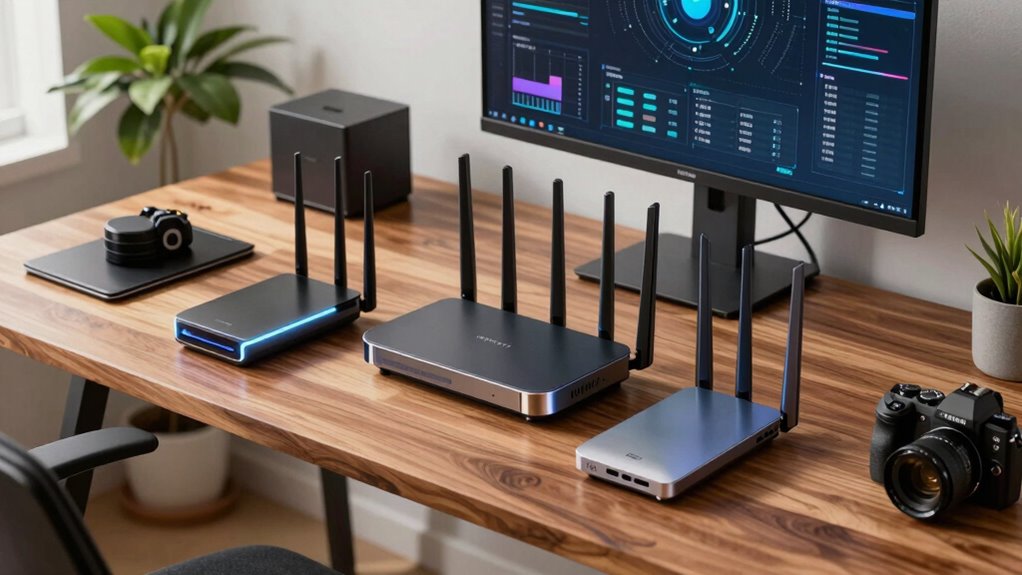

Choosing a Wi Fi 7 router for a home office involves balancing speed, coverage, and ease of use. The Deco 7 Dual-Band WiFi 7 Mesh System stands out as the best overall for its combination of performance and expandability, while the TP-Link BE6500 offers a solid mid-range option with great reliability. For those new to high-speed networking, simpler models like the TP-Link Archer BE3600 provide straightforward setup without sacrificing too much speed. The main tradeoffs involve balancing maximum throughput against coverage and ease of installation. Keep reading for a detailed breakdown of each product and how to choose the right one for your home office needs.

Get comfort and recovery gear delivered free with Prime
- Fast, free delivery on millions of items
- Prime Video, Amazon Music and more included
- Member-only deals all year
Complete the kit


Key Takeaways
- Top picks combine high bandwidth with reliable coverage suitable for demanding home office setups.
- Tri-band routers generally provide better performance and future-proofing compared to dual-band options, especially in larger spaces.
- Mesh systems like Deco 7 excel in covering multiple floors or larger areas, but may come at a higher cost.
- Ease of setup and user interface remain key factors for non-technical users, influencing overall satisfaction.
- Premium models offer additional features such as VPN support and multi-WAN, but may not be necessary for all users.
| Deco 7 Dual-Band WiFi 7 Mesh System (BE5000), 4-Stream, 5 Gbps |  | Best Overall for Seamless Whole-Home Coverage | WiFi Standard: WiFi 7 | Speed: 5 Gbps | Bands: Dual-band | VIEW ON AMAZON | See Our Full Breakdown |
| TP-Link BE6500 Dual-Band WiFi 7 Router (BE400) |  | Best for High-Speed, Reliable Single-Router Coverage | Wi-Fi Technology: Wi-Fi 7 | Maximum Speed: 5764 Mbps | Bands: Dual-Band | VIEW ON AMAZON | See Our Full Breakdown |
| TP-Link Tri-Band WiFi 7 Router (Archer BE550) |  | Best for High-Performance, Multi-Device Networks | WiFi Standard: WiFi 7 | Speed: up to 9.2 Gbps | Bands: Tri-band | VIEW ON AMAZON | See Our Full Breakdown |
| Deco 7 Pro Tri-Band WiFi 7 BE10000 Whole Home Mesh System 6-Stream 10 Gbps |  | Best for Large, High-Performance Mesh Coverage | Coverage: 7,600 sq. ft. | Device Support: Over 200 devices | Speed: up to 10 Gbps | VIEW ON AMAZON | See Our Full Breakdown |
| TP-Link Deco 7 BE23 Dual-Band WiFi 7 Mesh Router |  | Best for Compact, Smart-Wireless Home Coverage | Wi-Fi Standard: Wi-Fi 7 | Max Speed: 3.6 Gbps | Coverage: 2,500 sq. ft. | VIEW ON AMAZON | See Our Full Breakdown |
| GL.iNet GL-BE9300 Flint 3 Tri-Band Wi-Fi 7 Router |  | Best Overall for High-Performance Smart Homes | Model: GL-BE9300 | Wi-Fi Standard: Wi-Fi 7 | Frequency Band: Tri-Band | VIEW ON AMAZON | See Our Full Breakdown |
| NETGEAR Nighthawk WiFi 7 Router RS140, Up to 2,250 sq ft, 5 Gbps |  | Best Value for Large Homes with Reliable Speed | Coverage: 2,250 sq ft | Max Speed: 5 Gbps | Bands: Dual-band | VIEW ON AMAZON | See Our Full Breakdown |
| TP-Link Tri-Band WiFi 7 Router (Archer BE600) |  | Best for High-Speed, Large Coverage with Advanced Security | WiFi Bands: Tri-band (6GHz, 5GHz, 2.4GHz) | Total Bandwidth: 9.7 Gbps | Coverage: Up to 2,600 sq ft | VIEW ON AMAZON | See Our Full Breakdown |
| NETGEAR Nighthawk WiFi 7 Router RS90, Up to 2,000 sq ft, 3.6 Gbps |  | Best for Easy Setup and Moderate Speed Needs | Speed: 3.6 Gbps | Coverage: 2,000 sq ft | Bands: Dual-band | VIEW ON AMAZON | See Our Full Breakdown |
| NETGEAR Nighthawk WiFi 7 Router, Up to 2,500 sq ft, 9.3 Gbps |  | Best for Demanding Smart Homes with Highest Speed | WiFi Speed: up to 9.3 Gbps | Coverage: 2,500 sq ft | Device Capacity: up to 100 devices | VIEW ON AMAZON | See Our Full Breakdown |
| ASUS RT-BE58U WiFi 7 Router – Dual-WAN, 3.6 Gbps, Mesh + VPN Compatible |  | Best Overall for Versatile Home Office Use | WiFi Standard: WiFi 7 (802.11be) | Total Speed: 3600 Mbps | Bandwidth: 160MHz | VIEW ON AMAZON | See Our Full Breakdown |
| TP-Link Dual-Band Wi-Fi 7 Router, Archer BE3600 |  | Best Value for Large Homes with Many Devices | Wi-Fi Technology: Wi-Fi 7 | Speed (5 GHz): 2882 Mbps | Speed (2.4 GHz): 688 Mbps | VIEW ON AMAZON | See Our Full Breakdown |
| wi fi 7 router for home office | Coverage | Security | Bands |
|---|---|---|---|
| Deco 7 Dual-Band WiFi 7 Mesh S | 6,600 sq. ft. | TP-Link HomeShield | Dual-band |
| TP-Link BE6500 Dual-Band WiFi | 2400 sq. ft. | — | Dual-Band |
| TP-Link Tri-Band WiFi 7 Router | — | — | Tri-band |
| Deco 7 Pro Tri-Band WiFi 7 BE1 | 7,600 sq. ft. | — | — |
| TP-Link Deco 7 BE23 Dual-Band | 2,500 sq. ft. | WPA3, HomeShield | — |
| GL.iNet GL-BE9300 Flint 3 Tri- | — | — | — |
| NETGEAR Nighthawk WiFi 7 Route | 2,250 sq ft | NETGEAR Armor (30-day free trial) | Dual-band |
| TP-Link Tri-Band WiFi 7 Router | Up to 2,600 sq ft | TP-Link HomeShield with parental controls | — |
| NETGEAR Nighthawk WiFi 7 Route | 2,000 sq ft | NETGEAR Armor (30-day free trial) | Dual-band |
| NETGEAR Nighthawk WiFi 7 Route | 2,500 sq ft | — | Tri-band (2.4 GHz, 5 GHz, 6 GHz) |
| ASUS RT-BE58U WiFi 7 Router | — | WPA3, WPA2, Firewall, VPN, AiProtection Pro | — |
| TP-Link Dual-Band Wi-Fi 7 Rout | Up to 2,000 sq. ft. | TP-Link HomeShield | — |
More Details on Our Top Picks
Deco 7 Dual-Band WiFi 7 Mesh System (BE5000), 4-Stream, 5 Gbps
The Deco 7 Mesh WiFi system stands out for delivering extensive coverage and reliable performance across large homes, supporting up to 150 devices with WiFi 7’s high speeds. Unlike the TP-Link BE6500, which is a single-router setup, Deco’s mesh architecture provides more consistent connectivity in every corner, though it requires multiple units and a separate modem. Its AI-driven roaming simplifies management, making it accessible for users who prioritize ease of use. However, the setup can become complex if you want optimal backhaul performance, and advanced features might overwhelm non-technical users. Compared to the Deco 7 Pro, it offers slightly less raw speed but excels in coverage and simplicity for multi-room setups.
Pros:- Extensive coverage up to 6,600 sq. ft. with mesh technology
- Supports up to 150 devices, ideal for busy households
- Easy setup and management through the Deco app
- Enhanced security with TP-Link HomeShield
Cons:- Requires a separate modem for internet connection
- Mesh backhaul setup may need multiple units for best performance
- Advanced features could be complex for non-technical users
Best for: Homeowners needing expansive, seamless WiFi coverage for large spaces with many devices
Not ideal for: Small apartments or users seeking a simple, single-router solution without mesh complexity
- WiFi Standard:WiFi 7
- Speed:5 Gbps
- Bands:Dual-band
- Streams:4-Stream
- Coverage:6,600 sq. ft.
- Max Devices:150
- Ethernet:2.5G Ethernet
- Security:TP-Link HomeShield
Our verdict“This mesh system is best suited for large homes seeking reliable, high-speed WiFi with simple management.”
TP-Link BE6500 Dual-Band WiFi 7 Router (BE400)
Compared with the Deco 7 mesh system, the TP-Link BE6500 offers a straightforward dual-band router setup that supports high-speed connections up to nearly 6 Gbps. It’s well-suited for users who prefer a single device rather than a mesh, providing easy management via the Tether app and solid security features like WPA3. Its coverage of around 2,400 sq. ft. makes it ideal for medium-sized homes, but it doesn’t support mesh expansion, unlike the Deco 7. While the setup is simple, advanced features like MU-MIMO and OFDMA might seem complex for non-technical users. If you need a reliable, high-performance router for a single location, this option simplifies deployment without sacrificing speed.
Pros:- Supports fast WiFi 7 speeds with up to 5.8 Gbps on 5 GHz
- Easy setup and management via Tether app
- Strong security features including WPA3 and HomeShield
- Robust port options with 2.5 Gbps WAN/LAN ports
Cons:- Not compatible with mesh WiFi systems like Deco
- Requires a separate modem for internet access
- Complex features might overwhelm casual users
Best for: Consumers wanting a high-speed, standalone WiFi 7 router for medium-sized homes or apartments
Not ideal for: Very large homes or those who prefer mesh systems for seamless coverage in every corner
- Wi-Fi Technology:Wi-Fi 7
- Maximum Speed:5764 Mbps
- Bands:Dual-Band
- Coverage:2400 sq. ft.
- Devices Supported:Up to 90
- Ports:1x 2.5 Gbps WAN/LAN
Our verdict“Ideal for users needing a powerful, reliable WiFi 7 router for a single location without mesh complexity.”
TP-Link Tri-Band WiFi 7 Router (Archer BE550)
The Archer BE550’s tri-band setup supports speeds up to 9.2 Gbps, making it a top choice for demanding home networks, especially when compared to the dual-band BE6500. Its 6 antennas and advanced features like Multi-Link Operation provide enhanced stability and coverage, suitable for gaming, streaming, and multiple smart devices. It includes full 2.5G ports for future-proof wired connections, adding versatility over simpler routers. However, its performance can depend heavily on ISP speed and network environment, and it comes at a higher price point. This model is perfect for tech-savvy users seeking maximum speed and capacity in a single device, but less so for casual users on tighter budgets.
Pros:- Exceptional speeds up to 9.2 Gbps with tri-band support
- Full 2.5G ports for wired performance
- Easy setup with the Tether app and voice assistant compatibility
- Advanced security with WPA3 and HomeShield
Cons:- High price compared to simpler routers
- Performance depends on ISP and network conditions
- Requires compatible modem for full functionality
Best for: High-demand households with multiple 4K streams, gaming, and smart home devices
Not ideal for: Users with basic internet needs or small homes where tri-band features are unnecessary
- WiFi Standard:WiFi 7
- Speed:up to 9.2 Gbps
- Bands:Tri-band
- Max Speed (6 GHz):5760 Mbps
- Max Speed (5 GHz):2880 Mbps
- Max Speed (2.4 GHz):574 Mbps
- Ports:1x 2.5G WAN, 4x 2.5G LAN
Our verdict“Best suited for power users who demand maximum speed and capacity in a single-router setup.”
Deco 7 Pro Tri-Band WiFi 7 BE10000 Whole Home Mesh System 6-Stream 10 Gbps
The Deco 7 Pro Mesh System offers expansive coverage up to 7,600 sq. ft. and supports over 200 devices, making it ideal for very large homes or those with heavy device usage. Its tri-band architecture and speeds up to 10 Gbps on the 6 GHz band make it a powerhouse for streaming, gaming, and smart home integration. The inclusion of a 10G WAN/LAN port ensures future-proof wired connectivity, and AI-driven roaming maintains seamless connections across the entire space. Compared to the single-router BE6500, it provides far more coverage and capacity, but its complexity and higher cost are drawbacks. This system is perfect for users who need both size and speed, but for smaller homes, it might be overkill.
Pros:- Massive coverage up to 7,600 sq. ft. with mesh technology
- Supports over 200 devices simultaneously
- Fast speeds up to 10 Gbps on the 6 GHz band
- Future-proof 10G WAN/LAN port
Cons:- Requires a separate modem for internet access
- Setup and management may be complex for average users
- Higher price point compared to smaller systems
Best for: Large households or smart homes requiring extensive coverage and high device capacity
Not ideal for: Small apartments or users on a tight budget seeking a simple setup
- Coverage:7,600 sq. ft.
- Device Support:Over 200 devices
- Speed:up to 10 Gbps
- WAN/LAN Ports:4 x 2.5G
- WiFi Standard:WiFi 7
- Mesh System:Yes
Our verdict“Best for large, demanding homes that need extensive, high-speed WiFi coverage and capacity.”
TP-Link Deco 7 BE23 Dual-Band WiFi 7 Mesh Router
The Deco 7 BE23 offers a balanced combination of speed, coverage, and security, supporting WiFi 7 speeds up to 3.6 Gbps and covering approximately 2,500 sq. ft. with support for multiple devices. Its dual-band setup and multi-gig Ethernet ports make it versatile for smaller homes or apartments where high performance is desired without the complexity of mesh expansion. Compared to the Deco 7, it provides less overall coverage but is easier to set up and manage for less tech-savvy users. The support for WiFi 7 ensures future-ready performance, although maximum speed and coverage are limited for larger spaces or heavy multi-device environments.
Pros:- Supports WiFi 7 with speeds up to 3.6 Gbps
- Supports multiple devices with low latency
- Multi-gig Ethernet ports for wired connections
- Secure with WPA3 and HomeShield
Cons:- Limited coverage compared to larger mesh systems
- Requires compatible WiFi 7 devices to maximize benefits
- Setup may be complex for non-technical users
Best for: Urban dwellers or small family homes needing reliable WiFi 7 coverage with simple setup
Not ideal for: Large homes or users who need extensive mesh coverage or maximum speed
- Wi-Fi Standard:Wi-Fi 7
- Max Speed:3.6 Gbps
- Coverage:2,500 sq. ft.
- Ethernet Ports:2x 2.5 Gbps
- Mesh Compatibility:Yes
- Security:WPA3, HomeShield
Our verdict“Ideal for small to medium-sized homes seeking reliable WiFi 7 performance with straightforward management.”
GL.iNet GL-BE9300 Flint 3 Tri-Band Wi-Fi 7 Router
The GL.iNet GL-BE9300 Flint 3 stands out as the most powerful option, delivering up to 9 Gbps speeds across three bands. Unlike the NETGEAR RS140, which maxes out at 5 Gbps, this router provides a significant boost for bandwidth-intensive tasks like 4K streaming and gaming. Its coverage of 2,000 sq ft and support for multiple VPN protocols make it ideal for smart homes with many connected devices. However, its setup process is more complex, requiring technical knowledge, and the higher price reflects its premium features. Compared to simpler models, it offers more control but demands more effort to configure. Best for tech-savvy users wanting top-tier performance and security in a single device.
Pros:- Ultra-fast Wi-Fi 7 speeds up to 9 Gbps for seamless streaming and gaming
- Extensive coverage up to 2,000 sq ft with strong signal strength
- Supports multiple VPN protocols and parental controls for security and family management
- High device capacity suitable for smart homes and high-density environments
Cons:- Complex setup may require advanced technical knowledge
- Price may be higher compared to more straightforward routers
- VPN speeds may vary depending on ISP and network conditions
Best for: Homeowners with demanding smart home setups, gamers, or streamers who need maximum performance and security.
Not ideal for: Less experienced users or those seeking quick, plug-and-play solutions due to setup complexity.
- Model:GL-BE9300
- Wi-Fi Standard:Wi-Fi 7
- Frequency Band:Tri-Band
- Maximum Speed:9 Gbps
- Coverage Area:2000 sq ft
- Number of Ports:5
- Security Protocols:wpa2-psk, wpa3, wpa2-enterprise, wpa-enterprise, wps
- Operating System:Linux
Our verdict“This router is best suited for tech-savvy homeowners who prioritize maximum speed, security, and extensive coverage in their smart home or gaming environment.”
NETGEAR Nighthawk WiFi 7 Router RS140, Up to 2,250 sq ft, 5 Gbps
The NETGEAR Nighthawk RS140 offers a solid balance of speed and coverage, supporting up to 5 Gbps across 2,250 sq ft, making it a strong contender against the TP-Link Archer BE600. While it doesn’t match the ultra-high speeds of the GL.iNet Flint 3, it simplifies setup with a user-friendly app and provides reliable performance for streaming, gaming, and multiple device connections. Its dual-band design and broad coverage make it ideal for large, multi-story homes, though real-world speeds can depend on device compatibility and ISP plan. Additionally, the subscription needed for ongoing security with NETGEAR Armor may be a consideration. Best for users seeking reliable, easy-to-manage Wi-Fi in sizable residences without needing the highest speeds.
Pros:- Fast WiFi 7 speeds up to 5 Gbps for streaming and gaming
- Wide coverage up to 2,250 sq ft suitable for large homes
- Easy setup and management via mobile app
- Supports multiple devices simultaneously
Cons:- Speeds depend on device compatibility and plan
- Mesh system may be needed for multi-story homes
- Security subscription required for continued Armor protection
Best for: Large household users who want dependable Wi-Fi with straightforward management and moderate high-speed needs.
Not ideal for: Power users requiring ultra-fast speeds or advanced security features without additional subscriptions.
- Coverage:2,250 sq ft
- Max Speed:5 Gbps
- Bands:Dual-band
- Ethernet Ports:3 x 1 Gigabit, 1 x 2.5 Gigabit WAN
- Device Capacity:Up to 80 devices
- Security:NETGEAR Armor (30-day free trial)
Our verdict“This router offers a reliable, user-friendly Wi-Fi 7 experience for large homes with moderate high-speed demands.”
TP-Link Tri-Band WiFi 7 Router (Archer BE600)
The TP-Link Archer BE600 provides a high-bandwidth experience, with total speeds reaching 9.7 Gbps across three bands—ideal for streaming, gaming, and smart home devices. Unlike the NETGEAR RS140, which focuses on simplicity, the BE600 offers extensive coverage of up to 2,600 sq ft and multiple multi-gigabit ports, making it a versatile choice for demanding households. Its quad-core CPU and advanced security features, including parental controls and threat detection, make it suitable for tech-savvy users. However, setup can be daunting for non-technical users, and its size requires ample space. This makes it perfect for those who want high performance and security but are comfortable with complex configuration.
Pros:- High-speed tri-band WiFi 7 with up to 9.7 Gbps bandwidth
- Extensive coverage up to 2,600 sq ft
- Multiple multi-gigabit ports for fast wired connections
- Advanced security with parental controls and threat detection
Cons:- Setup may be challenging for non-technical users
- Large size may require dedicated space
- Premium price point
Best for: Tech-savvy users who need high-speed, large-area coverage, and advanced security features for their home network.
Not ideal for: Less experienced users or those seeking a simple, plug-and-play router due to its setup complexity.
- WiFi Bands:Tri-band (6GHz, 5GHz, 2.4GHz)
- Total Bandwidth:9.7 Gbps
- Coverage:Up to 2,600 sq ft
- Ports:1x 10 Gbps WAN, 1x 2.5 Gbps WAN, 3x 2.5 Gbps LAN
- Processor:Quad-core CPU
- Security:TP-Link HomeShield with parental controls
Our verdict“This router suits users who prioritize high-speed performance and security, and are willing to handle a more complex setup process.”
NETGEAR Nighthawk WiFi 7 Router RS90, Up to 2,000 sq ft, 3.6 Gbps
The NETGEAR Nighthawk RS90 strikes a balance between performance and convenience, offering speeds up to 3.6 Gbps and coverage of 2,000 sq ft. Compared to the NETGEAR RS140, which emphasizes high speeds, the RS90 is more accessible for users seeking straightforward installation and reliable performance for streaming and smart devices. Its dual-band setup simplifies network management, though this limits peak speeds compared to tri-band models like the Archer BE600. The included app makes configuration simple, but some advanced security features require a subscription after the free trial. Ideal for users looking for a hassle-free, reliable Wi-Fi 7 router for everyday use.
Pros:- Fast WiFi 7 speeds up to 3.6 Gbps for streaming and gaming
- Reliable coverage of up to 2,000 sq ft suitable for most homes
- Simple setup and management via mobile app
- Supports multiple connected devices
Cons:- Limited to dual-band speeds compared to tri-band options
- May need mesh system for larger multi-story homes
- Security features require subscription after trial
Best for: Home users who want dependable Wi-Fi with minimal setup effort and moderate speed requirements.
Not ideal for: Power users or large households needing ultra-high speeds or extensive coverage beyond 2,000 sq ft.
- Speed:3.6 Gbps
- Coverage:2,000 sq ft
- Bands:Dual-band
- Ethernet Ports:Four 1 Gig Ethernet
- Compatibility:Works with most cable, fiber, DSL, satellite providers
- Security:NETGEAR Armor (30-day free trial)
Our verdict“This router offers a straightforward, reliable Wi-Fi 7 experience ideal for typical home environments with moderate speed needs.”
NETGEAR Nighthawk WiFi 7 Router, Up to 2,500 sq ft, 9.3 Gbps
The NETGEAR Nighthawk RS90 stands out for its tri-band speeds reaching up to 9.3 Gbps, making it a top choice for large, demanding homes. It surpasses the TP-Link Archer BE600 in raw speed and device capacity, supporting up to 100 devices across a wide 2,500 sq ft area. Features like multi-gig ports and a quad-core processor cater to heavy bandwidth use, such as 4K streaming, VR, and extensive smart home networks. However, it requires a compatible modem, and many advanced features may need a subscription post-trial. Its size and complexity mean it’s best for users comfortable with advanced setup. This router is suited for large, high-demand households that need maximum speed and coverage.
Pros:- Exceptional tri-band WiFi 7 speeds up to 9.3 Gbps
- Huge coverage of up to 2,500 sq ft
- Supports up to 100 devices simultaneously
- Multiple multi-gig wired ports for fast wired connections
Cons:- Requires existing modem or gateway for internet access
- Many features need subscription after free trial
- Complex setup may be daunting for some users
Best for: Large smart homes or demanding users needing top-tier speed, device capacity, and extensive coverage.
Not ideal for: Small households or users seeking simple, plug-and-play solutions without extensive configuration.
- WiFi Speed:up to 9.3 Gbps
- Coverage:2,500 sq ft
- Device Capacity:up to 100 devices
- Bands:Tri-band (2.4 GHz, 5 GHz, 6 GHz)
- Ethernet Ports:2x 2.5 Gbps, 2x 1 Gbps
- Processor:Quad-core 2.0 GHz
Our verdict“This router is designed for large, tech-savvy households demanding maximum speed, device capacity, and coverage in a single device.”
ASUS RT-BE58U WiFi 7 Router – Dual-WAN, 3.6 Gbps, Mesh + VPN Compatible
The ASUS RT-BE58U stands out for combining high-speed WiFi 7 support with advanced features like dual-WAN, mesh capabilities, and robust security via AiProtection Pro. Compared to the TP-Link Archer BE3600, it offers more flexible connectivity options and better security, making it ideal for users who need both fast internet and reliable network management. However, the setup process can be challenging for beginners, and some may find the feature set overkill if their needs are simple. Its internal antennas and Linux-based OS ensure a sleek design and customization potential, but the complexity may deter less tech-savvy users. This router is best suited for tech-savvy professionals or small business owners who want maximum control and speed in their home office environment.
Pros:- Supports WiFi 7 with speeds up to 3600 Mbps for demanding tasks
- Dual-WAN and mesh networking for flexible, reliable coverage
- Includes AiProtection Pro security for enhanced safety
- USB port allows mobile tethering for backup or remote access
Cons:- Setup process can be complex for less experienced users
- Features may be excessive for basic internet needs
Best for: Power users and small business owners who require advanced security, dual-WAN support, and high-speed WiFi 7 performance
Not ideal for: Casual users or those seeking a straightforward plug-and-play setup, as the configuration may be daunting
- WiFi Standard:WiFi 7 (802.11be)
- Total Speed:3600 Mbps
- Bandwidth:160MHz
- Number of Antennas:4
- Ports:5
- Security:WPA3, WPA2, Firewall, VPN, AiProtection Pro
- Control Method:App
- Frequency Band:Dual-Band
Our verdict“This router is ideal for tech-savvy users needing high performance and advanced network features in a home office setting.”
TP-Link Dual-Band Wi-Fi 7 Router, Archer BE3600
The TP-Link Archer BE3600 offers solid WiFi 7 performance with speeds up to 2882 Mbps on the 5 GHz band, making it a practical choice for users seeking reliable coverage across large spaces. Unlike the ASUS RT-BE58U, it focuses on simplicity and extensive coverage, supporting up to 60 devices, which benefits busy households or remote work setups. Although it lacks the 6 GHz band found in higher-end models, its extensive coverage and multiple gigabit ports make it a dependable pick for those who prioritize wired and wireless stability. The device’s security features are robust through TP-Link’s HomeShield, but the need for a separate modem can be inconvenient for some. This router is best suited for families or small teams in need of reliable, whole-home WiFi without complex setup requirements.
Pros:- Supports WiFi 7 with speeds up to 2882 Mbps on 5 GHz
- Extensive coverage up to 2,000 sq. ft. suitable for large homes
- Multiple gigabit ports for wired connections
- Seamless mesh compatibility for whole-home coverage
Cons:- Does not support the 6 GHz band, limiting future-proofing
- Requires separate modem for internet connection
- Performance can vary depending on environment and obstacles
Best for: Homeowners or remote workers with large spaces and many connected devices seeking reliable WiFi 7 coverage
Not ideal for: Users who want the latest multi-band technology, including the 6 GHz band, or an all-in-one modem/router solution
- Wi-Fi Technology:Wi-Fi 7
- Speed (5 GHz):2882 Mbps
- Speed (2.4 GHz):688 Mbps
- Ports:1x 2.5 Gbps WAN/LAN, 1x 2.5 Gbps LAN, 3x 1 Gbps LAN
- Coverage:Up to 2,000 sq. ft.
- Antennas:4 internal with beamforming
- Processor:Quad-core 2.0 GHz
- Security:TP-Link HomeShield
Our verdict“This router provides a reliable, coverage-focused option for large homes or busy households needing stable WiFi 7 connections without extra complexity.”

How We Picked
I evaluated each router based on performance metrics like maximum throughput, latency, and coverage area, ensuring they handle multiple devices simultaneously. Build quality and ease of setup were also critical, as a router that’s complicated to install can negate performance benefits. Value was considered by comparing features relative to price, aiming to identify options that deliver high performance without unnecessary extras. I prioritized products that are specifically designed to meet the demands of a home office environment, including stability, security, and future-proofing with Wi Fi 7 technology. The ranking reflects a balanced approach, favoring those that excel across these criteria while considering real-world usability and reliability.| wi fi 7 router for home office | Bands | Security |
|---|---|---|
| Deco 7 Dual-Band WiFi 7 Mesh S | Dual-band | TP-Link HomeShield |
| TP-Link BE6500 Dual-Band WiFi | Dual-Band | — |
| TP-Link Tri-Band WiFi 7 Router | Tri-band | — |
| Deco 7 Pro Tri-Band WiFi 7 BE1 | — | — |
| TP-Link Deco 7 BE23 Dual-Band | — | WPA3, HomeShield |
| GL.iNet GL-BE9300 Flint 3 Tri- | — | — |
| NETGEAR Nighthawk WiFi 7 Route | Dual-band | NETGEAR Armor (30-day free trial) |
| TP-Link Tri-Band WiFi 7 Router | — | TP-Link HomeShield with parental controls |
| NETGEAR Nighthawk WiFi 7 Route | Dual-band | NETGEAR Armor (30-day free trial) |
| NETGEAR Nighthawk WiFi 7 Route | Tri-band (2.4 GHz, 5 GHz, 6 GHz) | — |
| ASUS RT-BE58U WiFi 7 Router | — | WPA3, WPA2, Firewall, VPN, AiProtection Pro |
| TP-Link Dual-Band Wi-Fi 7 Rout | — | TP-Link HomeShield |
Factors to Consider When Choosing Wi Fi 7 Router For Home Office
Selecting the right Wi Fi 7 router for a home office requires weighing several key factors. Understanding your space, device count, and speed needs can help you avoid overpaying for features you don’t need or ending up with insufficient coverage and bandwidth. Compatibility with your existing network, ease of setup, and future-proofing are also essential considerations. This guide will walk through the main points to keep in mind to make a smart purchase and avoid common pitfalls when choosing your router.Coverage and Range
Assess your home’s size and layout to determine the coverage needed. Larger or multi-story homes benefit from mesh systems or tri-band routers that can extend signals more effectively. Relying solely on dual-band routers in extensive spaces can create dead zones, forcing manual adjustments or additional extenders. Remember, higher frequency bands like Wi Fi 7’s 6 GHz are faster but have shorter ranges, so balancing speed with coverage is key to a stable home office connection.
Performance and Speed
For demanding tasks like video conferencing, large file transfers, or cloud computing, a router with high throughput—preferably over 6 Gbps—is advantageous. Wi Fi 7 routers are designed to handle multiple streams with minimal lag, but actual performance depends on your ISP plan and connected devices. Investing in a tri-band router can reduce congestion if many devices are active simultaneously, though it often comes at a higher cost. Consider what your actual speed needs are and match the hardware accordingly.
Ease of Setup and User Interface
Even high-performance routers can be frustrating if setup is complicated. Look for models with intuitive apps or web interfaces that guide you through installation and network management. Features like automatic firmware updates, parental controls, and guest networks add convenience but vary in accessibility. For home office users who prefer simplicity, avoiding overly complex configurations can save time and reduce frustration.
Security and Future-Proofing
Security features such as WPA3 encryption, automatic updates, and VPN support are important, especially for protecting sensitive work data. Wi Fi 7’s advanced capabilities mean your router should support upcoming standards and devices, so opting for a model with good firmware support and upgradeability is wise. Skipping security features or buying outdated hardware can expose your network to vulnerabilities over time.
Additional Features and Value
Features like multi-WAN ports, MU-MIMO, OFDMA, and integrated smart home hubs can add value but may not be necessary for everyone. Carefully evaluate whether these extras align with your home office needs or inflate the price unnecessarily. Often, investing in a slightly more expensive but more capable router results in better long-term performance and fewer upgrade headaches.
Frequently Asked Questions
Is Wi Fi 7 worth upgrading to for my home office?
Upgrading to Wi Fi 7 can be highly beneficial if you require higher speeds, lower latency, and better device management, especially in busy home offices with multiple users. While your current setup may handle basic tasks, Wi Fi 7 offers future-proofing and scalability for newer devices and demanding applications. However, if your internet plan and existing devices don’t support Wi Fi 7 yet, the upgrade might be more about readiness than immediate necessity.
Should I choose a mesh system or a traditional router for my home office?
Mesh systems like the Deco 7 excel in larger, multi-story homes where coverage is a concern, providing seamless connectivity across multiple zones. Traditional routers can be sufficient in smaller spaces or if you prefer a straightforward setup. The main consideration is the size and layout of your home—if coverage is a challenge, a mesh system may prevent dead zones, but it often comes at a higher price and complexity.
How many devices can a Wi Fi 7 router support effectively?
Most Wi Fi 7 routers are designed to handle dozens of devices simultaneously, thanks to OFDMA and MU-MIMO technologies. For a typical home office with multiple work devices, smart home gadgets, and personal gadgets, a high-end router can usually sustain stable speeds across all. If your setup includes many high-bandwidth devices, investing in a tri-band or mesh system ensures better overall performance and less congestion.
Is security a concern with Wi Fi 7 routers?
Security remains a critical aspect, regardless of Wi Fi generation. Wi Fi 7 routers generally support WPA3 encryption, which provides stronger protection against hacking attempts. Regular firmware updates are essential to patch vulnerabilities, so choosing a vendor with good support is wise. Neglecting security features or using outdated hardware can leave your network exposed, especially when handling sensitive work information in a home office environment.
What is the main tradeoff between high-end and budget Wi Fi 7 routers?
High-end routers offer faster speeds, broader coverage, and advanced features like multi-Gig ports and VPN support, making them suitable for demanding setups. Budget models, while more affordable, often sacrifice some of these capabilities, potentially leading to less coverage or lower maximum throughput. The key is to balance your actual needs—if you only have a small home office with moderate device use, a mid-range router may suffice. For larger spaces or power users, investing in premium hardware ensures better reliability and future readiness.
Conclusion
For most home office users, the Deco 7 Dual-Band WiFi 7 Mesh System offers a compelling balance of speed and coverage, making it the best overall choice. Those seeking the best value without sacrificing too much performance should consider the TP-Link BE6500. If you’re new to high-speed networking or prefer simplicity, the TP-Link Archer BE3600 provides a straightforward setup. For users with larger spaces or demanding workflows, investing in a tri-band or mesh system ensures future-proofing and reliable connectivity. Ultimately, your choice should align with your space, device needs, and budget to make the most of Wi Fi 7’s capabilities in your home office.
Columbus Day / Indigenous Peoples' Day Picks
long weekend sales
As an affiliate, we earn on qualifying purchases.