

TL;DR
Ergonomic laptop stands help align your screen to eye level, reducing neck and shoulder strain. They come in various styles, with recent tech-integrated options and eco-friendly designs. Choosing the right stand depends on adjustability, build quality, and portability.
Imagine spending hours at your desk, neck craned down, eyes glued to a screen that’s too low. Your shoulders ache, your back tightens. Now, picture a simple solution: a sturdy, adjustable stand that lifts your laptop to eye level, instantly improving your posture. Ergonomic laptop stands aren’t just accessories—they’re game changers for anyone who works on a laptop for more than an hour a day. Whether you’re remote, at a coffee shop, or in a busy office, the right stand can make a noticeable difference.
In this guide, you’ll learn what makes a stand truly ergonomic, explore the latest innovations, and get tips for choosing the best one for your needs. No fluff, just honest advice to help you work smarter, healthier, and more comfortably.
Choose stands with adjustable height and tilt for personalized comfort.
Prioritize durable, stable materials like aluminum or bamboo.
Consider portability if you work remotely or travel often.
Smart features like built-in USB hubs or cooling fans add value.
Always verify compatibility with your laptop size and weight.
What Makes an Ergonomic Laptop Stand Truly Work?
Ever wonder what separates a good ergonomic stand from a mediocre one? The secret lies in adjustability and build quality. A truly ergonomic stand allows you to customize your setup for optimal comfort, which is crucial because every individual’s body and workspace are different. Adjustable height and tilt are not just convenience features; they directly impact your posture, eye health, and long-term comfort. For example, a stand that only elevates your laptop by 2 inches might be insufficient for taller users, leading to neck strain. Conversely, a stand that can go up to 8 inches and lock securely provides flexibility and stability, accommodating various working positions.
Build quality also plays a vital role. A sturdy stand made from quality materials like aluminum or high-grade plastic ensures stability, reducing wobble that can cause discomfort or even accidents. A wobbling surface forces your muscles to compensate for instability, increasing fatigue over time. Ventilation is another key feature; overheating can cause your laptop to throttle performance and become uncomfortable to touch. An open or ventilated design allows heat dissipation, maintaining optimal device performance and preventing heat-related discomfort, which is especially important during long working sessions. Ultimately, the right combination of adjustability, stability, and cooling features ensures your stand supports healthy ergonomics and device longevity.
Furthermore, the tradeoff between adjustability and portability must be considered. Highly adjustable stands often involve more complex mechanisms, which can add weight or bulk, potentially reducing portability. Conversely, ultra-portable designs might limit the range of adjustments, forcing users to compromise on ideal ergonomics for convenience. Recognizing these tradeoffs helps you select a stand that balances your ergonomic needs with your mobility requirements, ensuring sustained comfort without sacrificing ease of transport.

Nulaxy Ergonomic Adjustable Laptop Stand for Desk, Dual Foldable Computer Riser with Advanced Heat-Vent, Heavy-Duty Portable Notebook Holder for Posture Correction, Compatible with Mac 10-17" Laptops
Ergonomic Posture Correction: Designed to elevate your laptop to the perfect eye level, this adjustable laptop stand significantly…
As an affiliate, we earn on qualifying purchases.
As an affiliate, we earn on qualifying purchases.
How to Pick the Perfect Ergonomic Stand in 3 Simple Steps
- Assess your workspace and needs: Consider how much mobility you require. Do you work mainly at a desk, or do you frequently switch locations like cafes or co-working spaces? Do you need additional ports or a stand that folds easily for travel? Clarifying these needs helps narrow down options that fit your lifestyle and work habits. For instance, if you often work remotely or travel, prioritizing lightweight and foldable options enhances convenience. Conversely, if your primary workspace is static, stability and cooling features might take precedence, as these directly impact comfort during long sessions.
- Check adjustability and compatibility: Ensure the stand offers sufficient height and tilt adjustments to match your laptop size (typically 11-17 inches). Testing whether it locks securely at your preferred angles is essential because loose locks can shift during use, leading to poor posture or repetitive strain. Compatibility also involves considering your workspace dimensions; a stand that is too bulky or heavy may hinder movement or desk organization. The goal is to find a balance where the stand provides enough flexibility to suit your ergonomic needs while fitting comfortably within your environment.
- Review materials and extras: Prioritize durable, stable materials like aluminum, bamboo, or high-strength plastics that resist wear and provide a firm support base. Consider extra features such as cable management, USB hubs, or foldability, which can streamline your workspace and improve efficiency. For example, cable management reduces clutter, preventing accidental pulls that could destabilize your device. USB hubs expand connectivity, especially useful if your laptop lacks sufficient ports. Foldable designs enhance portability for those on the move. Evaluating these extras helps tailor your choice to match your work style and ergonomic priorities, ensuring sustained comfort and productivity.
Following these steps makes the selection process more strategic, helping you find a stand that truly supports your health and workflow.

havit HV-F2056 15.6"-17" Laptop Cooler Cooling Pad – Slim Portable USB Powered (3 Fans), Black/Blue
Ultra-Portable: Slim, portable, and light weight allowing you to protect your investment wherever you go
As an affiliate, we earn on qualifying purchases.
As an affiliate, we earn on qualifying purchases.
Compare Top 3 Ergonomic Laptop Stands — Which One Fits You?
| Feature | Model A | Model B | Model C |
|---|---|---|---|
| Adjustable Height | 3-8 inches | 4-10 inches | 2-6 inches |
| Material | Aluminum | Recycled Plastic | Bamboo |
| Portability | Foldable, lightweight | Rigid, heavy-duty | Compact, foldable |
| Cooling | Open design | Built-in fan | Open design |
| Price Range | $40 | $60 | $30 |
This table highlights key differences. Need maximum height? Model B’s flexible range suits taller desks and standing setups, providing greater ergonomic versatility. Want sustainability? Bamboo (Model C) offers an eco-friendly choice that combines style and function, supporting environmentally conscious work habits. For portability, Model A excels with its lightweight, foldable design, making it ideal for those frequently on the move. These distinctions help you identify which features are most critical for your specific ergonomic needs and lifestyle, enabling a more informed purchase decision.
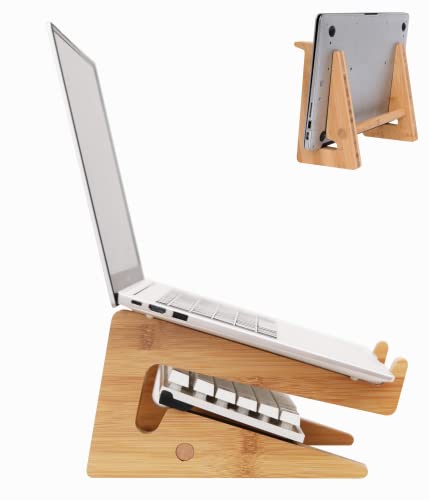
Nuvograin Laptop Stand, Wooden Vertical Laptop Stand for Desk, Bamboo Laptop Stand Compatible with MacBook Air Pro/Dell XPS/Surface pro/HP/Pixelbook/Lenovo, More Laptops 13-17.7inch
【High-quality Material】 Made of good quality solid wood, it has a good load bearing capacity(load-bearing up to 44pound)…
As an affiliate, we earn on qualifying purchases.
As an affiliate, we earn on qualifying purchases.
Latest Trends Making Ergonomic Stands Smarter & Greener
Today’s ergonomic stands are evolving rapidly, integrating advanced features that enhance usability while supporting sustainability. Smart features like built-in USB hubs, wireless charging pads, and integrated cable management turn your stand into a multifunctional tech hub, reducing clutter and streamlining your workspace. For example, a stand with a wireless charging pad allows you to power your phone effortlessly, eliminating the need for messy cords and creating a cleaner, more organized desk.
Designers are increasingly focusing on eco-friendly materials such as recycled plastics, responsibly sourced wood, and sustainable composites. These choices not only reduce environmental impact but also appeal to consumers seeking greener options without sacrificing style or durability. Lightweight, foldable models made from advanced materials like carbon fiber are gaining popularity among remote workers and travelers, offering a blend of portability, strength, and modern aesthetics. Think of a stand that combines ergonomic flexibility with eco-conscious design, making it a smart choice for environmentally aware users who don’t want to compromise on functionality.
Hybrid solutions are also emerging, combining ergonomic adjustability with integrated workspace accessories like document holders, monitor risers, or even built-in lighting. These innovations make your workspace more adaptable and organized, supporting a variety of work styles and preferences while emphasizing sustainability and tech integration.

BENFEI Laptop Stand with USB C 7in1 Docking Station,HDMI 4K@60Hz,1*SD 1*Micro SD,100W Power Delivery,10Gbps 1*USB C 3.2 and 2*USB A 3.2 Compatible with MacBook Pro/Air, iPad Pro, XPS, Thinkpad
【Ergonomic Design】BENFEI Laptop stand can be easily adjusted to comfortable height and angle based on your actual need…
As an affiliate, we earn on qualifying purchases.
As an affiliate, we earn on qualifying purchases.
Your Ergonomic Stand Buying Checklist — What Really Matters
- Adjustability: Can you easily change height and tilt to match your eye level? Proper adjustability ensures you can set your screen at the optimal angle, preventing neck strain and eye fatigue. The ability to fine-tune your setup means you can adapt your workspace as your posture or tasks change, promoting long-term comfort.
- Build quality: Is it sturdy, stable, and made from durable materials? A well-built stand resists wobbling and wear, maintaining its support over time. This stability is essential for safety, especially when typing or using your laptop intensively, as instability can lead to awkward postures or accidental falls.
- Size and compatibility: Will it support your laptop size (11-17 inches) comfortably? Ensuring proper support prevents your device from slipping or wobbling, which can cause frustration or damage. Compatibility also involves considering your workspace dimensions and whether the stand fits comfortably without crowding your area.
- Portability: Is it lightweight or foldable for travel? Portability is crucial if you work in multiple locations. A lightweight, foldable stand enables you to maintain ergonomic positioning wherever you go, reducing the temptation to compromise your posture when working remotely or on the move.
- Additional features: USB ports, cooling fans, cable management? These extras can significantly enhance your workspace’s efficiency. For example, built-in USB hubs reduce cable clutter, while cooling fans prevent overheating during intensive tasks, helping maintain device performance and comfort.
What Could Go Wrong? Risks & How to Avoid Them
Using the wrong stand can cause more harm than good. A stand that’s too flimsy might wobble or collapse, risking your laptop falling and potentially damaging your device or causing injury. Overly high stands without secure locking mechanisms can shift during use, leading to poor posture, neck strain, or discomfort. These issues are compounded if the stand doesn’t support your device’s weight properly, resulting in instability that can cause repetitive strain injuries over time.
To avoid these risks, always test stability and locking mechanisms before purchasing. Ensure the stand supports your specific laptop size and weight comfortably. Checking reviews or trying the stand in-store can help verify its durability. Remember, even the most advanced stand won’t improve your ergonomics if it’s unstable or poorly designed. Prioritize quality materials and secure locking features to ensure safety and long-term support. Investing a little extra in a well-made stand can prevent costly accidents or health issues down the line, making it a smarter, safer choice for your workspace.
Additionally, be aware of cheap models made from thin plastics or low-quality materials, which may look appealing but are prone to cracking or breaking under pressure. Always choose trusted brands or those with positive user feedback to safeguard your health and device safety.
Frequently Asked Questions
How do I know if a stand is ergonomic enough for me?
Look for adjustable height and tilt options that allow you to set your screen at eye level. Stability and material quality also matter. Test the stand if possible before buying or check reviews for real user feedback on comfort and durability.Can a laptop stand really reduce neck and back pain?
Yes. Properly positioning your laptop to eye level reduces the need to crane your neck, which can lower strain on your neck, shoulders, and back. Consistent use of an ergonomic stand encourages better posture over time.Are portable stands as effective as stationary ones?
Portable stands are often lighter and foldable, making them perfect for travel. While they may have fewer adjustable features, if they support proper height and tilt, they can be just as effective for maintaining ergonomic posture on the go.What’s a realistic budget for a quality ergonomic stand?
You can find solid options starting around $20, with premium models costing $60-$100. Invest based on your needs—if you work long hours or travel frequently, a higher-quality, feature-rich stand may be worth the extra cost.Are there health risks with using a laptop stand?
When used correctly, ergonomic stands reduce strain and are safe. The main risk is choosing a stand that’s unstable or poorly designed, which can cause accidents or poor posture. Always verify stability and quality before use.Conclusion
A good ergonomic laptop stand isn’t just a fancy accessory; it’s a simple step toward healthier, happier workdays. Think of it as giving your neck and shoulders a well-deserved break every time you sit down to work.
Investing in the right stand transforms your workspace into a command center of comfort and efficiency. So, why settle for a slouch? Your neck will thank you—and your productivity, too.