
TL;DR
An ergonomic office chair is designed to support comfortable, adaptable sitting during desk work. Choose one that lets you support your feet, keep pressure off the backs of your knees, rest your lower back comfortably, and relax your shoulders; then adjust your workstation and change position through the day.
The word ergonomic on a chair’s box cannot tell you whether your feet will reach the floor or the seat edge will press into your legs. Those details show up after you have spent an hour answering emails, with your shoulders creeping toward your ears and your feet hunting for a comfortable spot.

Get comfort and recovery gear delivered free with Prime
- Fast, free delivery on millions of items
- Prime Video, Amazon Music and more included
- Member-only deals all year
An ergonomic office chair is designed to support comfortable, adaptable sitting during desk work. This guide shows you how to check fit, adjust the chair, compare materials and features, and build a setup that works with your desk and habits.
You do not need to hold a perfect pose all day. You need support that feels comfortable, adjustments you can actually use, and chances to move. A chair can help make desk work more comfortable, but it cannot replace movement or medical advice for persistent pain.
Treat the ergonomic label as a starting point; judge the chair by its fit and adjustments.
Set seat height so your feet are supported, then leave a small gap behind your knees.
Choose armrests and back support that feel comfortable without raising your shoulders or forcing one posture.
Compare the chair with your actual desk, flooring, and work habits before you buy.
Change positions and take movement breaks; a chair does not make all-day sitting ideal.
What Makes an Office Chair Feel Ergonomic?
An ergonomic office chair supports comfortable, varied sitting through a fit that suits your body and workstation. It should let you support your feet, rest your back comfortably, and position your arms without lifting your shoulders. The useful test is how the chair fits you, not the label on its product page.
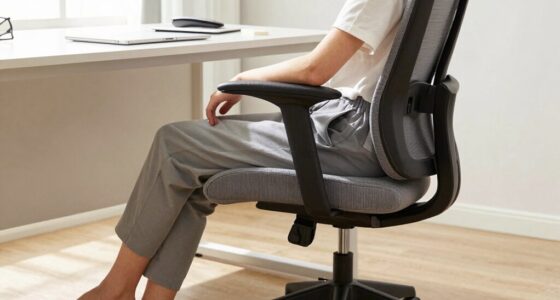
Start with the seat. Sit back and check that it supports most of your thighs while leaving a small gap behind your knees. If the seat presses into the backs of your legs, or you have to perch on its edge to reach the floor, the fit needs attention. A shorter user, for example, may need a seat depth adjustment or a footrest to keep their feet supported without losing back support.
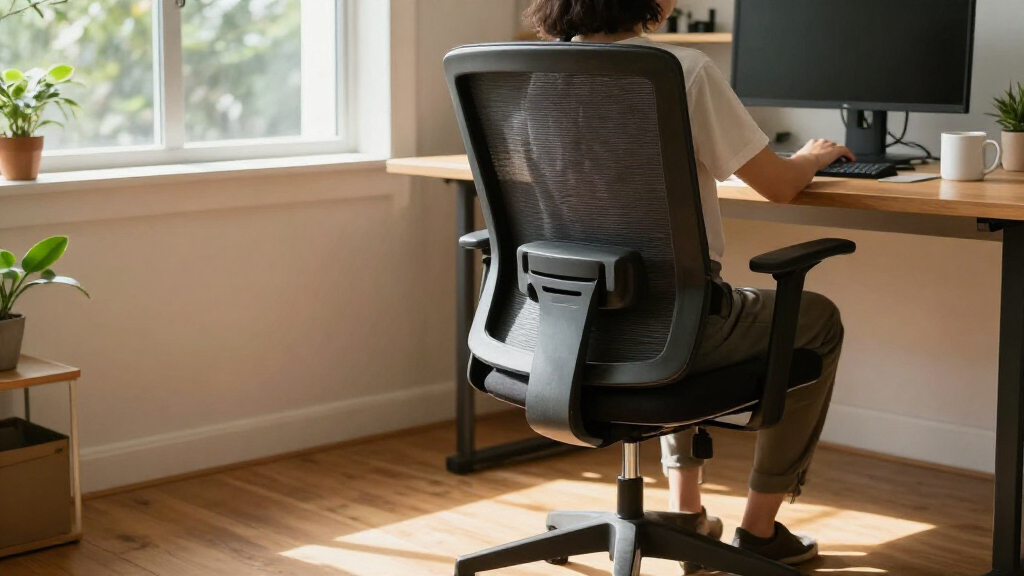
Next, check the backrest and lumbar area. The lower back should feel supported without a hard bump forcing you into one stiff position. A backrest that reclines can help you shift during a long afternoon of spreadsheets; it should move comfortably with you rather than make every lean feel like a struggle.
Armrests matter when they let your shoulders rest and your elbows stay near your body. If they hit the desk before you can sit close enough to reach the keyboard, they are in the way. In other words, a chair is designed to support comfortable work only when its adjustments and shape suit the person, the desk, and the task.
Popular right now

Bose QuietComfort True Wireless Earbuds with Active Noise Cancellation, Bluetooth 5.3, USB-C Charging, IPX4, Black

Ninja Foodi Smart 6-in-1 Indoor Grill and Air Fryer, 4 qt, FG551

Shark Rocket Pet Plus Corded Stick Vacuum, Bordeaux/Silver, HV322
As an affiliate, we earn on qualifying purchases.
Five Adjustments That Help You Find a Better Fit
To adjust an ergonomic office chair, set your feet and seat first, then check your backrest and arms against your desk. This order gives you a simple starting point: build a comfortable base before fine-tuning the parts you use to reach your screen and keyboard. Try the setup during ordinary work, not just while sitting still for a quick showroom test.
- Set seat height: Keep both feet on the floor or a footrest, with your knees roughly level with or slightly below your hips. If raising the chair helps your desk position but leaves your feet dangling, add a footrest.
- Check seat depth: Sit back and leave a small gap behind your knees. If the chair has a sliding seat, adjust it; otherwise, consider whether its depth suits you.
- Set backrest support: Adjust its angle and lumbar area so your lower back feels supported, not pushed into a rigid arch.
- Set the armrests: Let your shoulders drop and keep your elbows near your sides. Lower or move the rests if they collide with the desk.
- Test your reach: Sit close enough to use your keyboard without stretching forward. Adjust your desk or screen if the chair fits but the workstation still makes you hunch.
For example, if you raise the chair to bring your elbows in line with a high desk, check your feet again before calling the job done. A footrest can bridge that height difference. Move one setting at a time and work for a few minutes before deciding whether it helps; comfort is easier to judge when you can feel the change.
Choose a Chair That Fits Your Desk and Body
The best ergonomic office chair is the one that fits your body, desk, and work habits, because a long list of adjustments does little good if you cannot use them comfortably. Check the chair’s seat-height range, seat depth, armrest movement, and backrest shape against your needs. If you are shorter or taller than average, those measurements may matter more than a headrest or an app.
| What to check | What a good fit feels like | Example to watch for |
|---|---|---|
| Seat height | Feet rest on the floor or a footrest | Your toes point down because the seat is too high |
| Seat depth | Thighs feel supported, with space behind the knees | The edge presses into your legs when you sit back |
| Armrests | Shoulders relax and elbows stay near your sides | The arms stop you sitting close to the desk |
| Backrest | Lower-back support feels comfortable as you move | A fixed lump feels painful or pushes you forward |
Imagine choosing a chair online because it has every adjustment, then discovering its seat is too deep for you to sit back comfortably. A return policy and a chance to test the chair can matter more than one extra feature. Check return costs and assembly requirements before you buy.
People outfitting an ergonomic office should also test chair and desk as a pair. A chair that fits in isolation may still leave you reaching over a thick desk edge or bumping its arms against the desktop. If you share a workstation, easy-to-reach controls help each person reset the seat between tasks.
Pick Materials and Features You Will Actually Use
Mesh, fabric, foam, and extra adjustments each change how a chair feels, but none guarantees a better fit. Mesh often feels cooler, while an upholstered or foam seat may feel softer to you. Try the exact seat if possible: a chair that feels plush for five minutes can feel too firm, warm, or restrictive after a longer stretch at your desk.
Look for stable construction, sturdy adjustment controls, and a base suited to your floor. If you work on hard flooring, check whether the casters roll smoothly without scratching; on carpet, different wheels may behave better. A practical buying check is to adjust the chair several times. Controls should be easy to find and should hold their position.
Newer models may add synchronized recline, adjustable lumbar components, headrests, weight-sensitive recline, or posture reminders. Those features may suit particular tasks or preferences, but they are not proven necessities for everyone. A headrest can feel pleasant when you recline to read, yet push your head forward when you sit upright to type.
For instance, someone working through warm afternoons might prefer breathable mesh, while a person who finds a taut mesh seat uncomfortable may prefer a cushioned surface. Compare comfort, fit, and build quality before paying extra for connected reminders or a long feature list. Price can buy a wider adjustment range or a stronger warranty, but it cannot promise that the chair suits your body.
Pair Your Chair With Movement and a Sensible Workstation
An ergonomic office chair supports your workday, but it does not make uninterrupted sitting ideal or replace a well-arranged desk. Ergonomics favors a neutral, changeable posture rather than one “perfect” position held for hours. Pair a comfortable chair with a screen, keyboard, and desk position that let you work without repeatedly leaning forward.
Try a small reset when you finish a meeting or switch tasks: stand, stretch, refill your water, or walk to another room. If you have a sit-stand desk, alternate positions when it suits your work rather than treating standing as a new pose to hold all day. Even a quick walk while a document loads gives your body a change from the seat.
Suppose your lower back feels tired after a long morning. Adjust the recline, check whether your feet are supported, and notice if your screen makes you lean forward. Then take a short movement break. If a chair setting feels restrictive, change it; the aim is comfortable support that lets you vary your position.
A chair can support comfort during desk work, but it cannot diagnose or cure back pain. If pain persists, worsens, or comes with specific medical needs, ask a qualified clinician or ergonomics professional for guidance. Make adjustments gradually, and let comfort and your personal circumstances guide how you use the chair.
Frequently Asked Questions
What makes an office chair ergonomic?
An ergonomic chair offers useful adjustments and a fit that supports comfortable, varied sitting. Check seat height and depth, lower-back support, and armrests against your body and desk; the marketing label alone cannot tell you whether it fits.
How should I adjust my office chair?
Start with seat height so your feet rest on the floor or a footrest, then leave a small gap behind your knees. Adjust the backrest and armrests until your back feels supported and your shoulders can relax; check your keyboard and desk reach afterward.
Is lumbar support necessary?
Many people find lower-back support comfortable, but the shape and amount that feel right vary. It should support you without pain or restriction. If a support pad pushes you forward or feels like a hard bump, try a different adjustment or chair.
Is mesh better than foam or fabric?
Mesh often feels cooler, while foam or upholstered seats may feel softer. The material alone does not determine comfort or durability, so try the specific chair and consider how warm your room is and how the seat feels after sitting for a while.
Are expensive ergonomic office chairs worth it?
A higher price may bring stronger construction, a longer warranty, or a wider range of adjustments, but it does not guarantee a good fit. Test the chair if you can, compare its settings with your needs, and read the return terms before buying.
Can an ergonomic chair fix back pain?
A chair may support greater comfort for some people, but back pain can have many causes. It should not be presented as a cure. If pain persists or you have a medical condition, seek advice from a qualified clinician.
Conclusion
Choose a chair that lets you support your feet, relax your shoulders, and rest your back comfortably. Adjust it to your desk, and give yourself reasons to move during the day. A comfortable chair should feel like a steady base for work, not a pose you have to fight to hold.
Before you buy, sit in the chair if you can, check the return terms, and test the settings you will use every day. Then step away from the desk now and then. Your best setup should make both working and moving feel natural.