
To move meetings after DST smoothly, communicate changes early using multiple channels like emails and calendar invites, explaining the reason clearly. Verify all devices and apps are updated, and double-check time zones and calendar settings to prevent confusion. Use scheduling tools that automatically adjust for DST and consider participants’ local times to avoid early mornings or late nights. If you want practical tips to make this process easier, keep exploring for more effective strategies.
Key Takeaways
- Send early, clear notifications explaining the DST change and new meeting times across all communication channels.
- Use calendar tools that automatically adjust for DST and verify each participant’s local time zone.
- Schedule meetings at universally reasonable times, avoiding early mornings or late nights for international teams.
- Double-check all calendar entries for correct time zones and synchronize devices to prevent discrepancies.
- Follow up with reminders close to the new meeting time to ensure everyone is aligned and prepared.

As daylight saving time (DST) ends and clocks fall back, many organizations find it helpful to move meetings to later in the day. This shift can improve attendance and guarantee everyone is on the same page, but it also introduces challenges like time zone conversion and calendar synchronization. If you don’t handle these carefully, you risk confusion and missed commitments. Fortunately, with a strategic approach, you can transition smoothly without annoying your team or clients.
First, acknowledge the importance of clear communication. When you decide to adjust meeting times, inform everyone well in advance. Use multiple channels—emails, calendar invites, or team chat—to make sure everyone sees the change. Highlight the reason for the shift and specify the new meeting times, emphasizing that these are aligned with local times after the DST change. This helps prevent misunderstandings, especially when participants are spread across different regions.
Clear communication is key—inform everyone early through multiple channels about the new meeting times aligned with local DST changes.
Next, leverage technology to simplify the process. Many calendar platforms automatically adjust for DST, but you need to double-check that the scheduled meetings reflect the correct local times. This is where calendar synchronization becomes critical. Ensure all your tools and apps are updated and synced across devices. If you’re scheduling across time zones, use features that display the meeting time in each participant’s local zone. This reduces the risk of someone joining too early or too late, which can be frustrating and disruptive.
When planning the new meeting schedule, consider the impact of time zone conversion. For remote teams or international clients, a meeting that’s convenient for one region might be problematic for another. Use reliable world clock tools or scheduling apps that automatically account for time zone differences and DST changes. This way, you can pick times that are reasonable for everyone, avoiding early mornings or late nights. Also, be aware that creating simple systems can help streamline your scheduling process and reduce errors.
Finally, verify all details before sending out updates. Cross-check the appointment times, confirm the time zone settings, and assure calendar synchronization is intact. Encourage your team to review their calendars and adjust if needed. If someone encounters issues, be ready to assist with quick guidance on how to update their settings or reschedule if necessary.
Handling the transition smoothly requires a mix of proactive communication, technological support, and consideration of different time zones. When you prioritize clarity and leverage the right tools, you can move meetings after DST without causing confusion or frustration. This way, you keep your team aligned, productive, and stress-free during the time change.

SPW Hunter Hydrawise HPC-400 4-16 Station Wi-Fi Controller Web-Based i-Phone Android App 4 Zones Expandable to 16 Zones with Optional Expansion Modules HPC400
4 Zone Timer Expandable to 16 Zones with Optional Expansion Modules
As an affiliate, we earn on qualifying purchases.
As an affiliate, we earn on qualifying purchases.
Frequently Asked Questions
How Can I Inform Attendees About Time Changes Effectively?
You should send clear notifications using templates that include time zone jargon to avoid confusion. Make sure your message highlights the specific time change and why it’s happening. Send reminders ahead of the meeting date and consider multiple channels like email and calendar invites. This way, attendees stay informed and avoid missing or showing up at the wrong time, ensuring a smooth shift after DST.
What Tools Can Automatically Adjust Meeting Times for DST?
You can use tools like Calendly, Doodle, or Google Calendar for automatic scheduling that adjusts for DST. These platforms handle timezone conversion seamlessly, ensuring your meetings stay accurate regardless of time changes. By integrating these tools, you eliminate manual adjustments and reduce confusion, making it easier for everyone to join at the right time. This automation keeps your schedule consistent and hassle-free, even during daylight saving time shifts.
How Do I Handle International Participants Across Multiple Time Zones?
You handle international participants across multiple time zones by prioritizing clear communication, using reliable scheduling tools, and respecting each region’s daylight saving adjustments. You coordinate by sharing accurate time zone conversions, setting recurring meetings at mutually convenient times, and leveraging calendar apps that automatically adapt for daylight saving. You stay proactive, double-check schedules, and keep everyone informed to guarantee smooth, hassle-free meetings despite the complexities of global time zones.
What Are Best Practices for Rescheduling Recurring Meetings Post-Dst?
To reschedule recurring meetings after DST, you should first check time zone conversions for all participants, ensuring you’re considering the clock change. Use calendar synchronization tools to automatically adjust meeting times, preventing confusion. Communicate the new schedule clearly and in advance, and confirm everyone’s availability. This approach helps avoid disruptions, keeps everyone aligned, and respects each participant’s local time, making shifts smooth and hassle-free.
How Do I Address Potential Confusion Caused by Time Zone Differences?
Think of time zone conversions as a puzzle you’re solving together; clear communication is your key piece. To avoid confusion, double-check meeting times across zones and send out updated schedules promptly. Use calendar tools that automatically adjust for daylight saving changes to keep scheduling consistency. By keeping everyone on the same page and verifying times, you guarantee your meetings run smoothly like a well-oiled clock, no matter the time zone.
DST calendar synchronization tool
As an affiliate, we earn on qualifying purchases.
As an affiliate, we earn on qualifying purchases.
Conclusion
Think of your schedule like a garden pond—when daylight shifts, the ripples need to settle. Moving meetings after DST is like waiting for the water to find its calm again, ensuring everyone’s efforts flow smoothly. Don’t rush the change; let the new rhythm settle in. By staying patient and adjusting thoughtfully, you’ll keep your team’s energy aligned, like gentle waves harmonizing on a peaceful lake, rather than chaotic splashes disrupting the calm.
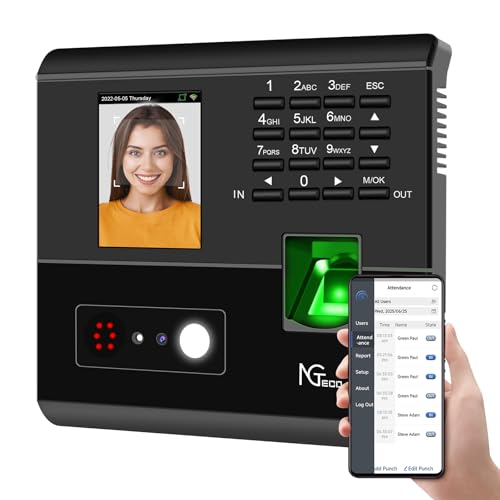
NGTeco APP-Based Time Clocks, 4-in-1 (Face, Fingerprint, RFID, PIN) Times Clock for Employees Small Business, 2.4GHz WiFi Clock in Machine Support Shift Schedules, iOS & Android APP, No Monthly Fee
Multi-Method Verification for Absolute Accuracy: Eliminate buddy punching and time disputes. Combining facial recognition, fingerprint scanning, and RFID,…
As an affiliate, we earn on qualifying purchases.
As an affiliate, we earn on qualifying purchases.

YUYIALARM WiFi Digital Calendar Clock, Smart Touchscreen Electronic 2026 Calendar Family Planner for Scheduling/Organizing/Reminders,No APP(10.1inch Black)
🔔[No APP] Our smart calendar does not require a mobile app—it syncs directly via Wi-Fi to update time,…
As an affiliate, we earn on qualifying purchases.
As an affiliate, we earn on qualifying purchases.