The best Logitech computer peripherals depend on how you work, play, and share devices: my best overall pick is the MX Keys S Combo for its balanced keyboard-and-mouse setup, while the MX Master 3S stands out for mouse-focused productivity and the MK270 for straightforward everyday value. The main tradeoffs are between ergonomic comfort and familiar shapes, multi-device flexibility and simplicity, and premium controls and a basic reliable setup. Logitech’s lineup ranges from compact travel mice to full-size combos, so a higher feature count does not automatically mean a better fit. I compare the 15 options by usability, comfort, connectivity, and versatility to clarify which compromises make sense for each buyer. Continue reading for the full breakdown and picks by need.

Get comfort and recovery gear delivered free with Prime
- Fast, free delivery on millions of items
- Prime Video, Amazon Music and more included
- Member-only deals all year
Complete the kit


Key Takeaways
- The MX Keys S Combo is the most balanced all-in-one choice: it pairs a productivity-focused keyboard and mouse, while the MX Master models suit buyers who want to prioritize mouse controls.
- Ergonomic shape is a personal fit decision, not a universal upgrade: the Lift and ERGO M575S change hand posture and cursor control, but buyers who prefer conventional movement may be better served by the M720 or M510.
- Combo kits simplify setup but limit mix-and-match choice: the MK540, MK850, MK880, and MK270 bundle input devices, while separate MX products give buyers more scope to tailor the keyboard and mouse.
- Multi-device support matters most in shared workflows: the M720 and MX-focused options are better suited to switching between computers than a basic single-device setup such as the M185.
- Small, inexpensive-feeling choices are not interchangeable: the G305 is aimed at wireless gaming, the M185 at compact everyday use, and the M510 at a fuller conventional mouse shape.
| Logitech G305 Lightspeed Wireless Gaming Mouse – Black |  | Best for Wireless Gaming | Connectivity: Lightspeed wireless via USB Nano Receiver | Sensor: Logitech HERO 12K optical | DPI range: 200–12,000 DPI | VIEW LATEST PRICE | See Our Full Breakdown |
| Logitech M720 Triathlon Full-Size Multi-Device Wireless Mouse – Black | 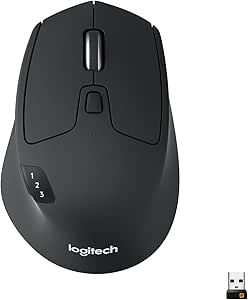 | Best for Multi-Device Work | Connectivity: Bluetooth and USB Unifying Receiver | Device switching: Easy-Switch for up to 3 devices | Buttons: 6 customizable | VIEW LATEST PRICE | See Our Full Breakdown |
| Logitech Signature Comfort Plus MK880 Keyboard and Mouse Combo (Graphite) |  | Best for Ergonomic Comfort | Connectivity: Bluetooth | Device switching: Easy-Switch for up to 3 devices | Keyboard layout: QWERTY | VIEW LATEST PRICE | See Our Full Breakdown |
| Logitech MK540 Full Size Advanced Wireless Keyboard and Mouse Combo |  | Best for a Simple Full-Size Desk Setup | Connectivity: Logitech Unifying USB receiver | Keyboard layout: QWERTY, 104 keys with numeric keypad | Keyboard dimensions: 7.62 × 18 × 0.94 in | VIEW LATEST PRICE | See Our Full Breakdown |
| Logitech MX Keys Combo for Business Keyboard and Mouse, Graphite |  | Best Premium Business Combo | Connectivity: Bluetooth and Logi Bolt wireless | Keyboard layout: QWERTY, 104 keys | Keyboard backlighting: Single color | VIEW LATEST PRICE | See Our Full Breakdown |
| Logitech MX Master 3S Bluetooth Wireless Mouse – Graphite (No Receiver) |  | Best for Quiet, Precise Productivity | Connectivity: Bluetooth; connects to up to 3 devices | Maximum sensitivity: 8,000 DPI | Buttons: 7 programmable buttons | VIEW LATEST PRICE | See Our Full Breakdown |
| Logitech M185 Compact Ambidextrous Wireless Mouse, Swift Grey |  | Best Simple, Portable Pick | Connectivity: 2.4 GHz wireless via USB nano receiver | Tracking: Optical | Maximum sensitivity: 1,000 dpi | VIEW LATEST PRICE | See Our Full Breakdown |
| Logitech ERGO M575S Wireless Trackball Mouse, Graphite |  | Best for Minimal Desk Movement | Connectivity: Bluetooth and USB via included Logi Bolt receiver | Movement detection: Trackball with thumb control | Maximum sensitivity: 2,000 dpi | VIEW LATEST PRICE | See Our Full Breakdown |
| Logitech MX Master 4 Ergonomic Wireless Mouse with Haptics – Graphite |  | Best Premium Productivity Mouse | Connectivity: Bluetooth, radio frequency, USB-C dongle | Maximum sensitivity: 8,000 DPI | Battery life: Up to 70 days | VIEW LATEST PRICE | See Our Full Breakdown |
| Logitech MK850 Performance Wireless Keyboard and Mouse Combo – Graphite |  | Best Keyboard-and-Mouse Set for Multi-Device Work | Connectivity: Radio frequency and USB; supports Bluetooth or USB-connected devices | Keyboard layout: Full-size QWERTY | Multi-device support: Switches between up to 3 devices | VIEW LATEST PRICE | See Our Full Breakdown |
| Logitech Lift Vertical Ergonomic Wireless Mouse – Graphite |  | Best for Ergonomic Comfort | Weight: 125 g | Dimensions: 108 x 70 x 71 mm | Tracking: Adjustable up to 4000 DPI | VIEW LATEST PRICE | See Our Full Breakdown |
| Logitech MX Keys S Combo for Mac – Space Gray |  | Best Premium Mac Combo | Keyboard layout: Mac QWERTY | Keyboard weight: 810 g | Keyboard dimensions: 20.5 x 430.2 x 131.63 mm | VIEW LATEST PRICE | See Our Full Breakdown |
| Logitech MK270 Full Size Wireless Keyboard and Mouse Combo – Black |  | Best for Simple Everyday Use | Keyboard layout: 104-key QWERTY | Connectivity: 2.4 GHz wireless via USB nano receiver | Wireless range: Up to 10 m | VIEW LATEST PRICE | See Our Full Breakdown |
| Logitech MX Keys S Combo Wireless Keyboard and Mouse – Graphite |  | Best for Cross-Platform Productivity | Keyboard weight: 810 g | Keyboard dimensions: 20.5 x 430.2 x 131.63 mm | Keyboard battery: Rechargeable Li-Po, 1500 mAh | VIEW LATEST PRICE | See Our Full Breakdown |
| Logitech M510 Full Size Ambidextrous 2.4 GHz Wireless Mouse |  | Best for Comfortable Everyday Navigation | Connectivity: 2.4 GHz wireless via USB Unifying receiver | Buttons: 7 programmable buttons | Maximum sensitivity: 1000 DPI | VIEW LATEST PRICE | See Our Full Breakdown |
| Logitech computer peripheral | Connectivity |
|---|---|
| Logitech G305 Lightspeed Wirel | Lightspeed wireless via USB Nano Receiver |
| Logitech M720 Triathlon Full-S | Bluetooth and USB Unifying Receiver |
| Logitech Signature Comfort Plu | Bluetooth |
| Logitech MK540 Full Size Advan | Logitech Unifying USB receiver |
| Logitech MX Keys Combo for Bus | Bluetooth and Logi Bolt wireless |
| Logitech MX Master 3S Bluetoot | Bluetooth; connects to up to 3 devices |
| Logitech M185 Compact Ambidext | 2.4 GHz wireless via USB nano receiver |
| Logitech ERGO M575S Wireless T | Bluetooth and USB via included Logi Bolt receiver |
| Logitech MX Master 4 Ergonomic | Bluetooth, radio frequency, USB-C dongle |
| Logitech MK850 Performance Wir | Radio frequency and USB; supports Bluetooth or USB-connected devices |
| Logitech Lift Vertical Ergonom | Bluetooth Low Energy or Logi Bolt USB receiver |
| Logitech MX Keys S Combo for M | Bluetooth Low Energy; optional Logi Bolt receiver |
| Logitech MK270 Full Size Wirel | 2.4 GHz wireless via USB nano receiver |
| Logitech MX Keys S Combo Wirel | Bluetooth Low Energy or Logi Bolt USB receiver |
| Logitech M510 Full Size Ambide | 2.4 GHz wireless via USB Unifying receiver |
More Details on Our Top Picks
Logitech G305 Lightspeed Wireless Gaming Mouse – Black
The G305 Lightspeed is the clearest choice here for buyers who want gaming responsiveness without a cable. Its 1 ms Lightspeed connection and HERO sensor make quick cursor movement feel controlled, while the single AA battery avoids frequent charging. At 99 g, it is light enough to carry between a desk and a gaming setup, though it is not as feature-rich as the business-focused MX Master 3S. The six programmable buttons cover common commands, but players who want more inputs or elaborate onboard customization may find the layout limiting. It also skips RGB lighting, favoring a simpler, lower-maintenance design. Choose it over the M720 Triathlon for play; choose the M720 if switching among work devices matters more than gaming speed.
Pros:- Lightspeed wireless connection with 1 ms latency
- HERO 12K sensor with adjustable sensitivity up to 12,000 DPI
- Up to 250 hours of battery life from one AA cell
- 99 g weight makes it easy to move and transport
Cons:- Six programmable buttons may not be enough for players who rely on numerous shortcuts
- No RGB lighting or advanced customization features
- Uses a replaceable AA battery rather than built-in rechargeable power
Best for: PC and Mac gamers who want a responsive wireless mouse with long battery life and a portable shape
Not ideal for: Users who need many programmable controls, RGB lighting, or a mouse designed specifically for productivity across several computers
- Connectivity:Lightspeed wireless via USB Nano Receiver
- Sensor:Logitech HERO 12K optical
- DPI range:200–12,000 DPI
- Buttons:6 programmable
- Battery life:Up to 250 hours; up to 9 months in endurance mode
- Battery type:1 AA battery, included
- Weight:3.4 oz (99 g)
- Compatibility:PC, Mac, Windows 10
Our verdict“Choose the G305 if gaming response and long battery life matter more than extra buttons or multi-device productivity features.”
Logitech M720 Triathlon Full-Size Multi-Device Wireless Mouse – Black
The M720 Triathlon earns its place by making one mouse useful across a multi-computer desk. Easy-Switch for up to three devices, Bluetooth and Unifying receiver support, and Logitech Flow give it a more flexible work setup than the gaming-focused G305. Its hyper-fast scroll wheel can move through long documents quickly, then stop precisely when needed. The tradeoff is modest tracking sensitivity: at up to 1000 DPI, it is aimed at office navigation rather than the finer speed range of the G305 or MX Master 3S. The full-size, right-hand shape may also feel awkward for smaller hands or left-handed users. Its standout 24-month AA battery life reduces battery changes, but it is not rechargeable.
Pros:- Easy-Switch supports up to three connected devices
- Bluetooth and Unifying receiver connectivity
- Hyper-fast scroll wheel with an instant-stop mode
- Up to 24 months of use from one AA battery
Cons:- Maximum sensitivity of 1000 DPI is modest for gaming or high-speed pointer work
- Right-handed, full-size shape may not suit left-handed users or smaller hands
- Uses a replaceable AA battery rather than rechargeable power
Best for: People who regularly switch between a work computer, personal computer, and tablet and want one full-size mouse for all three
Not ideal for: Competitive gamers, left-handed users, or people with small hands who prefer a compact or ambidextrous mouse
- Connectivity:Bluetooth and USB Unifying Receiver
- Device switching:Easy-Switch for up to 3 devices
- Buttons:6 customizable
- Maximum sensitivity:1000 DPI
- Battery life:Up to 24 months
- Battery type:1 AA battery, included
- Hand orientation:Right-handed
- Wireless range:5.0 meters
Our verdict“Pick the M720 if you move between several computers and value scrolling and battery endurance over gaming-grade sensitivity.”
Logitech Signature Comfort Plus MK880 Keyboard and Mouse Combo (Graphite)
The MK880 stands apart from Logitech’s more conventional bundles by putting wrist and palm support at the center of the setup. Its curved dual-foam palmrest and mouse cushion are aimed at people who spend long stretches typing and navigating, while quiet mouse clicks keep a shared workspace calmer. Bluetooth Easy-Switch connects the set to as many as three devices without a dongle, a more convenient approach than the receiver-only MK540. Logi Options+ adds customizable controls, DPI adjustments, an AI launch key, and meeting controls, making this a more adaptable desk kit than a basic keyboard-and-mouse pairing. The comfort-first design has limits: the mouse is right-handed, and the supplied information does not specify a rechargeable battery or spill resistance. Choose it for supported posture and shortcuts, not a compact setup.
Pros:- Curved dual-foam palmrest and integrated mouse palm cushion
- Bluetooth Easy-Switch supports up to three devices
- Logi Options+ offers customizable buttons, DPI control, and meeting controls
- Long stated battery life for both keyboard and mouse
Cons:- Mouse is designed only for right-handed use
- Full-size keyboard and cushioned mouse take more desk space than compact alternatives
- Battery-powered design does not provide the convenience of a stated rechargeable setup
Best for: Hybrid workers who type for long sessions and want a cushioned full-size keyboard and mouse that can switch among three Bluetooth devices
Not ideal for: Left-handed users, small-desk setups, or buyers who need a spill-resistant keyboard or confirmed rechargeable power
- Connectivity:Bluetooth
- Device switching:Easy-Switch for up to 3 devices
- Keyboard layout:QWERTY
- Keyboard features:Curved dual-foam palmrest, AI launch key, and meeting controls
- Mouse:Right-handed design with integrated palm cushion and quiet clicks
- Keyboard battery life:Up to 36 months
- Mouse battery life:Up to 24 months
- Compatibility:Windows, macOS, Chrome OS, Linux, iPadOS, and Android
Our verdict“Choose the MK880 if long-session comfort and multi-device Bluetooth switching matter more than an ambidextrous mouse or a compact footprint.”
Logitech MK540 Full Size Advanced Wireless Keyboard and Mouse Combo
The MK540 is a straightforward choice for buyers who want a full-size keyboard with a number pad, a matching mouse, and few battery changes. Its spill-resistant keyboard, palm rest, and adjustable tilt legs add practical touches for a fixed home or office desk. Battery life is rated up to 36 months for the keyboard and 18 months for the mouse, outlasting the MK880’s stated mouse battery life. That convenience comes with less flexibility: the MK540 relies on a Unifying USB receiver and offers no Bluetooth, unlike the M720 Triathlon and MK880. The included mouse is ambidextrous but has only three buttons, so it is less adaptable than those alternatives. Pick this bundle for a familiar, low-maintenance desktop setup, not multi-device switching or advanced mouse controls.
Pros:- Full-size 104-key keyboard includes a numeric keypad
- Spill-resistant keyboard with palm rest and adjustable tilt legs
- Keyboard battery life up to 36 months and mouse battery life up to 18 months
- Ambidextrous mouse suits either hand
Cons:- USB Unifying receiver is the only listed connectivity option; no Bluetooth
- Three-button mouse offers fewer shortcuts than the M720 or MK880
- Keyboard and mouse use replaceable batteries rather than built-in rechargeable power
Best for: Office users who want a full-size keyboard with number pad, spill resistance, and long battery life at a single receiver-connected workstation
Not ideal for: People who switch between computers, need Bluetooth, or want a mouse with more than basic navigation controls
- Connectivity:Logitech Unifying USB receiver
- Keyboard layout:QWERTY, 104 keys with numeric keypad
- Keyboard dimensions:7.62 × 18 × 0.94 in
- Keyboard battery life:Up to 36 months with 2 AAA batteries
- Mouse battery life:Up to 18 months with 1 AA battery
- Wireless range:Up to 33 ft
- Mouse:Ambidextrous optical mouse with 3 buttons
- Special keys:Music controls and programmable hotkeys
Our verdict“Choose the MK540 for a dependable, full-size receiver-based desk bundle, but pick the M720 or MK880 if you need multi-device switching.”
Logitech MX Keys Combo for Business Keyboard and Mouse, Graphite
The MX Keys Combo for Business is the premium pick for a polished work desk, pairing a backlit full-size keyboard with the MX Master 3S. The mouse’s 8000 DPI sensor tracks on glass, quiet clicks reduce distraction, and MagSpeed scrolling is better suited to long documents and detailed navigation than the basic mouse in the MK540. Bluetooth and Logi Bolt provide more connection choice than that receiver-only combo, while rechargeable power removes routine AA and AAA swaps. This setup is less compelling if ergonomic hand fit or customization is the priority: the mouse is right-handed, and the keyboard offers only single-color backlighting. Compared with the M720, it is a more capable productivity pairing, but the M720 remains the practical pick for a simpler three-device mouse setup.
Pros:- MX Master 3S mouse tracks on glass with an 8000 DPI sensor
- Quiet Click technology reduces mouse noise
- MagSpeed scrolling supports fast movement through long documents
- Bluetooth and Logi Bolt connectivity with rechargeable power
Cons:- Mouse is designed for right-handed use
- Keyboard backlighting is single-color only
- Rechargeable setup may not suit buyers who prefer easily replaceable batteries
Best for: Business users who want a backlit full-size keyboard and a precise, quiet mouse for varied surfaces and frequent document navigation
Not ideal for: Left-handed users, buyers who want multicolor keyboard lighting, or people seeking an ambidextrous mouse
- Connectivity:Bluetooth and Logi Bolt wireless
- Keyboard layout:QWERTY, 104 keys
- Keyboard backlighting:Single color
- Mouse:MX Master 3S with 8000 DPI optical sensor
- Mouse features:Quiet Click technology and MagSpeed scrolling
- Power:Rechargeable; includes lithium polymer battery
- Compatible operating systems:ChromeOS, Linux, macOS, and Windows
- Warranty:2-year limited hardware warranty
Our verdict“Choose this combo for premium business navigation, quiet clicks, and rechargeable backlit input, provided the right-handed mouse fits your setup.”
Logitech MX Master 3S Bluetooth Wireless Mouse – Graphite (No Receiver)
I’d choose the MX Master 3S for desk work that calls for precise control, fast scrolling, and quieter clicks. Its 8,000 DPI Darkfield sensor can track on glass, while the MagSpeed wheel handles long documents quickly or slows down for fine adjustments. Compared with the simpler Logitech M185, it offers a more adaptable shape, thumb controls, and connections to three devices; that added functionality comes with a larger, heavier body and more setup. Quiet Clicks suit shared offices, but the mouse connects by Bluetooth only, so it may not fit a computer that needs a USB receiver. Full button customization also depends on Logi Options+ software. I’d pick it over the newer MX Master 4 when haptic feedback and its Actions Ring are not priorities.
Pros:- Quiet Clicks reduce click noise for shared workspaces.
- 8,000 DPI Darkfield tracking works on glass and other challenging surfaces.
- MagSpeed wheel supports fast scrolling and precise control.
- Pairs with up to three devices and has a rechargeable battery rated for up to 70 days.
Cons:- Bluetooth-only connectivity; no USB receiver is included.
- At 141 g, it is heavier and less portable than the M185.
- Full customization requires Logi Options+ software, and actual battery life varies with use.
Best for: Desk-based professionals who switch among several Bluetooth devices and want quiet clicks, detailed cursor control, and programmable shortcuts.
Not ideal for: Buyers who need a USB receiver, prefer a lightweight compact mouse, or want advanced customization without installing Logi Options+.
- Connectivity:Bluetooth; connects to up to 3 devices
- Maximum sensitivity:8,000 DPI
- Buttons:7 programmable buttons
- Battery:Rechargeable 500 mAh Li-Po; up to 70 days
- Dimensions:2 × 3.3 × 4.9 in (51 × 84.3 × 124.9 mm)
- Weight:141 g (4.97 oz)
- Wireless range:Up to 33 ft (10 m)
- Compatibility:Windows, macOS, Linux, Chrome OS, iPadOS, Android
Our verdict“Choose the MX Master 3S for quiet, feature-rich desktop work if Bluetooth suits your setup and you do not need the MX Master 4’s haptic controls.”
Logitech M185 Compact Ambidextrous Wireless Mouse, Swift Grey
The M185 is the straightforward choice in this group: it trades the MX Master 3S’s advanced controls and high-resolution tracking for a small, ambidextrous design and simple plug-and-play setup. Its nano USB receiver suits computers where Bluetooth pairing is inconvenient, and the included AA battery is rated for up to 12 months. That makes it an easy fit for travel bags, classrooms, or a spare workstation. The compromise is capability: its 1,000 dpi optical tracking and basic controls are not aimed at detailed creative work or extensive shortcuts. Compared with the ERGO M575S, it moves across the desk rather than staying in place, but is more familiar for people who do not want to learn thumb-controlled tracking. Its compact size can also feel cramped in larger hands.
Pros:- Ambidextrous contoured shape works for either hand.
- Plug-and-play 2.4 GHz connection uses a nano USB receiver.
- Included AA battery is rated for up to 12 months.
- Compact size is easy to carry between workspaces.
Cons:- Small body may not suit larger hands or extended sessions.
- 1,000 dpi tracking and basic controls offer less precision and flexibility than the MX Master 3S.
- Uses a replaceable AA battery, and battery life varies with usage and computing conditions.
Best for: Students, office users, and travelers who want a compact, ambidextrous mouse with receiver-based setup and minimal upkeep.
Not ideal for: Users with larger hands, people who need high-resolution cursor control or programmable shortcuts, and buyers whose devices lack a USB-A port.
- Connectivity:2.4 GHz wireless via USB nano receiver
- Tracking:Optical
- Maximum sensitivity:1,000 dpi
- Hand orientation:Ambidextrous
- Battery:1 included AA battery; up to 12 months
- Wireless range:Up to 33 ft (10 m)
- Compatibility:Windows, Mac, Chrome OS, Linux
- Warranty:3-year limited hardware warranty
Our verdict“Pick the M185 if you want a simple, portable mouse for either hand and do not need the comfort features or advanced controls of larger models.”
Logitech ERGO M575S Wireless Trackball Mouse, Graphite
The ERGO M575S changes how you control the cursor: your thumb rolls the trackball, so the mouse stays put instead of traveling across the desk. I’d favor it for a compact workstation or for users who want to limit repeated arm movement. Its sculpted, right-handed shape and Bluetooth or Logi Bolt connectivity offer more ergonomic positioning flexibility than the M185, while the MX Master 3S is the better fit for users who want a conventional moving mouse with more programmable controls. The M575S is not ambidextrous, and its listed two-button configuration is notably simpler than the MX Master 3S’s seven buttons. Trackball control also has a learning curve for anyone accustomed to moving a mouse. The included AA battery is rated for up to 18 months, and the Graphite version uses 52% certified post-consumer recycled plastic.
Pros:- Thumb-operated trackball keeps the mouse stationary and reduces required desk space.
- Sculpted form is designed for a more relaxed hand and forearm posture.
- Bluetooth and included Logi Bolt receiver provide two connection options.
- Included AA battery is rated for up to 18 months; Graphite model contains 52% certified post-consumer recycled plastic.
Cons:- Right-handed shape excludes left-handed users.
- Listed two-button configuration is less flexible than the MX Master 3S.
- Trackball operation may take adjustment for users accustomed to a standard mouse.
Best for: Right-handed users with limited desk space or those who want cursor control without moving a mouse or arm across the desk.
Not ideal for: Left-handed users, people who prefer conventional mouse movement, or buyers who need many physical buttons and extensive on-device controls.
- Connectivity:Bluetooth and USB via included Logi Bolt receiver
- Movement detection:Trackball with thumb control
- Maximum sensitivity:2,000 dpi
- Buttons:2 listed
- Hand orientation:Right-handed
- Battery:1 included AA battery; up to 18 months
- Compatible operating systems:Windows, macOS
- Recycled plastic content:52% for Graphite model
Our verdict“Choose the ERGO M575S if you are right-handed and want a stationary, space-saving alternative to the conventional movement of the M185 or MX Master 3S.”
Logitech MX Master 4 Ergonomic Wireless Mouse with Haptics – Graphite
The MX Master 4 earns the premium role by adding customizable haptic feedback and an Actions Ring to the familiar ergonomic, multi-control mouse format. Those features can put shortcuts and feedback closer to hand; the MagSpeed wheel still serves users who alternate between rapid document travel and pixel-precise scrolling. Compared with the MX Master 3S, the 4 is the more feature-focused pick, while the 3S is a simpler choice for buyers who mainly want quiet clicks, strong tracking, and multi-device Bluetooth. The MX Master 4 supports Bluetooth, radio frequency, and a USB-C dongle, but its added functionality may be unnecessary for basic browsing and office tasks. It is also described as potentially heavier than basic mice. Its listed power details call for an included AA rechargeable battery, while no charging cable is included, so check that arrangement against your charging preferences.
Pros:- Customizable haptic feedback and Actions Ring provide additional ways to access shortcuts.
- MagSpeed wheel supports fast scrolling and pixel-precise control.
- Ergonomic design and quiet clicks are aimed at reducing noise and hand fatigue.
- Uses 54% recycled plastic and 100% recycled cobalt in the battery.
Cons:- May be heavier than a basic mouse due to its added features.
- Charging cable is not included.
- AA rechargeable battery setup may be less convenient than an integrated rechargeable battery.
Best for: Power users who can make use of shortcut access and customizable haptic feedback, and who want a high-control mouse for sustained productivity work.
Not ideal for: Casual users seeking a light, uncomplicated mouse, or buyers who expect a charging cable to be included with a rechargeable battery.
- Connectivity:Bluetooth, radio frequency, USB-C dongle
- Maximum sensitivity:8,000 DPI
- Battery life:Up to 70 days
- Battery details:1 AA rechargeable battery included; charging cable not included
- Materials:54% recycled plastic; 100% recycled cobalt in battery
- Color:Graphite
- Compatible operating systems:Windows, macOS, Linux, Chrome OS, iPadOS, Android
Our verdict“Choose the MX Master 4 over the MX Master 3S if you will use its haptics and Actions Ring; otherwise, the 3S covers core productivity needs with fewer added controls.”
Logitech MK850 Performance Wireless Keyboard and Mouse Combo – Graphite
The MK850 is the pick here for buyers who need a matched keyboard-and-mouse setup rather than a standout mouse alone. Both devices can switch among up to three connected computers, tablets, or phones, making it more useful for a multi-device desk than the M185, which is a standalone mouse with a single receiver connection. The full-size keyboard’s cushioned palm rest and concave keys suit longer typing sessions, while the mouse adds a hyper-fast scroll wheel and customizable buttons. Compared with the MX Master 3S, the included mouse offers less advanced tracking and fewer premium controls, but the bundle covers both typing and navigation. The right-handed mouse excludes left-handed users, and replaceable batteries mean it is not an all-in-one rechargeable setup despite the rechargeable feature listed in the data. Compatibility details also emphasize Windows and Chrome OS, so check support for your specific devices.
Pros:- Keyboard and mouse can switch among up to three connected devices.
- Full-size keyboard has a cushioned palm rest and concave keys for extended typing.
- Mouse includes a hyper-fast scroll wheel and customizable buttons.
- Listed battery life reaches up to three years for the keyboard and two years for the mouse.
Cons:- Included mouse is right-handed and unsuitable for left-handed users.
- Mouse uses replaceable batteries rather than built-in rechargeable cells.
- Operating-system compatibility details are narrower than those listed for the MX Master 3S.
Best for: People who work across up to three computers or mobile devices and want a full-size keyboard, palm rest, and matching mouse in one set.
Not ideal for: Left-handed users, buyers who want an individually rechargeable mouse, or those seeking the advanced sensor and controls of the MX Master 3S.
- Connectivity:Radio frequency and USB; supports Bluetooth or USB-connected devices
- Keyboard layout:Full-size QWERTY
- Multi-device support:Switches between up to 3 devices
- Keyboard battery life:Up to 3 years
- Mouse battery life:Up to 2 years
- Mouse tracking:Optical
- Mouse hand orientation:Right-handed
- Listed operating-system compatibility:Chrome OS, Linux kernel 2.6+, Windows 10 or later
Our verdict“Choose the MK850 if you want a comfortable full-size keyboard and mouse that can switch between several devices, but pick a standalone MX Master 3S for more advanced mouse control.”
Logitech Lift Vertical Ergonomic Wireless Mouse – Graphite
The Logitech Lift is the clearest choice here for buyers who want a vertical mouse rather than a conventional shape. Its 57-degree angle encourages a more natural hand position, while the compact size is aimed at small to medium right hands. Compared with the Logitech M510, which keeps a familiar full-size contour, the Lift makes a more substantial change to how your hand rests; that may suit long work sessions, but the upright grip can take time to get used to. Bluetooth or the included Logi Bolt connection and Easy-Switch support make moving among as many as three devices straightforward. The SmartWheel and customizable buttons add useful control, though full customization depends on Logi Options+. Its replaceable AA battery can last up to two years, but it lacks a rechargeable pack and there is no left-handed version in this listing.
Pros:- 57-degree vertical shape is designed to support a more natural wrist posture.
- Bluetooth and Logi Bolt connectivity with Easy-Switch for up to three devices.
- SmartWheel and customizable buttons provide more control than a basic office mouse.
- A single AA cell can power it for up to two years.
Cons:- This listing is for a right-handed model only.
- Full button customization requires Logi Options+ software.
- Uses a replaceable AA battery rather than a rechargeable battery.
Best for: Right-handed office workers with small to medium hands who want a vertical grip and switch between several computers or tablets.
Not ideal for: Left-handed users, people who prefer a familiar horizontal mouse, or buyers who want a built-in rechargeable battery.
- Weight:125 g
- Dimensions:108 x 70 x 71 mm
- Tracking:Adjustable up to 4000 DPI
- Connectivity:Bluetooth Low Energy or Logi Bolt USB receiver
- Battery:1 AA cell; up to 24 months
- Wireless range:10 m
- Compatibility:Windows, macOS, iPadOS, Chrome OS, Linux, Android
- Color:Graphite
Our verdict“Choose the Lift if you want a vertical, multi-device mouse for a small to medium right hand and are willing to adapt to its grip.”
Logitech MX Keys S Combo for Mac – Space Gray
This Mac-specific MX Keys S Combo pairs a Mac-layout keyboard with the MX Master 3S mouse, making it a stronger fit for an Apple-centered desk than Logitech’s multi-OS MX Keys S Combo in Graphite. The keyboard’s proximity-activated backlighting helps when room light changes, and the mouse’s 8K DPI Darkfield sensor and MagSpeed scrolling suit detailed work across large displays. Bluetooth pairing for up to three Apple devices also makes switching between a Mac and iPad easier than managing separate input sets. Those capabilities come with a less flexible layout: buyers who regularly use Windows may prefer the Graphite combo’s broader OS focus. The Logi Bolt receiver is optional rather than included, and the product data flags possible FileVault compatibility issues. This is a substantial, rechargeable desktop setup, not the simplest choice for a mixed-platform household.
Pros:- Mac QWERTY layout is tailored to Apple workflows.
- MX Master 3S mouse combines an 8K DPI sensor with MagSpeed scrolling.
- Bluetooth supports quick switching among up to three Apple devices.
- Both devices have rechargeable batteries, and the design uses post-consumer recycled plastic.
Cons:- Logi Bolt receiver is not included.
- The product data notes possible compatibility issues when FileVault is enabled.
- Mac-focused layout is a less natural fit for frequent Windows use.
Best for: Mac and iPad users who want a matched, rechargeable keyboard-and-mouse set with multi-device switching and advanced scrolling.
Not ideal for: People who frequently switch between Mac and Windows, need a USB receiver in the box, or want a lightweight travel setup.
- Keyboard layout:Mac QWERTY
- Keyboard weight:810 g
- Keyboard dimensions:20.5 x 430.2 x 131.63 mm
- Keyboard battery:Rechargeable Li-Po, 1500 mAh
- Mouse weight:141 g
- Mouse sensor:Darkfield high precision, 8K DPI
- Mouse buttons:7
- Connectivity:Bluetooth Low Energy; optional Logi Bolt receiver
- Backlighting:Proximity-activated, single-color
Our verdict“Pick this combo for a Mac-first desk where premium scrolling, backlighting, and Apple-device switching matter more than cross-platform flexibility.”
Logitech MK270 Full Size Wireless Keyboard and Mouse Combo – Black
The Logitech MK270 is the straightforward pick for buyers who need a full-size keyboard and mouse without a rechargeable ecosystem or advanced software setup. Its 104-key layout, numeric keypad, and eight multimedia hotkeys cover routine home and office tasks, while the shared 2.4 GHz nano receiver keeps the connection simple. Compared with the rechargeable MX Keys S Combo, it gives up backlighting, premium typing features, and multi-device Bluetooth switching; in return, its long stated battery life and basic controls suit a fixed workstation. The keyboard is spill-resistant, which adds some reassurance around drinks, but it has no palm rest and its keys are not backlit. Both devices use AA batteries, so this is less appealing if you want a rechargeable desk setup or frequently type in dim rooms.
Pros:- Full-size 104-key keyboard includes a numeric keypad and multimedia hotkeys.
- One 2.4 GHz nano receiver connects the keyboard and mouse.
- Spill-resistant keyboard suits everyday shared workspaces.
- Stated battery life is up to 36 months for the keyboard and 12 months for the mouse.
Cons:- Neither device has a built-in rechargeable battery.
- Keyboard lacks backlighting for dim work areas.
- No built-in palm rest for longer typing sessions.
Best for: Home-office users, students, and families who want a dependable full-size wireless keyboard and mouse for everyday tasks.
Not ideal for: Frequent typists seeking backlighting or a palm rest, and users who want rechargeable devices or multi-computer switching.
- Keyboard layout:104-key QWERTY
- Connectivity:2.4 GHz wireless via USB nano receiver
- Wireless range:Up to 10 m
- Keyboard battery life:Up to 36 months
- Mouse battery life:Up to 12 months
- Keyboard features:Spill-resistant, low-profile keys
- Mouse features:Ambidextrous compact design; eight multimedia hotkeys
- Color:Black
Our verdict“Choose the MK270 for uncomplicated full-size wireless basics, not for premium typing comfort or multi-device productivity.”
Logitech MX Keys S Combo Wireless Keyboard and Mouse – Graphite
For a desk shared by different operating systems, the Graphite MX Keys S Combo is the more flexible premium set in this group. Its keyboard and MX Master 3S mouse can connect to as many as three computers through Bluetooth or Logi Bolt, while compatibility spans Windows, macOS, Linux, Chrome OS, iPadOS, and Android. The Mac-only MX Keys S Combo for Mac is a closer match for Apple users, but this version is the better fit when devices and platforms vary. Smart backlighting, laptop-like keys, and the mouse’s MagSpeed wheel and 8K DPI sensor serve long workdays and detailed navigation. The tradeoff is a heavier keyboard that is less convenient to carry, plus reliance on Logi Options+ for full functionality. Basic support can also be limited on non-Windows and non-macOS platforms.
Pros:- Connects with up to three computers through Bluetooth or Logi Bolt.
- Broad stated compatibility covers major desktop and mobile operating systems.
- Smart backlighting and laptop-like keys support extended typing sessions.
- MX Master 3S offers MagSpeed scrolling and an 8K DPI sensor.
Cons:- The 810 g keyboard is less convenient to carry regularly.
- Full functionality depends on Logi Options+.
- Basic support is limited on some platforms outside Windows and macOS.
Best for: Professionals who move between several computers or operating systems and want a premium keyboard and precision mouse at one workstation.
Not ideal for: Frequent travelers, users who want full functionality without Logi Options+, or buyers seeking a simple budget-oriented combo.
- Keyboard weight:810 g
- Keyboard dimensions:20.5 x 430.2 x 131.63 mm
- Keyboard battery:Rechargeable Li-Po, 1500 mAh
- Mouse weight:141 g
- Mouse sensor:Darkfield high precision, 8K DPI
- Mouse buttons:7
- Connectivity:Bluetooth Low Energy or Logi Bolt USB receiver
- OS compatibility:Windows, macOS, Linux, Chrome OS, iPadOS, Android
- Color:Graphite
Our verdict“Choose the Graphite combo for a feature-rich desk shared across operating systems, and skip it if portability or minimal software dependence matters more.”
Logitech M510 Full Size Ambidextrous 2.4 GHz Wireless Mouse
The Logitech M510 suits buyers who want a familiar full-size mouse with more navigation controls than a basic model. Its contoured shape, rubber grips, programmable buttons, and side-to-side scrolling make document work and browser navigation more convenient than with the compact mouse included with the MK270. It also has a longer stated battery life than that combo’s mouse, although it takes two AA batteries rather than using a rechargeable pack. The small Unifying receiver supports 2.4 GHz wireless operation and can share a dongle with compatible Logitech devices, but this is not a Bluetooth or multi-device-switching mouse like the Lift. Although the product title calls it ambidextrous, the supplied specs identify right-handed orientation, so left-handed buyers should check fit carefully. Its sensor also may not track reliably on glass or mirrors.
Pros:- Contoured shape and soft rubber grips are suited to extended everyday use.
- Programmable buttons and side-to-side scrolling add useful navigation controls.
- Stated battery life is up to two years.
- Unifying receiver can connect compatible Logitech devices through one dongle.
Cons:- Uses two AA batteries instead of a rechargeable battery.
- Optical tracking may not work reliably on glass or mirrored surfaces.
- Supplied specifications list a right-handed orientation despite the title describing it as ambidextrous.
Best for: Right-handed Windows or macOS users who want a full-size, grippy mouse with side scrolling and programmable navigation buttons.
Not ideal for: Left-handed users, people who work on glass or mirrored surfaces, or buyers seeking Bluetooth, rechargeable power, or multi-device switching.
- Connectivity:2.4 GHz wireless via USB Unifying receiver
- Buttons:7 programmable buttons
- Maximum sensitivity:1000 DPI
- Wireless range:10 m
- Battery:2 AA batteries
- Stated battery life:Up to 2 years
- Hand orientation:Right-handed, according to supplied specifications
- Compatibility:Windows, macOS, Linux, Chrome OS
- Color:Graphite
Our verdict“Pick the M510 for comfortable, button-rich everyday navigation on a compatible surface, but verify its right-handed fit before buying.”

How We Picked
I compared these 15 Logitech peripherals by how well each fits a distinct buyer need: everyday typing, gaming, multi-device work, portability, ergonomic comfort, or an all-in-one desk setup. The ranking weighs practical usability, device connectivity, shape and likely comfort, keyboard-and-mouse balance, and how much flexibility a product offers beyond basic input. I also considered the tradeoffs behind each design, including the learning curve of trackballs and vertical mice, the desk space needed by full-size keyboards, and the limits of choosing a bundled combo.
The highest-ranked options offer a strong fit for a broad use case without making a major compromise. The MX Keys S Combo leads as a balanced productivity setup; specialized picks rank highly for buyers who specifically need their strengths, but not as universal replacements. More basic and compact models remain sensible where simplicity, portability, or a complete starter set matters more than advanced controls. Since preferences for mouse shape and keyboard feel vary, the ranking reflects versatility and use-case fit rather than treating the most feature-rich product as automatically best.
Factors to Consider When Choosing Best Logitech Computer Peripherals
Before choosing, I would match the peripherals to the way the computer is used, rather than comparing feature lists in isolation. A mouse that supports device switching may be wasted on a single-computer desk, while a bundled keyboard and mouse can be a poor fit if one half does not suit your hands.
Choose the Setup Before the Individual Devices
Decide whether you need a complete keyboard-and-mouse set or want to select each device separately. A combo can reduce setup complexity and create a coordinated desk, but it ties your choice of keyboard to a mouse you may not love. Separate MX models give more freedom to pair a preferred keyboard with a different pointing device. A common mistake is choosing a bundle because it looks convenient, then replacing one component and losing much of that convenience. If only one device needs an upgrade, buy for that need rather than replacing a working peripheral. For a first desk setup, a combo makes more sense when both included devices match your routine.
Match Mouse Shape to How Your Hand Moves
Mouse shape changes the way you position your hand and control the pointer, so it deserves more attention than a feature checklist. Conventional shapes such as the M720, M510, and M185 suit familiar wrist-and-arm movement, while the Lift places the hand in a more upright posture. The ERGO M575S uses a stationary body and thumb-controlled trackball, which shifts pointer movement away from moving the whole mouse. These designs can feel unfamiliar at first; switching solely because a shape is marketed as ergonomic may lead to a poor fit. Think about desk space, grip style, and whether you can tolerate a learning period. If possible, try a similar shape before making an ergonomic design your everyday device.
Pay for Multi-Device Switching Only When You Will Use It
Device switching earns its place when one keyboard or mouse regularly serves more than one computer. It can simplify a work-and-personal setup and cut down on duplicate peripherals, but it adds little to a desk with one fixed computer. Check how many devices you actually need to control and whether your computer connections support the peripherals you plan to use. Do not confuse wireless connectivity with multi-device control: a wireless device is not automatically convenient for switching between computers. For occasional use across two systems, a simple setup may be easier than paying for advanced workflow features. If switching is part of your daily routine, it should rank above cosmetic details.
Balance Keyboard Size Against Desk Space and Number Entry
Full-size keyboards offer familiar layouts and a number pad, which can help with spreadsheets and data entry. They also occupy more desk space and may leave less room for broad mouse movement. Compact options can free up space, but make sure their layout and key access suit the tasks you perform every day. Buyers sometimes focus on a keyboard’s appearance and overlook the number pad, navigation keys, or the reach between keyboard and mouse. Consider whether you type for long stretches, enter numbers often, or need to keep a small travel setup. The right size is the one that supports your work without crowding your desk.
Decide Whether Gaming or General Productivity Comes First
A mouse designed around gaming and one designed around office work solve different problems. The G305 is the lineup’s gaming-focused option, while the MX Master models emphasize productivity controls and everyday workflow. A gaming-oriented pick may be a better match for play, but it does not automatically provide the extra controls or device flexibility some office users want. Conversely, choosing a productivity mouse for a gaming setup may leave the buyer without the traits they value most in play. Think about your main use, not the occasional one, and avoid expecting one device to excel equally at every task. If your work and gaming needs are very different, separate devices may be more satisfying than a compromise.
Account for Connection Type and Ownership Habits
Wireless peripherals can connect through different methods, and compatibility should be checked against the computers you use before buying. A model sold without a receiver, such as the MX Master 3S version listed here, makes connection planning especially relevant. Consider whether you need Bluetooth, a supplied receiver, or the ability to keep a connection setup simple when moving between devices. Also think about how often you travel with the peripheral and whether you prefer a compact mouse or a full-size desk model. Do not assume every Logitech wireless product connects or switches in the same way. Confirm the connection details for the exact model and computer combination you intend to use.
Frequently Asked Questions
Which Logitech option makes the most sense if I need both a keyboard and a mouse?
I would start with the MX Keys S Combo if you want a balanced productivity setup and do not have a strong reason to choose a simpler bundle. The MK270 and MK540 are more straightforward alternatives for buyers who want a conventional full-size combo without prioritizing advanced workflow features. The MK850 and MK880 make more sense when their particular bundled approach suits your desk and device habits. Before choosing, check whether the included mouse shape and keyboard layout both fit you. A bundle is only convenient if you plan to use both parts.
Should I choose the Lift or ERGO M575S for a more ergonomic mouse?
Choose based on the movement style you are willing to adopt, not on the assumption that one ergonomic design suits everyone. The Lift uses a vertical form, while the ERGO M575S keeps the mouse in place and uses a thumb-operated trackball. The trackball can help when desk space for mouse movement is limited, but cursor control may take practice. The Lift retains familiar pointer movement but changes hand position. If comfort is the priority, trying the shape before committing is more useful than choosing by the word “ergonomic” alone.
Is the MX Master 3S a better choice than the MX Master 4?
Neither is automatically the better fit: the MX Master 3S is a productivity-focused mouse with a version here that is listed without a receiver, while the MX Master 4 adds haptics to its ergonomic wireless design. I would favor the 3S if its controls and connection approach match your workflow and you do not need the newer model’s added feature. The MX Master 4 is more appropriate if haptic feedback is a reason you want to step up. Compare the exact connectivity and software support for your computer before deciding. If you mainly need basic pointer control, either premium model may offer more than your routine requires.
Can I use one Logitech mouse for both work and gaming?
Yes, but the right choice depends on which activity sets the requirements. The G305 is the clearest gaming-oriented pick in this roundup, while the MX Master mice focus more on productivity controls and desk workflows. A general-purpose model such as the M720 may appeal if you value everyday versatility and multi-device use over specialized gaming priorities. Consider your games, preferred grip, and whether work requires device switching or extra mouse controls. If you spend substantial time on both activities, choosing a primary mouse for your more demanding use can prevent a frustrating compromise.
Is a compact mouse like the M185 a good primary mouse for a desk?
The M185 can work as a primary mouse if you prefer a small, simple device or need to move it between locations. For long desk sessions, its compact size may be less comfortable than fuller shapes such as the M510 or M720, depending on your hand and grip. It also serves a different purpose from the G305, which is the gaming-oriented option in this group. Think about how many hours you use a mouse each day and whether portability matters more than a fuller hand fit. If possible, compare the actual dimensions with a mouse you already find comfortable.
Conclusion
For most productivity-focused buyers, I recommend the MX Keys S Combo as the best overall because it brings together a capable keyboard and mouse in a versatile setup. The MK270 is my best value and beginner-friendly choice for someone who wants a simple, full-size wireless combo without a specialized learning curve. For a premium mouse-first setup, look at the MX Master 4 for haptics or the MX Master 3S if its feature set and connection arrangement suit your workflow. Buyers with specific needs should choose the G305 for gaming, the Lift or ERGO M575S for a different ergonomic approach, and the M185 for compact portability. If none of those needs stands out, start with the M720 for multi-device flexibility or a basic combo that matches your desk, rather than paying for features you will not use.
Evergreen bestsellers Picks

Apple AirPods Max 2 Wireless Over-Ear Headphones – Midnight

Roborock Robot Vacuum and Mop Combo with Self-Empty Dock

Shark AI Ultra Robot Vacuum, Black/Silver, AV2511AE
As an affiliate, we earn on qualifying purchases.