When choosing a compact USB C hub for travel, portability and versatility are key. The Anker USB-C Hub 7-in-1 stands out for its all-in-one functionality, while the Belkin 100W Multiport Hub offers impressive power delivery and speed. Many options trade off between size, number of ports, and power capabilities—smaller hubs often have fewer ports or lower wattage, which can limit usability during travel. Continue reading for a detailed breakdown of the best picks and what makes each suitable for different types of travelers.

Get comfort and recovery gear delivered free with Prime
- Fast, free delivery on millions of items
- Prime Video, Amazon Music and more included
- Member-only deals all year
Complete the kit



Key Takeaways
- The best compact hubs balance port selection with size, avoiding bulk without sacrificing essential connectivity.
- Power delivery capacity varies significantly; higher wattage is critical for charging laptops on the go.
- Build quality and cable design impact durability and ease of use, especially in travel environments.
- More ports mean added convenience but often increase size; finding a sweet spot is key.
- Price often correlates with features—more advanced hubs tend to be more expensive but offer better performance for frequent travelers.




More Details on Our Top Picks
Anker USB-C Hub 7-in-1 Multi-Port USB Adapter with 4K HDMI, 85W PD, SD/TF Card Reader
This Anker hub stands out for combining a wide range of ports—including 4K @ 60Hz HDMI, SD/TF card readers, and multiple USB-A ports—in a compact form. Compared with the Belkin 100W hub, it offers more multimedia options, making it a versatile choice for travelers who need both high-quality video and fast data transfer. However, the charger isn’t included, which adds an extra step for full setup, and its USB-C port is data-only, limiting its functionality for some devices. The 85W charging capacity is strong enough for most ultrabooks, making it a balanced pick for those who want flexibility without sacrificing portability.
Pros:- Supports 4K@60Hz HDMI output for high-quality visuals
- Includes SD/TF card readers for quick media transfer
- Offers 85W charging for most ultrabooks
Cons:- Charger not included, requiring additional purchase
- USB-C port handles data only, not video
Best for: Travelers who need a multi-purpose hub with video, data, and card slot support in a compact form.
Not ideal for: Power users relying on full 100W charging or Linux compatibility, since the hub’s device support is somewhat limited.
- Ports:HDMI, 2 USB-A 3.0, USB-C data, SD card, TF card
- Video Output:4K@60Hz HDMI
- Power Delivery:Up to 85W
- Transfer Speed:5Gbps
Our verdict“This hub is ideal for travelers who want a well-rounded, versatile solution without extra bulk.”
Belkin 100W 10Gbps Multiport USB-C Hub Adapter for Laptop, iPad, PC, & More
Compared with the Anker 7-in-1, this Belkin hub emphasizes raw data transfer speed with 10Gbps ports and up to 100W pass-through charging, making it perfect for quick file transfers and powering high-demand devices. Its focus on USB-C ports only means it misses out on HDMI or media reading, which could be limiting for users needing multimedia support. The requirement for a USB-C power source might be a hurdle for some, but for those with compatible devices, it delivers fast, reliable connectivity with minimal footprint.
Pros:- Supports 10Gbps data transfer for quick file movement
- Provides 100W pass-through charging for seamless power delivery
- Universal compatibility with MacBook, iPad, and PCs
Cons:- Limited to USB-C devices only
- No HDMI or media card ports
Best for: Professionals who prioritize fast data transfer and high wattage charging in a travel setup.
Not ideal for: Users seeking multimedia features like HDMI or SD card support, since this hub is USB-C only.
- Ports:4 USB-C 3.2 Gen 2
- Data Transfer Speed:10Gbps
- Power Delivery:100W
- Compatibility:MacBook, iPad, PC
Our verdict“This hub suits those who need rapid data transfers combined with high wattage charging, but it sacrifices multimedia versatility.”
Anker USB-C Hub 5-in-1 Multiport Adapter with 4K HDMI and 90W Power Delivery
This 5-in-1 Anker hub emphasizes 4K HDMI support at 30Hz, which is slightly lower than the 60Hz some users might prefer, but it still offers reliable high-quality visuals for most travel needs. It includes USB-A ports and 90W charging, similar to the Anker 7-in-1 but with fewer ports overall, making it more compact. Unlike the Belkin or Lexar options, it balances video, data, and charging but doesn’t excel in any single aspect. Its limited HDMI refresh rate and the absence of a charger mean you’ll need additional accessories for full functionality.
Pros:- Supports 4K HDMI output for high-quality visuals
- Provides 90W pass-through charging
- Includes multiple USB-A ports for peripherals
Cons:- Limited to 30Hz refresh rate at 4K, less smooth for some uses
- Charger not included, requiring external power
Best for: Travelers who want a small, affordable option that covers basic video and charging needs.
Not ideal for: Power users needing 4K at 60Hz or multiple media card slots, as this hub’s video output is limited and it lacks media readers.
- Number of Ports:5
- HDMI Output:4K at 30Hz
- USB-A Ports:3
- Power Delivery:90W
Our verdict“This hub fits travelers seeking affordable, portable 4K video output and reliable charging, with some tradeoffs in refresh rate.”
4-Port USB C Hub with Rotatable Design, PD Power Input, and Multiple USB Ports
Compared with the Anker or Belkin hubs, this 4-port option offers a unique rotatable design that enhances flexibility and positioning, ideal for tight spaces or adjustable setups. It supports 5Gbps transfer speeds and provides a dedicated power input, but with only 5W power delivery, it isn’t suitable for charging laptops or powering high-drain devices. Its plug-and-play nature makes it accessible for quick setup, but the limited power output and lack of multimedia ports narrow its use to data expansion and simple connectivity.
Pros:- Rotatable design for flexible positioning
- Supports fast data transfer up to 5Gbps
- Plug-and-play, no drivers needed
Cons:- Limited power output at 5W, not for charging laptops
- No HDMI or media card support
Best for: Travelers who need flexible port expansion with adjustable positioning for light data tasks.
Not ideal for: Power users or those needing charging capability or multimedia outputs, as it doesn’t support high wattage or video features.
- Number of USB Ports:4
- USB 3.0 Ports:1
- USB 2.0 Ports:2
- Power Delivery:5W
- Rotation:90°/180°
Our verdict“This hub is best for those prioritizing adaptable positioning and basic data expansion over charging and multimedia features.”
Lexar Go Portable Hub, 4 Type-C Ports, USB 3.2 Gen 2, Compact
The Lexar Go Portable Hub excels in high-speed data transfer, supporting 10Gbps across four Type-C ports, making it well-suited for photographers or content creators on the move. Its broad compatibility with smartphones, PCs, tablets, and cameras sets it apart from more specialized hubs like the Belkin or Anker models. However, it’s limited to Type-C devices, and additional adapters may be needed for some setups, which could complicate travel use. Its compact design makes it easy to carry but not as feature-rich for multimedia or charging compared to larger hubs.
Pros:- Supports 10Gbps transfer speeds for rapid media transfer
- Versatile connectivity options with multiple adapters
- Compact and portable design
Cons:- Limited to Type-C devices, requiring adapters for others
- Additional accessories needed for some setups
Best for: Travelers who need fast data transfer and broad device compatibility, especially for media-heavy workflows.
Not ideal for: Users with a mix of USB-A or older devices, since this hub is strictly Type-C focused and may require adapters.
- Number of Ports:4
- USB Version:USB 3.2 Gen 2
- Transfer Speed:10Gbps
- Compatibility:Smartphones, PCs, tablets, cameras
Our verdict“Ideal for high-speed data transfer and device versatility among Type-C compatible devices, but less so for mixed or legacy setups.”
Satechi 4-in-1 USB-C Mobile Hub, 4K HDMI, 100W PD Pass-Through Charging
This Satechi hub stands out for its ability to deliver a crisp 4K HDMI display at 60Hz, making it ideal for presentations or media consumption on the go. Compared with the Acer hub, it offers a more versatile audio jack and supports 100W pass-through charging, which is crucial for powering multiple devices without extra adapters. The lightweight design (just 15.9g) makes it perfect for travel, but it’s limited to USB-C devices and doesn’t support VR glasses like the XREAL One. Its simplicity means no software customization, but that also keeps it straightforward and reliable.
Pros:- Supports 4K HDMI display at 60Hz for crisp visuals
- Provides up to 100W pass-through charging for multiple devices
- Extremely lightweight and travel-friendly
Cons:- Limited to USB-C compatible devices only
- Cannot connect to VR glasses like XREAL One
Best for: Travelers who need high-quality video output and reliable power delivery in a compact form
Not ideal for: Users with non-USB-C devices or those who need additional ports like SD card readers or Ethernet
- HDMI Output:4K at 60Hz
- Power Delivery:100W pass-through
- Data Transfer Speed:10 Gbps
- Audio Jack:3.5 mm
- Weight:15.9g
Our verdict“This hub is best suited for frequent travelers who prioritize high-quality video and power in a minimal size.”
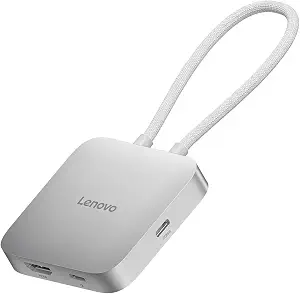
Lenovo USB-C 5-in-1 Travel Hub, 90W Power Delivery, 4K 60Hz HDMI, Dual USB-C and USB-A Ports, Plug and Play, Compact, Silver Grey
Compared with the UGREEN 5-in-1, the Lenovo hub offers a balanced mix of ports including dual USB-C and USB-A, making it ideal for users who need flexibility without sacrificing size. The 90W power delivery supports most laptops, but it’s slightly less powerful than some counterparts, and it doesn’t include additional features like SD card slots or Ethernet. Its plug-and-play design simplifies setup, but it’s limited to USB-C compatible devices and lacks advanced customization options. For those who value straightforward connectivity, this model offers a dependable choice.
Pros:- Supports 4K 60Hz output for clear visuals
- Provides up to 90W charging for mobile devices
- Compact, lightweight, and easy to use
Cons:- Limited to USB-C devices only
- No SD card or Ethernet ports included
Best for: Business travelers or students seeking reliable, multi-port connectivity without extra bells and whistles
Not ideal for: Power users who need more than 5 ports or features like SD card readers
- Number of Ports:5
- HDMI Resolution:4K at 60Hz
- Power Delivery:90W
- Color:Silver Grey
- Compatibility:USB-C devices
Our verdict“This hub works well for users prioritizing straightforward, reliable connectivity on the move.”
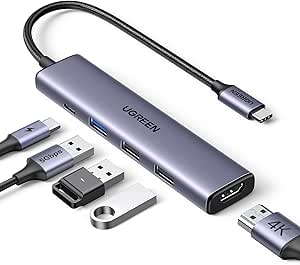
UGREEN USB C Hub 5-in-1 Multiport USB Adapter with 4K HDMI and 100W Power Delivery
The UGREEN 5-in-1 excels with a broad compatibility range, supporting MacBook, iPad Pro, and even Android devices, unlike the Lenovo or Satechi hubs which are more limited. Its support for 4K at 30Hz is slightly lower than the others, but the 100W power delivery and multiple USB-A ports make it a flexible choice for multitasking. Its USB-C video port depends on device support, which can be a drawback for some users. The potential data transfer issues if unplugged during operation are worth noting for those who need consistent performance.
Pros:- Supports 4K HDMI at 30Hz with vivid visuals
- Offers 100W charging for fast device power-up
- Multiple USB-A ports for data and peripherals
Cons:- Requires device support for HDMI over USB-C
- Data transfer issues possible if unplugged during use
Best for: Power users who need broad device compatibility and multiple USB-A ports for peripherals
Not ideal for: Those who want higher refresh rates for video or need SD card/Ethernet support
- Number of ports:5
- HDMI resolution:4K at 30Hz
- Power Delivery:100W
- USB-A ports:3
- Compatibility:MacBook, iPad Pro, Windows, Linux, Android
Our verdict“This hub suits users needing broad device support and multiple connection options for everyday multitasking.”
Acer 10 Gbps USB C Hub with 4 USB-C 3.2 Ports and 100W PD Port
Compared to the UGREEN and Lenovo hubs, the Acer hub focuses heavily on high-speed data transfer with 10Gbps across four USB-C ports, making it ideal for transferring large files quickly. Its aluminum body enhances durability and heat management, which is advantageous for mobile or office use. However, it lacks video output capabilities, unlike the other hubs with HDMI support, so it’s less suitable for media consumption or presentations. If your primary need is fast data transfer and robust build quality, this model deserves consideration.
Pros:- High-speed 10Gbps data transfer across all ports
- Sturdy aluminum alloy construction
- Compact and durable for mobile use
Cons:- No HDMI or video output support
- Limited to data transfer functions only
Best for: Professionals who prioritize high-speed data transfer and durable design in a compact form
Not ideal for: Users who need video output or additional ports like SD card readers
- Data Transfer Speed:10Gbps
- Number of USB-C Ports:4
- Power Delivery:100W
- Material:Aluminum alloy
- Compatibility:Various laptops, tablets, smartphones
Our verdict“Ideal for users who need rapid data movement and a rugged, space-efficient hub for daily use.”
Small USB C HUB for Laptop, USB C Dongle for MacBook Pro, XPS | 60W Fast Charging and 480Mbps Data Transfer USB C Docking Station, USB C Splitter for iMac, iPhone 17, XPS. 2-piece Set
This dual-piece set is perfect for users who want a very lightweight, minimal setup with basic connectivity, supporting 60W charging and 480Mbps data transfer. It’s notably less powerful than other hubs with 100W charging and slower data rates, but its small size makes it exceptionally portable—ideal for light travel or as a backup. The limited ports and data speed mean it’s not suitable for heavy workloads or fast file transfers, but it’s a practical choice for simple tasks and quick connectivity.
Pros:- Extremely compact and lightweight
- Supports 60W fast charging
- Includes a USB A to C adapter for versatility
Cons:- Data transfer limited to 480Mbps
- No video output or additional ports
Best for: Casual users or students who need a tiny, affordable adapter for light device expansion
Not ideal for: Power users or professionals needing fast data transfer or multiple ports
- Number of ports:3
- USB C port:1
- PD charging:60W
- Data transfer rate:480Mbps
- Included accessories:USB A to C adapter
Our verdict“This set is best for minimalistic users who prioritize portability over speed and extensive connectivity.”
Dell Pro 4-in-1 USB-C Travel Hub DA225
The Dell Pro 4-in-1 USB-C Travel Hub stands out for its portable design and smart power management, making it ideal for travelers who prioritize energy efficiency and straightforward connectivity. Unlike larger multiport hubs like the UGREEN Revodok Pro, it offers fewer ports but keeps the form factor slim and lightweight. Its 4K HDMI and USB-A ports support typical presentation and accessory needs, but the absence of Ethernet or SD card slots limits versatility for certain professional workflows. This pick is perfect for users who need a simple, reliable hub to connect a few devices on the go without extra bulk. The main tradeoff is its limited port selection, which might fall short for those with more expansive device needs.
Pros:- Extremely portable and travel-friendly design
- Smart power management to optimize energy use
- Supports 4K HDMI and multiple USB connections
Cons:- Limited to only 4 ports, restricting expandability
- No Ethernet or SD card reader for comprehensive connectivity
- Requires compatible devices to utilize full features
Best for: Travelers who want a slim, plug-and-play hub for basic connectivity and energy efficiency
Not ideal for: Power users requiring extensive ports or Ethernet and card reader options
- HDMI:4K HDMI
- USB Ports:USB-A, USB-C (2 ports)
- Cable Length:10.63 inches
- Features:Smart Power Management, Plug and Play
Our verdict“A sensible choice for travelers seeking a lightweight, efficient hub for essential connections.”
USB C Hub Type C Splitter with 100W Power Delivery, USB 3.0 Data, Multiport Adapter for Laptops and Devices
This USB C Hub Type C Splitter offers a broad range of ports—USB 3.0, USB 2.0, and 100W Power Delivery—making it perfect for users who need to connect multiple peripherals and charge simultaneously. Compared with the UGREEN USB C Hub 5-in-1, it excels in delivering high-speed data transfer, but it lacks video output support via its USB-C data ports, limiting multimedia capabilities. Its compact size makes it highly portable, yet the 5Gbps transfer speed, while adequate for many tasks, isn’t as fast as some premium hubs. This is best for professionals who prioritize high-power charging and multiple data connections over video expansion, but it’s less suitable for users needing video output or higher data speeds.
Pros:- Supports up to 100W charging for laptops
- Multiple ports for versatile peripheral connections
- Compact, travel-friendly dimensions
Cons:- USB C 100W PD port doesn’t support data transfer
- Limited to 5Gbps data transfer speeds
- No dedicated video output via USB-C port
Best for: Professionals needing multiple USB connections and reliable charging while traveling
Not ideal for: Content creators requiring high-resolution video output or fast data transfer beyond 5Gbps
- Ports:1xUSB C 3.0, 1xUSB C 2.0, 1xUSB 3.0, 1xPower Delivery (100W)
- Data Transfer Speed:Up to 5 Gbps
- Dimensions:2.72 x 1.02 x 0.43 inches
- Compatibility:MacBook Pro/Air, iPad Pro, Dell XPS, Chromebook, Switch, Steam Deck, PS5, Surface Pro, iPhone 16, Meta Quest 2, ROG Ally, Legion Go
Our verdict“A practical four-in-one for users needing robust power delivery and data transfer on the go, but not for advanced multimedia use.”
UGREEN USB C Hub 5-in-1 Revodok, Slim Portable USB-C Adapter with 100W PD Charging, 4K HDMI, 10Gbps USB 3.2 Ports, Lock Button & Cable Clip for MacBook Air/Pro, iPad, Laptops
The UGREEN USB C Hub 5-in-1 Revodok combines high-resolution output with rapid data transfer in a sleek, compact form factor. Its 4K HDMI at 60Hz surpasses many competitors offering only 30Hz, making it ideal for presentation or media viewing on the go. The 10Gbps USB 3.2 ports facilitate quick file transfers, while the 100W Power Delivery ensures safe charging for most laptops. The added lock button and cable clip help keep workspace tidy, which is a thoughtful touch. However, the HDMI is limited to 4K 30Hz if used simultaneously with other ports, and the hub’s compatibility is primarily with USB-C devices, narrowing its universal appeal. It suits users who need high-res display support combined with fast data transfer and organized setup.
Pros:- Supports 4K resolution at 60Hz for smooth visuals
- Fast 10Gbps data transfer speeds
- Includes lock button and cable clip for organization
Cons:- Limited to specific USB-C devices; not universal
- HDMI limited to 4K 30Hz if multiple ports are used
- No SD card reader or additional video outputs
Best for: Professionals needing high-quality video and fast data transfer in a portable device
Not ideal for: Users requiring SD card readers or more extensive ports for extensive peripherals
- Ports:HDMI, USB-C Power Delivery, 2x USB 3.2
- HDMI Resolution:4K@60Hz
- Data Transfer Speed:10Gbps
- Compatibility:MacBook Air/Pro, iPad, laptops
Our verdict“A refined choice for professionals demanding high-res visuals and rapid data transfer in a portable format.”
BENFEI USB C Hub 5-in-1 with 4K HDMI, 100W Power Delivery, 3 USB-A Ports, Aluminum Case
The BENFEI USB C Hub 5-in-1 offers a budget-conscious option that still delivers essential features like 4K HDMI output and 100W charging. Its aluminum case adds durability without bulk, making it suitable for travel. However, the HDMI is limited to 30Hz, which may not satisfy users needing smooth video or gaming capabilities. The hub’s USB-A ports support standard peripherals, but it lacks a USB-C data port, restricting future expandability. This makes it ideal for users who need basic connectivity on a tight budget, but not for those who prioritize high refresh rates or additional ports such as SD readers.
Pros:- Affordable price with essential features
- Durable aluminum case for travel
- Supports 4K resolution at 30Hz
Cons:- HDMI limited to 4K 30Hz, less smooth for video
- No USB-C data port for future expandability
- Limited port options for complex setups
Best for: Budget-conscious travelers needing a simple, durable hub for basic display and charging
Not ideal for: Content creators or power users who need higher refresh rates or more ports
- Ports:1 HDMI, 3 USB-A
- HDMI Resolution:4K 30Hz
- Power Delivery:100W
- Cable Length:20cm
- Material:Aluminum
Our verdict“A practical, budget-friendly hub suitable for basic display and charging needs during travel.”
UGREEN Revodok Pro USB-C Hub 6-in-1 with 10Gbps Data Transfer, 4K HDMI, and 100W Power Delivery
The UGREEN Revodok Pro excels by combining multiple high-speed USB ports, 4K HDMI at 60Hz, and 100W Power Delivery—making it a comprehensive solution for demanding users. Its 6-in-1 configuration supports two USB-C ports and two USB-A ports, plus a 4K HDMI, facilitating simultaneous connection of multiple devices with crisp visuals. Compared with the Ugreen Revodok 5-in-1, it offers more ports and higher data transfer speeds, but it demands a USB-C port for full functionality, which could limit compatibility with some ultrabooks. This hub is best suited for those who need maximum connectivity and high-speed data transfer, but it might be excessive for minimalist travelers or those with fewer device needs.
Pros:- Supports 10Gbps data transfer for quick file handling
- Dual USB-C ports and multiple USB-A ports for extensive device connection
- Supports 4K 60Hz HDMI output
Cons:- Requires USB-C port for full functionality; not universal for all devices
- No SD card reader or additional video options
- Bulkier than simpler hubs, less portable
Best for: Power users who need multiple high-speed connections and 4K display support
Not ideal for: Travelers with limited USB-C ports or seeking a lightweight, minimal setup
- Number of ports:6
- USB-C ports:2
- USB-A ports:2
- HDMI:4K 60Hz
- Power Delivery:100W
Our verdict“An excellent choice for high-performance needs on the go, especially for connecting multiple fast devices and high-res displays.”

How We Picked
I evaluated each product based on portability, port variety, power delivery, build quality, and user convenience. Size and weight were primary factors, as these determine if a hub can truly be considered ‘compact’ for travel. I also considered the versatility of ports, ensuring options like HDMI, SD card readers, and multiple USB types were available without making the hub bulky. Price-to-performance ratio was important, favoring hubs that deliver good value for frequent travelers. Hubs with durable construction and reliable performance earned higher rankings, as these are essential for travel environments.Factors to Consider When Choosing Compact Usb C Hub For Travel
Choosing the right compact USB C hub for travel requires balancing size, port selection, power needs, and build quality. It’s important to consider not just the number of ports, but also whether they match your devices and usage scenarios. A hub that’s too small may lack essential features, while a larger one might defeat the purpose of portability. Here are key factors to keep in mind to make an informed decision.Port Selection and Compatibility
Assess what devices you need to connect—such as external displays, SD cards, or USB drives—and ensure the hub offers those ports. Compatibility with your laptop or tablet is vital; some hubs are optimized for specific brands like MacBook or Dell XPS. Avoid hubs with ports you rarely use to keep size minimal, but always prioritize those that fulfill your primary travel needs. Remember, more ports typically mean increased size, so choose wisely based on your device ecosystem.Size and Weight
A truly travel-friendly hub should be lightweight and compact enough to slip into a pocket or small bag. Check dimensions carefully—some hubs claim to be compact but still add noticeable bulk. The tradeoff often involves fewer ports or lower power capacity for reduced size. For frequent travelers, a slim profile that doesn’t compromise essential features offers the best mix of convenience and functionality.Power Delivery (PD)
Power delivery is a critical factor, especially if you want your hub to charge your laptop while in use. Higher wattage (like 85W or 100W) enables full-speed charging, preventing device downtime during travel. Be cautious: hubs with lower wattage might charge slowly or not at all, which can be frustrating on the go. Always match your power needs with the hub’s PD output to avoid inconvenience.Build Quality and Durability
Travel hubs face constant movement and potential impacts. Look for hubs with sturdy casing, reinforced cables, and reliable connectors. Metal housings tend to be more durable than plastic, and features like cable clips or reinforced joints add longevity. A well-built hub can withstand the rigors of travel without sacrificing performance, which makes it a better long-term investment.Connectivity Performance and Speed
Fast data transfer and video output are important—especially if you’re working remotely or need to connect high-resolution monitors. Check for USB 3.1 or 3.2 ports, 4K HDMI support, and high transfer speeds. A hub with slower ports or limited video capabilities might be fine for casual use but could hinder productivity for business travel. Prioritize hubs that deliver both speed and reliability for seamless operation.Frequently Asked Questions
Will a compact USB C hub support multiple devices at once without slowing down?
Most compact hubs are designed to handle multiple connections, but performance can vary based on the number of active ports and the hub’s internal bandwidth. Higher-quality hubs with fast data ports and sufficient power delivery are better suited to support multiple devices without lagging. It’s wise to check the specifications for maximum data throughput and power limits, especially if you plan to connect several peripherals simultaneously.Can I use a compact USB C hub with my iPad or Android tablet?
Yes, many hubs are compatible with tablets that support USB-C, provided they meet the device’s power and port requirements. However, not all hubs support video output or OTG functionality, so it’s important to verify compatibility with your specific device. If you plan to connect external displays or SD cards, choose a hub explicitly designed for mobile devices with appropriate power delivery and port support.How much should I expect to pay for a reliable travel USB C hub?
Prices for travel-friendly hubs generally range from $30 to $100, depending on features and build quality. Budget options may lack high wattage charging or multiple ports, but often suffice for basic connectivity. Investing in a slightly more expensive hub usually results in better durability, faster data speeds, and full power delivery, which are valuable for frequent travelers and professionals.Is it better to buy a hub with a built-in cable or one with a detachable cable?
A hub with a built-in cable offers convenience and a tidy setup, but a detachable cable provides flexibility, easier replacement, and potentially longer lifespan. If you travel often, a built-in cable minimizes loose parts, but a detachable cable can be swapped if damaged or if you need a different length. Consider your usage habits and environment when choosing between the two.Are all USB-C hubs compatible with MacBook Pro and other Apple devices?
Most USB-C hubs work with MacBook Pro and other Apple devices, but compatibility isn’t guaranteed for all features. Some hubs are optimized for macOS, supporting full video output and charging, while others may lack certain features. Look for hubs explicitly labeled as compatible with MacBook or Apple devices, and check user reviews to ensure reliable performance in Apple ecosystems.Conclusion
For general travel needs, the Anker USB-C Hub 7-in-1 provides a balanced mix of ports, power, and portability—ideal for most users. The Belkin 100W Multiport Hub is perfect for those prioritizing fast charging and data speeds, especially professionals on the move. If budget is a concern, the Satechi 4-in-1 USB-C Mobile Hub offers solid features at a lower price, suitable for casual users. For premium users or frequent travelers demanding maximum performance, hubs like the UGREEN Revodok Pro or Benfei 5-in-1 justify the investment with durability and fast data transfer. Ultimately, your choice depends on your device compatibility, port needs, and how much size you’re willing to trade for additional features.
Columbus Day / Indigenous Peoples' Day Picks
long weekend sales
As an affiliate, we earn on qualifying purchases.