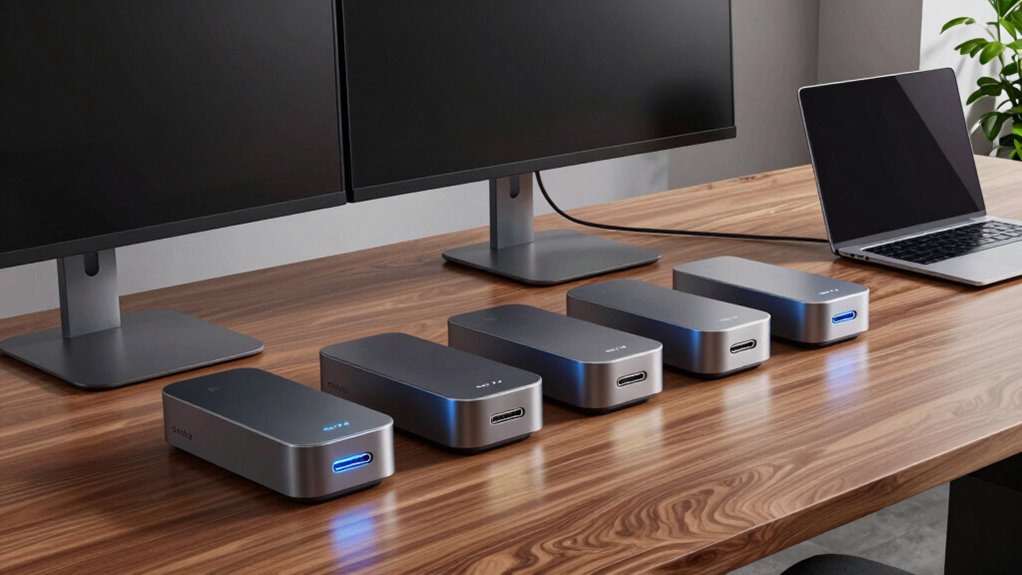

Choosing the right docking station with DisplayPort 1.4 support can dramatically boost your productivity, especially if you rely on multiple high-resolution displays. For those needing extensive connectivity options, the Anker Prime Docking Station (DL7400) stands out with its triple 4K output and robust charging capabilities. Meanwhile, the WAVLINK Dock is ideal for users who want to support up to four monitors with 8K resolution, though it lacks some compatibility with Mac systems. For a versatile choice supporting dual 4K displays and multiple systems, the Anker Prime Dual Monitor Dock offers broad compatibility, but it falls short with higher-res monitors. The MOKiN Dock emphasizes multi-monitor support with HDMI and DisplayPort options, suitable for mixed device environments. Lastly, the Plugable 13-in-1 is perfect for users who need extensive peripherals and triple 4K monitor support, but requires driver management on macOS. Each of these options balances connectivity, resolution support, and device compatibility, with some tradeoffs in system-specific features and complexity.

Get comfort and recovery gear delivered free with Prime
- Fast, free delivery on millions of items
- Prime Video, Amazon Music and more included
- Member-only deals all year
Complete the kit



Key Takeaways
- The Anker Prime DL7400 excels in triple 4K output and high-speed charging, ideal for power users needing multiple high-res screens.
- WAVLINK supports up to four monitors with 8K resolution but has limited Mac compatibility, making it better for Windows-centric setups.
- The Anker Prime dual monitor dock offers broad system compatibility but is limited to dual 4K outputs, not supporting higher resolutions or more monitors.
- MOKiN provides extensive HDMI and DisplayPort options for versatile multi-monitor configurations, though it may need additional accessories for full setup.
- Plugable‘s station supports triple 4K displays with 100W charging but requires driver installation on macOS and lacks HDCP support.
| Anker Prime Docking Station (DL7400), 14-in-1 Triple Display with DisplayLink |  | Best Overall for Power and Versatility | Hardware Interface: 3.5mm Audio, DisplayPort, Ethernet, HDMI, MicroSD, USB, USB Type C | Compatible Devices: USB C Windows laptops | Total USB Ports: 7 | VIEW ON AMAZON | See Our Full Breakdown |
| WAVLINK Laptop Docking Station with Quad Monitors, Dual DisplayPort, HDMI, VGA |  | Best for High-Resolution Multi-Monitor Setups | Number of Ports: 8 | Display Outputs: Dual DisplayPort, HDMI, VGA | Maximum Resolution: 8K@60Hz (DP), 4K@60Hz (HDMI) | VIEW ON AMAZON | See Our Full Breakdown |
| Anker Prime Docking Station 14-in-1 Dual Monitor Laptop Dock |  | Best for Wide Compatibility and Dual 4K Monitors | Connectivity: 14-in-1 | Display Support: Dual 4K @ 60Hz or 1080p @ 60Hz | Total Power Output: 160W | VIEW ON AMAZON | See Our Full Breakdown |
| Plugable 13-in-1 USB C Docking Station 4K Triple Monitor with 100W Charging |  | Best for Professional Multi-Monitor Workstations | Number of ports: 13 | Display support: Triple 4K 60Hz | Power delivery: 100W | VIEW ON AMAZON | See Our Full Breakdown |
| docking station with displayport 14 | Number of Ports | Display Outputs | Power Delivery | Display Support |
|---|---|---|---|---|
| Anker Prime Docking Station | 14 | — | — | — |
| WAVLINK Laptop Docking Station | 8 | Dual DisplayPort, HDMI, VGA | 95W | — |
| Anker Prime Docking Station 14 | — | — | — | Dual 4K @ 60Hz or 1080p @ 60Hz |
| Plugable 13-in-1 USB C Docking | 13 | 3 HDMI, 3 DisplayPort | 100W | Triple 4K 60Hz |
More Details on Our Top Picks
Anker Prime Docking Station (DL7400), 14-in-1 Triple Display with DisplayLink
The Anker Prime DL7400 stands out for supporting three 4K monitors simultaneously, making it perfect for demanding multitaskers. Its extensive port selection includes multiple USB-C, HDMI, DisplayPort, Ethernet, and SD card slots, providing comprehensive connectivity. The 160W wattage supports high-speed charging for laptops, while built-in cooling features ensure stable operation during prolonged use. Compared to other options, it offers the most balanced mix of display support, power delivery, and expandability, though it requires specific DisplayLink drivers and may not support DRM-protected streaming without issues. It’s ideal for users who prioritize high-resolution multitasking and robust data transfer, but less so for those seeking Mac compatibility or plug-and-play simplicity.
Pros:- Supports triple 4K monitor setup for efficient multitasking
- Multiple high-speed ports including USB-C, HDMI, DisplayPort, Ethernet
- Powerful 140W charging capacity for laptops
- Built-in fan and ActiveShield 3.0 for cooling and stability
Cons:- Requires specific DisplayLink driver installation
- Front USB-C ports do not support media display
- DRM-protected streaming may show black screens
Best for: Power users needing triple 4K displays and high-speed data transfer
Not ideal for: Mac users or those seeking simple out-of-the-box setup without driver concerns
- Hardware Interface:3.5mm Audio, DisplayPort, Ethernet, HDMI, MicroSD, USB, USB Type C
- Compatible Devices:USB C Windows laptops
- Total USB Ports:7
- Number of Ports:14
- Total Number of HDMI Ports:2
- Wattage:160 watts
Our verdict“A highly capable docking station ideal for power users with demanding multi-monitor, charging, and connectivity needs.”
WAVLINK Laptop Docking Station with Quad Monitors, Dual DisplayPort, HDMI, VGA
The WAVLINK Dock supports up to four monitors with resolutions up to 8K, making it a top choice for those who need maximum display real estate. It offers dual DisplayPort, HDMI, and VGA outputs, ensuring flexibility across different devices and setups. With 95W power delivery, it can charge compatible Windows laptops while expanding your workspace efficiently. However, it is not compatible with Mac OS and may have hardware limitations on some Windows laptops regarding the number of supported monitors. Its focus on high resolution makes it suitable for content creators and professionals who rely on crisp visuals, but it’s less ideal for Mac users or those requiring plug-and-play simplicity without additional hardware or driver considerations.
Pros:- Supports high-resolution quad monitor setup with 8K and 4K outputs
- Provides 95W power delivery for compatible laptops
- Multiple video output options including DP, HDMI, and VGA
Cons:- Not compatible with Mac OS
- Some Windows laptops may support fewer monitors due to hardware limits
- Requires a compatible USB-C port supporting video output and charging
Best for: Professionals needing up to four 8K/4K monitors for detailed workflows
Not ideal for: Mac users or users with laptops lacking DisplayPort 1.4 support
- Number of Ports:8
- Display Outputs:Dual DisplayPort, HDMI, VGA
- Maximum Resolution:8K@60Hz (DP), 4K@60Hz (HDMI)
- Power Delivery:95W
Our verdict“An excellent choice for Windows users who need maximum resolution and multi-monitor flexibility, but incompatible with Mac systems.”
Anker Prime Docking Station 14-in-1 Dual Monitor Laptop Dock
The Anker Prime Dual Monitor Dock offers a versatile setup supporting two 4K displays, making it suitable for office environments that don’t demand three screens. With 14-in-1 connectivity, including USB-C ports up to 100W, it delivers rapid charging and broad device compatibility across Windows, ChromeOS, and Thunderbolt systems. Its main limitation lies in its support for only dual 4K monitors, which may not satisfy users with more expansive multi-monitor needs. The dock’s straightforward design and reliable performance make it a good pick for users who prioritize system compatibility and high-quality dual display support without the complexity of higher monitor counts.
Pros:- Supports dual 4K displays at 60Hz
- Fast charging up to 160W total power output
- Broad system compatibility including Windows, ChromeOS, and Thunderbolt
Cons:- Limited to dual 4K, not supporting triple or higher resolutions
- Does not support monitors with 5120×1440 resolution
- Requires specific driver setup on some systems
Best for: Users needing reliable dual 4K display support across multiple operating systems
Not ideal for: Power users requiring three or more high-resolution monitors
- Connectivity:14-in-1
- Display Support:Dual 4K @ 60Hz or 1080p @ 60Hz
- Total Power Output:160W
- USB-C Ports:3 at 100W each
Our verdict“A dependable dual-monitor solution with broad compatibility, but not suitable for advanced multi-display setups.”
Plugable 13-in-1 USB C Docking Station 4K Triple Monitor with 100W Charging
The Plugable UD-ULTC4K offers strong support for three 4K monitors and includes a wide array of peripherals, making it suitable for professional environments. It supports 100W charging for laptops, along with multiple HDMI and DisplayPort outputs, delivering extensive display options for complex workflows. Its main tradeoff is the need for DisplayLink drivers on macOS, which can introduce setup complexity or compatibility issues, and it doesn’t support HDCP content playback. This station is best suited for Windows users requiring a powerful, multi-monitor setup with high peripheral integration, but less ideal for those seeking plug-and-play simplicity on Mac systems or HDCP-protected content playback.
Pros:- Supports triple 4K monitors for expansive screen real estate
- Provides 100W charging for laptops
- Multiple connection options including HDMI, DisplayPort, Ethernet
Cons:- Requires DisplayLink drivers on macOS
- Lacks HDCP support, affecting protected content playback
- Setup can be more complex due to driver installation
Best for: Professionals needing triple 4K monitors with extensive peripheral connectivity
Not ideal for: Mac users or those requiring seamless HDCP content support
- Number of ports:13
- Display support:Triple 4K 60Hz
- Power delivery:100W
- Display outputs:3 HDMI, 3 DisplayPort
Our verdict“A capable, feature-rich docking station for Windows professionals needing extensive multi-monitor support, with driver considerations for Mac users.”

How We Picked
Our selection focuses on docking stations supporting DisplayPort 1.4, prioritizing multi-monitor capabilities, power delivery, and compatibility with modern laptops. We considered the number and types of video outputs to accommodate various multi-display setups, especially those supporting 4K and 8K resolutions. Port variety and data transfer speeds were also key, along with power delivery to ensure devices stay charged during intensive use. Compatibility across operating systems, including Windows, macOS, and ChromeOS, was essential, as was ease of setup and reliability. We balanced features against potential drawbacks like driver requirements, system limitations, and design constraints to identify options suitable for different user needs and budgets.
| docking station with displayport 14 | Display Support |
|---|---|
| Anker Prime Docking Station | — |
| WAVLINK Laptop Docking Station | — |
| Anker Prime Docking Station 14 | Dual 4K @ 60Hz or 1080p @ 60Hz |
| Plugable 13-in-1 USB C Docking | Triple 4K 60Hz |
Factors to Consider When Choosing Docking Station With Displayport 14
Choosing the right docking station with DisplayPort 1.4 support hinges on understanding your specific needs for display count, resolution, system compatibility, and power delivery. Whether you prioritize maximum resolution, multiple high-res monitors, or broad peripheral connectivity, each feature affects your overall experience. Consider your laptop’s ports and supported standards, as well as your workflow’s demands for high-quality video output and device charging. The following sections break down these factors to help you select the best docking station for your setup.
Display Support and Resolution
DisplayPort 1.4 enables high-resolution output, including 8K at 60Hz and multiple 4K displays at 60Hz. When choosing a docking station, assess how many monitors you need and their resolutions. Some stations support triple 4K, while others extend to 8K or support multiple monitors with lower resolutions. Higher resolutions demand more bandwidth, so verify that your laptop’s graphics hardware can handle these outputs seamlessly. Consider your workflow—content creators and professionals working with detailed visuals benefit from higher resolutions, but ensure your hardware supports these capabilities.
Number of Monitors and Multi-Display Capabilities
Different docks support varying numbers of monitors, from dual setups to four or more. Decide how many screens you need for your tasks, and check the dock’s maximum supported monitors and resolutions. For example, the Anker Prime DL7400 supports three 4K displays, while WAVLINK can handle four monitors at up to 8K. Keep in mind that some docks may require specific hardware or driver configurations, especially for more complex multi-monitor arrangements. Your choice should align with your productivity needs and system capabilities.
Compatibility and Ease of Use
Compatibility depends heavily on your laptop’s ports and supported standards. Thunderbolt 3/4, USB-C, and DisplayPort 1.4 support are common criteria. Some docks, like the MOKiN, support a wide range of operating systems, including Windows and ChromeOS, but may need additional drivers or adapters. Mac users should verify driver support and compatibility, especially for multi-monitor setups. Ease of setup varies—plug-and-play options exist, but some docks require driver installation or firmware updates, which can complicate initial configuration. Prioritize a dock that matches your system’s compatibility to avoid frustrations down the line.
Power Delivery and Peripheral Connectivity
High power delivery (PD) is essential if you want your laptop to charge through the dock while working. Look for docks offering at least 60W, with 100W or more being ideal for larger laptops. Peripheral support, including USB ports, SD card slots, Ethernet, and audio, adds convenience and expands your workstation’s capabilities. Evaluate whether the dock provides enough ports for your peripherals and ensure the power output matches your device’s charging requirements. Balancing these features ensures your setup remains efficient without needing multiple chargers or adapters.
Frequently Asked Questions
Can I use a docking station with DisplayPort 1.4 for 8K resolution?
Yes, many docking stations with DisplayPort 1.4 support 8K resolution at 60Hz, provided your laptop’s graphics hardware and cable support this bandwidth. This makes them ideal for high-end content creation, professional editing, or detailed visual workflows. However, ensure your system is compatible with DisplayPort 1.4 standards and that the dock explicitly supports 8K output to avoid performance issues or resolution limitations.
Will I need special drivers to use these docks?
Most docks, especially those supporting DisplayLink technology like the Anker Prime DL7400, require specific drivers for full functionality. Driver installation can add complexity but offers enhanced performance and compatibility. Some docks, like the Plugable, may also need drivers on macOS, which can sometimes cause issues or additional setup steps. Carefully review driver requirements and support options before purchasing, especially if you prefer a plug-and-play experience.
Are these docks compatible with MacBooks?
Compatibility with MacBooks varies. Docks supporting DisplayPort 1.4 and Thunderbolt 3/4 generally work well, but some features like multi-monitor configurations or driver-dependent functions may require additional setup or have limitations. For example, the WAVLINK may not support Mac systems at all, while others like the Plugable or Anker Prime can work with MacBooks but may need driver installation or specific configurations. Always verify compatibility with your specific Mac model before purchase.
Will I need extra cables for these docks?
Most docks include essential cables, such as USB-C upstream cables, but additional cables might be needed for connecting monitors or peripherals, especially if your setup requires adapters or longer cables. Check the product details to see what’s included and consider whether your existing cables match the required specifications for resolution and bandwidth. Having the right cables ensures optimal performance without bottlenecks or connection issues.
Can I connect multiple high-resolution monitors with these docks?
Yes, most docks support multiple high-resolution monitors, with some supporting triple 4K or even 8K setups. The key is verifying the maximum number of monitors supported at the desired resolution and ensuring your laptop’s graphics hardware can handle the output. For instance, the Anker Prime DL7400 supports three 4K displays, while WAVLINK can handle four at up to 8K. Always check compatibility and system requirements to avoid overloading your hardware or encountering performance issues.
Conclusion
Those with high-demand professional workflows or extensive multi-monitor needs will benefit most from models like the Anker Prime DL7400 or WAVLINK, which support multiple high-resolution displays and extensive connectivity. Power users requiring reliable dual 4K setups might find the Anker Prime Dual Monitor Dock to be an excellent fit. Budget-conscious users seeking straightforward connectivity should consider the Plugable dock, while Mac users need to verify compatibility carefully. Ultimately, your choice depends on the number of monitors, resolution, compatibility, and whether you prioritize high-power charging or broad peripheral support. Selecting the right dock aligns with your specific device ecosystem and productivity demands, ensuring a seamless and efficient workspace.
Fall Picks
fall essentials
As an affiliate, we earn on qualifying purchases.