Finding the right printer scanner copier for remote work involves balancing performance, size, and cost. The Canon PIXMA TR8620a stands out as the best overall choice due to its versatile features and reliable wireless connectivity. For those prioritizing portability, the HP OfficeJet 250 offers excellent mobility with a built-in battery, while the Brother DCP-L2640DW provides a budget-friendly monochrome laser option for heavy document use. These options exemplify the tradeoffs many remote workers face: feature set versus size, color versus monochrome, and upfront cost versus ongoing ink or toner expenses. Continue reading for a detailed breakdown to find the best fit for your remote work needs.
Complete the kit



Key Takeaways
- Top picks balance performance with ease of use, ensuring seamless remote work integration.
- Wireless connectivity and mobile printing are essential features for flexible remote setups.
- Laser models offer faster printing and lower cost per page for high-volume document needs.
- All-in-one capabilities, including scanning and copying, significantly enhance productivity at home.
- Size and design matter: compact models are ideal for small spaces but may lack some advanced features.
| Canon PIXMA TR8620a All-in-One Printer – Wireless, 4-in-1, Auto Document Feeder, AirPrint, Alexa Compatible |  | Best Overall for Versatile Remote Work | Print Speed: 15 / 10 ipm | Paper Capacity: 200 sheets | Functions: Print, Copy, Scan, Fax | VIEW ON AMAZON | See Our Full Breakdown |
| Canon PIXMA TS3720 Wireless All-in-One Home Office Printer, Copier, Scanner, Black |  | Best for Compact Home Use | Functions: Print, Copy, Scan | Connectivity: Wireless, USB | Print Speed: 7.7 ppm black / 4 ppm color | VIEW ON AMAZON | See Our Full Breakdown |
| HP OfficeJet 250 Wireless Mobile Printer, Scanner, Copier – Black, Battery Included |  | Best for Mobile Remote Work | Printer Type: Wireless Mobile Printer | Functions: Print, Scan, Copy | Battery Included: Yes | VIEW ON AMAZON | See Our Full Breakdown |
| Canon PIXMA TS6520 Wireless Color Inkjet Printer with Duplex Printing |  | Best Budget All-in-One for Home Use | Display: 1.42” OLED | Printer Type: Color Inkjet | Connectivity: Wi-Fi (dual-band 2.4GHz/5GHz) | VIEW ON AMAZON | See Our Full Breakdown |
| Brother MFC-J1360DW Wireless Color Inkjet All-in-One Printer with Duplex Printing and 1.8″ Color Display |  | Best for Small Office or Heavy Remote Use | Printer Type: All-in-One Inkjet | Connectivity: Wireless and USB | Display: 1.8-inch color display | VIEW ON AMAZON | See Our Full Breakdown |
| Brother DCP-L2640DW Wireless Monochrome Multi-Function Laser Printer with Copy and Scan |  | Best Overall for Small Spaces and Fast Black-and-White Printing | Print Speed: up to 36 ppm | Scan Speed: up to 23.6/7.9 ipm | Auto Document Feeder: 50 pages | VIEW ON AMAZON | See Our Full Breakdown |
| Canon PIXMA TR7120 Wireless Color Inkjet Printer |  | Best for Home Use with High-Quality Color Printing and Hybrid Flexibility | Printer Type: All-in-One Inkjet | Color: Color | Connectivity: Wi-Fi (dual-band 2.4GHz/5GHz) | VIEW ON AMAZON | See Our Full Breakdown |
| Brother MFC-J1410DW Wireless Color Inkjet All-in-One Printer with Touchscreen and Duplex Printing |  | Best for Small Offices Needing Versatile Features and Touchscreen Control | Printer Type: Wireless Color Inkjet | Touchscreen: 2.7-inch color display | Automatic Duplex: Yes | VIEW ON AMAZON | See Our Full Breakdown |
| HP LaserJet Pro MFP 3105sdw Wireless Printer |  | Best for Small Teams Requiring Speed and Security | Print Speed: up to 33 ppm | Connectivity: Wi-Fi | Functions: Print, Scan, Copy | VIEW ON AMAZON | See Our Full Breakdown |
| Epson EcoTank ET-4800 Wireless All-in-One Supertank Printer with Scanner, Copier, Fax, ADF, Ethernet, White |  | Best for Cost-Conscious Remote Users with High-Volume Needs | Printer Type: All-in-One Supertank | Connectivity: Wireless, Ethernet | Color: Yes | VIEW ON AMAZON | See Our Full Breakdown |
| HP LaserJet Pro MFP 3101fdw Wireless Black & White All-in-One Laser Printer |  | Best Overall for Small Teams | Print Speed: Up to 35 pages per minute | Functions: Print, scan, copy, fax | Auto 2-sided printing: Yes | VIEW ON AMAZON | See Our Full Breakdown |
| HP OfficeJet Pro 9125 Wireless All-in-One Color Inkjet Printer |  | Best Value for Versatile Office Printing | Print Speed (Black): 22 ppm | Print Speed (Color): 18 ppm | Input Tray Capacity: 250 sheets | VIEW ON AMAZON | See Our Full Breakdown |
| HP OfficeJet Pro 8139 Wireless All-in-One Color Inkjet Printer |  | Best for Home Office with Security Features | Print Speed: Up to 20 ppm black, 10 ppm color | Input Tray Capacity: 225 sheets | Touchscreen: 2.7-inch color touchscreen | VIEW ON AMAZON | See Our Full Breakdown |
| Canon PIXMA TR4720 All-in-One Wireless Printer | 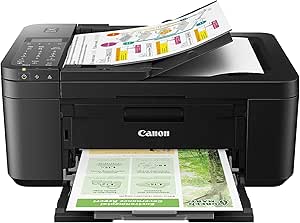 | Best Compact Home Office Solution | Functionality: Print, Copy, Scan, Fax | Connectivity: Wireless | Print Speed: Approx. 8.8 ipm (Black), 4.4 ipm (Color) | VIEW ON AMAZON | See Our Full Breakdown |
| printer scanner copier for remote work | Connectivity | Print Speed | Functions |
|---|---|---|---|
| Canon PIXMA TR8620a All-in-One | Wireless, AirPrint, Micro SD Slot | 15 / 10 ipm | Print, Copy, Scan, Fax |
| Canon PIXMA TS3720 Wireless Al | Wireless, USB | 7.7 ppm black / 4 ppm color | Print, Copy, Scan |
| HP OfficeJet 250 Wireless Mobi | — | — | Print, Scan, Copy |
| Canon PIXMA TS6520 Wireless Co | Wi-Fi (dual-band 2.4GHz/5GHz) | — | Print, Scan, Copy |
| Brother MFC-J1360DW Wireless C | Wireless and USB | Up to 16 ppm black, 9 ppm color | — |
| Brother DCP-L2640DW Wireless M | Wireless (2.4GHz / 5GHz), Ethernet, USB | up to 36 ppm | Print, Scan, Copy |
| Canon PIXMA TR7120 Wireless Co | Wi-Fi (dual-band 2.4GHz/5GHz) | — | — |
| Brother MFC-J1410DW Wireless C | — | 16 ppm black / 9 ppm color | — |
| HP LaserJet Pro MFP 3105sdw Wi | Wi-Fi | up to 33 ppm | Print, Scan, Copy |
| Epson EcoTank ET-4800 Wireless | Wireless, Ethernet | — | — |
| HP LaserJet Pro MFP 3101fdw Wi | Wi-Fi, Ethernet, Bluetooth | Up to 35 pages per minute | Print, scan, copy, fax |
| HP OfficeJet Pro 9125 Wireless | Wireless, dual-band Wi-Fi | — | — |
| HP OfficeJet Pro 8139 Wireless | Dual-band Wi-Fi, HP App | Up to 20 ppm black, 10 ppm color | — |
| Canon PIXMA TR4720 All-in-One | Wireless | Approx. 8.8 ipm (Black), 4.4 ipm (Color) | — |
More Details on Our Top Picks
Canon PIXMA TR8620a All-in-One Printer – Wireless, 4-in-1, Auto Document Feeder, AirPrint, Alexa Compatible
The Canon PIXMA TR8620a stands out for its all-around performance and smart features, making it suitable for those who need a reliable home office with multiple functions. Compared with the HP OfficeJet 250, it offers a larger paper capacity and automatic duplex printing, which can reduce manual intervention during long tasks. However, its slower print speed might be a drawback for high-volume printing, and its ink reordering process, while seamless with Smart Reorders, adds a layer of setup complexity. The device’s compatibility with Alexa and AirPrint enhances remote convenience, but the limited details on ink costs could impact ongoing expenses. This model is ideal for remote workers who value versatility and connectivity over rapid throughput.
Pros:- Wireless connectivity with AirPrint and Alexa integration
- Auto 2-sided printing reduces paper use
- Large 200-sheet paper capacity
Cons:- Print speed may be slow for frequent high-volume tasks
- Requires enrollment for Smart Reorders, adding setup steps
Best for: Remote professionals needing a multi-functional, connected device with high capacity and voice control
Not ideal for: High-volume print shops or users prioritizing speed and low running costs
- Print Speed:15 / 10 ipm
- Paper Capacity:200 sheets
- Functions:Print, Copy, Scan, Fax
- Auto 2-Sided Printing:Yes
- Connectivity:Wireless, AirPrint, Micro SD Slot
- Energy Star:Yes
Our verdict“This printer suits remote workers seeking a feature-rich, reliable all-in-one with smart home integration.”
Canon PIXMA TS3720 Wireless All-in-One Home Office Printer, Copier, Scanner, Black
The Canon PIXMA TS3720 excels in small spaces, offering a compact design that doesn’t compromise essential functions. Its wireless and USB connectivity make it flexible for various setups, and the borderless photo printing is a bonus for personal projects. Compared with the Brother MFC-J1360DW, it’s less suited for larger volumes due to its limited paper capacity of just 60 sheets and slower print speeds, which can be frustrating during busy workdays. The basic 1.5-inch LCD is simple but less intuitive in bright environments. This model makes sense for casual remote workers or families with minimal printing needs, but it may fall short for those with high-volume demands or frequent scanning needs.
Pros:- Compact and space-efficient design
- Wireless and USB connectivity for flexible setup
- Borderless photo printing
Cons:- Slow print speeds for large or frequent jobs
- Limited paper capacity at 60 sheets
Best for: Casual remote workers or families with light printing needs in limited space
Not ideal for: High-volume or professional use where speed and capacity matter
- Functions:Print, Copy, Scan
- Connectivity:Wireless, USB
- Print Speed:7.7 ppm black / 4 ppm color
- Paper Capacity:60 sheets
- Display:1.5-inch LCD
- Maximum Paper Size:8.5 x 11 inches
Our verdict“This compact model is perfect for light, occasional printing in small home offices or apartments.”
HP OfficeJet 250 Wireless Mobile Printer, Scanner, Copier – Black, Battery Included
The HP OfficeJet 250 offers true portability, making it ideal for remote workers who frequently work outside the traditional home office environment. Its lightweight design and built-in battery allow printing and scanning from anywhere, which is a significant advantage over larger, stationary options like the Canon PIXMA TR8620a. While it supports various paper sizes, its use of specific cartridges can lead to higher ongoing costs, and battery life isn’t specified, which might limit its effectiveness on longer outings. The device’s support for multiple paper formats and rapid charging make it a dependable on-the-go solution, but it’s less suitable for high-volume or high-speed demands typical of a busy home office.
Pros:- Portable and lightweight for mobile use
- Wireless printing, scanning, and copying from mobile devices
- Fast charging capability
Cons:- Uses specific, potentially costly cartridges
- Battery life details are not provided, limiting planning
Best for: Remote workers who need a portable, all-in-one device for mobile or temporary setups
Not ideal for: High-volume office environments or users prioritizing speed over mobility
- Printer Type:Wireless Mobile Printer
- Functions:Print, Scan, Copy
- Battery Included:Yes
- Supported Paper Sizes:Letter, Legal, Statement, etc.
- Charging Time:90 minutes
- Warranty:One-year limited hardware
Our verdict“This model is best for remote workers who need a reliable, portable printer for on-the-go tasks.”
Canon PIXMA TS6520 Wireless Color Inkjet Printer with Duplex Printing
The Canon PIXMA TS6520 offers a balance of affordability and quality, making it suitable for occasional remote work or home use. Its wireless setup and 1.42” OLED display make it straightforward for users who want decent print quality without complexity. Compared to the Brother MFC-J1360DW, it’s less suited for high-volume tasks, given its smaller media size support and slower speeds. However, it excels at producing vibrant documents and photos, thanks to its hybrid ink system. This printer makes the most sense for remote workers with moderate printing needs who prioritize image quality over speed or large capacity.
Pros:- Affordable, all-in-one functionality
- Vibrant, high-quality print output
- Wireless connectivity with mobile printing
Cons:- Limited to 8.5” x 11” media
- Small OLED display may be less visible outdoors
Best for: Budget-conscious remote workers needing occasional high-quality prints
Not ideal for: High-volume or fast-paced office environments needing rapid throughput
- Display:1.42” OLED
- Printer Type:Color Inkjet
- Connectivity:Wi-Fi (dual-band 2.4GHz/5GHz)
- Functions:Print, Scan, Copy
- Media Support:Up to 8.5” x 11”
- Automatic Duplex Printing:Yes
Our verdict“This printer is perfect for budget-conscious users who need good quality, occasional printing at home.”
Brother MFC-J1360DW Wireless Color Inkjet All-in-One Printer with Duplex Printing and 1.8″ Color Display
The Brother MFC-J1360DW strikes a good balance for small office or dedicated remote work setups, with a larger 150-sheet capacity and faster speeds than many compact models like the TS3720. Its 1.8-inch color display simplifies operation, and the automatic duplex printing helps save paper during frequent tasks. Compared with the Canon PIXMA TS6520, it handles higher volumes more efficiently but comes with a slightly larger footprint. Cartridges from the LC501 series may increase running costs, and its slower color speed could be a bottleneck for demanding workflows. Overall, it’s a solid choice for those who need a versatile, wired/wireless device that balances speed, capacity, and ease of use.
Pros:- Wireless and USB connectivity with cloud support
- Automatic duplex printing saves paper
- Large 150-sheet paper capacity
Cons:- Print speed may be slow for high-volume tasks
- Uses specific ink series which could be costly
Best for: Small offices or remote workers with moderate to high printing volumes and need for straightforward operation
Not ideal for: Users who prioritize ultra-high speed or infrequent, light-duty printing
- Printer Type:All-in-One Inkjet
- Connectivity:Wireless and USB
- Display:1.8-inch color display
- Automatic Duplex Printing:Yes
- Paper Capacity:150 sheets
- Print Speed:Up to 16 ppm black, 9 ppm color
Our verdict“This printer offers reliable performance for those needing a flexible, office-ready device at home.”
Brother DCP-L2640DW Wireless Monochrome Multi-Function Laser Printer with Copy and Scan
This compact monochrome laser printer stands out for its speed and connectivity, making it ideal for remote workers who need quick document handling without color. Compared to the Epson EcoTank ET-4800, it offers faster printing and scanning, but only in monochrome, limiting its versatility. Its wireless and Ethernet options mean it integrates seamlessly into a home office setup, especially where space is at a premium. The tradeoff is that it lacks color printing, which might be a downside for those needing vibrant visuals or photos. Still, for straightforward document tasks, this model delivers reliable performance with minimal footprint.
Pros:- Fast print and scan speeds for quick document handling
- Compact design fits easily into small spaces
- Multiple connectivity options including wireless and Ethernet
- Mobile device management via app
Cons:- Limited to monochrome printing, no color output
- Requires toner replacement, adding ongoing costs
- No color printing capabilities limits versatility
Best for: Remote workers in small offices needing fast monochrome printing and scanning without space constraints
Not ideal for: Creative professionals or home users requiring color printing or photo quality output
- Print Speed:up to 36 ppm
- Scan Speed:up to 23.6/7.9 ipm
- Auto Document Feeder:50 pages
- Connectivity:Wireless (2.4GHz / 5GHz), Ethernet, USB
- Functions:Print, Scan, Copy
- Color Printing:No
Our verdict“This printer is perfect for remote workers prioritizing speed and simplicity in monochrome document workflows.”
Canon PIXMA TR7120 Wireless Color Inkjet Printer
This all-in-one inkjet printer excels at delivering vibrant color prints and photos, making it suitable for remote workers who handle both documents and visual content. Unlike the Brother DCP-L2640DW, which is monochrome, the PIXMA TR7120 offers true color output, but at a slower pace, especially for bulk printing. Its compact size and easy mobile setup make it a good choice for small home offices, though its limited ink cartridges may increase running costs over time. The small OLED display is less intuitive than larger touchscreens, but overall, it balances affordability with versatility.
Pros:- Affordable all-in-one inkjet with high-quality color output
- Easy setup with mobile printing options
- Automatic duplex printing saves paper
- Compact design fits small spaces
Cons:- Limited to two ink cartridges, increasing replacement costs
- Slower print speeds compared to laser models
- Small OLED display may reduce ease of use
Best for: Home-based remote workers needing high-quality color prints and occasional photo printing
Not ideal for: High-volume document workflows or users requiring fast black-and-white printing
- Printer Type:All-in-One Inkjet
- Color:Color
- Connectivity:Wi-Fi (dual-band 2.4GHz/5GHz)
- Media Size:Up to 8.5″ x 11″
- Display:1.42″ Monochrome OLED
- Auto Document Feeder:Yes
Our verdict“Ideal for remote workers who prioritize vivid color printing and photo quality over speed and volume.”
Brother MFC-J1410DW Wireless Color Inkjet All-in-One Printer with Touchscreen and Duplex Printing
This versatile all-in-one inkjet printer offers a balance of color printing, copying, and scanning with a user-friendly 2.7-inch touchscreen. Compared with the HP LaserJet Pro MFP 3105sdw, which is laser-based and faster for black-and-white tasks, the Brother MFC-J1410DW provides color capabilities and cloud integration. Its automatic duplex printing and small footprint are advantages, but its slower speeds make it less suitable for high-volume environments. The requirement for genuine Brother ink cartridges also means ongoing expenses. This model suits those who need flexible features in a compact form but aren’t racing against large workloads.
Pros:- Compact size fits well in small spaces
- Intuitive touchscreen with cloud app support
- Automatic duplex printing reduces paper use
- Wireless and USB connectivity
Cons:- Slower print speeds for high-volume needs
- Dependent on genuine cartridges for optimal performance
- Limited to small office/home use
Best for: Remote workers in small home offices who need color printing and easy-to-use features
Not ideal for: High-volume offices or users with tight deadlines for fast black-and-white document printing
- Printer Type:Wireless Color Inkjet
- Touchscreen:2.7-inch color display
- Automatic Duplex:Yes
- Automatic Document Feeder:20 sheets
- Paper Capacity:150 sheets
- Print Speed:16 ppm black / 9 ppm color
Our verdict“This printer suits remote workers needing versatile color printing with straightforward operation in a compact package.”
HP LaserJet Pro MFP 3105sdw Wireless Printer
This laser all-in-one offers fast, secure printing and scanning tailored for small teams, making it a strong choice for remote workgroups. Its 33 ppm speed and auto duplex capabilities outpace many inkjet models, including the Brother MFC-J1410DW, especially for document-heavy workflows. Its security features and ability to handle up to 7 users make it more suitable for collaborative environments. However, its reliance on specific HP cartridges and the 7-user limit could pose drawbacks for some. Compared to the Epson EcoTank ET-4800, which offers cost savings on ink, this model emphasizes speed and data protection, trading off some initial cost and versatility.
Pros:- Fast print speeds of up to 33 ppm for efficiency
- Enhanced security features protect sensitive data
- Easy setup with mobile printing support
- Auto duplex printing and scanning
Cons:- Dependent on specific HP cartridges with chips
- Limited to small teams of up to 7 users
- Higher ongoing cartridge costs
Best for: Remote teams needing quick, secure, and multi-user document handling within small office environments
Not ideal for: Solo remote workers or those seeking color printing capabilities
- Print Speed:up to 33 ppm
- Connectivity:Wi-Fi
- Functions:Print, Scan, Copy
- Auto Duplex:Yes
- Maximum Users:7
Our verdict“This model is ideal for small remote teams prioritizing speed, security, and reliability in their printing needs.”
Epson EcoTank ET-4800 Wireless All-in-One Supertank Printer with Scanner, Copier, Fax, ADF, Ethernet, White
This EcoTank supertank printer provides a compelling alternative to cartridge-based models for remote workers who prioritize low operating costs and high-volume printing. Its high-capacity ink tanks and integrated scanner, copier, and fax make it a versatile all-in-one, especially for those printing large batches of documents. Compared with laser options like the HP LaserJet Pro, the EcoTank’s initial investment is higher, but the long-term savings on ink can be significant. Its larger footprint and higher price may be less suitable for smaller spaces, but the eco-friendly design and low waste are attractive features for sustainable-minded users.
Pros:- High-capacity ink tanks reduce ongoing costs
- Eco-friendly, cartridge-free design minimizes waste
- Includes fax, scanner, copier, and Ethernet connectivity
- Sharp text and vibrant color prints
Cons:- Higher initial purchase price compared to standard inkjet or laser models
- Larger size may not fit small offices
- Setup complexity can be higher for less tech-savvy users
Best for: Remote workers with frequent, high-volume printing needs seeking cost efficiency and eco-friendliness
Not ideal for: Small spaces or users with tight budgets upfront who prefer low initial costs
- Printer Type:All-in-One Supertank
- Connectivity:Wireless, Ethernet
- Color:Yes
- Features:Scanner, Copier, Fax, ADF
- Technology:Micro Piezo Heat-Free Technology
- Ink System:EcoTank cartridge-free
Our verdict“This printer suits remote workers with high-volume printing demands who want to save on long-term ink costs and reduce waste.”
HP LaserJet Pro MFP 3101fdw Wireless Black & White All-in-One Laser Printer
This laser printer excels in fast, reliable black-and-white printing, making it perfect for small office environments where speed and security matter most. Compared with the inkjet options like the HP OfficeJet Pro 9125, it offers significantly quicker print speeds and more robust security features, though only in monochrome. Its wireless and Ethernet connectivity supports multiple devices seamlessly, and the auto duplex and document feeder boost workflow efficiency. The main tradeoff is its limited color capabilities, which means it isn’t suitable for tasks requiring color printing. Nonetheless, this model provides a dependable, secure, and high-speed solution for teams prioritizing text documents and internal printing needs.
Pros:- Fast printing speeds up to 35 ppm suitable for office workflows
- Wireless and Ethernet connectivity for multiple device support
- Secure printing with customizable security settings
- Auto duplex printing and automatic document feeder for efficiency
Cons:- Limited to monochrome printing, not suitable for color needs
- Designed primarily for small teams, may lack scalability for larger offices
Best for: Small business teams needing fast, secure black-and-white printing and copying.
Not ideal for: Teams requiring high-volume color printing or photo-quality output, as it only prints in black & white.
- Print Speed:Up to 35 pages per minute
- Functions:Print, scan, copy, fax
- Auto 2-sided printing:Yes
- Auto document feeder:Yes
- Connectivity:Wi-Fi, Ethernet, Bluetooth
- Compatible Devices:Microsoft, Mac, AirPrint, Android, Chromebook
Our verdict“This printer is ideal for small teams that need fast, secure monochrome printing with minimal fuss.”
HP OfficeJet Pro 9125 Wireless All-in-One Color Inkjet Printer
This inkjet model offers vibrant color printing, versatile all-in-one functions, and a large input tray, making it well-suited for busy offices that need both high-quality color documents and flexible scanning and copying. Unlike the monochrome LaserJet 3101fdw, it provides rich color output, though at a slightly slower speed and with higher ongoing costs due to ink cartridges. Its 2.7-inch touchscreen simplifies operation, and wireless support ensures easy mobile printing. However, it requires original HP cartridges, and firmware updates can sometimes introduce security concerns, especially after the included trial of Instant Ink expires. Overall, it balances cost, color capability, and multifunctionality for small to medium workgroups on a budget.
Pros:- Fast color printing and all-in-one versatility
- Large, easy-to-use touchscreen interface
- Wireless and mobile app support for flexible workflows
- Includes a 3-month Instant Ink trial for cost savings
Cons:- Requires original HP cartridges with specific chips, limiting third-party options
- Firmware updates necessary to maintain security, which can be disruptive
- Ongoing ink subscription costs may add up over time
Best for: Small teams needing affordable, color-capable all-in-one printing with easy mobile access.
Not ideal for: High-volume printing environments where speed and low cost per page are critical, or users needing frequent, fast monochrome output.
- Print Speed (Black):22 ppm
- Print Speed (Color):18 ppm
- Input Tray Capacity:250 sheets
- Touchscreen Size:2.7 inches
- Connectivity:Wireless, dual-band Wi-Fi
- Included Trial:3 months of Instant Ink
Our verdict“This printer delivers excellent value for small offices needing reliable, vibrant color printing and multifunctionality without high costs.”
HP OfficeJet Pro 8139 Wireless All-in-One Color Inkjet Printer
This versatile inkjet printer caters well to home offices with its fast color printing, scanning, copying, and fax functions. Compared to the 9125, it includes HP Wolf Essential Security, making it a slightly more secure choice for sensitive documents. Its 1-year Instant Ink trial helps control ongoing costs, and the large 2.7-inch touchscreen simplifies operation. While it offers respectable speeds—up to 20 ppm black and 10 ppm color—it may fall short for high-volume office environments due to slower output and smaller paper capacity. The need for original HP cartridges and firmware updates can be inconveniences, but overall, it balances security, functionality, and cost for remote workers or small home offices with moderate printing needs.
Pros:- Fast color printing and comprehensive all-in-one functions
- Secure with HP Wolf Essential Security
- Includes a 1-year Instant Ink trial for cost management
- Large, user-friendly 2.7-inch touchscreen
Cons:- Requires original HP cartridges with specific chips, limiting third-party options
- Firmware updates needed to maintain security, which may cause interruptions
- Slower speeds compared to laser options, less ideal for high-volume tasks
Best for: Home office workers who prioritize security, moderate volume, and color printing.
Not ideal for: High-volume or fast-paced office environments where speed and capacity are more critical than security features.
- Print Speed:Up to 20 ppm black, 10 ppm color
- Input Tray Capacity:225 sheets
- Touchscreen:2.7-inch color touchscreen
- Connectivity:Dual-band Wi-Fi, HP App
- Security:HP Wolf Essential Security
- Recycled Content:Over 45% recycled plastic
Our verdict“This model suits home office users seeking a secure, feature-rich printer with moderate speeds and integrated security features.”
Canon PIXMA TR4720 All-in-One Wireless Printer
This small, versatile printer is ideal for home settings where space is limited but multi-functionality is desired. It supports printing, copying, scanning, and faxing, with auto document feeding and duplex printing to save paper. Compared to the larger HP models, the PIXMA TR4720 offers a more compact footprint, making it suitable for tighter spaces. Its slower print speed—around 8.8 ipm black and 4.4 ipm color—limits its effectiveness for high-volume tasks but excels in producing high-quality photos and documents. It also supports smart features like Alexa reordering, adding convenience for casual users. The main tradeoff is its slower speed, which makes it less suitable for fast-paced remote work environments that demand frequent printing.
Pros:- Versatile all-in-one functionality including fax and wireless support
- Auto duplex printing and auto document feeder for efficiency
- Supports smart reordering via Alexa
- Compact, space-saving design
Cons:- Slower print speeds may hinder productivity for frequent printing
- Limited paper capacity at 100 sheets
- Not suitable for large-scale or high-volume office use
Best for: Home users needing a space-saving, all-in-one printer for occasional printing and photo tasks.
Not ideal for: Remote workers with high-volume or fast-turnaround printing needs, due to slow output speeds.
- Functionality:Print, Copy, Scan, Fax
- Connectivity:Wireless
- Print Speed:Approx. 8.8 ipm (Black), 4.4 ipm (Color)
- Borderless Printing:Up to 8.5″ x 11″
- Auto Document Feeder:Yes
- Auto Duplex Printing:Yes
Our verdict“This printer fits well for small home offices with limited space that need occasional, high-quality printing and scanning.”

How We Picked
The products in this roundup were selected based on their performance, usability, build quality, and value for remote work environments. Priority was given to wireless connectivity, multi-functionality, and ease of setup, as these are critical for home offices. We also considered ongoing costs like ink and toner, as well as size and portability for those working in limited space or needing mobile options. Products were ranked by how well they balance these factors, ensuring each offers a distinct advantage to different types of remote workers, from casual users to professionals with high-volume needs.| printer scanner copier for remote work | Functions |
|---|---|
| Canon PIXMA TR8620a All-in-One | Print, Copy, Scan, Fax |
| Canon PIXMA TS3720 Wireless Al | Print, Copy, Scan |
| HP OfficeJet 250 Wireless Mobi | Print, Scan, Copy |
| Canon PIXMA TS6520 Wireless Co | Print, Scan, Copy |
| Brother MFC-J1360DW Wireless C | — |
| Brother DCP-L2640DW Wireless M | Print, Scan, Copy |
| Canon PIXMA TR7120 Wireless Co | — |
| Brother MFC-J1410DW Wireless C | — |
| HP LaserJet Pro MFP 3105sdw Wi | Print, Scan, Copy |
| Epson EcoTank ET-4800 Wireless | — |
| HP LaserJet Pro MFP 3101fdw Wi | Print, scan, copy, fax |
| HP OfficeJet Pro 9125 Wireless | — |
| HP OfficeJet Pro 8139 Wireless | — |
| Canon PIXMA TR4720 All-in-One | — |
Factors to Consider When Choosing Printer Scanner Copier For Remote Work
Choosing the right printer scanner copier for remote work involves several key considerations beyond basic features. Understanding what matters most for your specific setup can prevent costly mistakes and improve your workflow. From connectivity options to document volume handling, the right device should fit seamlessly into your home office environment while supporting your daily tasks.Connectivity and Wireless Features
For remote work, wireless capabilities are non-negotiable. Look for printers that support Wi-Fi, AirPrint, or cloud printing, enabling you to print directly from laptops, tablets, or smartphones without cumbersome cables. Multi-user networks and compatibility with smart assistants can streamline your workflow, especially if multiple devices are involved. A common mistake is neglecting to verify compatibility with your specific operating system or device ecosystem, which can lead to frustrating setup issues.
Print Speed and Volume Capacity
If you print frequently or in high volumes, consider models with higher pages-per-minute (PPM) rates and larger input trays. Laser printers typically excel here, offering faster output and lower cost per page, making them suitable for busy home offices. Inkjet models may be sufficient for occasional use but can become costly if used heavily. Overlooking these factors can result in bottlenecks or increased running costs, especially if you find yourself waiting for slow printing or constantly refilling trays.
Multi-Functionality (Scan and Copy)
Most remote workers need more than just printing; scanning and copying are often essential. Choose a device with an automatic document feeder (ADF) and good scan resolution to streamline document workflows. Be aware that some models excel at printing but fall short on scanning quality or speed, which can hinder productivity. Prioritize multifunction devices that balance all functions well, avoiding the trap of purchasing a single-purpose printer that limits your versatility.
Size, Design, and Space Considerations
Limited space at home means compact, lightweight models are often preferable. However, smaller devices might compromise on input capacity or features. Consider your available workspace and whether portability is a priority—especially for those who need to move equipment between locations. Oversized models may offer more features but can be cumbersome, leading to clutter or inconvenience. Choosing a size-appropriate device ensures your home office remains functional without sacrificing essential capabilities.
Cost of Ink and Toner
Initial purchase price is only part of the total cost of ownership. Inkjet printers, while cheaper upfront, often have higher ongoing ink costs, especially with frequent use. Laser printers tend to be more economical over time because toner cartridges last longer and are cheaper per page. Be wary of models with proprietary inks or expensive replacement parts, which can quickly inflate your expenses. Evaluating these costs upfront can prevent surprises and help select a device that remains affordable in the long run.
Frequently Asked Questions
Can I use a printer scanner copier for remote work without a wired connection?
Yes, most modern printers designed for remote work support wireless connectivity, including Wi-Fi and Bluetooth. This allows you to print, scan, and copy directly from your devices without the need for cables. Compatibility with mobile apps and cloud services further enhances convenience, enabling remote printing from anywhere in your home. Ensuring your chosen model supports your preferred connectivity methods will make your workflow smoother and more flexible.
Are laser printers worth it for remote work, or should I stick with inkjet models?
Laser printers generally provide faster printing speeds, higher volume capacity, and lower cost per page, making them ideal for those who print frequently. Inkjet models may be more affordable initially and better for occasional printing or high-quality photo printing. If your remote work involves大量 document printing or frequent scanning, investing in a laser model can save you time and money over the long term. However, for light use, an inkjet might suffice and save space.
What features should I prioritize if I have limited space at home?
For small or shared spaces, compact and all-in-one models are the best choice. Look for printers with a small footprint, integrated scanning, and copying functions, and minimal setup requirements. Wireless capabilities are also essential to avoid cluttering your workspace with cables. Avoid larger, multifunction printers that can overwhelm your desk or storage area, and consider models with foldable or stackable designs to optimize your space.
Is automatic duplex printing necessary for remote work?
Automatic duplex printing, which allows double-sided printing without manual intervention, can save paper and time, especially if you handle large documents. It is a useful feature for those printing reports, contracts, or multiple-page documents regularly. However, it may come at a higher cost or be limited to certain models. If your volume is low, manual duplexing might suffice, but for consistent or high-volume printing, automatic duplexing offers clear efficiency benefits.
How important is print speed for remote work printers?
Print speed becomes significant if you regularly print large documents or multiple pages in a short period. Faster printers reduce waiting time and improve productivity, especially during busy work periods. However, for casual or occasional printing, speed may be less critical. Prioritizing speed can sometimes mean paying more upfront, so consider your typical workload before choosing a model, balancing speed with other features like cost and size.