
Choosing the right thunderbolt external SSD for Mac involves balancing speed, durability, and compatibility. The Samsung T9 Portable SSD 4TB stands out as the best overall for its fast transfer rates and reliable build. The OWC Envoy Ultra 2TB is a strong contender for users needing ruggedness and Mac-specific features, while the SABRENT Rocket XTRM 5 offers cutting-edge Thunderbolt 5 performance at a competitive price. However, these drives often require tradeoffs between cost, size, and performance. Continue reading to see a detailed breakdown of each option and find the best fit for your needs.

Get comfort and recovery gear delivered free with Prime
- Fast, free delivery on millions of items
- Prime Video, Amazon Music and more included
- Member-only deals all year
Complete the kit



Key Takeaways
- Performance is heavily influenced by Thunderbolt version, with Thunderbolt 4 and 5 offering the fastest speeds.
- Build quality and durability vary, with some drives designed for rugged use and others for sleek portability.
- Compatibility with macOS and Thunderbolt ports is essential, especially for seamless plug-and-play operation.
- Price ranges reflect differences in speed, capacity, and build; premium models often offer better longevity.
- Most drives excel in data transfer speed but may differ in size, power consumption, and additional features like water resistance.
| Samsung T9 Portable SSD 4TB, USB 3.2 Gen 2×2 External Solid State Drive | 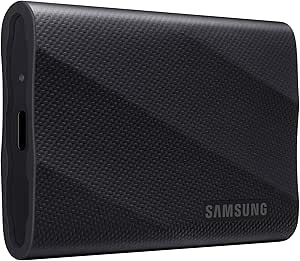 | Best Overall Thunderbolt External SSD for Mac | Capacity: 4TB | Interface: USB 3.2 Gen 2×2 | Read Speed: up to 2,000MB/s | VIEW ON AMAZON | See Our Full Breakdown |
| OWC Envoy Ultra 2TB Thunderbolt 5 Portable NVMe SSD Storage Solution |  | Best for Extreme Speed and Durability | Storage Capacity: 2TB | Transfer Speed: Over 6000MB/s | Compatibility: Thunderbolt 3/4, USB4, Macs, PCs, iPad Pro, Chromebooks, Surface | VIEW ON AMAZON | See Our Full Breakdown |
| Corsair EX400U 2TB USB4 Portable External SSD |  | Best for High-Speed Compatibility with Mac and Windows | Capacity: 2TB | Read Speed: 4000MB/sec | Write Speed: 3600MB/sec | VIEW ON AMAZON | See Our Full Breakdown |
| SanDisk Professional 4TB PRO-G40 SSD – Thunderbolt 3 & USB-C, IP68 Dust/Water Resistance |  | Best Rugged Performance for Demanding Environments | Capacity: 4TB | Max Read Speed: 3000MB/s | Max Write Speed: 2500MB/s | VIEW ON AMAZON | See Our Full Breakdown |
| SanDisk 2TB Extreme Portable SSD |  | Best Compact Rugged Drive for On-the-Go Use | Capacity: 2TB | Read Speed: 1050MB/s | Write Speed: 1000MB/s | VIEW ON AMAZON | See Our Full Breakdown |
| SABRENT Rocket XTRM 5 2TB Thunderbolt 5 Portable SSD |  | Best Overall for Rugged, High-Speed Portable Storage | Capacity: 2TB | Connection: Thunderbolt 5 | Transfer Speeds: Up to 64Gbps | VIEW ON AMAZON | See Our Full Breakdown |
| SABRENT Rocket Nano XTRM 4TB External SSD – Thunderbolt 3 & USB 3.2 Gen 2 |  | Best for Portable High-Capacity Speed and Compatibility | Storage Capacity: 4TB | Interface: Thunderbolt 3 / USB 3.2 Gen 2 | Max Speed: 2700 MB/s | VIEW ON AMAZON | See Our Full Breakdown |
| thunderbolt external ssd for mac | Capacity | Compatibility |
|---|---|---|
| Samsung T9 Portable SSD 4TB | 4TB | Desktop, camera, gaming console, iPhone 15 Pro Res 4K at 60fps |
| OWC Envoy Ultra 2TB Thunderbol | — | Thunderbolt 3/4, USB4, Macs, PCs, iPad Pro, Chromebooks, Surface |
| Corsair EX400U 2TB USB4 Portab | 2TB | Windows, Mac, iOS |
| SanDisk Professional 4TB PRO-G | 4TB | — |
| SanDisk 2TB Extreme Portable S | 2TB | — |
| SABRENT Rocket XTRM 5 2TB Thun | 2TB | Thunderbolt 3, Thunderbolt 4, USB4 |
| SABRENT Rocket Nano XTRM 4TB E | — | — |
More Details on Our Top Picks
Samsung T9 Portable SSD 4TB, USB 3.2 Gen 2×2 External Solid State Drive
The Samsung T9 Portable SSD stands out for its blazing transfer speeds of up to 2,000MB/s, making it an excellent choice for professionals handling large files or 4K video workflows. Compared with the SanDisk Extreme, it offers significantly faster read/write speeds, but this speed comes with a higher price and reliance on the included cable for optimal performance. Its advanced thermal management ensures the drive stays cool during intense use, which is essential for sustained work sessions. Compatibility spans Mac, Windows, smartphones, and gaming consoles, adding versatility. However, users with older USB ports may not see full performance, and the premium cost might deter casual users. This makes it ideal for power users who need top-tier speed and broad device support, despite the premium price.
Pros:- Extremely fast transfer speeds up to 2,000MB/s
- Effective thermal management maintains performance during heavy use
- Broad compatibility including smartphones and gaming consoles
- Reliable brand with ongoing firmware updates
Cons:- Requires included cable for optimal connection, which may be less convenient
- Price premium compared to smaller or lower-capacity drives
- Performance may be limited on older USB ports
Best for: Creative professionals and power users needing fast, reliable transfers across multiple device types
Not ideal for: Casual users or those with older USB ports, who won’t experience full speed or find the cost unjustifiable
- Capacity:4TB
- Interface:USB 3.2 Gen 2×2
- Read Speed:up to 2,000MB/s
- Thermal Management:Dynamic Thermal Guard
- Compatibility:Desktop, camera, gaming console, iPhone 15 Pro Res 4K at 60fps
- Brand:Samsung
Our verdict“This drive is best suited for professionals who demand maximum speed and compatibility, accepting the higher cost for top performance.”
OWC Envoy Ultra 2TB Thunderbolt 5 Portable NVMe SSD Storage Solution
The OWC Envoy Ultra 2TB excels in ultra-high transfer speeds, over 6000MB/s, making it a standout for demanding data transfer needs. Compared to the SanDisk Extreme or Corsair EX400U, it offers unparalleled speed, especially suited for large video files or real-time editing. Its weatherproof IP67 design and shock resistance add to its appeal for mobile professionals working outdoors or in rugged environments. The integrated Thunderbolt 5 cable simplifies setup, and its 5-year warranty offers peace of mind. However, this performance comes at a premium price, and the 2TB storage limit may be restrictive for some users. If durability and maximum throughput are priorities, this model clearly outperforms most alternatives, though it’s overkill for casual use.
Pros:- Exceptional transfer speeds over 6000MB/s
- Weatherproof and shock-resistant design provides durability
- Compatible with Thunderbolt 3/4, USB4, and multiple devices
- Bus-powered with an integrated cable for convenience
Cons:- High price point limits accessibility for some users
- Limited to 2TB capacity, restricting storage flexibility
- Overkill for typical everyday tasks
Best for: High-end professionals needing extreme speed and rugged durability in portable storage
Not ideal for: Casual users or those needing larger storage options at a lower cost
- Storage Capacity:2TB
- Transfer Speed:Over 6000MB/s
- Compatibility:Thunderbolt 3/4, USB4, Macs, PCs, iPad Pro, Chromebooks, Surface
- Protection:IP67, shock-resistant
- Cable:Integrated Thunderbolt 5
- Warranty:5 years
Our verdict“This drive is unmatched in speed and ruggedness, ideal for users who need extreme performance in demanding environments, despite its high cost.”
Corsair EX400U 2TB USB4 Portable External SSD
The Corsair EX400U offers ultra-fast transfer speeds, reaching 4,000MB/sec read and 3,600MB/sec write, making it perfect for high-performance tasks such as 4K editing and large file transfers. Its compact form factor emphasizes portability, and its compatibility with USB4 and Thunderbolt 4 ensures broad support for Mac and Windows users. Unlike the SanDisk Extreme, which balances speed and durability, the Corsair focuses on raw performance, though connection-dependent performance can vary. Its premium price reflects its high-speed capabilities, but it may be more than needed for general storage. This makes it an excellent choice for users who prioritize speed above all else, especially on newer systems with Thunderbolt 4 or USB4 ports.
Pros:- Exceptionally fast data transfer speeds
- Compact, portable design
- Wide compatibility with Thunderbolt 4 and USB4
- Plug-and-play setup
Cons:- Performance varies based on connection type and host device
- Premium price for high-speed SSD
- Limited capacity options beyond 2TB
Best for: Creative professionals and power users needing fast, portable storage on modern Macs and PCs
Not ideal for: Casual users or those with older laptops without Thunderbolt 4 or USB4 ports
- Capacity:2TB
- Read Speed:4000MB/sec
- Write Speed:3600MB/sec
- Connection:USB4, USB Type-C, Thunderbolt 4
- Form Factor:Portable
- Compatibility:Windows, Mac, iOS
Our verdict“This drive delivers rapid speeds for demanding workflows on modern systems, though its price may be high for casual users or older hardware.”
SanDisk Professional 4TB PRO-G40 SSD – Thunderbolt 3 & USB-C, IP68 Dust/Water Resistance
The SanDisk PRO-G40 4TB SSD combines robust durability with solid performance, topping out at 3000MB/s transfer speeds. Its rugged IP68 rating ensures resistance to dust, water, and impacts, making it suitable for outdoor or industrial use. Compared to the Samsung T9, which offers higher speeds, the PRO-G40 emphasizes resilience over raw throughput, but still provides fast enough speeds for most professional media workflows. Its dual Thunderbolt 3 and USB-C ports enhance compatibility, although its premium price reflects both its durability and performance. Not ideal for casual or indoor-only users, this drive targets those who need a rugged, reliable storage solution in tough conditions.
Pros:- Fast transfer speeds up to 3000MB/s
- Rugged IP68 water, dust, and impact resistance
- Dual Thunderbolt 3 and USB-C connectivity
- Mac ready (APFS)
Cons:- Price premium for rugged features and speed
- Limited to specific connectivity options
- Speed may be overkill for basic storage needs
Best for: Field professionals and outdoor workers needing durable, high-speed storage
Not ideal for: Casual or indoor-only users who don’t require rugged features or overpaying for performance
- Capacity:4TB
- Max Read Speed:3000MB/s
- Max Write Speed:2500MB/s
- Connectivity:Thunderbolt 3, USB-C
- Water Resistance:IP68
- Drop Resistance:3 meters
Our verdict“This drive excels where durability and speed are needed in harsh environments, though it commands a higher price for ruggedness.”
SanDisk 2TB Extreme Portable SSD
The SanDisk Extreme Portable SSD offers solid NVMe performance with speeds up to 1050MB/s, paired with rugged features like IP65 water and dust resistance and up to 3 meters of drop protection. Compared with the Corsair EX400U, it trades some raw speed for enhanced portability and durability, making it suitable for users who prioritize mobility and security. Its hardware encryption adds a layer of privacy, and the compact design with a carabiner loop makes it ideal for outdoor professionals or travelers. However, performance can vary depending on the host device, especially on older systems. This model is well-suited for those needing a reliable, rugged drive on the move, but less so for high-speed data transfer tasks that demand maximum throughput.
Pros:- Fast read/write speeds for quick data transfer
- Rugged design with water, dust, and drop resistance
- Hardware encryption for added security
- Compact with attachment options
Cons:- Performance depends on host device capabilities
- Price not specified, potentially higher for features
- Limited to 2TB capacity
Best for: Travelers and outdoor professionals requiring durable, secure storage
Not ideal for: Users needing maximum transfer speeds or large capacity at a lower cost
- Capacity:2TB
- Read Speed:1050MB/s
- Write Speed:1000MB/s
- Water Resistance:IP65
- Drop Protection:Up to 3 meters
- Encryption:256-bit AES hardware
Our verdict“This drive offers a good balance of speed, durability, and security for mobile users, though it may not match the fastest models for raw performance.”
SABRENT Rocket XTRM 5 2TB Thunderbolt 5 Portable SSD
The SABRENT Rocket XTRM 5 stands out for combining blazing-fast transfer speeds up to 64Gbps with a rugged build, making it ideal for creators and professionals who need reliable, mobile storage that can withstand tough conditions. Compared to the SABRENT Rocket Nano XTRM, which offers higher capacity at 4TB but slightly lower speeds, this model’s durability and Thunderbolt 5 compatibility make it a better choice for on-the-go workflows demanding maximum speed and protection. The premium price reflects its advanced technology and rugged design, which may be a drawback for casual users or those with a limited budget. Its broad compatibility with Thunderbolt 3, 4, and USB4 ensures seamless integration with most modern Macs and PCs, but the need for Thunderbolt 5 ports for full speed could limit some setups. This pick makes the most sense for mobile professionals and creators who prioritize speed, durability, and future-proof connectivity over capacity options or affordability.
Pros:- Extremely fast transfer speeds up to 64Gbps for large file workflows
- Durable aluminum and silicone construction for drop protection
- Broad compatibility with Thunderbolt 3, 4, and USB4 devices
- Bus-powered, no external power adapter needed
Cons:- Premium price may be cost-prohibitive for some users
- Requires Thunderbolt 5 or compatible ports for maximum speed
- Limited storage options beyond 2TB
Best for: Creative professionals and on-the-move users who need ultra-fast, durable storage with Thunderbolt 5 support
Not ideal for: Casual users or those on a tight budget who do not require the highest transfer speeds or rugged design
- Capacity:2TB
- Connection:Thunderbolt 5
- Transfer Speeds:Up to 64Gbps
- Compatibility:Thunderbolt 3, Thunderbolt 4, USB4
- Build Material:Aluminum and Silicone
- Power:Bus-powered
Our verdict“This is the best choice for users who need top-tier speed and durability in a portable Thunderbolt 5 SSD.”
SABRENT Rocket Nano XTRM 4TB External SSD – Thunderbolt 3 & USB 3.2 Gen 2
The SABRENT Rocket Nano XTRM offers a compelling balance of high-speed data transfer—up to 2700 MB/s via Thunderbolt 3—and portability, making it ideal for professionals like video editors who need to shuttle large files quickly. Compared to the SABRENT Rocket XTRM 5, which boasts higher speeds but is less portable and more expensive, this model’s compact size and included cables make it more versatile for travel and varied environments. The aluminum chassis and silicone sleeve enhance durability and heat dissipation, though the 4TB capacity might fall short for users with massive storage needs, especially when compared to larger-capacity drives. Its compatibility with Mac, PC, and Linux broadens its appeal, but the reliance on Thunderbolt 3 means it won’t reach the highest possible speeds available with Thunderbolt 4 or Thunderbolt 5. This makes it ideal for users who prioritize speed, portability, and broad device compatibility without the need for the latest Thunderbolt standard.
Pros:- High transfer speeds up to 2700 MB/s for large file workflows
- Compact, lightweight design for travel or field work
- Durable aluminum chassis with silicone sleeve for heat and drop protection
- Includes both Thunderbolt and USB-C to USB-A cables for versatile connectivity
Cons:- Premium price may be a barrier for casual users
- Limited to 4TB capacity, which might not suit all professional needs
- Requires compatible Thunderbolt 3 port for maximum speeds
Best for: Professional video editors and content creators needing portable, high-capacity storage with fast Thunderbolt 3 performance
Not ideal for: Casual users or those with storage needs exceeding 4TB who do not require ultra-fast transfer speeds
- Storage Capacity:4TB
- Interface:Thunderbolt 3 / USB 3.2 Gen 2
- Max Speed:2700 MB/s
- Dimensions:2.95 x 1.34 x 0.71 inches
- Weight:1.69 oz
- Material:Aluminum
Our verdict“This drive suits professionals who need fast, portable storage with broad device compatibility, especially via Thunderbolt 3.”

How We Picked
The products in this roundup were evaluated based on several key criteria: transfer speed, compatibility with Mac and Thunderbolt standards, build quality, portability, and value for price. We prioritized drives that leverage Thunderbolt 3, 4, or 5 protocols to ensure maximum performance for demanding workflows. Durability features, such as IP ratings or rugged casings, were also considered for users needing protection in various environments. Our ranking emphasizes a balance between speed, reliability, and cost, aiming to recommend options suitable for a range of Mac users from professionals to casual users.| thunderbolt external ssd for mac | Compatibility |
|---|---|
| Samsung T9 Portable SSD 4TB | Desktop, camera, gaming console, iPhone 15 Pro Res 4K at 60fps |
| OWC Envoy Ultra 2TB Thunderbol | Thunderbolt 3/4, USB4, Macs, PCs, iPad Pro, Chromebooks, Surface |
| Corsair EX400U 2TB USB4 Portab | Windows, Mac, iOS |
| SanDisk Professional 4TB PRO-G | — |
| SanDisk 2TB Extreme Portable S | — |
| SABRENT Rocket XTRM 5 2TB Thun | Thunderbolt 3, Thunderbolt 4, USB4 |
| SABRENT Rocket Nano XTRM 4TB E | — |
Factors to Consider When Choosing Thunderbolt External Ssd For Mac
When selecting a thunderbolt external SSD for Mac, understanding the core factors can help you make an informed decision that aligns with your workflow and budget. Beyond raw speed, considerations like durability, compatibility, and future-proofing can significantly impact your long-term satisfaction with the drive.Thunderbolt Version and Performance
Choosing the right Thunderbolt standard is key to maximizing data transfer speeds. Thunderbolt 3 offers up to 40Gbps, while Thunderbolt 4 and 5 can push even higher, ensuring faster backups and file transfers. However, your Mac must also support the specific Thunderbolt version for you to benefit fully. Investing in a drive with the latest Thunderbolt protocol can future-proof your setup but typically comes at a higher cost.
Build Quality and Durability
For users working in varied environments, durability features like water resistance, shockproof casing, and dust-proof ratings matter. Some drives, like the SanDisk Professional PRO-G40, include IP68 ratings for water and dust resistance, making them suitable for rugged use. Conversely, sleek, lightweight drives prioritize portability but may sacrifice some robustness, which is a tradeoff to consider depending on your use case.
Compatibility and Ecosystem
Ensuring your external SSD is fully compatible with macOS and Thunderbolt ports prevents connection issues and simplifies setup. Some drives include special software or hardware features optimized for Mac, like encryption or sleep mode management. Be wary of drives that only support Windows or require extra adapters, as they can introduce latency or complicate your workflow.
Capacity and Price
Capacity needs vary widely; professionals handling large media files may prefer 4TB or larger drives, while casual users might settle for 1-2TB options. Higher capacity drives tend to be more expensive but can save money in the long run by reducing the need for multiple devices. Balance your storage needs against your budget, and consider whether spending more on a faster, more durable drive aligns with your priorities.
Size, Portability, and Power
Portability is often a key concern for Mac users on the go. Smaller drives like the SABRENT Rocket Nano XTRM are easier to carry but may have fewer features or lower capacities. Power consumption is also relevant—some drives can draw power directly from Thunderbolt, eliminating the need for an extra power brick, which simplifies portability but may limit performance under certain conditions.
Frequently Asked Questions
Will my older Mac support the latest Thunderbolt 4 or 5 drives?
Compatibility depends on your Mac’s Thunderbolt port version and hardware age. Macs released in recent years typically support Thunderbolt 3 and above, but older models might only support Thunderbolt 2 or earlier. For Thunderbolt 4 or 5 drives to work at full speed, ensure your Mac has the corresponding port or consider an appropriate adapter. Always check your Mac’s specifications before purchasing a high-speed drive to confirm compatibility and avoid bottlenecks.
Is a rugged drive necessary for everyday use?
For typical desktop use, a non-rugged, sleek drive might suffice, offering lighter weight and better aesthetics. However, if you frequently transport your drive or work in outdoor or challenging environments, a rugged drive with water and dust resistance provides extra peace of mind. Choosing a rugged model often means paying a premium for durability, so consider your environment and risk factors carefully.
How important is Thunderbolt 5 support for my needs?
Thunderbolt 5 offers the fastest transfer speeds and higher bandwidth, making it ideal for large files and demanding workflows like 8K video editing. If you require cutting-edge performance and your Mac supports Thunderbolt 5, investing in a compatible drive can future-proof your setup. However, for most current users, Thunderbolt 4 still provides ample speed, and Thunderbolt 5’s advantages may not justify the higher cost unless your tasks are extremely data-intensive.
Should I prioritize capacity or speed?
This depends on your primary use case. Large media files, extensive backups, or working with 4K/8K video will benefit from high capacity and fast transfer rates. If your tasks are more occasional or involve smaller files, a lower-capacity but fast drive might be more cost-effective. Balancing capacity and speed ensures you don’t overspend on unnecessary features while meeting your performance needs.
Are software or hardware encryption features worth paying extra for?
Encryption adds a layer of security, especially if you’re handling sensitive data. Hardware encryption is faster and less taxing on the drive’s performance compared to software solutions. For business or privacy-conscious users, drives with built-in encryption can justify a higher price point, providing peace of mind without sacrificing speed. Evaluate your security needs and choose accordingly.
Conclusion
For professional Mac users seeking the best overall performance, the Samsung T9 Portable SSD offers high speeds and reliability. Those prioritizing durability and ruggedness should consider the SanDisk Professional PRO-G40. Budget-conscious buyers or casual users will find excellent value in drives like the SABRENT Rocket Nano XTRM. If maximum future-proofing matters, investing in a Thunderbolt 5-compatible drive makes sense. Beginners or light users should focus on balancing capacity with ease of use, while power users handling large files will want the fastest, most durable options available.
Halloween Picks
halloween
As an affiliate, we earn on qualifying purchases.