The best one-handed keyboards give you dedicated game controls without taking up space meant for a full keyboard. My best overall pick is the Razer Tartarus V2 for its programmable controls, while the Redragon K585 PRO stands out for wireless flexibility and the Keychron C0 HE 8K for players seeking a more performance-focused wired keypad. The main tradeoffs are programmability versus simplicity, wired reliability versus wireless freedom, and compact size versus the number of keys you can reach comfortably. Some models also bundle a mouse, while others focus on a keypad or mechanical controls. Read on for the full breakdown and guidance on which design fits your games and desk.

Get comfort and recovery gear delivered free with Prime
- Fast, free delivery on millions of items
- Prime Video, Amazon Music and more included
- Member-only deals all year
Complete the kit



Key Takeaways
- The Razer Tartarus V2 leads for programmable control, while its 32-key layout is a different fit from the larger Redragon K585 models.
- Wireless options such as the Redragon K585 PRO and RedThunder Wireless trade a cable for charging and connection management; wired models avoid that upkeep.
- The Keychron C0 HE 8K and ATTACK SHARK M36 HE bring Hall Effect technology to this lineup, appealing to buyers who prioritize adjustable input behavior over a simple, low-cost keypad.
- Combo bundles can reduce the number of separate accessories to choose, but buyers should check whether the included mouse suits their grip and gaming preferences.
- Key count alone does not determine comfort: compact layouts such as the 29-key MechLands AJAZZ AK029 may be easier to reach, while larger boards offer more assigned controls.
| Guiheng Wired One-Handed Gaming Keyboard and Mouse Combo, 39-Key Keypad, Rainbow Backlighting, Black |  | Best One-Handed Starter Bundle | Key count: 39 | Connectivity: Wired USB | Mouse DPI: 1200, 2400, or 3600 | VIEW LATEST PRICE | See Our Full Breakdown |
| Redragon K585 Wired One-Handed RGB Gaming Keypad, 42-Key Layout |  | Best for Macro Customization | Key count: 42 | Connectivity: Wired USB | Onboard macro keys: 7 | VIEW LATEST PRICE | See Our Full Breakdown |
| RedThunder G30 One-Handed Gaming Keyboard with RGB Backlighting |  | Best for Simple Plug-and-Play Use | Key count: 35 | Switch type: Membrane | Layout: QWERTY | VIEW LATEST PRICE | See Our Full Breakdown |
| RedThunder Wireless One-Handed Gaming Keyboard, 2.4GHz RGB Backlit Mini Keypad with 2000mAh Rechargeable Battery |  | Best Compact Wireless Pick | Key layout: 35-key, 40% layout | Connectivity: 2.4GHz wireless via USB receiver | Battery capacity: 2000mAh | VIEW LATEST PRICE | See Our Full Breakdown |
| Redragon K585 PRO Wireless One-Handed RGB Gaming Keypad |  | Best Wireless Customizable Keypad | Key count: 42 | Connectivity: Bluetooth and 2.4GHz wireless | Macro keys: 7; up to 28 macros across 4 profiles | VIEW LATEST PRICE | See Our Full Breakdown |
| CHONCHOW T10A One-Handed Gaming Keyboard with RGB LED Backlighting |  | Best for a Simple Wired Setup | Keys: 35 | Connectivity: Wired USB | Switch type: Tactile | VIEW LATEST PRICE | See Our Full Breakdown |
| One-Handed RGB Gaming Keyboard and Mouse Combo |  | Best Starter Bundle | Included items: One-handed keyboard, mouse, four-port USB splitter, USB-A to USB-C adapter | Keyboard lighting: RGB; static and breathing modes | Mouse speeds: 1200, 2400, 4800, and 7200 DPI | VIEW LATEST PRICE | See Our Full Breakdown |
| MageGee Wireless One-Handed Gaming Keyboard with RGB Backlighting |  | Best for Wireless Flexibility | Keys: 34 | Connectivity: Bluetooth, 2.4 GHz wireless, USB-C | Switch type: Linear red | VIEW LATEST PRICE | See Our Full Breakdown |
| One-Handed Mechanical Gaming Keyboard with 35 Keys, Waterproof Design and 3-Color Backlight |  | Best for Spill-Prone Desks | Model: K13 | Keys: 35 | Switch model: Cherry MX | VIEW LATEST PRICE | See Our Full Breakdown |
| Keychron C0 HE 8K Wired One-Handed Gaming Keypad |  | Best Premium Performance | Keys: 35 | Switch type: Hall Effect magnetic | Actuation precision: 0.01 mm | VIEW LATEST PRICE | See Our Full Breakdown |
| Razer Tartarus V2 Left-Handed Gaming Keypad with 32 Programmable Keys | 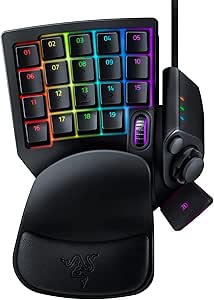 | Best for Custom Controls | Keys: 32 programmable keys | Switch type: Mecha-Membrane | Hand orientation: Left | VIEW LATEST PRICE | See Our Full Breakdown |
| ATTACK SHARK M36 HE One-Handed Hall Effect Gaming Keyboard |  | Best for Adjustable Actuation | Layout: 36-key one-handed QWERTY | Switch type: Magnetic Hall Effect | Adjustable actuation: 0.1–3.3 mm | VIEW LATEST PRICE | See Our Full Breakdown |
| Redragon K776WL Wireless One-Handed Mechanical Keyboard with Knob |  | Best Wireless Pick | Model: K776-WL | Connectivity: Bluetooth, 2.4 GHz, and USB-C | Battery capacity: 4,000 mAh | VIEW LATEST PRICE | See Our Full Breakdown |
| Redragon K758 39-Key Wired One-Handed RGB Mechanical Gaming Keyboard |  | Best for Clicky Tactile Feedback | Keys: 39 | Layout: QWERTY | Hand orientation: Left | VIEW LATEST PRICE | See Our Full Breakdown |
| MechLands AJAZZ AK029 29-Key One-Handed Gaming Keyboard |  | Best Compact Hall Effect Pick | Keys: 29 | Layout: QWERTY, left-hand orientation | Switch type: Linear Hall Effect magnetic | VIEW LATEST PRICE | See Our Full Breakdown |
| one-handed keyboard | Connectivity | Switch type | Backlighting |
|---|---|---|---|
| Guiheng Wired One-Handed Gamin | Wired USB | — | Rainbow LED with breathing and static modes |
| Redragon K585 Wired One-Handed | Wired USB | — | — |
| RedThunder G30 One-Handed Gami | USB | Membrane | RGB, 7 colors, breathing and static modes |
| RedThunder Wireless One-Handed | 2.4GHz wireless via USB receiver | Tactile | 7 static colors and dynamic breathing mode |
| Redragon K585 PRO Wireless One | Bluetooth and 2.4GHz wireless | Linear OUTEMU Red | RGB |
| CHONCHOW T10A One-Handed Gamin | Wired USB | Tactile | RGB LED |
| One-Handed RGB Gaming Keyboard | — | — | — |
| MageGee Wireless One-Handed Ga | Bluetooth, 2.4 GHz wireless, USB-C | Linear red | Customizable RGB |
| One-Handed Mechanical Gaming K | Wired USB | — | 3-color |
| Keychron C0 HE 8K Wired One-Ha | Wired, non-detachable USB-A cable | Hall Effect magnetic | — |
| Razer Tartarus V2 Left-Handed | Wired USB-A | Mecha-Membrane | Individually backlit RGB |
| ATTACK SHARK M36 HE One-Handed | Wired USB-C | Magnetic Hall Effect | — |
| Redragon K776WL Wireless One-H | Bluetooth, 2.4 GHz, and USB-C | Pre-lubricated linear | — |
| Redragon K758 39-Key Wired One | USB-C | Clicky Redragon Blue mechanical | — |
| MechLands AJAZZ AK029 29-Key O | USB-C | Linear Hall Effect magnetic | — |
More Details on Our Top Picks
Guiheng Wired One-Handed Gaming Keyboard and Mouse Combo, 39-Key Keypad, Rainbow Backlighting, Black
I’d pick the Guiheng combo for a buyer who needs both a compact keypad and a mouse, rather than a keypad alone. Its 39-key layout gives you a focused set of gaming controls, while the included mouse offers three DPI settings up to 3600. That makes it a more complete entry point than the RedThunder G30, which keeps the setup smaller but does not include a mouse. Anti-ghosting and the wrist rest suit gameplay that involves repeated key combinations, and USB plug-and-play avoids a wireless setup. The tradeoff is specialization: 39 keys are not a replacement for a full keyboard, and the wired connection limits where you can position the set. I’d choose it for a basic gaming station, not for buyers seeking a customizable macro keypad like the Redragon K585.
Pros:- Includes a mouse with adjustable 1200, 2400, and 3600 DPI settings
- Anti-ghosting supports simultaneous key presses during games
- Ergonomic wrist rest adds support during longer sessions
- USB plug-and-play setup with rainbow lighting modes
Cons:- The 39-key layout is too limited to serve as a regular keyboard
- Wired USB connection restricts placement flexibility
- Macro programming and hot-swappable switches are not listed
Best for: PC or console players building a basic gaming setup who want a one-handed keypad and mouse in one package.
Not ideal for: Players who need wireless placement, extensive programmable macros, or a keypad that can handle everyday typing.
- Key count:39
- Connectivity:Wired USB
- Mouse DPI:1200, 2400, or 3600
- Backlighting:Rainbow LED with breathing and static modes
- Key feature:Anti-ghosting
- Compatibility:Windows XP, Vista, 7, 8, and 10; Mac OS X; PS4; Xbox One
- Color:Black
Our verdict“Choose the Guiheng if you want a compact gaming keypad and adjustable-DPI mouse together and do not need wireless freedom or advanced customization.”
Redragon K585 Wired One-Handed RGB Gaming Keypad, 42-Key Layout
The Redragon K585 is the strongest wired pick here for players who want to shape a keypad around their own controls. Its seven onboard macro keys can store up to 28 macros across four profiles, which gives it more control flexibility than the RedThunder G30 and its two macro-recording shortcuts. Hot-swappable support for 3-pin and 5-pin switches also lets owners change the feel without soldering, a useful distinction from the membrane-based G30. The detachable magnetic wrist rest and USB pass-through make it easier to fit into an existing desk setup. In exchange, this is a companion device, not a standalone keyboard, and advanced macro and lighting setup depends on software. I’d favor it over the wireless K585 PRO when a cable is acceptable and macro capacity matters more than placement freedom.
Pros:- Seven onboard macro keys support up to 28 macros across four profiles
- Hot-swappable support for 3-pin and 5-pin switches
- Detachable magnetic wrist rest can be removed to suit desk setup
- USB pass-through adds a convenient connection point
Cons:- Wired connection offers less placement freedom than the K585 PRO
- Advanced macro and lighting customization requires software
- The 42-key layout is designed to supplement a full keyboard
Best for: PC gamers who want multiple saved macro profiles, switch customization, and a wired keypad to use beside a full keyboard.
Not ideal for: Buyers who want a standalone keyboard, wireless placement, or simple setup without software for advanced customization.
- Key count:42
- Connectivity:Wired USB
- Onboard macro keys:7
- Macro capacity:Up to 28 macros across 4 profiles
- Switch compatibility:Hot-swappable 3-pin or 5-pin switches
- USB pass-through:Yes
- Wrist rest:Detachable magnetic
- RGB lighting:16.8 million colors, 5 modes
Our verdict“Choose the wired K585 if macro profiles and switch swapping matter more to you than wireless use.”
RedThunder G30 One-Handed Gaming Keyboard with RGB Backlighting
I’d recommend the RedThunder G30 to a buyer who wants a basic one-handed keypad without taking on a feature-heavy setup. Its 35-key membrane layout keeps the controls compact, while USB plug-and-play and support for Windows, macOS, and Linux make it a straightforward fit across common computer systems. Anti-ghosting across all 35 keys helps when a game calls for several inputs at once. Compared with the Redragon K585, the G30 gives up hot-swappable switches, a USB pass-through, and a bank of dedicated macro keys; in return, its two macro-recording shortcuts and simpler feature set may be enough for casual play. The membrane switches are less suited to buyers seeking mechanical customization, and the 35-key limit makes this a gaming accessory rather than an everyday typing solution.
Pros:- USB plug-and-play setup does not require a driver
- Anti-ghosting covers all 35 keys
- Two macro-recording shortcuts support basic command playback
- Compact body includes an ergonomic wrist rest
Cons:- Membrane switches lack the swap options of the Redragon K585
- Two macro shortcuts provide less control than dedicated macro banks
- The 35-key layout is too limited for regular typing
Best for: Casual PC gamers who want a compact, driver-free keypad for common game controls and simple macro recording.
Not ideal for: Players who want mechanical switches, many dedicated macro keys, or enough keys for regular typing.
- Key count:35
- Switch type:Membrane
- Layout:QWERTY
- Connectivity:USB
- Macro controls:2 recording shortcuts: FN+F1 and FN+F2
- Anti-ghosting:All 35 keys
- Backlighting:RGB, 7 colors, breathing and static modes
- Dimensions and weight:9.06 × 6.69 × 1.18 in; 0.35 kg
- Compatibility:Windows, macOS, and Linux
Our verdict“Choose the G30 if you want a compact, simple gaming keypad and can accept membrane switches and a small key set.”
RedThunder Wireless One-Handed Gaming Keyboard, 2.4GHz RGB Backlit Mini Keypad with 2000mAh Rechargeable Battery
The RedThunder wireless keypad suits players who want a small one-handed control area without another cable running across the desk. Its 2.4GHz USB receiver provides wireless connection without relying on Bluetooth, and full anti-ghosting supports simultaneous inputs across the 35-key layout. The 2000mAh battery is rated for 15–20 hours with lighting on, so it offers more placement freedom than the wired RedThunder G30 while keeping a similar compact key count. It is also described as left-hand optimized and ambidextrous, which may make it easier to position for different setups. The limits are clear: 35 keys are for gaming, not general typing, and the receiver must occupy a USB port. Charging takes about eight hours, so the wireless convenience comes with charging downtime.
Pros:- 2.4GHz wireless connection reduces cable clutter
- Full anti-ghosting across its 35-key layout
- 2000mAh battery is rated for 15–20 hours with backlighting on
- Compact design includes an ergonomic wrist rest
Cons:- Requires a USB receiver and does not connect through Bluetooth
- 35 keys are not suited to regular typing
- A full charge takes about eight hours
Best for: Left-hand-oriented gamers and portable gaming setups that need a compact keypad without a cable tether.
Not ideal for: Buyers who need Bluetooth, a full typing layout, or longer play sessions without recharging.
- Key layout:35-key, 40% layout
- Connectivity:2.4GHz wireless via USB receiver
- Battery capacity:2000mAh
- Battery life:15–20 hours with backlight; up to 30 hours with lights off
- Charging:Detachable Type-C cable; about 8 hours for a full charge
- Switch type:Tactile
- Anti-ghosting:Full anti-ghosting
- Backlighting:7 static colors and dynamic breathing mode
- Hand orientation:Left-hand optimized / ambidextrous
Our verdict“Choose this RedThunder if wireless placement and a compact gaming layout matter more than Bluetooth or an expansive key set.”
Redragon K585 PRO Wireless One-Handed RGB Gaming Keypad
The Redragon K585 PRO brings the wired K585’s macro-focused approach to a wireless setup. Its 42 keys and seven programmable macro keys make it more suited to players who want a broad bank of mapped controls than the 35-key RedThunder wireless keypad. Bluetooth and 2.4GHz give buyers two wireless connection options, while hot-swappable 3-pin and 5-pin support lets them change switches without soldering. A detachable magnetic wrist rest adds setup flexibility, and the ambidextrous orientation is less limiting than a left-hand-optimized design. The tradeoff is a specialized gaming layout that still needs a full keyboard nearby for ordinary typing. Battery life is rated at 15–20 hours per charge, so buyers who play for long stretches should plan around recharging. I’d choose it over the wired K585 when cable-free placement is worth that upkeep.
Pros:- Bluetooth and 2.4GHz wireless connectivity offer placement flexibility
- Seven programmable macro keys support up to 28 macros across four profiles
- Hot-swappable support for most 3-pin and 5-pin switches
- Detachable magnetic wrist rest and RGB lighting
Cons:- Rated battery life of 15–20 hours means regular recharging
- Specialized one-handed layout is not suited to everyday typing
- Wireless connectivity may not suit buyers who prefer a direct wired connection
Best for: Wireless PC gamers who want programmable macros, switch swapping, and more keys than a compact 35-key keypad provides.
Not ideal for: Buyers seeking a full everyday keyboard, long sessions without recharging, or a simple gaming pad without customization features.
- Key count:42
- Connectivity:Bluetooth and 2.4GHz wireless
- Macro keys:7; up to 28 macros across 4 profiles
- Switch type:Linear OUTEMU Red
- Hot-swappable switches:Supports most 3-pin and 5-pin switches
- Battery life:15–20 hours of continuous play
- Backlighting:RGB
- Wrist rest:Detachable magnetic
- Hand orientation:Ambidextrous
Our verdict“Choose the K585 PRO if you want wireless flexibility and extensive keypad customization, and are comfortable recharging it regularly.”
CHONCHOW T10A One-Handed Gaming Keyboard with RGB LED Backlighting
The CHONCHOW T10A is a straightforward choice for players who want a compact one-handed layout without wireless setup or advanced configuration. Its 35 keys, stepped arrangement, and included wrist rest keep the active controls close while leaving more desk space for mouse movement. USB plug-and-play and multimedia shortcuts also make it useful for basic PC control beyond gaming. Compared with the MageGee Wireless One-Handed Gaming Keyboard, the T10A gives up wireless flexibility and switch customization, but its simple wired connection avoids battery management. The tradeoff is a limited key set that cannot replace a full keyboard, plus no water resistance. I’d choose it for a fixed desk setup, not for spill-prone spaces or users who need more programmable controls.
Pros:- Compact 35-key layout leaves more room for mouse movement.
- Included wrist rest supports a more relaxed hand position.
- RGB lighting offers static and breathing modes.
- USB setup and multimedia shortcuts keep everyday operation simple.
Cons:- The 35-key layout cannot handle full-keyboard tasks on its own.
- Not water resistant, so spills can damage it.
- Wired-only connectivity limits flexible placement.
Best for: PC and console players who want a compact, wired gaming keypad with a wrist rest and simple plug-and-play setup.
Not ideal for: People who need a full keyboard, wireless use, or spill protection.
- Keys:35
- Connectivity:Wired USB
- Switch type:Tactile
- Layout:QWERTY
- Backlighting:RGB LED
- Dimensions:8.3 × 6.3 × 1.2 inches
- Compatibility:PC, laptop, Xbox, PS3, PS4, PS5, Mac
- Water resistance:Not water resistant
Our verdict“Choose the T10A for a no-fuss wired gaming keypad with a wrist rest, but skip it if wireless use or spill protection matters.”
One-Handed RGB Gaming Keyboard and Mouse Combo
This bundle suits buyers setting up a compact gaming station who need a mouse as well as a one-handed keyboard. The included mouse, four-port USB splitter, and USB-A to USB-C adapter make it a more complete out-of-box package than the standalone CHONCHOW T10A, which provides the keypad but not the pointing device or extra USB connections. Plug-and-play setup across Windows, macOS, and listed consoles keeps the basics accessible, while adjustable mouse speeds offer a way to tailor cursor response. The compromise is that the keyboard’s key count and switch details are not specified, so it is harder to judge its layout against dedicated keypads. Console play can also depend on each game’s compatibility rules, and iPhone connection needs a separate adapter.
Pros:- Includes both a one-handed keyboard and a mouse.
- Four-port USB splitter adds connection options for accessories.
- USB-A to USB-C adapter broadens device connectivity.
- Plug-and-play setup requires no driver.
Cons:- Console compatibility depends on the rules and support of each game.
- The product data does not specify the keyboard’s key count or switch type.
- An additional compatible adapter is needed for iPhone use.
Best for: New PC or console players who need a compact keyboard-and-mouse setup plus extra USB connectivity in one purchase.
Not ideal for: Buyers seeking a clearly specified mechanical switch, a dedicated premium keypad, or guaranteed compatibility with every console game.
- Included items:One-handed keyboard, mouse, four-port USB splitter, USB-A to USB-C adapter
- Keyboard lighting:RGB; static and breathing modes
- Mouse speeds:1200, 2400, 4800, and 7200 DPI
- Compatibility:Windows, macOS, PS4, Xbox One, and Switch
- Setup:Plug and play; no driver required
- Wrist rest:Included
- Warranty:One year
Our verdict“Pick this bundle if you want a ready-made compact keyboard-and-mouse setup, but choose a dedicated keypad if switch and layout details matter most.”
MageGee Wireless One-Handed Gaming Keyboard with RGB Backlighting
The MageGee stands apart from wired options such as the Keychron C0 HE 8K by offering three connection paths: Bluetooth, 2.4 GHz wireless, and USB-C. That flexibility makes it a better fit for users who move between devices or want to reduce cable clutter, while its built-in wrist rest keeps support integrated into the compact body. The 34-key layout uses linear red switches, which favor a smooth press rather than a tactile bump; buyers who want clearer physical feedback may prefer a tactile option such as the CHONCHOW T10A. Customizable RGB adds visual control, and the stated waterproof construction offers reassurance around spills. Still, 34 keys are not a substitute for a full keyboard, and wireless operation means managing its battery.
Pros:- Supports Bluetooth, 2.4 GHz wireless, and USB-C connections.
- Built-in wrist rest avoids a separate support accessory.
- Customizable RGB lighting allows a tailored look.
- Waterproof construction provides spill protection.
Cons:- Linear red switches lack a tactile bump.
- The 34-key layout is too limited to replace a full keyboard.
- Battery power requires charging or power management.
Best for: Multi-device gamers and shortcut users who want Bluetooth, 2.4 GHz, and USB-C connectivity in a compact keypad.
Not ideal for: People who prefer tactile switch feedback or need a full-size keyboard for typing-heavy work.
- Keys:34
- Connectivity:Bluetooth, 2.4 GHz wireless, USB-C
- Switch type:Linear red
- Layout:QWERTY
- Backlighting:Customizable RGB
- Wrist rest:Built-in
- Compatible operating systems:Windows, Mac, Linux
- Dimensions:8.5 × 6.5 × 1.6 inches
- Water resistance:Waterproof
Our verdict“Choose the MageGee for connection flexibility and spill protection, but favor a tactile model if switch feedback is a priority.”
One-Handed Mechanical Gaming Keyboard with 35 Keys, Waterproof Design and 3-Color Backlight
For a gaming area where drinks are nearby, this 35-key K13 makes a practical case with its stated waterproof construction, a feature the CHONCHOW T10A lacks. Its curved palm rest and rubber feet address two useful parts of one-handed play: supporting the hand and keeping the keypad steady during quick inputs. The three-color backlight is simpler than the customizable RGB on the MageGee, so this is less suited to buyers who want detailed lighting effects. USB plug-and-play keeps setup uncomplicated, but the compatibility list focuses on older Windows versions, leaving less confidence for current systems. The listing also warns that old and new model variants may ship at random, so buyers should expect possible variation rather than a tightly specified configuration.
Pros:- Waterproof construction protects against accidental spills.
- Curved palm rest supports the hand during extended use.
- Rubber non-slip feet help keep the keypad stable.
- Compact 35-key layout saves desk space.
Cons:- Listed operating-system support centers on older Windows versions.
- Random old or new model variants may create inconsistent features.
- Three-color lighting offers less customization than RGB models such as the MageGee.
Best for: Gamers who want a compact wired keypad with spill protection and a palm rest for a desk where accidents are possible.
Not ideal for: Buyers who need confidently specified compatibility with current operating systems, broad programmability, or a full typing layout.
- Model:K13
- Keys:35
- Switch model:Cherry MX
- Connectivity:Wired USB
- Cable length:1.5 meters (59.1 inches)
- Backlighting:3-color
- Material:ABS plastic
- Water resistance:Waterproof
- Listed operating systems:Windows 95, 98, XP, 2000, ME, Vista, 7, 8, 10
Our verdict“Pick the K13 for spill protection and a stable palm-rest design, but confirm operating-system support and model details before choosing it.”
Keychron C0 HE 8K Wired One-Handed Gaming Keypad
The Keychron C0 HE 8K is the performance-focused pick here: its Hall Effect magnetic switches allow adjustable actuation, while rapid trigger and an 8K polling rate target players who want fine control over fast repeated inputs. The browser-based configurator lets users change mappings, actuation, and per-key RGB without installing software, a more involved setup than the plug-and-play CHONCHOW T10A. That added control is the point, but it will matter most to competitive players and shortcut-heavy users willing to tune their layout. Like the MageGee and other compact models, it still has only 35 keys, so it cannot take over full-keyboard duties. The fixed USB-A cable is another practical compromise: it keeps the connection wired but cannot be detached for easier replacement or packing.
Pros:- Hall Effect switches offer adjustable actuation with 0.01 mm precision.
- 8K polling rate and rapid trigger support responsive input.
- Browser-based configurator handles mappings, actuation, and lighting without software installation.
- Per-key RGB and ambidextrous orientation add customization.
Cons:- The 35-key layout cannot serve as a full keyboard.
- Non-detachable USB-A cable limits replacement and cable-management options.
- Advanced settings may be unnecessary for casual gaming.
Best for: Competitive PC gamers and power users who want adjustable actuation, rapid trigger, and per-key customization in a compact keypad.
Not ideal for: Casual players who want a simple plug-and-play device, wireless use, or a keypad that can replace a full keyboard.
- Keys:35
- Switch type:Hall Effect magnetic
- Actuation precision:0.01 mm
- Polling rate:8K
- Connectivity:Wired, non-detachable USB-A cable
- Hand orientation:Ambidextrous
- Lighting:Per-key RGB
- Compatible operating systems:Windows 10, Windows 11, macOS 14 Sonoma
- Weight:503 g
Our verdict“Choose the C0 HE 8K if adjustable magnetic switches and rapid input control justify a wired, highly compact layout.”
Razer Tartarus V2 Left-Handed Gaming Keypad with 32 Programmable Keys
The Razer Tartarus V2 is the pick for players who want more than a cluster of movement keys: its 32 programmable keys, 8-way thumbpad, and 3-way scroll wheel put several kinds of commands within left-hand reach. That control range makes it more adaptable for games with complex hotkeys than the MechLands AJAZZ AK029, whose 29-key Hall Effect design prioritizes adjustable actuation and fast response. The two-position palm rest also gives buyers some flexibility in hand placement. The tradeoff is that the Tartarus V2 uses Mecha-Membrane switches, rather than the magnetic switches in the AJAZZ or ATTACK SHARK M36 HE, and it is tethered by USB-A. I’d choose it for macro-heavy play, not for wireless use or a Hall Effect-focused setup.
Pros:- 32 programmable keys support custom commands and macros.
- 8-way thumbpad and 3-way scroll wheel add controls beyond the main key cluster.
- Adjustable palm rest has two positions.
- Individually backlit RGB keys support extensive color customization.
Cons:- Wired USB-A connection limits placement flexibility.
- Left-hand orientation excludes players who need a right-hand keypad.
- Mecha-Membrane switches lack the adjustable magnetic actuation offered by the ATTACK SHARK M36 HE and MechLands AJAZZ AK029.
Best for: Left-handed PC gamers who want a broad set of programmable commands, thumb controls, and a scroll wheel in one keypad.
Not ideal for: Players seeking wireless placement, Hall Effect switches, or a keypad for right-handed use.
- Keys:32 programmable keys
- Switch type:Mecha-Membrane
- Hand orientation:Left
- Connectivity:Wired USB-A
- Thumbpad:8-way directional
- Scroll wheel:3-way
- Backlighting:Individually backlit RGB
- Palm rest:Adjustable, two positions
Our verdict“Choose the Tartarus V2 if you want a left-hand command center with many programmable inputs, and skip it if wireless use or Hall Effect switches matter more.”
ATTACK SHARK M36 HE One-Handed Hall Effect Gaming Keyboard
The ATTACK SHARK M36 HE suits FPS players who want to tune when each key registers: its magnetic Hall Effect switches offer adjustable actuation from 0.1 to 3.3 mm, alongside rapid trigger and an 8000Hz polling rate. That makes it a more configurable response-focused option than the Redragon K758, which uses clicky mechanical switches and emphasizes macros, a wrist rest, and USB pass-through instead. PBT keycaps and a web driver add useful customization beyond the response settings. The compromise is its narrow 36-key gaming layout: it is built around a limited set of actions, not everyday typing. It also requires a wired USB-C connection, so the wireless flexibility of the Redragon K776WL is absent.
Pros:- Adjustable Hall Effect actuation ranges from 0.1 to 3.3 mm.
- Rapid trigger and 8000Hz polling support responsive gaming input.
- Hot-swappable magnetic switches and web driver allow response customization.
- Compact 36-key layout leaves desk space available for mouse movement.
Cons:- The 36-key layout is restrictive for general typing.
- Wired USB-C connection limits placement flexibility.
- Its FPS-focused response features may be unnecessary for buyers who mainly want macros or broad command access.
Best for: FPS players who want to fine-tune magnetic key actuation and keep a compact keypad beside a mouse.
Not ideal for: People who need a general-purpose typing keyboard or want wireless connectivity.
- Layout:36-key one-handed QWERTY
- Switch type:Magnetic Hall Effect
- Adjustable actuation:0.1–3.3 mm
- Rapid trigger precision:0.01 mm
- Polling rate:8000Hz
- Connectivity:Wired USB-C
- Keycaps:PBT
- Compatibility:Android, Linux, Mac, and PC
Our verdict“Pick the M36 HE for a compact FPS keypad with tunable magnetic input, but choose the Redragon K776WL if wireless use and broader everyday flexibility matter more.”
Redragon K776WL Wireless One-Handed Mechanical Keyboard with Knob
The Redragon K776WL is the clearest choice here for buyers who want a one-handed mechanical keyboard without being tied to a desk cable. It supports Bluetooth, 2.4 GHz, and USB-C, giving it more connection options than the wired Razer Tartarus V2 or Redragon K758. Three macro keys and a multifunction volume knob make it useful for gaming controls and quick media adjustments, while hot-swappable linear switches leave room to change the feel. The 4,000 mAh battery supports its wireless design, though the listed data does not specify runtime. Its main limitation is the layout itself: like other one-handed keypads, it cannot replace a full keyboard for routine typing. I’d pick it over the K758 for wireless flexibility, but not for a built-in wrist rest or a clicky switch feel.
Pros:- Bluetooth, 2.4 GHz, and USB-C provide three connection choices.
- Three programmable macro keys and a multifunction volume knob add useful controls.
- Hot-swappable sockets support 3-pin and 5-pin switches.
- Pre-lubricated linear switches and customizable RGB offer room to tailor the setup.
Cons:- One-handed QWERTY layout is not a substitute for a full typing keyboard.
- The product data gives battery capacity but no runtime estimate.
- Does not list the dedicated wrist rest included with the Redragon K758.
Best for: PC and Mac gamers who want a one-handed mechanical keypad that can connect wirelessly or by cable.
Not ideal for: Buyers who need a full-size typing keyboard, a listed battery-runtime guarantee, or a built-in wrist rest.
- Model:K776-WL
- Connectivity:Bluetooth, 2.4 GHz, and USB-C
- Battery capacity:4,000 mAh
- Switch type:Pre-lubricated linear
- Hot-swappable switches:3-pin and 5-pin
- Macro keys:3 (M1–M3)
- RGB lighting:18 modes, 16.8 million colors
- Compatibility:Mac and PC
Our verdict“Choose the K776WL if wireless connectivity is your priority, and favor the wired K758 if you want a wrist rest and clicky switches instead.”
Redragon K758 39-Key Wired One-Handed RGB Mechanical Gaming Keyboard
The Redragon K758 is for left-handed players who want a more traditional mechanical feel in a compact gaming keypad. Its 39 clicky Blue switches make key presses audible and distinct, while four programmable macro keys add shortcuts without requiring a larger board. Compared with the ATTACK SHARK M36 HE, the K758 gives up adjustable magnetic actuation and rapid-trigger tuning, but adds an integrated wrist rest and USB pass-through. Hot-swappable sockets offer some switch flexibility, although the clicky sound may be unwelcome in shared rooms or voice-chat setups. This is also a wired USB-C model with a left-hand layout, so it is less adaptable than the wireless Redragon K776WL. I’d choose it for tactile feedback and practical desk features, not quiet or cable-free play.
Pros:- 39-key layout provides a compact set of QWERTY gaming controls.
- Four programmable macro keys support custom commands.
- Hot-swappable socket allows switch changes.
- Integrated wrist rest and USB pass-through add practical desk features.
Cons:- Clicky Blue switches can be disruptive in shared spaces.
- Wired USB-C connection offers less placement freedom than the Redragon K776WL.
- Left-hand orientation and 39-key layout limit its usefulness as a general keyboard.
Best for: Left-handed gamers who prefer audible mechanical feedback and want macro keys, a wrist rest, and USB pass-through.
Not ideal for: Players who need quiet switches, wireless connectivity, adjustable Hall Effect actuation, or right-hand orientation.
- Keys:39
- Layout:QWERTY
- Hand orientation:Left
- Switch type:Clicky Redragon Blue mechanical
- Connectivity:USB-C
- Programmable macro keys:4
- Lighting:RGB, 5 modes
- Additional features:Hot-swappable socket, USB pass-through, integrated wrist rest
Our verdict“Choose the K758 for a wired, left-hand keypad with clicky switches and a wrist rest, but skip it if quiet operation or wireless use is a priority.”
MechLands AJAZZ AK029 29-Key One-Handed Gaming Keyboard
With just 29 keys, the MechLands AJAZZ AK029 is the most space-conscious choice in this group, leaving room for broad mouse movement in a gaming setup. Its Hall Effect switches offer adjustable actuation, and the listed 8000Hz polling rate and 128 kHz scan rate make it a response-focused alternative to the Razer Tartarus V2, which offers more keys and extra thumb controls but uses Mecha-Membrane switches. The AK029 also includes SOCD and DKS features, plus an aluminum plate and five-layer sound dampening. Those gaming-specific strengths come with a narrow-use layout: 29 keys are a poor fit for routine typing. It is wired USB-C and left-hand oriented, so the wireless Redragon K776WL is a better fit for buyers who value placement freedom over compact magnetic input.
Pros:- 29-key footprint preserves desk space for mouse movement.
- Hall Effect switches offer adjustable actuation and a listed 8000Hz polling rate.
- Programmable keys include SOCD and DKS features.
- Aluminum plate and five-layer sound dampening add structure and acoustic treatment.
Cons:- The 29-key layout is too limited for general typing.
- Left-hand orientation will not suit every player.
- Wired USB-C connection lacks the placement flexibility of the Redragon K776WL.
Best for: Left-handed PC or laptop gamers who want a very compact Hall Effect keypad for responsive play and mouse-heavy setups.
Not ideal for: People who need a general typing keyboard, a right-hand layout, or wireless connectivity.
- Keys:29
- Layout:QWERTY, left-hand orientation
- Switch type:Linear Hall Effect magnetic
- Polling rate:8000Hz
- Scan rate:128 kHz
- Connectivity:USB-C
- Plate material:Aluminum
- Compatibility:Laptop, PC, smartphone, and tablet
Our verdict“Pick the AK029 if minimum footprint and Hall Effect gaming controls matter most, but choose a larger or wireless model for broader daily use.”
How We Picked
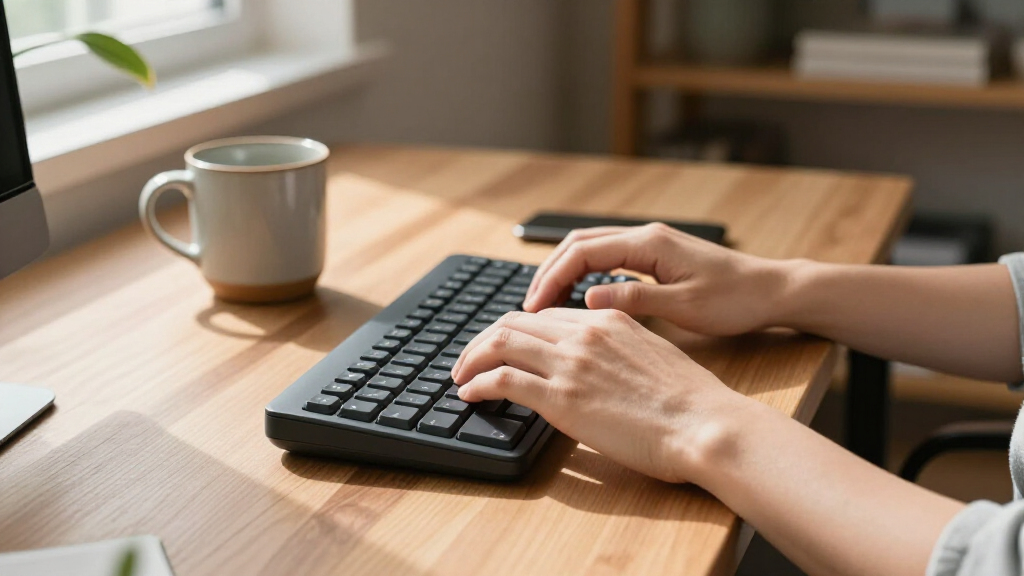
I compared these one-handed keyboards by how well they serve the core use case: keeping game or shortcut controls within reach of one hand while leaving the other free for a mouse or another task. The ranking weighs layout and reachable controls, connection type, key technology, programmability, and practical details such as charging, bundled accessories, and backlighting. A feature matters here only when it changes setup flexibility, control options, or the effort needed to use the keypad.
I ranked options with a clear, useful advantage for a defined buyer above models whose listings indicate a more basic feature set or leave more questions about fit. That puts the Tartarus V2 high for programmable control, wireless Redragon and RedThunder models higher for cable-free setups, and Hall Effect choices in a distinct performance-focused group. Products without a clearly stated standout role remain useful alternatives, but buyers should verify layout, software support, and compatibility before choosing them.
Factors to Consider When Choosing Best One-handed Keyboards
Before choosing a one-handed keyboard, decide what job it needs to do: replace a cluster of game controls, add programmable shortcuts, or create a compact gaming station. The best fit depends less on headline features than on your games, hand position, and tolerance for setup and maintenance.
Match the Layout to Your Hand and Games
Count the controls you can reach comfortably, not just the number printed in a product name. A large keypad may offer more assignments, but keys near the far edge can be awkward if your hand is small or you keep your wrist planted. A smaller model can feel more direct for games with a tight set of commands, while extra keys help when you need separate abilities, macros, or shortcuts. Check the placement of the thumb controls and any wrist support in product images, then compare that arrangement with how your hand naturally rests. If possible, prioritize a return policy that gives you room to judge the reach at your own desk.
Choose Wired or Wireless Based on Your Setup
Wired keypads suit fixed desks and buyers who do not want to track a separate battery charge. Wireless models reduce cable clutter and make it easier to move the keypad, but their convenience depends on battery life, charging access, and a dependable connection. A rechargeable battery is not a substitute for checking how the device connects or whether it supports the computer and games you use. Avoid buying wireless solely for a cleaner desk if the keypad will sit beside a free USB port and never move. For travel or shared spaces, cable-free placement may matter more than having one less device to charge.
Decide Whether Mechanical or Hall Effect Features Matter
Mechanical switches can offer a distinct key feel, but switch type and layout matter more than the word mechanical on a listing. Hall Effect models add a different input approach that may appeal to players who want adjustable actuation or other performance controls, when those features are supported by the product software. These technologies can add setup complexity, so check which adjustments are available rather than assuming every model offers the same functions. For casual play or general shortcuts, a simpler keypad may do the job without adding features you will not use. Pay for advanced input options only when a game or workflow can benefit from them.
Check Software, Compatibility, and Key Assignment
Programmable keys are only useful if you can assign them in a way that works with your games and operating system. Before buying, look for clear information about supported software, onboard profile storage, macro options, and whether the keypad relies on a desktop app. A device with many keys but limited remapping can be less flexible than a smaller programmable model. Also check whether the keypad sends standard keyboard inputs or requires a dedicated driver. If you switch between computers, prioritize straightforward setup and profile handling over a long feature list.
Treat Bundled Mice as a Tradeoff, Not a Bonus by Default
A keyboard-and-mouse combo may simplify shopping and reduce the number of separate accessories, but the included mouse can determine whether the bundle works for you. Shape, grip fit, sensor controls, and button placement vary, and a mouse that feels wrong can undermine the whole setup. Compare the combo against buying a keypad on its own with a mouse you already like. Bundles make the most sense for a new or secondary setup where convenience matters more than fine-tuning every accessory. Check the product details carefully so you know exactly what is included.
Account for Desk Space, Lighting, and Daily Upkeep
One-handed boards save space compared with a full keyboard, but their footprint still varies with wrist rests, cable routing, and attached controls. Measure the area beside your mouse before choosing a model, especially if you use a low mouse sensitivity and need room for broad movements. Backlighting can help identify controls in a dim room, but it does not replace readable labels or a layout you can learn. Wireless models add charging to routine upkeep; wired models add cable management instead. Choose the inconvenience you would rather live with, not the feature that looks best in a product photo.
Frequently Asked Questions
Can a one-handed keyboard replace a regular keyboard for everyday typing?
Usually, these products are designed as gaming keypads or shortcut devices rather than full typing replacements. Their compact layouts omit many keys or place them in arrangements that are not intended for sustained writing. Some models can be remapped for specialized tasks, but that still may not make them comfortable for email or long documents. If you need a one-hand typing solution because of an accessibility requirement, check the exact layout, software support, and compatibility with assistive tools before buying. For gaming beside a standard keyboard, a keypad is a more natural fit.
Is a wireless one-handed keyboard suitable for competitive gaming?
It can be, but the connection method and device specifications matter more than the wireless label alone. Check whether the model uses a dedicated 2.4GHz receiver or another connection type, and confirm that its stated compatibility fits your system. You will also need to keep the battery charged and the receiver positioned reliably. A wired model avoids battery upkeep and may be simpler for a permanent setup. Choose wireless when placement and cable reduction are meaningful benefits, not as an automatic performance upgrade.
Should I choose a Hall Effect keypad over a mechanical one?
Choose based on the input behavior you want, not on the technology name by itself. Hall Effect models in this roundup, including the Keychron C0 HE 8K and ATTACK SHARK M36 HE, target buyers interested in a more performance-focused input setup. Mechanical models may be the better match if you prefer a particular switch feel or want a simpler feature set. Check which adjustments the software actually provides and whether the games you play benefit from them. If you will leave advanced settings untouched, a standard keypad may be a more practical choice.
Will a one-handed keypad work alongside my existing keyboard and mouse?
That is a common setup: the keypad handles game commands while a full keyboard remains available for chat, menus, and general typing. Check that the keypad has enough space beside your mouse and does not force your wrist into an uncomfortable angle. A compact 29-key design can leave more room, while larger models may provide more dedicated controls. If you already own a mouse you like, a keypad-only model can also avoid duplicating accessories in a combo. Confirm that your game or software allows the keypad’s keys to be assigned as needed.
How many keys do I need on a one-handed keyboard?
Start with the commands you use frequently and can reach without shifting your hand. A smaller layout can make those controls easier to memorize and keep close, while a larger one offers more room for extra abilities, macros, or application shortcuts. More keys do not automatically mean faster control if many sit outside your comfortable reach. Write down the commands you want to assign, then compare them with the keypad’s layout and thumb controls. If you are unsure, favor an arrangement that feels easy to learn over the largest key count.
Conclusion
For most players who want software-driven control options, I recommend the Razer Tartarus V2 as the best overall. The Redragon K585 wired keypad is my best value-oriented pick for buyers who want a dedicated gaming layout without choosing a wireless model, while the Keychron C0 HE 8K is my best premium-style choice for shoppers drawn to Hall Effect input. Beginners should start with a straightforward wired keypad such as the RedThunder G30 and confirm its layout fits their game before paying for advanced controls. For cable-free use, compare the Redragon K585 PRO with the RedThunder Wireless; for a bundled setup, look at the Guiheng or CHONCHOW combos, but check the mouse details first. Choose by hand reach, connection preference, and the controls you will actually assign—not by key count alone.
Fall Picks
fall essentials
As an affiliate, we earn on qualifying purchases.