Wattage on a power bank shows how fast it can charge your laptop. A higher wattage means quicker charging and better compatibility with power-hungry devices. It also helps you understand if the power bank can supply enough power for your laptop’s needs. If the wattage is too low, your laptop may charge slowly or not at all. Want to know how to pick the right one for your device? Keep exploring to find out more.
Key Takeaways
- Wattage indicates how quickly a power bank can charge your laptop.
- Higher wattage supports faster charging, reducing downtime during recharges.
- Compatibility between the power bank’s wattage and your device’s requirements is essential.
- Wattage affects the power bank’s ability to efficiently run high-demand laptops.
- Combining sufficient wattage with capacity ensures longer and faster device usage.
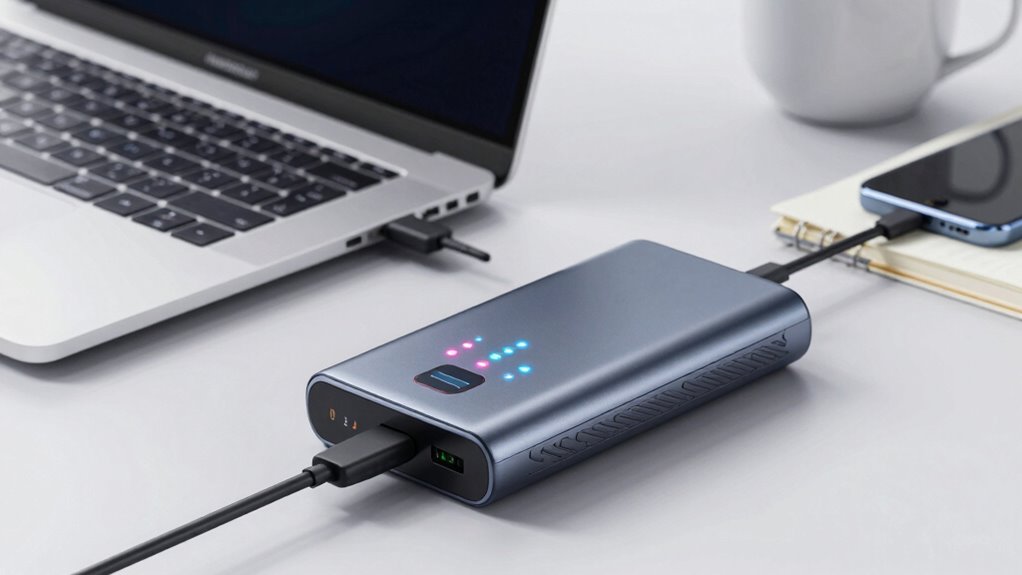
In today’s mobile world, having a reliable power source for your laptop is more important than ever, especially when you’re on the go. Power banks for laptops are increasingly popular because they offer the convenience of charging your device anywhere without hunting for wall outlets. But understanding what the wattage really means can be confusing. When you’re choosing a power bank, two key factors to consider are battery capacity and charging speed. These elements directly impact how long your device can run and how quickly it gets charged.
Battery capacity, measured in watt-hours (Wh) or milliamp-hours (mAh), tells you how much energy the power bank can store. The higher the capacity, the longer you’ll be able to keep your laptop powered without needing a recharge. If you’re someone who works remotely, travels frequently, or spends long hours away from power sources, opting for a power bank with a larger battery capacity ensures you won’t run out of juice prematurely. However, keep in mind that larger capacity often means a bigger, heavier device, so balance your portability needs with your power requirements. Additionally, understanding the relationship between capacity and runtime can help you better estimate how long your device will stay charged. Recognizing how wattage ratings influence your device’s charging speed can help you make smarter choices for your specific needs. Moreover, considering power management features can enhance overall efficiency and battery life. Being aware of battery efficiency can also help you maximize the use of your power bank over time.
Higher battery capacity means longer usage, but consider portability when choosing a larger, heavier power bank.
Charging speed is just as crucial, especially when you’re pressed for time. It refers to how quickly the power bank can transfer energy to your laptop. A power bank with a higher wattage output can deliver power faster, meaning your laptop spends less time plugged in and more time working or relaxing. If your device supports fast charging, choosing a power bank with a compatible output can significantly cut down charging times. Conversely, a power bank with a lower wattage might take longer to recharge your laptop, which could be inconvenient if you’re in a hurry or need a quick top-up.
Wattage ratings indicate the maximum power the power bank can deliver at once. For instance, a power bank rated at 65W can provide faster charging compared to one rated at 30W. But always check if your laptop supports the wattage output of the power bank; otherwise, you might not see the benefits of higher wattage. Combining a high battery capacity with fast charging capabilities is ideal for heavy users who need both extended use and quick turnaround times. Additionally, understanding the importance of wattage helps ensure compatibility and optimal performance for your device.
In the end, understanding the relationship between battery capacity and charging speed helps you pick a power bank tailored to your needs. It’s not just about wattage numbers but about how those numbers translate into real-world use—keeping your laptop charged and ready whenever you need it most.

UGREEN Power Bank 25,000mAh 145W Laptop Portable Charger, Nexode 3-Port USB C PD Battery Pack, for MacBook Pro/Air, Dell XPS, iPhone 17/16/15/14, Galaxy S26 Steam Deck, iPad, and More
Ultra-Fast 145W Charging: With PD3.1 and QC3.0, deliver a total of 145W fast charging. A single USB-C1 port…
As an affiliate, we earn on qualifying purchases.
As an affiliate, we earn on qualifying purchases.
Frequently Asked Questions
Can a Lower Wattage Power Bank Still Charge My Laptop?
Yes, a lower wattage power bank can still charge your laptop, but it might charge slower or not provide enough power for longer use. The key factors are battery capacity and charging speed; a lower wattage means less power output, which could limit how fast your laptop charges or how long it can run. Make certain the power bank’s capacity matches your needs for efficient, reliable charging.
How Long Does a Power Bank With Specific Wattage Typically Last?
A power bank’s duration depends on its battery capacity and your laptop’s power draw. Generally, a higher capacity means longer usage, but charging speed also matters. If your power bank has a large battery capacity, it can keep your laptop powered for several hours, especially if your device has a lower wattage. Keep in mind, faster charging might drain the power bank quicker, so balance capacity and speed for ideal use.
Is Higher Wattage Always Better for Laptop Charging?
Higher wattage isn’t always better for laptop charging. It can increase charging speed, but only if your device supports faster charging. Focus on the power bank’s battery capacity and wattage compatibility with your laptop. If your laptop needs 60W and the power bank supplies that, you’ll get ideal charging. Too high wattage won’t harm your device but won’t necessarily improve charging efficiency unless your laptop supports fast charging.
Do All Laptops Support Fast Charging From Power Banks?
Like in the age of chivalry, not all laptops knightly support fast charging from power banks. You need to check your device’s brand compatibility and charging safety features first. Some laptops do support fast charging, but only with compatible power banks that deliver the right wattage and voltage. Always verify your laptop’s specifications and use a power bank designed for fast charging to avoid damaging your device.
Can Power Banks Damage My Laptop’s Battery?
Power banks usually won’t damage your laptop’s battery if you use one with proper wattage and follow charging safety guidelines. However, consistently overloading or using a low-quality power bank can impact battery lifespan over time. Always choose a power bank compatible with your laptop’s power needs, and avoid frequent, improper charging to maintain ideal battery health and safety. Proper use ensures your laptop stays safe and its battery lasts longer.

JUOVI Portable Charger 65W Power Bank 20000mAh Compact USB C Laptop Power Bank Fast Charging Battery Pack for Laptop MacBook Dell XPS iPad Tablet Steam Deck iPhone 17/16/15/14 Series Samsung and More
65W Fast Charging for Laptop : JUOVI Laptop power bank Support up to 65W fast charging, compatible with…
As an affiliate, we earn on qualifying purchases.
As an affiliate, we earn on qualifying purchases.
Conclusion
Think of your laptop and power bank as a dance partners—each needs to move in harmony to keep the rhythm alive. When you understand wattage, you’re guiding the dance, ensuring your device stays energized and ready to perform. Choosing the right power bank isn’t just about numbers; it’s about fueling your journey, keeping your momentum steady. With the right wattage, you’ll never miss a beat, no matter where life takes you.

INIU 140W Laptop Power Bank, Flight-Safe 27000mAh High Capacity Portable Charger with USB C Cable, Digital Display Phone Charger, 3 Ports Travel External Battery Pack for MacBook iPad Steam Deck etc
From INIU—the SAFE Fast Charge Pro: Experience the safest charging with over 38 million global users. At INIU,…
As an affiliate, we earn on qualifying purchases.
As an affiliate, we earn on qualifying purchases.

Anker Laptop Power Bank,25,000mAh Portable Charger with 165W Total Output,3 USB-C Ports (100W Max Each),Built-in Retractable Cables,Flight-Ready,for iPhone 17/16 Series,MacBook,Samsung,and More
Triple 100W USB-C Ports for Multi-Device Charging: Ideal for laptop users, this 25,000mAh power bank features three 100W…
As an affiliate, we earn on qualifying purchases.
As an affiliate, we earn on qualifying purchases.