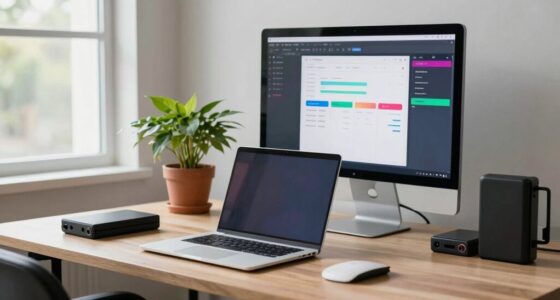

Having a desk that’s too deep can hurt your focus by forcing you to reach or lean forward to access essential items, which drains energy and breaks concentration. It also increases visual distractions, especially if objects are placed far back or outside your natural line of sight. Poor ergonomic setup can cause discomfort and fatigue, making it harder to stay engaged. Want to learn how to optimize your workspace for better focus and comfort? Keep exploring for more tips.

Get comfort and recovery gear delivered free — and shop member deals
- Fast, free delivery on millions of items
- Access to Prime Big Deal Days deals on October 6–7
- Prime Video, Amazon Music and more included
Key Takeaways
- Excessively deep desks cause unnecessary movements, reducing efficiency and increasing fatigue.
- Items placed too far back increase visual distraction and break concentration.
- Poor ergonomic setup from deep desks leads to awkward postures and physical discomfort.
- Clutter at the far end of deep desks pulls focus away from work tasks.
- Proper workspace design, including optimal desk depth, supports better posture and sustained attention.

If your desk is too deep, it could be sabotaging your focus without you realizing it. When your workspace extends too far back, it creates a disconnect between you and your work essentials. This setup can lead to unnecessary movements, which drain your energy and break your concentration. An ergonomic design isn’t just about comfort; it’s about creating a space that enhances your efficiency. When your desk’s depth is excessive, you might find yourself leaning forward or stretching to reach your monitor, keyboard, or important documents. These habits can cause discomfort and fatigue, making it harder to stay engaged for extended periods.
A deep desk also amplifies visual distraction. When your monitor is placed too far back, your eyes need to strain or shift to see the screen clearly, which distracts your focus. Clutter or scattered objects at the far end of your workspace can also pull your attention away from your tasks. The further your work items are from your natural line of sight, the more likely you are to become distracted or lose focus altogether. This disconnect between you and your work environment reduces the sense of control and comfort, which are key to maintaining concentration. Additionally, a deep desk can influence your ergonomic posture and overall comfort, impacting your ability to focus effectively. Proper ergonomic setup is essential for maintaining sustained attention and reducing physical strain. Ensuring your workspace aligns with ergonomic principles can significantly improve your focus and well-being.
Furthermore, a deep desk can negatively impact your posture. When your workspace isn’t aligned with ergonomic principles, you tend to adopt awkward positions—leaning forward, craning your neck, or hunching your shoulders. Over time, these habits cause discomfort and even pain, which can make focusing an uphill battle. Proper ergonomic design encourages you to keep your monitor at eye level and your keyboard within easy reach, minimizing strain and maintaining your attention on the task at hand. If your desk is too deep, you’re less likely to follow these guidelines, leading to poor posture and decreased productivity. To support your ergonomic health, consider workspace adjustments that promote proper alignment and comfort during work sessions. Recognizing the importance of workspace ergonomics can help you create a healthier, more focused environment.
As an affiliate, we earn on qualifying purchases.
Frequently Asked Questions
How Do I Measure My Desk Depth Accurately?
To measure your desk depth accurately, use a tape measure or ruler to find the distance from the front edge to the back edge of your workspace. Keep ergonomic accessories in mind, ensuring they fit comfortably within that space. Also, check your desk height to maintain proper posture. Adjust the depth if needed, so your monitor, keyboard, and accessories are within easy reach without causing strain or clutter.
Can a Shallow Desk Improve Focus?
A shallow desk can definitely improve your focus by enhancing workspace organization and reducing clutter. When your workspace is less crowded, it’s easier to keep essentials within reach, minimizing distractions. Plus, a shallow desk often boosts aesthetic appeal, creating a clean and open environment that promotes concentration. By decluttering and streamlining your workspace, you’ll find it easier to stay focused and productive throughout your tasks.
What Are Signs My Desk Is Too Deep?
If your desk feels cluttered or you find yourself stretching to reach essentials, it’s a sign your desk might be too deep. A deep desk can hinder focus by overwhelming your workspace and complicating storage optimization, impacting your desk aesthetic. You may notice items buried or difficulty maintaining an organized surface. Consider reducing depth or adding storage solutions to create a cleaner, more efficient workspace that helps you stay focused and productive.
Does Desk Depth Affect Posture and Health?
Yes, desk depth impacts your posture and health. If your desk is too deep, you might lean forward, straining your neck, shoulders, and back, which disrupts good desk ergonomics. This poor posture can cause discomfort and long-term health issues. To promote posture correction, make sure your desk isn’t too deep, keeping essential items within easy reach. Adjust your chair height and monitor position to maintain a healthy, ergonomic workspace.
Are There Ergonomic Tips for Deep Desks?
Yes, there are ergonomic tips for deep desks. You should use adjustable height desks to guarantee your monitor and keyboard are at comfortable eye and arm levels. Incorporate ergonomic accessories like monitor stands, keyboard trays, and footrests to optimize your posture. Position your most-used items within easy reach, avoid stretching or hunching, and take regular breaks to reduce strain. These adjustments help you stay comfortable and productive at your deep desk.
As an affiliate, we earn on qualifying purchases.
Conclusion
So, if your desk feels more like a canyon than a workspace, it’s time to rethink its depth. A too-deep desk can scatter your focus like leaves in the wind, making it harder to concentrate on your tasks. By choosing a more appropriately sized desk, you create a clear, cozy harbor for your productivity to thrive. Remember, a well-sized workspace isn’t just furniture—it’s the foundation of your focus and success.
As an affiliate, we earn on qualifying purchases.
As an affiliate, we earn on qualifying purchases.
Fall Picks
fall essentials
As an affiliate, we earn on qualifying purchases.