TL;DR

Get comfort and recovery gear delivered free with Prime
- Fast, free delivery on millions of items
- Prime Video, Amazon Music and more included
- Member-only deals all year
An ergonomic office chair is adjustable so you can fit the seat, backrest, and armrests to your body and work setup. Start with supported feet, relaxed shoulders, a small gap behind your knees, and a backrest that supports your lower back; then change positions throughout the day. A chair can support comfort, but it cannot guarantee pain prevention or replace movement and a suitable desk setup.
A chair can look like a cockpit and still leave your feet dangling or your shoulders creeping toward your ears by lunch. The right ergonomic office chair makes it easier to adjust your seat to your body and desk, so you can work comfortably and shift positions without fighting the furniture.
This guide explains the adjustments that matter, how to test a chair in a real work setup, and what to weigh before you spend. You’ll also see why the word ergonomic on a product page is only a starting point: fit, movement, and the rest of your workstation shape the experience.
Think of a chair as a well-fitted pair of walking shoes. Good support can make a long day feel more manageable, but no shoe—or chair—can promise to prevent every ache. The same applies if you work in an ergonomic office or a compact spare-room desk.
Choose a chair for its fit and useful adjustments; the ergonomic label alone proves little.
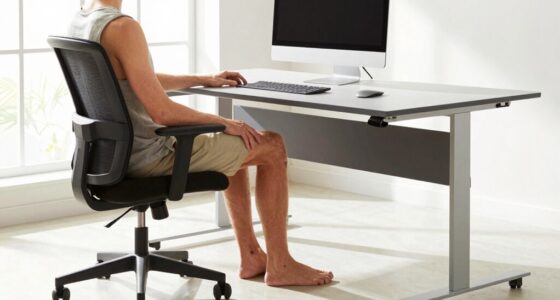
Set seat height so your feet are supported and your knees sit roughly level with or slightly below your hips.
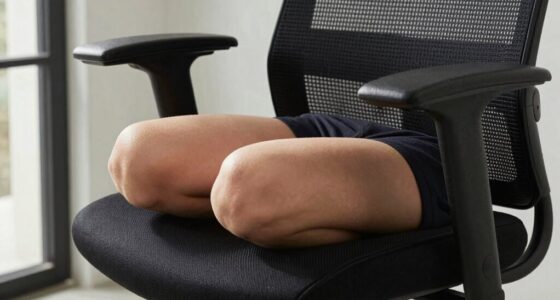
Leave a small gap behind your knees and adjust seat depth to support most of your thighs.
Use a backrest that supports your lower back while allowing comfortable position changes.
Compare warranty, return policy, and replacement parts alongside materials and price.
What makes an ergonomic office chair worth using?
An ergonomic office chair is a chair with useful adjustments that let you fit its seat and backrest to your body, desk, and work positions. It should support comfortable sitting and movement, rather than push you into one rigid pose. A product label alone does not tell you whether the chair will fit.
Start with the features you can feel. Your feet should rest on the floor or a footrest, the seat should support most of your thighs while leaving a small gap behind your knees, and the backrest should meet your lower back without poking or forcing an arch. Adjustable armrests should let your shoulders drop while your forearms rest near your sides.
For example, imagine two colleagues sharing a home office. One is tall and needs more seat depth; the other has shorter legs and needs a lower seat or a footrest. A chair that adjusts to both has more practical value than a plush chair that fits only one of them. Fit beats the label because it connects each feature to your body.
Other details matter too: a stable base, casters suited to your floor, durable materials, and a backrest that reclines with controlled tension. Mesh may feel cooler on a warm afternoon, while padded upholstery may feel softer at first. Neither material decides comfort on its own; the shape and fit still count.
Popular right now

Shark Navigator Lift-Away Upright Vacuum Cleaner, White (NV356E)

Dyson V8 Cyclone Cordless Vacuum

Ninja NC501 CREAMi XL Deluxe 11-in-1 Ice Cream and Frozen Treat Maker
As an affiliate, we earn on qualifying purchases.
Adjust your chair in five steps before your next meeting
Set up an ergonomic office chair by supporting your feet first, then adjusting the seat, backrest, armrests, and screen. This order helps because each adjustment affects the next: raising the seat for a tall desk, for instance, may leave your feet without support. Make one change at a time and sit for a few minutes before deciding whether it helps.
- Set seat height: Lower or raise the seat until your feet rest flat or on a footrest, with knees roughly level with or slightly below your hips.
- Check seat depth: Sit back against the backrest. Leave a small gap—about a few fingers—between the seat edge and the backs of your knees.
- Fit the backrest: Adjust its height or lumbar support so it meets your lower back without pressure that feels sharp or forced.
- Set the armrests: Let your arms hang naturally, then adjust the rests so your shoulders stay relaxed and your elbows sit near your sides.
- Match the desk and screen: Bring the chair close enough to type without reaching. Position the screen so you can look ahead instead of repeatedly bending your neck.
Picture a laptop worker whose desk is a little too tall. If she raises her chair to bring her elbows closer to the desktop, her feet may lift off the floor. A footrest can bridge that gap; otherwise her legs may feel unsupported during a long call.
After the setup, test it while doing ordinary work: type an email, join a meeting, and reach for a notebook. Your setup should support more than a perfect still photograph. Comfort is a fit you can use, not a posture you have to hold all day.
Compare mesh, padding, and the adjustments you’ll actually use
The best chair material depends on how it feels to you, while the most useful features are the ones that help the chair fit your body and workday. Mesh often feels more breathable; padded seats can feel softer. Neither is a universal winner, and a comfortable seat still needs suitable depth and support.
| Feature | What it can offer | What to check |
|---|---|---|
| Mesh back or seat | Airflow that may feel cooler | Whether the tension and texture feel comfortable against your body |
| Padded upholstery | A softer initial feel and a wider range of fabrics | How the cushioning holds its shape and how easy it is to clean |
| Adjustable lumbar support | A way to position lower-back support for different torso lengths | Whether it meets your lower back without pushing too hard |
| Adjustable armrests | More ways to support forearms and relax shoulders | Whether the chair can still slide close to your desk |
| Seat-depth adjustment | A better chance of supporting your thighs without pressing behind your knees | Whether you can set the seat edge comfortably behind your knees |
For a concrete comparison, consider a warm upstairs room and a cool, drafty studio. Mesh might feel pleasant in the first, while a padded seat may feel more inviting in the second. Yet if the mesh frame presses against your thighs or the padded chair is too deep, the material preference won’t solve the fit problem.
Some newer chairs add posture reminders, movement tracking, or app-connected controls. These extras can suit a person who likes prompts, but you do not need them to get a useful chair. Focus first on adjustability, build quality, fit, and return options; those are easier to judge in daily use than a flashy feature list.
Build movement into your workday instead of chasing perfect posture
A chair supports comfort best when it lets you change position, because no single sitting posture needs to be held for hours. A backrest that reclines and moves with you can make it easier to shift between focused typing, reading, and a relaxed call. Adjust the tilt tension or lock so the movement feels controlled rather than surprising.
Think of your chair like a hiking trail with several comfortable places to pause, rather than a narrow balance beam. You can sit upright for a spreadsheet, lean back to listen on a call, and stand to refill your water. Those small changes help break up the day’s stillness without turning every hour into a workout.
For example, set a gentle reminder to stand when you finish a meeting, or walk to the kitchen while a file uploads. If you prefer sitting, recline for a few minutes while reviewing a document. The point is to change positions regularly, not to follow a strict timer or treat one pose as the only correct one.
A chair may help some people feel more comfortable, but it cannot guarantee pain prevention or treat a health problem. Discomfort has many possible causes, including a poor desk setup or other factors outside the chair. If you have an existing condition or persistent symptoms, seek guidance from a qualified health professional rather than expecting furniture to provide care.
Spend on fit and service, not the biggest feature list
Choose an ergonomic office chair by comparing how it fits, how it is built, and what support you get after purchase—not by price alone. A higher price does not guarantee comfort, and a low-cost chair can still work well if it has the adjustments you need. Your own dimensions and desk setup decide which options are useful.
Before buying, check the seat-height and depth ranges, lumbar adjustment, armrest movement, recline controls, warranty, return window, and availability of replacement parts. If possible, try the chair for more than a quick showroom sit. Spend ten minutes typing, leaning back, and sitting close to a desk; a chair that feels wonderful for thirty seconds may feel different after an hour.
Suppose you work from home three days a week and share the desk with a partner. You may value quick adjustments and a sturdy mechanism more than app controls. Someone who sits for longer stretches might prioritize seat-depth adjustment and a return policy that allows a proper home trial. The right balance depends on your routine.
Use the phrase key facts for comparing chairs as a simple checklist: dimensions, adjustments, materials, warranty, return terms, and parts. If a listing makes claims about certifications, recycled materials, or health benefits, verify those details with current product information; availability and claims can change. A warranty and a sensible trial period can tell you more than a polished product photo.
Use this quick check to judge your chair after a week
A week of ordinary work can reveal whether your chair fits better than a brief showroom test. Check whether your feet stay supported, your thighs feel comfortable, your shoulders remain relaxed, and the backrest supports your lower back without constant fidgeting. Also notice whether you can move and recline without feeling trapped.
For instance, a designer may feel fine during a morning sketch session but notice pressure behind the knees during afternoon editing. That clue points toward seat depth, not necessarily a need for a whole new chair. Another worker may discover that the chair fits well but its armrests bump the desk, so lowering them or adjusting the desk approach may help.
- Keep the setup if you can type, read, and recline comfortably with feet supported.
- Try an adjustment if one area feels awkward, such as seat depth, armrest height, or lumbar position.
- Revisit the workstation if the chair forces you to reach, hunch toward the screen, or raise your shoulders.
- Use a footrest if your seat and desk work well together but your feet do not reach the floor.
Make one change at a time, then give it a work session. If you change the seat height, armrests, and lumbar support all at once, it becomes harder to tell what improved. A small adjustment can solve a specific mismatch, while a persistent problem may call for a different chair fit or professional advice.
Frequently Asked Questions
What makes a chair ergonomic?
A chair is ergonomic when its adjustments and shape let you fit it to your body, desk, and work positions. Check seat height and depth, backrest support, armrests, recline, and stable construction. The label itself does not guarantee a good fit.
Do ergonomic chairs prevent back pain?
An adjustable chair may support comfort for some people, but it cannot guarantee that you will avoid back pain or treat an existing problem. Discomfort can have many causes, including workstation setup and factors beyond the chair. Seek professional guidance for persistent symptoms or a pre-existing condition.
How should I adjust my office chair?
Start with feet flat on the floor or supported by a footrest, then set the seat so your knees are roughly level with or slightly below your hips. Leave a small gap behind your knees, position the backrest at your lower back, and set armrests so your shoulders can relax. Adjust your screen and desk so you do not need to reach or repeatedly bend your neck.
Is mesh better than a padded chair?
Neither is always better. Mesh may feel cooler, while padded upholstery may feel softer, but fit, support, quality, and personal preference matter more than material alone. Try the chair in a setting similar to your usual workspace if you can.
How much should I spend on an ergonomic office chair?
Price does not guarantee comfort or fit. Compare adjustment ranges, construction, warranty, return policy, and whether you can try the chair; those details help you judge value for your own setup. Choose features you will use rather than paying extra for controls that do not suit your workday.
Are gaming chairs ergonomic?
Some gaming chairs offer useful adjustments, while others emphasize appearance or a particular sitting style. Check the same basics as you would with an office chair: seat depth, height range, back support, armrest adjustment, recline, and whether it fits your desk.
Conclusion
Start with the chair you can adjust to your body and desk: support your feet, leave room behind your knees, relax your shoulders, and set the backrest to meet your lower back comfortably. Then let yourself move through the day. A good chair supports your work; it does not demand a perfect pose or promise to solve every ache.
Before you buy, test the adjustments you’ll actually use and check the return terms. The best seat is the one that lets you finish the day feeling supported—and still makes it easy to stand up and stretch.